
Standing Desk Converter vs Standing Desk: Which Is Worth It?
For most people who already own a desk they like, a converter is the better buy: $150 to $400, installed in minutes. Buy a full standing desk instead if you are over 6’1″, run dual 27-inch monitors plus a laptop, or need more than 46 inches of keyboard height — a converter runs out of lift.
As an Amazon Associate I earn from qualifying purchases.
TL;DR — The short answer, by situation
- Keep your desk and buy a converter if you rent, move often, or your budget is under $250 — best value is the VIVO DESK-V000K, about $150.
- Buy a full standing desk if you are tall or run a heavy dual-monitor setup — best value is the FlexiSpot E7 Pro, about $450–$480.
- The deciding number is 46 inches. A converter on a 29-inch desk tops out near 46 inches of keyboard height — above that, you will hunch.
Method: we compared published specs, November 2026 prices, and verified owner feedback — no hands-on testing.
What is a standing desk converter — and how is it different from a standing desk?
A standing desk converter is a two-tier riser that sits on your existing desk: squeeze a lever and the top tier rises about 15 to 17 inches while a lower keyboard tray drops into place. Your old desk never moves. A full standing desk replaces the whole thing — motorized legs lift the entire desktop from about 25 to 51 inches.
That difference matters more than the price gap suggests: a converter adds a second moving layer, so monitors and keyboard travel on two tiers with a fixed gap, while a full desk moves one surface and the screen-to-keyboard relationship never changes — which explains most ergonomic complaints about converters. Our best standing desk converter roundup ranks the current models.
How much does each option actually cost?
A converter wins on upfront cost by a wide margin.
| Option | Typical price (Nov 2026) | What it includes |
|---|---|---|
| Budget converter (VIVO DESK-V000K) | ~$150 | Riser, keyboard tray, gas-spring lift |
| Mid-range converter (VariDesk Pro Plus 36) | ~$395 | 36-inch top, 11 height settings |
| Premium converter (Ergotron WorkFit-T) | ~$399 | 35-inch top, monitor mount, 5-year warranty |
| Value full desk (FlexiSpot E7 Pro) | ~$450–$480 | Frame plus desktop, dual motors |
| Premium full desk (UPLIFT V2) | ~$800 | Frame plus desktop, 355 lb capacity |
The converter’s sticker price is the honest total — it arrives assembled with nothing to dispose of. A full desk adds an hour or two of assembly plus moving your old desk out.
If you can wait, Black Friday week (Nov 27–30) is when standing desk prices hit their yearly floor — our Black Friday standing desk deals guide tracks the discount bands to expect. Converters typically drop 20–30% and full desks often drop $100 or more.
Which one gives you the right height range?
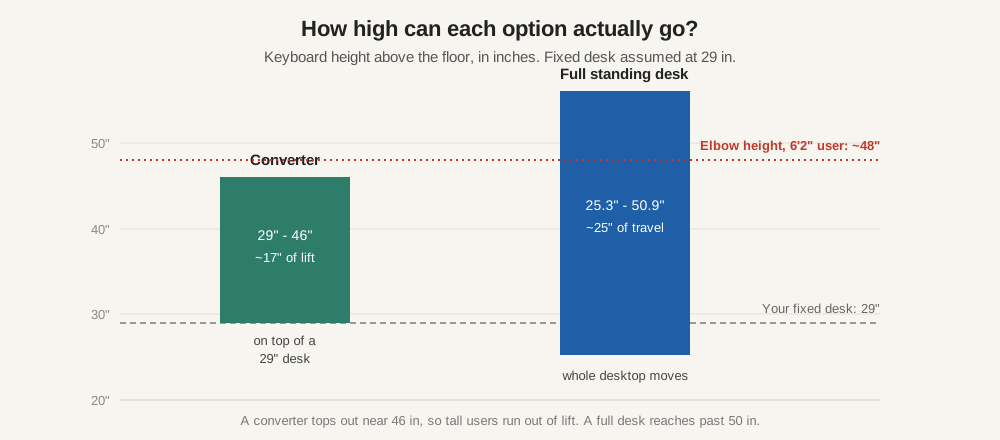
Height range is where converters lose: a converter adds roughly 15 to 17 inches of lift on a fixed 29-inch desk, so the keyboard tops out near 44 to 46 inches, while a full electric desk adjusts the whole surface from about 25 to 51 inches — roughly 25 inches of travel instead of 17.
That gap decides the purchase for tall users. Standing elbow height is about 41 inches at 5’6″, 44 inches at 5’10”, and 48 inches at 6’2″. A converter works up to roughly 5’11”; past 6’1″ your elbows sit below 90 degrees and you end up shrugging or bending your wrists. A full desk reaches 50 inches and covers users to about 6’6″.
Measure your standing elbow height before you buy: stand relaxed, elbows at 90 degrees, and measure floor to fingertips. Above 46 inches, skip the converter; below 44 inches, either option works.
How do converters and full desks compare on stability and monitor capacity?
| Factor | Standing desk converter | Full standing desk |
|---|---|---|
| Height range | ~29–46 in (on a 29 in desk) | ~25–51 in |
| Weight capacity | 33–39 lb total | 220–440 lb |
| Dual 27 in monitors | Yes, on 36 in models | Yes, easily |
| 34 in ultrawide + second monitor | Borderline — check capacity | Yes |
| Stability at full height | Good on wide models; some bounce | Best — legs are the structure |
Weight capacity is the second hard limit. Converters are rated for 33 to 39 pounds total, covering everything on both tiers. Two 27-inch monitors weigh about 20 to 24 pounds together, which leaves room — but add a 34-inch ultrawide at 15 to 20 pounds plus a second screen and you are over the rating on a VIVO, and near it on a VariDesk. A full desk rated for 355 pounds never notices your monitors.
Stability follows the same pattern: a converter is a mechanism sitting on a desk, so hard typing at full height can bounce lighter models — owner feedback reports more wobble on narrow 32-inch converters than on 36-inch ones. A full desk’s legs are the structure, so the surface stays rigid.
Is a converter ergonomic, or does the keyboard tray ruin it?
The keyboard tray is the converter’s weakest ergonomic point. It hangs below the monitor tier at a fixed distance — typically 4 to 6 inches lower — designed for an average user. It lands close to right for most people, but if you are short the tray can sit too high, and if you are tall, too low. You cannot adjust the two tiers independently on most models, so the fit is approximate by design. A full desk has no tray at all: keyboard and monitor sit on the same surface, and you set the height so both are right at once. If you want a tray on a full desk, add one later — see our best under-desk keyboard tray guide — and choose its height yourself.
Will a converter fit the desk you already own?
A converter is not a universal fit. Three measurements decide it. Width: a 32-inch converter needs a desk at least 32 inches wide, a 36-inch one needs 36 inches, plus clearance so the lift mechanism does not scrape a wall or a monitor arm. Depth: the footprint is 24 to 26 inches, so your desk needs at least that, ideally 30 inches — glass tops are a special case, as the weight concentrates on four small feet. Front edge: the keyboard tray swings out below it, so a thick apron or drawer unit underneath can block it. Fail any check and the decision makes itself: buy a full desk.
Which should you buy? A decision flowchart
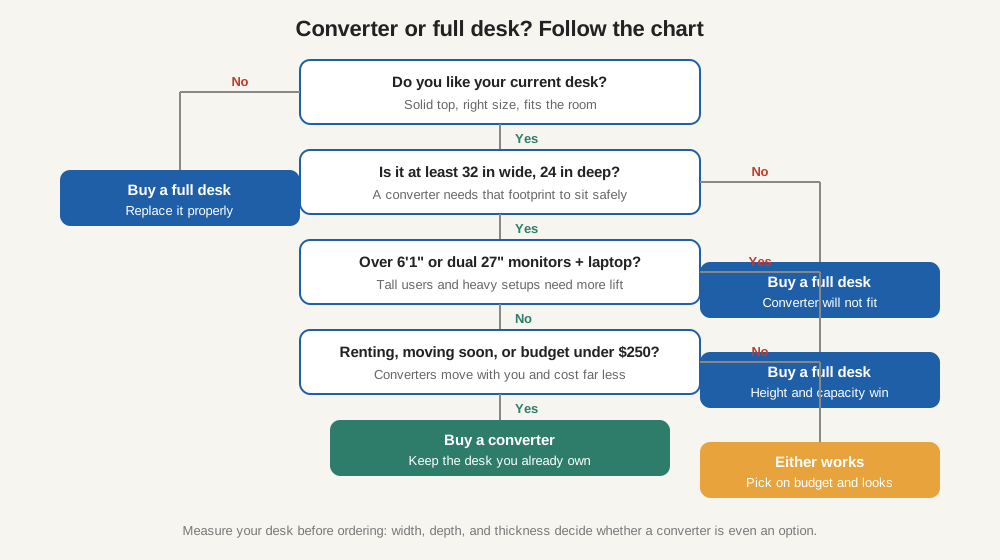
Four questions decide it — here is how most buyers recognize themselves.
Renter: buy a converter. You cannot drill or replace the landlord’s desk, and you will move soon — a converter lifts out and works on the next desk: the VIVO DESK-V000K, about $150.
Small space: buy a converter. A full desk’s assembly and footprint are the problem in a bedroom corner; a 32-inch converter adds sit-stand without adding furniture — if your desk is at least 24 inches deep.
Heavy dual-monitor setup: buy a full desk. Two 27-inch monitors plus a laptop is about 30 pounds — the edge of what a converter carries. Buy the FlexiSpot E7 Pro, about $450–$480.
Tall user: buy a full desk. Above 6’1″, the 46-inch ceiling is the deal-breaker. The UPLIFT V2 reaches 50.9 inches; the FlexiSpot E7 Pro reaches 50.6 inches for roughly $300 less.
Tight budget: buy a converter. At about $150, the VIVO DESK-V000K is the cheapest credible route to sit-stand — less than a third of a good full desk.
The best converters and full desks to buy in 2026
Prices are Amazon US prices as of November 2026 — check the listing before ordering.
Best budget converter: VIVO DESK-V000K — about $150
Cheapest credible way into sit-stand: 32-inch top, 25-inch keyboard tray, dual gas springs, 6.5 to 17-inch lift, 33-pound capacity. Fits a laptop plus one monitor, or two 24-inch monitors. Check the VIVO DESK-V000K price on Amazon.
Best mid-range converter: FlexiSpot 36-inch (M37) — about $190
The value sweet spot: a 36-inch top that fits dual 27-inch monitors, 4.7 to 16.6-inch lift, 39-pound capacity — the highest among the budget converters here. Ships nearly assembled, and the X-frame lift stays vertical so monitors do not drift toward you. Check the FlexiSpot 36-inch converter price on Amazon.
Best premium converter: VariDesk Pro Plus 36 — about $395
For people who want to buy once: 36 inches wide, 11 height settings, spring-assisted lift, 35-pound capacity, weighted base. Arrives fully assembled. Check the VariDesk Pro Plus 36 price on Amazon.
Best converter for heavy setups: Ergotron WorkFit-T — about $399
The converter that behaves most like a full desk: 35-inch top, 15 inches of straight-up lift with no forward drift, and a monitor mount holding dual screens up to 35 pounds. The 26-inch keyboard tray fits a full-size keyboard and mouse. Buy it only when you must keep your existing desk. Check the Ergotron WorkFit-T price on Amazon.
Best value full desk: FlexiSpot E7 Pro — about $450–$480
The full desk most buyers should compare first: dual motors, a three-stage frame lifting from 25 to 50.6 inches, a 440-pound load rating, and a 15-year warranty on the frame and motors. The 48-by-30-inch configuration suits dual monitors — about $60 more than the premium converters. Check the FlexiSpot E7 Pro price on Amazon.
Best premium full desk: UPLIFT V2 — about $800
The category benchmark: a 25.3 to 50.9-inch range, a 355-pound capacity, and a 15-year warranty. UPLIFT is replacing the V2 with the newer V3, so Amazon bundles are the value play while stock lasts — a comparable V2 build typically runs about $150 less than a V3. For the full comparison, read our best standing desks roundup. Check the UPLIFT V2 price on Amazon.
How long should you stand each day?
The payoff comes from changing position, not from standing all day. Cornell University’s ergonomics group recommends the 20-8-2 pattern: in every 30 minutes, sit for 20, stand for 8, and move or stretch for 2 — roughly 2 hours of standing and 30 minutes of movement over a full workday.
OSHA’s computer workstation guidance makes the same point from the safety side: holding any one posture for long periods is a risk factor for musculoskeletal disorders — the fix is variation. The Mayo Clinic adds the caution in the other direction: too much sitting is linked to obesity and cardiovascular risk, but standing still for hours brings its own problems.
Frequently asked questions
Is a standing desk converter worth it?
Yes, if you already own a desk you like and your standing elbow height is under 46 inches. Skip it if you are tall or run a heavy dual-monitor setup.
Can a converter hold two monitors?
Yes, if it is wide enough and light enough. A 36-inch converter rated for 35 to 39 pounds holds two 24-inch or 27-inch monitors comfortably; a 32-inch converter rated for 33 pounds is tight for dual 27-inch screens, and a 34-inch ultrawide plus a second monitor usually exceeds the rating.
Is a full standing desk better than a converter?
A full desk wins on height range, capacity, stability, and surface, for about $60 more than a premium converter. A converter wins when you must keep your desk, rent, or move often.
The bottom line
Buy the converter if you like your desk, rent, or need sit-stand for under $250 — the VIVO DESK-V000K at about $150 is the starting point, and the FlexiSpot 36-inch at about $190 covers dual monitors. Buy the full desk if you are over 6’1″ or run a heavy monitor setup — the FlexiSpot E7 Pro at about $450–$480 is the value pick, and the UPLIFT V2 at about $800 is the premium one. Measure first: above 46 inches, the converter was never really an option.
Prices are Amazon US prices as of November 2026 — check the listing before ordering.