Best Ergonomic Chairs for Lower Back Pain (What Actually Helps, 2026)
If your lower back aches by 3 PM every workday, you’re not alone — and you’re probably blaming the wrong thing. Most “back pain” from desk work isn’t caused by a bad chair alone; it’s caused by a chair that doesn’t support your lumbar curve, forcing the muscles of your lower back to do the supporting instead. Eight hours of that, daily, adds up.As an Amazon Associate I earn from qualifying purchases.
See our ergonomic chairs guide for help choosing the right chair.
The right ergonomic chair doesn’t cure back pain — but the right lumbar support, seat depth, and recline mechanics can remove the constant strain that makes it worse. This guide explains which chair features actually matter for lower backs (and which are marketing), compares the best options at every budget, and covers the habits that matter as much as the chair.
A quick, important note: this article is about furniture, not medicine. If you have persistent, severe, or radiating back pain, see a doctor or physical therapist. A chair supports good posture; it doesn’t diagnose or treat conditions.
What Actually Helps Lower Back Pain in a Chair
Strip away the marketing and four things matter:
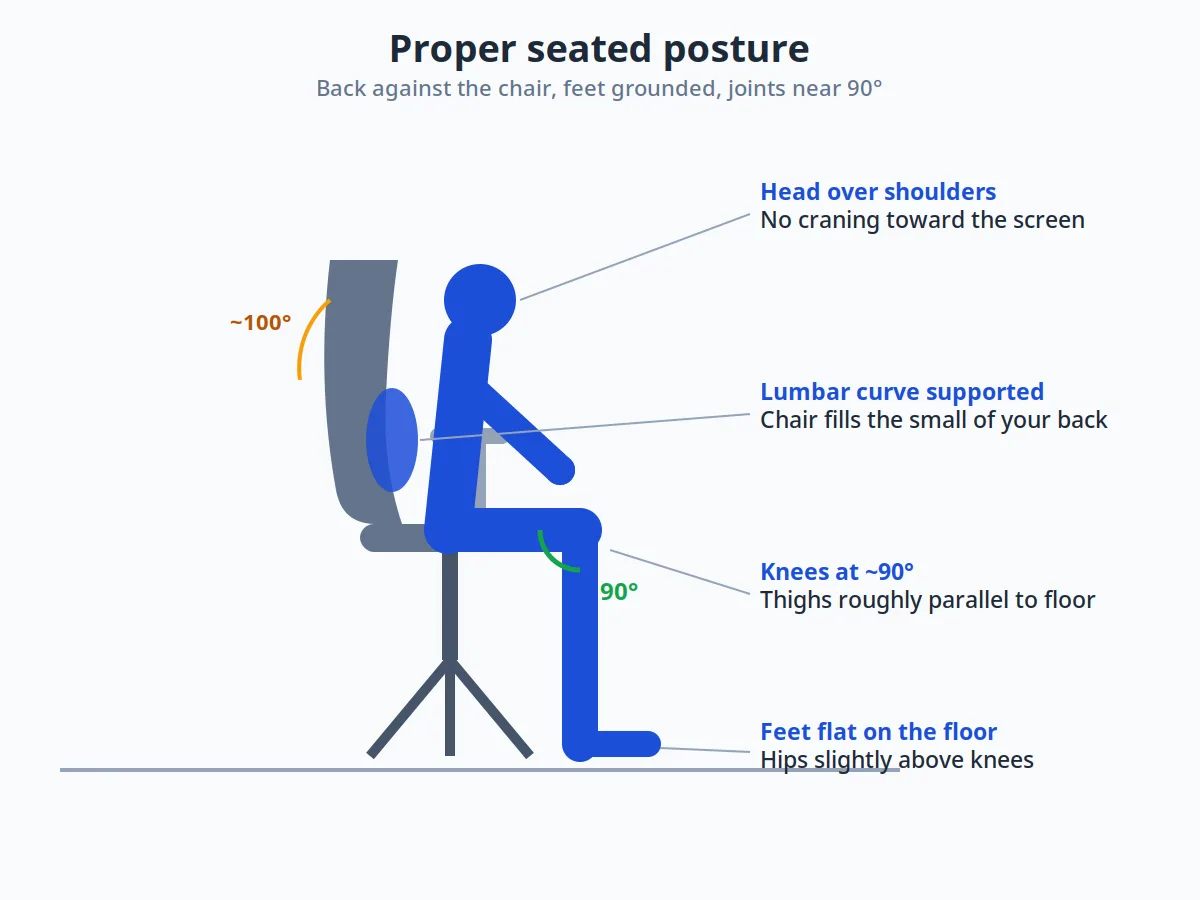
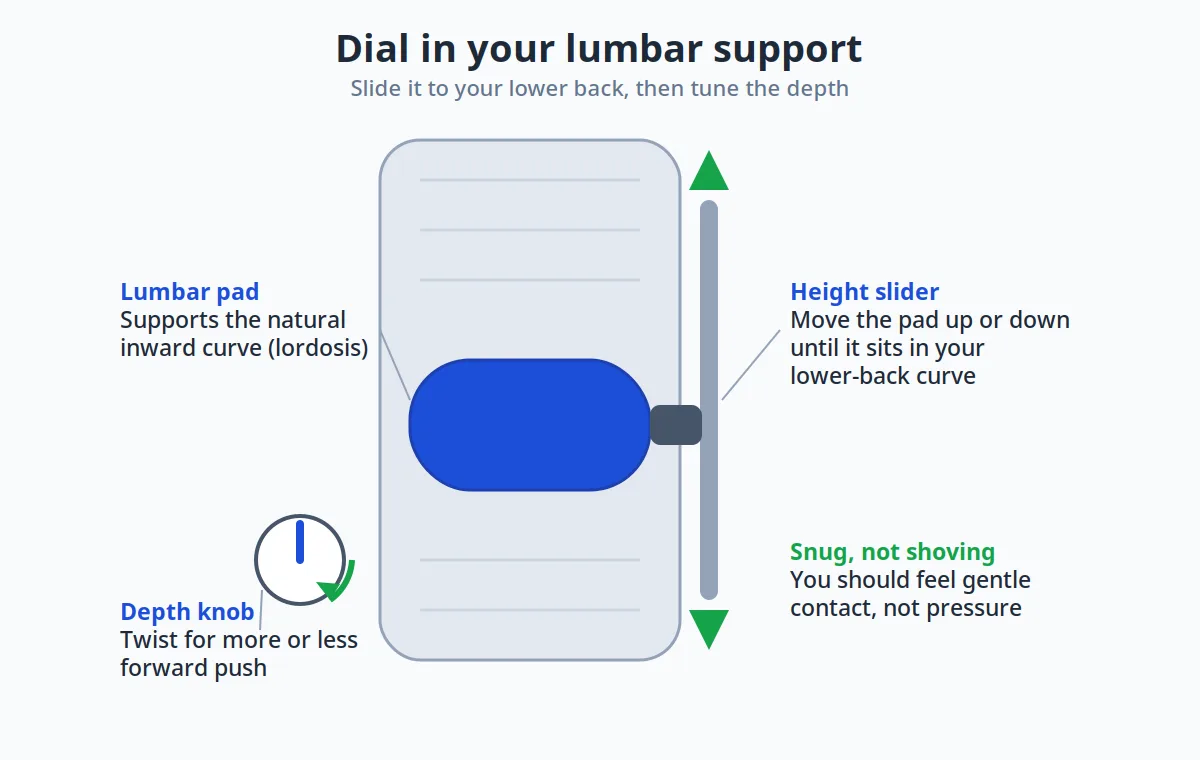
- Lumbar support that meets your spine. Your lower back curves inward (the lumbar lordosis). A chair should fill that curve so your muscles don’t have to. The support needs to be height-adjustable at minimum — fixed lumbar bumps miss most people’s curves entirely.
- Seat depth that fits your legs. If the seat is too deep, you can’t use the backrest without cutting off circulation behind your knees; too shallow and your thighs go unsupported. Adjustable seat depth (seat slide) is one of the most underrated features.
- Recline with proper tension. Slight recline (100–110°) opens the hip angle and reduces disc pressure compared to bolt-upright 90° sitting. A synchro-tilt mechanism — where the backrest reclines faster than the seat — keeps your feet planted as you lean back.
- Armrests that actually adjust. Armrests stuck at the wrong height make you hunch (too low) or shrug (too high), and both feed into back tension. Look for height, width, depth, and pivot adjustment (so-called 4D arms).
Everything else — mesh vs. upholstery, headrests, fancy materials — is comfort and durability, not back-pain therapy.
Why “Back Pain” Chairs Are Different From Generic Ergonomic Chairs
Every ergonomic chair claims to support your back. Chairs that actually help with back pain do three specific things differently.
First, the lumbar support is adjustable — not just present. A fixed lumbar bump helps only if your spine happens to match its curve. Look for lumbar support that moves up and down (to hit your belt line) and in and out (to match your curve depth). This single adjustment separates chairs that help from chairs that merely look ergonomic.
Second, the backrest moves with you. Your spine changes shape as you recline, lean forward to type, or twist to grab something. Backrests with dynamic flex (Steelcase calls it LiveBack; others have their own versions) keep contact through those movements instead of leaving gaps exactly when you need support.
Third, seat depth and tilt are tunable. If the seat pan is too deep, you slouch forward to reach the backrest — defeating the whole point. Adjustable seat depth plus tilt with tension control lets you dial in the position where your back actually rests against the support.
How to Choose: Buying Guide for Bad Backs
Lumbar Support Types, Ranked
- Adjustable (height + depth) lumbar: the gold standard. You position the support exactly on your curve and dial in the pressure. Found on premium chairs and the better mid-range models.
- Height-adjustable only: good — fits most people if the depth is well-judged.
- Dynamic/flexing lumbar: supports that flex as you move. Comfortable, but you can’t fine-tune them.
- Fixed lumbar bump: a gamble. If it happens to hit your curve, fine; if not, it’s just a lump.
If lower back pain is your main complaint, don’t buy a chair without at least height-adjustable lumbar. (Source: Mayo Clinic)
Mesh vs. Upholstered
Mesh backs breathe (a real advantage if you run warm) and flex with your spine, distributing support. (Source: OSHA) Upholstered backs feel plusher initially and suit cold offices. For back pain specifically, the support mechanism matters far more than the covering — a well-designed mesh back beats a poorly designed padded one.
Fit Matters More Than Price
Chair sizing is real: seat width, backrest height, and weight ratings all assume an “average” body. Petite users often need a smaller seat depth; taller users need taller backrests and higher weight ratings. The best chair in the world won’t help if it’s the wrong size for you. Check the manufacturer’s sizing guidance, not just the star rating.
What About Kneeling Chairs and Stools?
Kneeling chairs and active stools open the hip angle and engage core muscles, which some people love. But they’re not a primary all-day solution for existing back pain — they remove back support entirely, trading one strain for another. Consider them as secondary perches for short stints, not replacements.
Match the Support Type to Your Pain
Best lumbar-specific support: Herman Miller Aeron with PostureFit SL — the benchmark for lower-back support, with an adjustable pad that targets the sacral-pelvic region. (Source: Mayo Clinic) Premium price, decades-long track record.
Best full-spine support: Steelcase Leap — its LiveBack system flexes with your spine as you move, supporting the entire back rather than one zone. (Source: OSHA) The all-rounder for whole-back achiness.
Best budget pick: Sihoo Doro C300 — a mesh chair with genuinely adjustable lumbar support at roughly a quarter of the premium price. The value king for back-pain shoppers.
Best active-sitting option: HAG Capisco — a saddle-style seat that encourages posture changes throughout the day. Not for everyone, but fidgeters and people who hate static sitting often love it.
Lumbar-focused support
These chairs concentrate their engineering on the lower back — the zone where most desk workers feel pain first.
Full-spine support
These support the whole back — better if your pain moves around, or if your upper back and shoulders ache as much as your lower back.
Active-sitting options
These take a different approach: instead of supporting you in one perfect position, they encourage you to keep moving — which, for some backs, helps more than any amount of lumbar padding.
The Best Ergonomic Chairs for Lower Back Pain Compared
| Chair | Key Feature | Typical Price Range | Best For |
|---|---|---|---|
| Herman Miller Aeron | PostureFit SL adjustable lumbar; iconic ergonomics | $1,000–$1,500 | Best premium (if budget allows) |
| Steelcase Leap | LiveBack flexing spine support; highly adjustable | $900–$1,300 | Best premium alternative |
| HON Ignition 2.0 | Adjustable lumbar, synchro-tilt, solid build | $400–$600 | Best mid-range |
| Sihoo M57 / M18 | Adjustable lumbar + headrest at budget prices | $150–$300 | Best budget ergonomic |
| Hbada Ergonomic Chair | Flip-up arms, lumbar curve design, compact | $150–$250 | Best budget for small spaces |
| Duramont Ergonomic | Adjustable lumbar, breathable mesh, recline lock | $250–$350 | Best value all-rounder |
| Steelcase Series 1 | Brand ergonomics DNA at a lower price | $400–$550 | Best “brand” mid-range |
Prices shift frequently — treat ranges as approximate and check current listings.
1. Herman Miller Aeron — Best Premium
The Aeron is the chair every other ergonomic chair is measured against, and its PostureFit SL system — adjustable pads that support both the sacral and lumbar regions — remains one of the most effective lower-back solutions you can buy. The pellicle mesh distributes pressure without hot spots, and the tilt mechanism is still the smoothest in the business.
The catch, obviously, is price. But consider: a 12-year warranty means the annual cost rivals replacing a $200 chair every two years — and your back gets the better end of the deal the entire time. If your budget stretches, this is the answer.
2. Steelcase Leap — Best Premium Alternative
The Leap takes a different approach with its LiveBack system: the backrest is designed to flex and mirror your spine’s natural movement as you shift. For people who fidget — and fidgeting is actually healthy — this constant micro-adaptation keeps support where it belongs. Lumbar firmness and position both adjust.
Long the Aeron’s arch-rival, and the better choice if you prefer a more traditional upholstered feel or find the Aeron’s frame edges uncomfortable.
3. HON Ignition 2.0 — Best Mid-Range
HON is office-furniture industry royalty, and the Ignition 2.0 brings genuine ergonomic credentials — adjustable lumbar, synchro-tilt, seat-depth adjustment — to a price real humans pay. It lacks the refinement of the premium tier (the adjustments feel more mechanical, less fluid), but every feature that matters for a bad back is present and functional.
The smart money pick for most home offices.
4. Sihoo M57 / M18 — Best Budget Ergonomic
Sihoo proved that adjustable lumbar support doesn’t require a four-figure budget. The M57 (and its sibling M18) offer height-adjustable lumbar, a headrest, and a mesh back at prices that undercut the mid-range by half. Build quality won’t match HON or Steelcase — expect more plastic and a shorter lifespan — but the ergonomics-per-dollar ratio is unmatched.
Ideal as a first “real” ergonomic chair or for a secondary workspace.
5. Hbada Ergonomic Chair — Best Budget for Small Spaces
Hbada’s compact design with flip-up armrests solves a specific problem: small home offices where the chair must slide fully under the desk. The lumbar curve is built into the backrest shape rather than a separate mechanism — less adjustable, but the shape suits average builds well.
Pair it with one of our narrow standing desks and the whole footprint stays minimal.
6. Duramont Ergonomic — Best Value All-Rounder
Duramont sits in the sweet spot between budget and mid-range: adjustable lumbar support, breathable mesh, tilt lock, and flip-up arms, usually priced like a budget chair. Owner feedback consistently highlights the lumbar support as genuinely effective rather than decorative — rare at this price.
A strong choice when you want more adjustability than the ultra-budget tier without crossing $350.
7. Steelcase Series 1 — Best “Brand” Mid-Range
The Series 1 distills Steelcase’s ergonomic research into its most affordable chair: flexible backrest, adjustable lumbar option, and the company’s signature seat comfort. It doesn’t match the Leap’s adjustability, but it inherits the build quality and the all-day comfort engineering.
Worth it if you trust the brand and want premium build at a mid-range price.
8. Sihoo Doro C300 — Best value full-back pick
Sihoo has become the default recommendation for “good chair, sane price.” The Doro C300 offers adjustable lumbar support, a headrest, 4D armrests, and a mesh back at roughly $280–$350 as of October 2026. It doesn’t match the Leap’s dynamic backrest, but it covers the fundamentals — adjustable lumbar height and depth, seat depth, tilt lock — that actually determine whether a chair helps your back.
9. GABRYLLY Ergonomic Mesh Chair — Best under-$250 full-back chair
A frequent bestseller for a reason: high back, flip-up arms, decent lumbar support, and a price that hovers around $200–$260 as of October 2026. The mesh backrest breathes well and the headrest adjusts. It’s not in the same league as the Leap for build quality, but as a full-back-support chair under $250, it’s the pragmatic pick.
10. HAG Capisco — Best for Fidgeters
The Capisco’s saddle seat looks strange and works surprisingly well. You can sit forward, sideways, or perch half-standing, and the design nudges you to shift positions throughout the day — which is exactly what stiff backs tend to need. It’s popular with people who find traditional chairs make them feel “locked in.”
Typical price as of October 2026: $700–$900. This is a try-before-you-buy category if possible; saddle seating divides opinion, and the people who love it really love it while others never adapt.
Habits That Matter as Much as the Chair
A great chair can’t save a terrible sitting routine. These cost nothing:
- Stand up every 30–60 minutes. No chair, at any price, is healthy for 8 unbroken hours. Set a timer.
- Feet flat, knees at roughly 90°. If your feet dangle, get a footrest — a $25 fix for a surprising amount of lower-back strain.
- Monitor at eye level. Craning down at a laptop for hours pulls the whole spine out of alignment. A monitor arm or even a stack of books under the laptop (with an external keyboard — see our quiet keyboard picks) fixes this.
- Recline slightly. 100–110° beats bolt-upright 90° for disc pressure. Use the tilt.
- Strengthen the support system. Walking, core exercises, and hip flexor stretches do more for chronic desk-related back pain than any furniture upgrade. The chair removes strain; movement builds resilience.
Your back will also thank you for movement: pair the new chair with a narrow standing desk so you can alternate sitting and standing through the day.
Can an ergonomic chair fix my lower back pain?
It can remove a major aggravating factor — poor lumbar support during long sitting hours — which for many desk workers significantly reduces daily aching. But chairs don’t treat medical conditions. If pain persists, is severe, or radiates down your legs, see a healthcare professional.
What chair feature matters most for lower back pain?
Height-adjustable lumbar support, full stop. It’s the feature most directly connected to lower-back comfort, and its absence is the most common reason cheap “ergonomic-looking” chairs disappoint.
Is mesh or leather better for back pain?
Neither is inherently better for pain — what matters is the support mechanism underneath. Mesh breathes better and flexes with your spine; upholstery feels plusher. Choose based on climate and preference, then verify the lumbar system.
How should I sit to avoid lower back pain?
Feet flat on the floor, knees around 90°, back against the backrest with the lumbar support filling your lower-back curve, and a slight recline (100–110°). Equally important: don’t sit still all day — stand and move regularly.
Are expensive chairs like the Aeron worth it for back pain?
If you sit 8+ hours daily and have the budget, yes — the adjustability, support quality, and durability genuinely exceed cheaper chairs, and the long warranties make the annual cost reasonable. If the budget doesn’t stretch, a well-chosen mid-range chair with adjustable lumbar (like the HON Ignition 2.0) covers the essentials.
What’s the best office chair for back pain under $300?
The Sihoo Doro C300 (around $280–$350) is the strongest pick in this range, with adjustable lumbar support in both directions, a headrest, and 4D armrests. Just under it, the GABRYLLY mesh chair ($200–$260) covers the essentials. Both outperform chairs costing twice as much that lack real lumbar adjustability.