
Best Document Scanners for Home Offices (2026): A Use-Case Guide to Going Paperless
The best document scanner for most home offices in 2026 is the Fujitsu ScanSnap iX2500. It scans both sides at 45 pages per minute, holds 100 sheets, and sends searchable PDFs to the cloud over Wi-Fi — for about $400 as of November 2026. On a tighter budget, the Epson ES-400 II does nearly the same job over USB for about $330–$380.
As an Amazon Associate I earn from qualifying purchases.
TL;DR — Our 2026 document scanner picks, by use case
- Best overall: Fujitsu ScanSnap iX2500 — 45 ppm duplex, 100-sheet feeder, Wi-Fi 6, ~$400
- Best value desktop: Epson WorkForce ES-400 II — 35 ppm duplex, 50-sheet feeder, ~$330–$380
- Best budget duplex: Brother ADS-3100 — 40 ppm duplex, 60-sheet feeder, ~$380
- Best portable: Epson WorkForce ES-60W — battery-powered, Wi-Fi, fits in a laptop bag, ~$180
- Best for photos: Epson FastFoto FF-680W — one 4×6 photo per second, ~$530
Method: we compared published specs, November 2026 prices, and verified owner feedback — no hands-on testing.
Which scanner fits a paperless home office?
Start with volume, not brands — the right scanner depends on how much paper crosses your desk.
A few pages a month? Your phone camera or the scanner in your best small printer for a home office is enough. A dedicated scanner would sit idle, and idle hardware is wasted money.
A weekly stack — bills, school forms, receipts, a tax folder? That is the home-office sweet spot. Load 50 pages, press one button, come back to searchable PDFs. A 50-page stack takes about 90 seconds at 35 ppm, versus 25 minutes of manual page-flipping on a flatbed.
A filing-cabinet backlog — years of paper to digitize? Speed and feeder capacity become the whole decision. A 100-sheet feeder at 45 ppm clears a drawer in an afternoon.
Do you need a sheet-fed scanner or a flatbed?
The two designs solve different problems, and getting it wrong is the most common scanner-buying mistake.
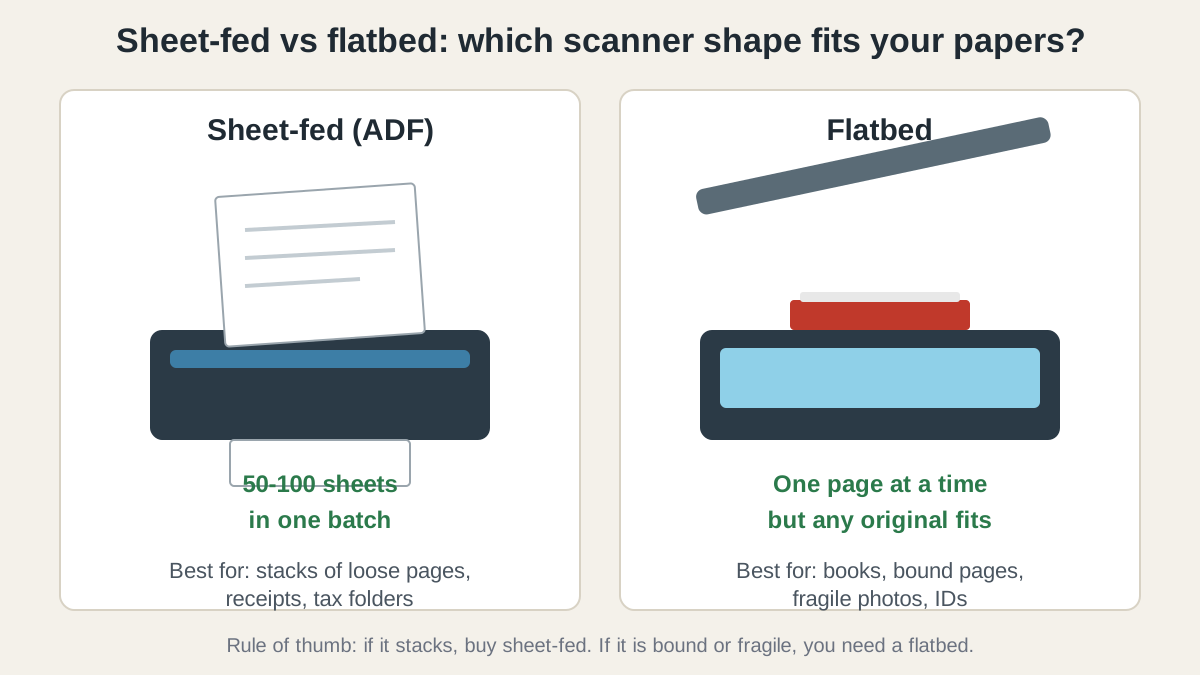
A sheet-fed scanner pulls loose pages through an automatic document feeder (ADF), scanning both sides at once. It is the only sensible choice for multi-page documents, and every desktop pick below is one.
A flatbed scanner is a glass plate under a lid: place one page, close the lid, scan. It is slow for stacks and unbeatable for anything that cannot be fed through rollers — bound books, laminated cards, wrinkled receipts, old photos.
Rule of thumb: if the paper stacks, buy sheet-fed; if it is bound, fragile, or one of a kind, you need a flatbed. Most home offices should buy sheet-fed and keep their printer’s flatbed for the occasional book page.
Compare duplex speed (ipm) and feeder capacity first — those two numbers decide everything.
The best document scanners for home offices in 2026, by use case
Best overall: Fujitsu ScanSnap iX2500 — the fastest route to a paperless desk
The iX2500 is the current ScanSnap flagship, replacing the long-running iX1600, and the fastest scanner in this guide: 45 pages per minute, 90 images per minute duplex, through a 100-sheet feeder. A 100-page double-sided stack becomes 200 images in just over two minutes. The 5-inch touchscreen picks a destination — folder, email, or cloud — without touching your computer, and Wi-Fi 6 plus USB-C cover wireless and wired setups.
ScanSnap Home is why it tops the list: it auto-names files, sorts them by type, and runs OCR so every PDF is searchable. The Receipt Edition adds QuickBooks integration and receipt-data extraction. At 11.5 × 6.26 × 6.34 inches and 7.7 pounds, it still needs vertical clearance for the paper path.
No TWAIN driver, though, so third-party scanning apps cannot see it — you use ScanSnap Home, full stop. And there is no flatbed, so bound books need carrier sheets or a separate flatbed. Pricing as of November 2026: about $400 (list $399.99).
Best for: anyone digitizing a real backlog, or running a weekly paperless routine.
Check the Fujitsu ScanSnap iX2500 price on Amazon
Best value desktop: Epson WorkForce ES-400 II — nearly the same speed for less
The ES-400 II is the value pick in this guide, and the gap to the iX2500 is smaller than the price gap suggests. It scans at 35 pages per minute (70 ipm duplex) through a 50-sheet feeder at 600 dpi — fast enough that a weekly stack disappears in a couple of minutes. Epson ScanSmart handles OCR, auto-rotation, and one-touch profiles.
The compromise is connectivity: USB only, no Wi-Fi, so it must sit tethered next to your computer. For a single-desk home office that is rarely a problem. Pricing as of November 2026: list $380, commonly about $330–$350.
Best for: a single-desk home office where the scanner stays plugged into one computer.
Check the Epson WorkForce ES-400 II price on Amazon
Best budget duplex: Brother ADS-3100 — the cheapest fast feeder with a software bundle
The ADS-3100 is the quiet value play of this guide. It scans at 40 pages per minute (80 ipm duplex) through a 60-sheet feeder — faster than the Epson with a bigger feeder — for about $380. It also scans directly to a USB flash drive, and it handles plastic ID cards, receipts, and photos through the same feeder.
The bundled software pushes it into the budget conversation: Kofax PaperPort, Kofax Power PDF, Presto! BizCard, and BR-Receipts, valued by Brother at over $250. The catch matches the Epson’s: USB 3.0 only, no Wi-Fi, so it is a one-computer scanner — and the plainest machine here, a white box with no touchscreen.
Best for: home offices that want duplex speed and a full PDF bundle without paying for Wi-Fi or a touchscreen.
Check the Brother ADS-3100 price on Amazon
Best portable: Epson WorkForce ES-60W — a scanner that lives in your laptop bag
The ES-60W is a different kind of scanner: a battery-powered wand the size of a rolled magazine (10.6 × 2.1 × 1.5 inches, 10.6 ounces) that scans a page in as fast as 4 seconds and sends it to your phone or laptop over Wi-Fi. It is the pick for contracts signed at a client site and receipts collected on a trip.
The trade-off is throughput: no automatic feeder, so you feed one sheet at a time, and duplex means running the page through twice. A 30-page document becomes a chore. Owner feedback is consistent: class-leading as a portable scanner, the wrong tool as a desktop one.
Best for: mobile professionals and anyone whose scanner needs to fit in a bag, not on a desk.
Check the Epson WorkForce ES-60W price on Amazon
Best for photos: Epson FastFoto FF-680W — a shoebox of prints in an afternoon
Digitizing printed photos is a different job from scanning documents, and the FF-680W is built for exactly that job. It feeds 36 photos at a time and scans a 4×6 print in about one second at 300 dpi, both sides at once, so handwritten notes on the back come along too. The FastFoto software auto-crops, rotates, and restores faded color — the feature that matters most for forty-year-old prints.
It doubles as a document scanner, with Wi-Fi, a 36-sheet feeder, and 600 dpi — but buying it for documents alone wastes money, since the picks above are faster and cheaper. Buy it when the job is a family archive: a few thousand prints that would cost $250–$1,200 per thousand at a scanning service, so the scanner pays for itself on the first shoebox. Pricing as of November 2026: list $630, street price about $530.
Best for: digitizing a family photo archive, especially prints with notes on the back.
Check the Epson FastFoto FF-680W price on Amazon
What about receipts and photos?
Receipts are small, thin, and often printed on thermal paper that fades. Every sheet-fed pick above handles them, but two details matter. First, crumpled receipts jam — flatten them under a book overnight. Second, thermal receipts fade within a few years, so scan them the week they arrive. The iX2500 Receipt Edition adds receipt-data extraction and QuickBooks export for business use; for personal use, the standard edition plus a cloud folder is enough.
Photos need gentleness, not speed. A sheet-fed scanner’s rollers can scratch old prints, and the FF-680W is the exception because its feeder and software are designed for photos. For a handful of prints, a flatbed or phone camera is safer and cheaper; for hundreds, the FF-680W turns a weekend project into an afternoon.
How do you set up a paperless workflow that actually sticks?
A scanner only saves time if the files land somewhere findable.
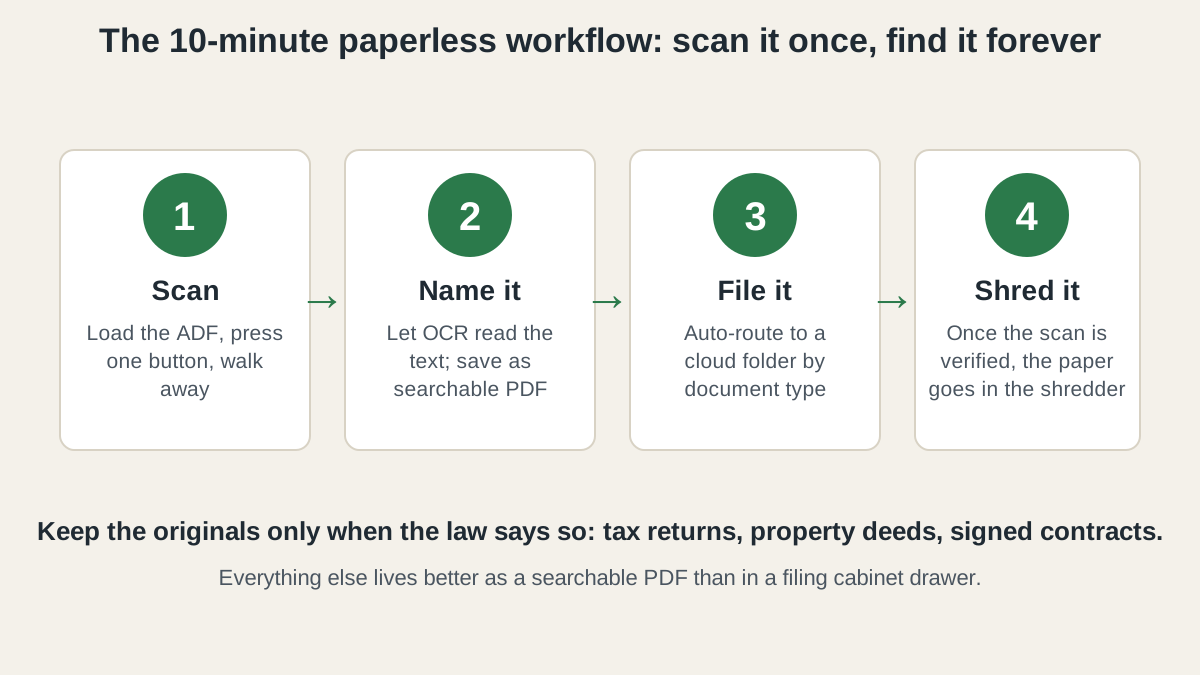
- Scan in batches, not one page at a time. Pick a weekly slot and run the whole week’s paper through the feeder in one sitting. Batching is what makes a 45 ppm scanner feel fast.
- Let OCR do the naming. All five picks run OCR, which turns scans into searchable PDFs. A file named
2026-11-08-electric-bill.pdfbeatsscan_0047.pdfevery time you need it. - File by document type, in the cloud. One folder per category — Taxes, Insurance, Medical, Receipts — synced to a cloud drive, with auto-routing by type set up once.
- Shred the original once the scan is verified. Check both sides scanned cleanly, then shred. Keep paper originals only when the law requires it — tax returns, property deeds, signed contracts. Everything else lives better as a searchable PDF than in a filing cabinet drawer.
Quick comparison: all five document scanners side by side
| Scanner | Speed (duplex) | ADF capacity | Connectivity | Typical price (Nov 2026) |
|---|---|---|---|---|
| Fujitsu ScanSnap iX2500 | 45 ppm / 90 ipm | 100 sheets | Wi-Fi 6, USB-C | ~$400 |
| Epson WorkForce ES-400 II | 35 ppm / 70 ipm | 50 sheets | USB only | ~$330–$380 |
| Brother ADS-3100 | 40 ppm / 80 ipm | 60 sheets | USB 3.0 | ~$380 |
| Epson WorkForce ES-60W | ~4 sec per page | Single sheet | Wi-Fi, USB, battery | ~$180 |
| Epson FastFoto FF-680W | 1 photo per sec | 36 photos | Wi-Fi, USB | ~$530 |
When should you buy a document scanner?
Scanners rarely see deep, predictable discounts — but the seasonal pattern is real. The iX2500 has been spotted near $380, and the FF-680W regularly drops from $630 toward $530. If you’re not in a hurry, Black Friday week (Nov 27–30) is when scanner prices hit their yearly floor — our Black Friday home office deals guide tracks the discount bands to expect. If your desk is buried in paper now, buy on fit: match your weekly volume to the feeder size and speed above.
FAQ: document scanners for home offices
Can a document scanner replace the scanner in my printer?
Yes, for documents — a dedicated sheet-fed scanner is faster and holds more pages than most all-in-one printers. Keep the printer’s flatbed for books and fragile originals.
Do I need OCR in a home office scanner?
Yes — OCR turns a scanned image into a searchable PDF, so you can find a bill by typing a word instead of opening files one by one.
How fast is fast enough for a home office?
35 pages per minute or more covers a weekly stack — a 50-page batch finishes in under two minutes. Below 20 ppm, a backlog becomes a weekend project.
Will a sheet-fed scanner damage old photos?
It can — rollers can scratch fragile prints, so old or one-of-a-kind photos belong on a flatbed or in the FastFoto FF-680W, whose feeder is designed for photos. Never feed a cracked or curled print through a standard document feeder.
The bottom line
For most desks, the Fujitsu ScanSnap iX2500 is the easiest buy: fastest duplex speed here, biggest feeder, Wi-Fi that lets it live anywhere on your desk. The Epson ES-400 II is the value pick if your scanner never leaves your computer’s side; the Brother ADS-3100 is the budget duplex pick, with a software bundle that closes the gap. Travel a lot? The Epson ES-60W fits in your bag. Family archive? The FastFoto FF-680W is the only pick built for it. Match the scanner to your paper — the right feeder size is the whole decision.