
How to Set Up a Standing Desk Ergonomically (2026 Guide)
Set up your standing desk so the desk top sits at your elbow height with arms bent at 90 degrees, the top of the monitor at or just below eye level, the screen 20-28 inches from your eyes, and your feet flat on the floor or a mat. Alternate sitting and standing every 30-60 minutes, building toward 2-4 hours of standing per day. The whole adjustment takes about five minutes with a tape measure.
Why does standing desk setup matter more than the desk itself?
A standing desk set to the wrong height is barely better than sitting. When the desk is too high, your shoulders creep up and your wrists bend; when it is too low, you hunch forward and your neck takes the load.
The good news: ergonomics for standing desks comes down to a handful of concrete measurements, and almost every electric desk sold in 2026 adjusts finely enough to hit them.
The one sentence that matters: Set desk height from your own body, not from a number on a chart — charts are a starting point, your elbows are the answer.
What is the correct standing desk height?
Stand in the shoes you work in, relax your shoulders, and let your arms hang with elbows bent at 90 degrees. Measure from the floor to the underside of your forearms. That number is your desk height. On an electric desk, just hold the button until the desk surface meets your forearms.
Use elbow height, not hand or waist height — neither one tracks your actual arm position.
The starting-point formula
If you cannot measure right now, use the widely cited rule of thumb: standing desk height in inches is roughly your height in inches times 0.613. Direct measurement beats the formula every time, because torso and arm proportions vary. The table below is computed from that formula, for a person in typical office shoes:
| Your height | Formula desk height | Practical setting |
|---|---|---|
| 5’0″ (152 cm) | 36.7″ | 36-37″ |
| 5’3″ (160 cm) | 38.6″ | 38-39″ |
| 5’6″ (168 cm) | 40.6″ | 40-41″ |
| 5’9″ (175 cm) | 42.2″ | 42-43″ |
| 6’0″ (183 cm) | 44.2″ | 44-45″ |
| 6’3″ (191 cm) | 46.1″ | 46-47″ |
Most electric desks in 2026 adjust from about 24″ to about 50″, covering roughly 5’0″ to 6’3″. If yours will not go low enough, a desk converter is one workaround.
Measure it yourself in 60 seconds
- Put on the shoes you will work in and stand naturally, weight even on both feet.
- Let your upper arms hang straight down, elbows bent at 90 degrees, palms facing each other.
- Raise the desk until its surface just meets your forearms — or have someone measure floor-to-forearm distance.
- Type a few test sentences. If your shoulders rise, lower the desk half an inch; if your wrists bend upward to reach the keys, raise it half an inch.
Save the result in your desk’s memory preset. Most electric desks in 2026 ship with 2-4 memory buttons — one tap returns you to your standing height every morning.
How should the monitor be positioned?
Monitor position causes more standing-desk pain than desk height: people stand but leave the screen at seated height — too low — and crane their neck all day.
The rule: the top edge of the screen should sit at or just below your eye level, with your gaze angling down roughly 15-20 degrees toward the center of the screen. Your eyes should rest 20-28 inches (50-70 cm) from the screen surface. These numbers come from OSHA’s computer workstation guidelines and the ANSI/HFES 100-2007 human-factors standard, and they apply whether you sit or stand — your eye level is simply higher when you stand.
Laptop users get this wrong almost every time: a laptop screen on a desk sits a foot below eye level, and no amount of standing fixes the crane-your-neck problem. The fix is a laptop stand plus an external keyboard and mouse — the keys under your fingers still have to sit at elbow height.
A quick monitor check
- Stand at your desk in your normal working posture, close your eyes, relax your neck, and open them looking straight ahead.
- You should be looking at the very top of the screen or just below it. If you see the middle of the screen, raise the monitor on a stand or arm.
- Hold your arm straight out toward the screen. Your fingertips should just about touch it — that is the 20-28 inch zone.
- Tilt the screen back slightly, about 10-20 degrees, so your downward gaze meets it squarely.
If your monitor has no height adjustment, a monitor arm is the cheapest reliable fix — typically $30-60 as of October 2026 — and it frees desk space too.
Where should the keyboard and mouse go?
The keyboard belongs at your measured desk height — directly in front of you, with about 4-6 inches of desk edge in front of it for wrist support. Keep the keyboard flat or tilted slightly away from you (negative tilt, front edge raised). Negative tilt keeps your wrists straighter when you stand, because it stops you from cocking your wrists upward to strike the keys.
The mouse sits at the same height, right beside the keyboard, close enough that your upper arm hangs straight down. Parking the mouse several inches from the keyboard forces a constant low-grade shoulder reach — exactly the kind of strain standing was supposed to prevent.
If you use a wrist rest, it should support your palms, not your wrists — pressing the wrist itself into a rest can compress the carpal tunnel area.
How do you stand correctly at the desk?
Standing correctly is an active skill, not a posture you lock into. Here is the checklist:
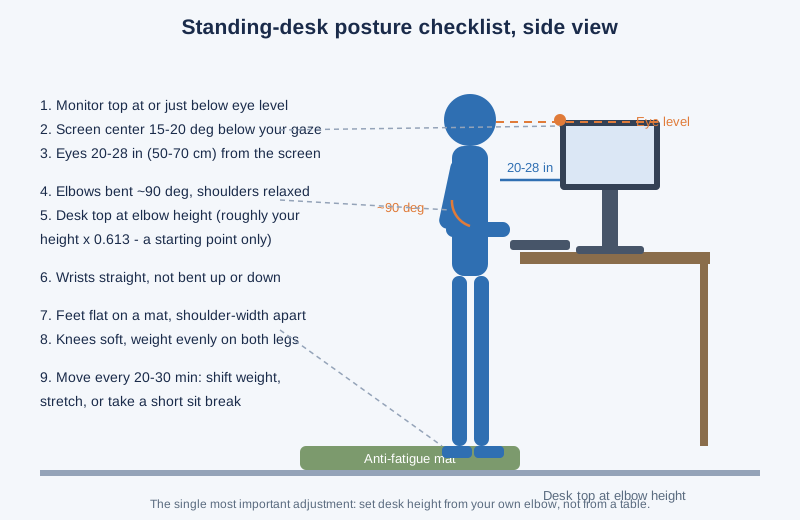
Feet: flat on the floor or a mat, roughly shoulder-width apart, toes pointing mostly forward. Do not lock your knees — soft knees keep circulation working and your lower back from stiffening.
Weight: even on both feet. The classic failure mode is leaning on one hip like you are waiting for a bus. When you catch yourself doing it, shift — or alternate one foot on a small footrest, which encourages the micro-shifts that keep standing comfortable.
Shoulders and head: shoulders relaxed and down, ears roughly over shoulders. If your ears drift ahead of your shoulders, your monitor is almost certainly too low — raise it rather than fighting your head position.
Movement: shift your weight, rock heel to toe, or take a few steps every 20-30 minutes. Still standing is not much better than still sitting. Wear the shoes you would wear for a long day on your feet — thin soles or bare feet on hard floors fatigue you fast; supportive shoes or a cushioned mat change the experience completely. Our full breakdown of pacing your day is in sit-stand schedules for remote workers.
How often should you switch between sitting and standing?
The target for most people is 2-4 hours of standing per 8-hour workday, built up over 2-4 weeks. More is not better: standing all day shifts the strain from your chair to your feet, knees, and lower back. The benefit comes from switching postures, not from standing as much as possible.
The best-known cadence is the 20-8-2 rule from Cornell ergonomist Alan Hedge: every 30 minutes, sit for 20, stand for 8, and move for 2. You do not have to run it with a stopwatch — stand for calls and email, sit for focused deep work, and never hold either posture for more than about an hour.
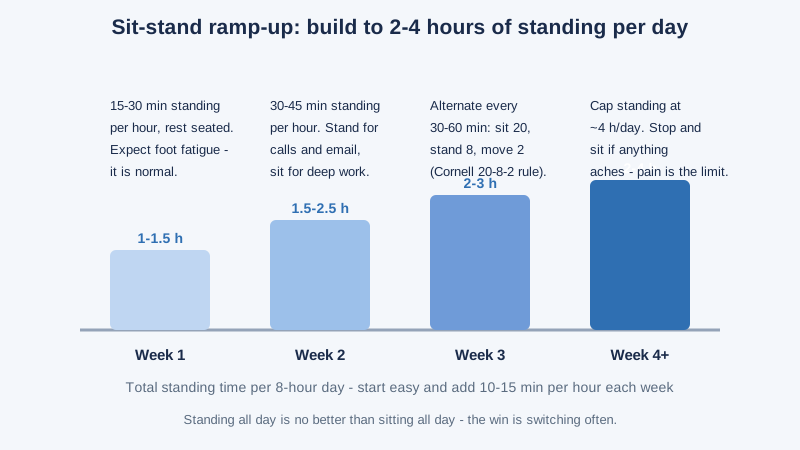
The ramp-up that actually works
Jumping straight to half your day standing is how people get sore feet and quit by Friday. Start with 15-30 minutes of standing per hour in week one, add roughly 10-15 minutes per hour each week, and expect some foot fatigue at first — it fades. Cap standing at about 4 hours a day even once conditioned. If anything aches, sit down; pain is the limit, not a milestone.
Do anti-fatigue mats actually work?
Yes — a good anti-fatigue mat is one of the highest-value accessories for a standing desk, and our full comparison is at best anti-fatigue mat for standing desk. The mechanism is simple: a cushioned surface encourages tiny, constant weight shifts and muscle adjustments that a hard floor suppresses, which reduces leg and back fatigue over hours.
Look for a mat about 3/4 inch thick with beveled edges (so you do not trip), roughly 20 x 36 inches or larger. Prices for well-reviewed mats run $40-80 as of October 2026. Replace a mat when it flattens out and stops springing back.
What are the most common standing-desk mistakes?
Setting the desk from a chart instead of your body. Charts assume average proportions. Your elbows are the measurement tool — use them.
Standing all day. The most common mistake, and the most ironic: the goal is 2-4 hours of standing inside an 8-hour day, with frequent switches. Under-desk treadmills can help some people add gentle movement — we compare them at best under desk treadmill — but build up gradually.
Monitor too low. The laptop-on-desk trap. Remember the monitor was probably set for your seated eye level, which is 8-10 inches lower — re-check it every time you switch.
Locked knees and one-hip leaning. Both are signs you have stood too long without moving. Shift, step, or sit.
The desk too high, shoulders shrugged. If your trapezius muscles ache by lunch, lower the desk half an inch at a time until your shoulders drop.
Ignoring cables. When the desk rises, cables stretch, snag, or yank equipment. Leave slack and use a cable tray — a safety issue as much as an aesthetic one.
The 5-minute standing desk setup checklist
Work through this once, and save the result in a desk memory preset:
- Stand in your work shoes, feet shoulder-width apart.
- Set the desk top to your elbow height — forearms at 90 degrees. Formula starting point: your height x 0.613.
- Raise the monitor so the top edge is at or just below eye level; screen center roughly 15-20 degrees below your gaze.
- Set viewing distance to 20-28 inches, tilt the screen back slightly.
- Place the keyboard flat or with slight negative tilt, mouse close beside it, wrists straight.
- Stand on your mat and type for two minutes. Adjust in half-inch steps until shoulders are relaxed and wrists are neutral.
- Save the height to a memory preset, and note your seated height too.
- Plan week one: 15-30 minutes standing per hour, seated the rest.
FAQ
How high should a standing desk be?
Set it to your elbow height with your arms bent at 90 degrees — roughly your height in inches times 0.613 as a starting point, then fine-tune by feel. A 5’9″ person lands around 42-43 inches; the table above covers 5’0″ to 6’3″.
Should the monitor be exactly at eye level when standing?
No — the top edge should sit at or just below eye level, with the screen center about 15-20 degrees below your straight-ahead gaze. Noticeably above eye level forces your neck back; noticeably below forces it down.
How long should you stand at a standing desk per day?
Aim for 2-4 hours of standing inside an 8-hour workday, built up over 2-4 weeks from a starting point of 15-30 minutes per hour. Cap standing at about 4 hours — standing all day trades sitting strain for foot and back strain.
Why does my back hurt when I use my standing desk?
The usual causes are a desk set too high, standing too long without moving, or locked knees. Re-measure elbow height, add a mat, shift your weight often, and alternate with sitting every 30-60 minutes.
The bottom line
A standing desk works when three numbers are right: desk at elbow height, monitor top at or below eye level, screen 20-28 inches away. Measure them once, save them in a memory preset, then alternate sitting and standing on a schedule your feet can sustain. The desk is the easy part — the setup is where the ergonomics actually happen.