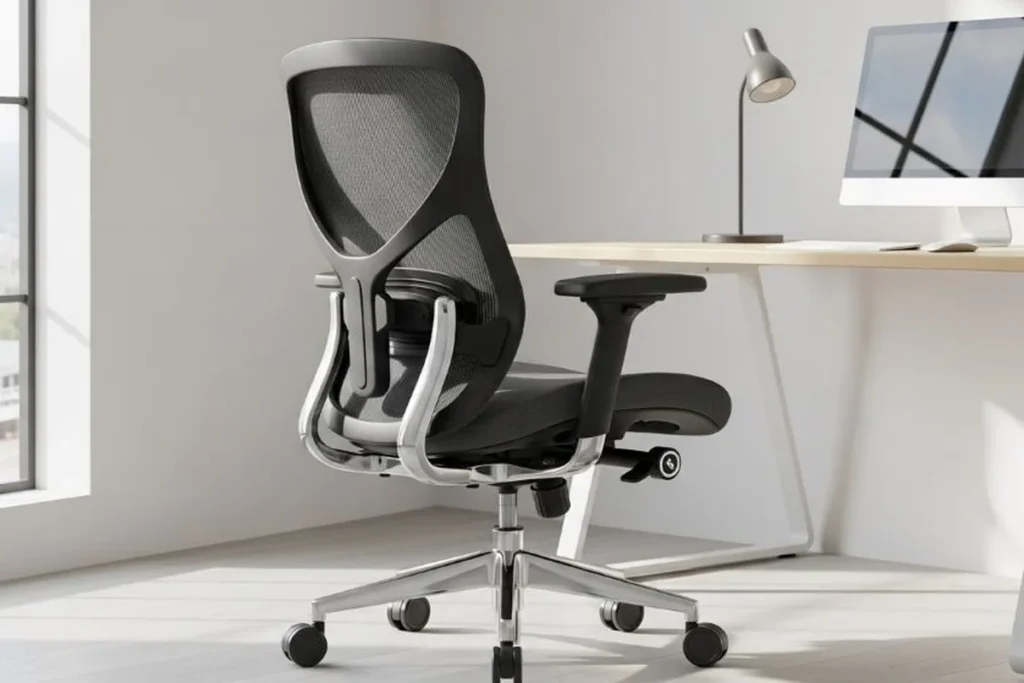
How to Choose an Ergonomic Office Chair (2026 Buying Guide)
To choose an ergonomic office chair, measure your inseam and thigh length first, then demand five adjustments: seat height, seat depth, lumbar height and depth, 4D armrests, and recline tension. Sit in the chair for five minutes with feet flat and knees at 90° — if the lumbar pad doesn’t meet your lower back, keep shopping.
Quick verdict: The chair matters less than the fit. A $250 chair adjusted to your body beats a $1,200 chair left at factory settings. Take three measurements (inseam, thigh length, torso), insist on adjustable lumbar support and seat depth — the two adjustments cheap chairs skip — and never buy a chair you can’t sit in (or return) first.
What body measurements should you take before buying a chair?
Chair shopping fails when it starts with the chair. Start with your body — three numbers decide nearly everything:
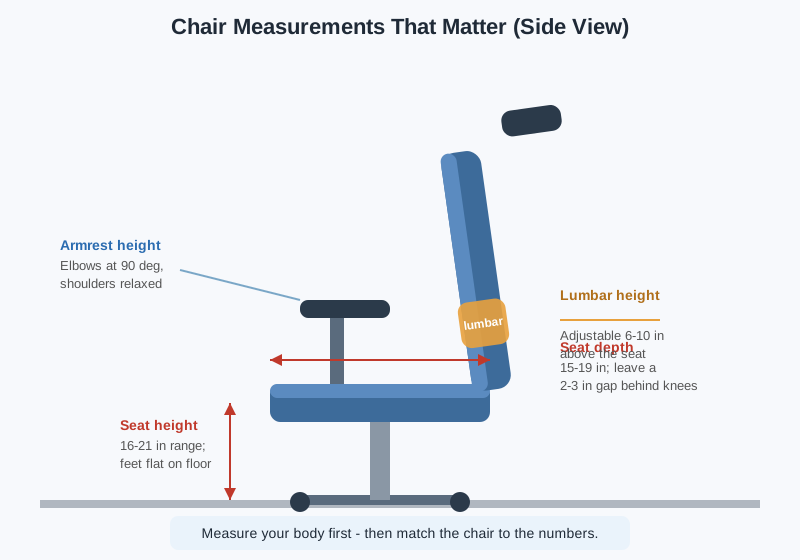
- Inseam (popliteal height): Stand barefoot against a wall, place a book between your knees, and measure from the floor to the top of the book. This is your ideal seat height. Most adults land between 16 and 21 inches — and most chair cylinders cover that range, but short and tall buyers should verify.
- Thigh length: Sit on a flat surface and measure from your lower back to the back of your knee. This sets your ideal seat depth: 15–19 inches for most adults, with a 2–3 inch gap between the seat edge and your knees.
- Torso length: Sit tall and measure from the seat surface to the top of your shoulders. This tells you how high the backrest and lumbar support need to reach — the number tall buyers most often get wrong.
Also note your shoulder width (for armrest spacing) and your weight (for cylinder and base ratings — most office chairs are rated to 250–275 lbs; big-and-tall models go to 350–500 lbs).
If you’re notably tall or short, standard chairs genuinely don’t fit — our guides to the best office chairs for tall people and the budget shortlist in our best ergonomic office chairs under $300 cover options sized for non-average bodies.
Which chair adjustments are must-haves?
Not all adjustments are equal. These five are non-negotiable; everything else is a bonus.
| Adjustment | What to look for | Why it matters |
|---|---|---|
| Seat height (pneumatic) | 16–21 in range, smooth gas lift | Feet flat on the floor with knees at 90° — the foundation of everything |
| Seat depth (slider) | 2–4 in of slide travel | Prevents the seat edge from pressing behind your knees (tall people) or leaving you perched (short people) |
| Lumbar support (height + depth) | Adjustable up/down at least 4 in, depth adjustable | A fixed lumbar bump hits the wrong vertebrae on half of all bodies |
| Armrests (4D) | Height, width, depth, and pivot all adjustable | Keeps elbows at 90° with shoulders relaxed at any desk height |
| Recline + tension | Lockable recline, tension dial matched to your weight | Lets you shift posture through the day instead of freezing in one position |
Nice-to-haves (worth paying for if the price is close): a headrest (essential above ~6’1″), forward seat tilt (great for task-intensive typing), and a waterfall seat edge (reduces thigh pressure). Marketing fluff you can ignore: “racing-style” bolsters, built-in massage, and anything described as “lumbar” that’s just a fixed foam bump.
All prices below are typical US street prices as of October 2026.
How should lumbar support actually fit?
Lumbar support is the most important adjustment and the most commonly misused. Here’s the fit check:
- Position: The pad should press into the small of your back at belt level (roughly the L4–L5 vertebrae). On chairs with height adjustment, slide it until you feel it “fill” your lower back curve.
- The fist test: Sit back fully. You should not be able to fit your fist between your lower back and the backrest. A fist-sized gap means the lumbar support is too shallow or positioned wrong.
- Depth matters as much as height: A height-adjustable pad that’s too shallow still leaves a gap. Look for depth adjustment (a dial or pump) — it’s the feature that separates $300 ergonomic chairs from $150 task chairs wearing an “ergonomic” label.
- Dynamic vs. fixed: Fixed lumbar pads work if they happen to match your spine. Dynamic/self-adjusting lumbar (a pad that flexes as you move) is more forgiving across body types and worth prioritizing if multiple people share the chair.
The uncomfortable truth: most back pain blamed on “a bad chair” is actually a lumbar pad sitting two inches too low. Adjust it before you replace the chair.
What should you look for in armrests?
Armrests exist for one job: holding your elbows at roughly 90° so your shoulders can stay down and relaxed. Everything else follows from that:
- 4D beats 2D beats fixed. Four-dimensional armrests (height, width, depth, pivot) let you match any desk height and body width. Two-dimensional (height + width) is acceptable. Fixed armrests are a dealbreaker if your desk isn’t exactly the right height — they’ll either hike your shoulders up or go unused.
- Width matters: Elbows should hang close to your torso, not splayed outward. If the armrests don’t adjust inward enough, wider-shouldered users end up shrugging all day.
- The desk conflict: Armrests that don’t drop low enough collide with the desk edge, pushing you too far from your keyboard. Before buying, check the armrest’s lowest height against your desk height (standard desks are 29–30 inches).
- Pad quality: Look for firm, slightly textured pads. Soft “pillow-top” armrests feel nice for a week, then compress into hard plastic.
What are the main types of ergonomic chairs?
| Chair type | Typical price (Oct 2026) | Best for | Trade-off |
|---|---|---|---|
| Ergonomic task chair (mesh back) | $200–$600 | All-day desk work, warm climates | Less “executive” looking; mesh can feel firm at first |
| High-back executive (foam/leather) | $250–$800 | Long calls, reclining breaks | Heavier, warmer; lumbar often fixed |
| Budget ergonomic (Hbada, SIHOO, etc.) | $130–$280 | First real ergonomic chair | Usually 2D armrests, simpler lumbar |
| Premium (Herman Miller Aeron, Steelcase Leap) | $900–$1,600 | 10+ year investment, proven ergonomics | Diminishing returns vs. a well-fit $400 chair |
| Gaming chair | $150–$400 | — | Bucket-seat bolsters fight neutral posture; usually the worst ergonomic value |
Mesh vs. foam seat: Mesh breathes and stays cool through long sessions but can feel hammock-like; high-density foam feels familiar and cushioned but traps heat. Neither is objectively better — it’s a climate and preference call.
A word on gaming chairs: The racing-bucket shape looks ergonomic but the side bolsters push your shoulders forward and the “lumbar pillows” are usually just straps. For the same money, a budget ergonomic task chair adjusts to your body instead of asking your body to adjust to it.
How do you do the 5-minute sit test?
Showroom or home trial — either way, run this checklist before committing:
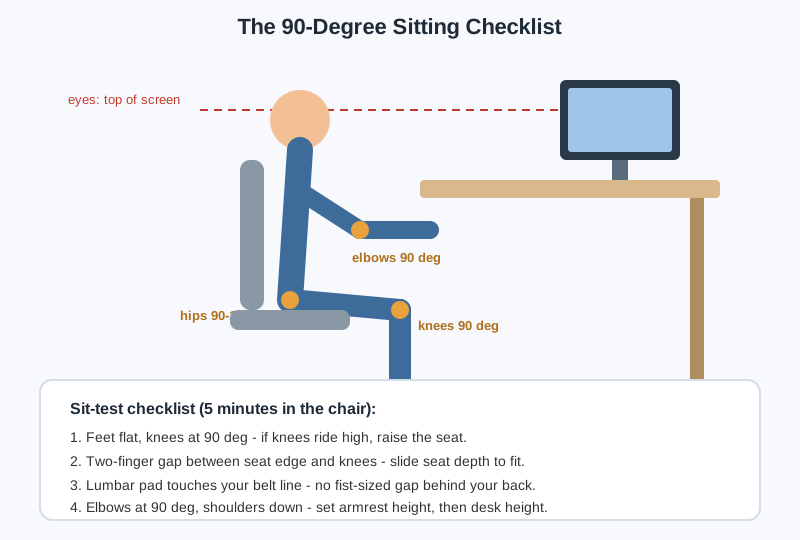
- Set seat height so your feet rest flat and your knees sit at 90°. If your knees ride above your hips, the seat is too high.
- Slide the seat depth until there’s a two-finger gap between the seat edge and the back of your knees.
- Dial in lumbar — height first, then depth — until the pad fills your lower back with no fist-sized gap.
- Set armrest height so elbows rest at 90° with shoulders fully down, then check the armrests clear your desk edge.
- Recline and return. Lean back, lock it, unlock it. The tension should support you without launching you forward or letting you collapse.
- Type for five minutes. Hands on keyboard, eyes on an imaginary screen. Discomfort that shows up in five minutes becomes pain in five hours.
When should you replace your office chair?
Even good chairs wear out. Replace (not repair) when you notice:
- The seat cushion has flattened — you feel the seat pan through the foam, or you slide forward constantly
- The cylinder sinks — you set the height in the morning and it’s lower by lunch
- The base wobbles or casters drag — a stability issue, not just an annoyance
- Armrests or lumbar mechanisms slip out of their set positions
Lifespan reality: budget chairs ($130–$280) last 3–5 years of daily use; mid-range ($300–$600) last 5–8; premium brands back 12-year warranties because their chairs actually survive that long. A $20 seat cushion can extend a flattening chair’s life by a year — but it’s a bandage, not a fix for broken adjustments.
When is the best time to buy an ergonomic chair?
Office chairs are one of the most discount-predictable categories in home office gear. If you’re not in a hurry, Black Friday week (Nov 27–30) is when ergonomic chairs hit their yearly floor — our Black Friday home office deals guide tracks the discount bands to expect. Mid-range brands like SIHOO, Hbada, and FlexiSpot routinely drop 25–35% during the event, which is often the difference between a budget chair and a genuinely adjustable one at the same out-of-pocket price.
Frequently asked questions
How much should I spend on an ergonomic office chair?
$250–$400 is the sweet spot where adjustable lumbar support, seat-depth sliders, and 4D armrests all appear together. Below $150 you’re buying a task chair with ergonomic marketing; above $600 you’re paying for brand, materials, and warranty length rather than meaningfully better ergonomics. Our best-ergonomic-chairs-under-$300 shortlist (linked above) lives right in the value zone.
Are gaming chairs ergonomic?
Rarely. The bucket-seat bolsters push shoulders inward, the fixed “lumbar pillows” don’t adjust to your spine, and the aggressive recline is for streaming, not typing. A similarly priced ergonomic task chair will fit more bodies better. Buy a gaming chair for the aesthetic, not the ergonomics.
Mesh or cushion seat — which is better?
Mesh wins in warm rooms and for long sessions (it breathes and distributes pressure); high-density foam wins if you dislike the hammock feel or sit in a cold office. Durability is comparable at the same price tier — cheap mesh sags and cheap foam flattens at about the same rate.
Do I need a headrest?
If you’re over about 6’1″, yes — a high backrest without a headrest leaves your neck unsupported when you recline. Below that height, headrests are optional comfort; many excellent chairs (including the Aeron) work fine without one for average-height users.
Can a seat cushion fix a bad chair?
Partially. A good cushion ($20–$40) fixes a flattened seat pan and tailbone pressure, buying a dying chair another year. It cannot fix missing lumbar adjustment, wrong seat depth, or a sinking cylinder — those are structural, and no cushion compensates for them.
What if I’m between sizes or share the chair?
Prioritize the adjustments with the widest range: a deep seat-depth slider, 4D armrests, and dynamic lumbar. Chairs with memory-foam-free mesh backs and simple lever controls (rather than cryptic dials) survive shared use best, since every user can reset the fit in seconds.