
Best Ergonomic Keyboards for Office Work (2026)
The best ergonomic keyboard for office work in 2026 is the Logitech Ergo K860: its split, curved keyframe plus cushioned palm rest cut wrist bending by a quarter, it connects over Bluetooth or USB receiver, and it typically costs $100–$130. First-timers should try the cheaper Logitech Wave Keys; tinkerers will love the adjustable Kinesis Freestyle2.
As an Amazon Associate I earn from qualifying purchases.
The short version: Logitech Ergo K860 is the best overall — split, curved, wireless, with a real palm rest. The Kinesis Freestyle2 is the best true split for people who want to adjust width, angle, and tenting. The Microsoft Sculpt Desktop is the best value combo (keyboard, mouse, and numpad). The Logitech Wave Keys is the best first ergonomic board with zero learning curve, and the wired Microsoft Ergonomic Keyboard is the best no-battery option.
How do the best ergonomic keyboards for office work compare?
Prices are typical US street prices as of October 2026.
| Keyboard | Design | Wireless | Palm rest | Price (Oct 2026) |
|---|---|---|---|---|
| Logitech Ergo K860 | Split, curved, fixed | Bluetooth + USB receiver | Cushioned, integrated | ~$100–$130 |
| Kinesis Freestyle2 (PC) | True split, adjustable | Wired USB (Blue is wireless) | Optional accessory | ~$110–$135 |
| Microsoft Sculpt Ergonomic Desktop | Split, domed, fixed | 2.4 GHz USB receiver | Cushioned, integrated | ~$70–$100 |
| Logitech Wave Keys | Curved wave, one piece | Bluetooth + Logi Bolt | Cushioned, integrated | ~$50–$70 |
| Microsoft Ergonomic Keyboard (LXM-00001) | Split, curved, fixed | Wired USB | Cushioned, integrated | ~$55–$75 |
What is the best ergonomic keyboard overall?
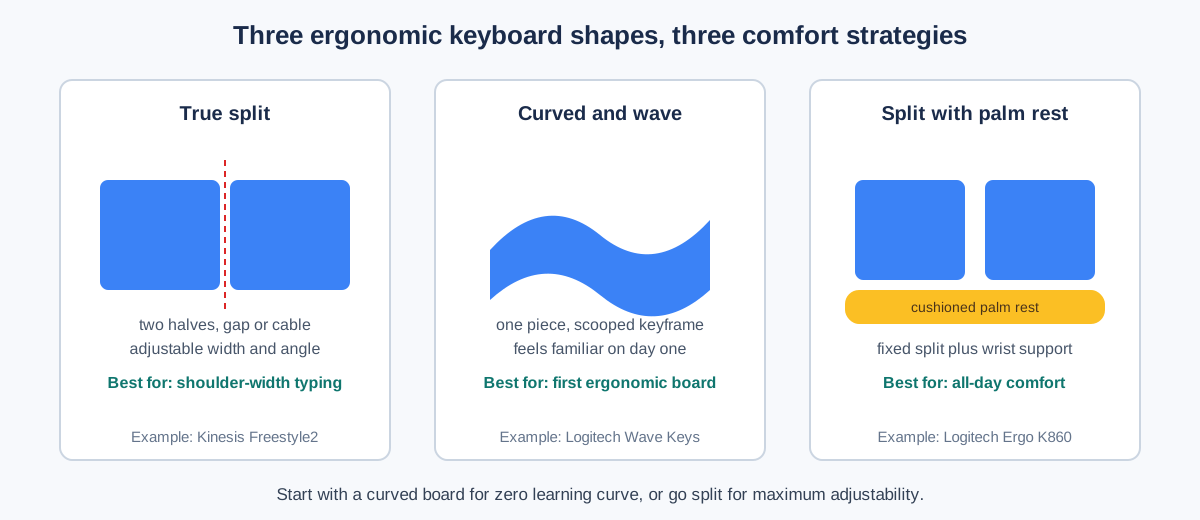
The Logitech Ergo K860 is the best ergonomic keyboard for most office workers, because it fixes the two angles that hurt — wrist bend and forearm twist — without asking you to relearn typing. The curved, split keyframe angles each half of the keyboard outward so your wrists stay straight, and the scooped key wells match your fingertips’ natural arc.
The numbers Logitech cites are unusually specific for keyboard marketing: 25% less wrist bending and 54% more wrist support versus a standard board without a palm rest, with the design certified by United States Ergonomics. The pillowed wrist rest uses a memory-foam layer under a stain-resistant fabric, and the tilt legs offer 0, -4, and -7 degrees — negative tilt being the position ergonomists actually recommend, since it keeps wrists neutral instead of cocked upward.
Practical office details are all here: Bluetooth plus a USB receiver, three-device Easy-Switch, a full layout with numpad, quiet Perfect Stroke keys, and up to two years on two AAA batteries. At roughly $100–$130 as of October 2026, it is the priciest board here — but it is also the one most likely to still be on your desk in five years.
Which keyboard is best for a true split layout?
The Kinesis Freestyle2 for PC is the only board here that physically separates into two independent halves, joined by a flexible cable. Spread them to shoulder width, angle them to match your natural arm position, and the ulnar deviation — the sideways wrist bend — that fixed boards only reduce simply disappears.
That adjustability is the Freestyle2’s whole argument. The standard 9-inch separation suits most people; a 20-inch version exists for very broad shoulders. Optional VIP3 accessories add tenting at 5, 10, or 15 degrees, lifting the inner edges so your forearms rotate toward the neutral handshake position instead of lying flat. The low-force membrane keys are quiet and light, with an embedded numpad layer for the tenkeyless footprint.
The trade-offs are real: it is wired (the Freestyle2 Blue adds Bluetooth for Mac), there is no backlight, and the minimalist look will not impress anyone. But for people with existing wrist or shoulder complaints, adjustability beats every fixed curve — typically $110–$135 as of October 2026, with tenting accessories extra.
What is the best value ergonomic keyboard and mouse combo?
The Microsoft Sculpt Ergonomic Desktop (L5V-00001) remains the value king years after launch: a split, domed ergonomic keyboard, a separate wireless numpad, and the sculpted Sculpt Ergonomic Mouse in one box, typically $70–$100 as of October 2026. Bought separately, an ergonomic keyboard and mouse alone would cost more.
The keyboard’s split layout angles the halves apart while the domed center raises the middle, reducing the forearm pronation that flat boards demand. The cushioned palm rest is genuinely comfortable for long sessions, and detaching the numpad is a quiet ergonomic win — it lets you center the typing area in front of you and pull the mouse closer, shortening the reach that strains shoulders.
Two caveats. The function row doubles as media keys by default (fixable in settings), and the whole set is Windows-first — Mac users should look at the K860 or Wave Keys instead. If you also need the mouse, our wireless keyboard and mouse combo guide compares more pairings. For a Windows office, though, the Sculpt Desktop is the most comfort per dollar on this list.
Which ergonomic keyboard is best for beginners?
The Logitech Wave Keys is the ergonomic keyboard for people who are ergonomics-curious but not ready to relearn typing. Its wavy keyframe is a gentle curve rather than a true split — your hands sit slightly angled, your fingers fall into the scooped rows, and you can touch-type at full speed within minutes.
Do not mistake “gentle” for “gimmick.” The cushioned memory-foam palm rest gives what Logitech measures as 57% more wrist support, the compact frame pulls your mouse closer to your body, and the board carries the same United States Ergonomics certification as the K860. Bluetooth plus Logi Bolt receiver, three-device switching, multi-OS support, and up to three years of battery life round out a thoroughly modern package.
At roughly $50–$70 as of October 2026, it is also the cheapest wireless pick here — half the K860’s price for maybe two-thirds of the ergonomic benefit. Buy the Wave Keys if your wrists are merely tired at 5pm; graduate to the K860 or Freestyle2 if they are actually sore.
What is the best wired ergonomic keyboard?
The Microsoft Ergonomic Keyboard (LXM-00001) is the answer for everyone who is done with batteries, dongles, and Bluetooth pairing dances. Plug in the USB cable and it works — on Windows, with no software, forever.
The design is the modern evolution of Microsoft’s classic Natural line: a split keyframe with a gentle curve, an improved cushion under the integrated palm rest, a dedicated number pad, and shortcut keys for Office apps and emoji. The split is fixed rather than adjustable, so it will not suit every body — but for average builds it lands in the comfort zone immediately.
Wired also means zero wireless lag and zero interference in crowded offices, which matters more than spec sheets suggest. At roughly $55–$75 as of October 2026, it undercuts every wireless split board here. The only real cost is the cable; if your desk already has a dock with a free USB port, that cost is zero.
What do split, tenting, and negative tilt actually do?
Three separate adjustments, three separate pains relieved. Understanding them makes choosing much easier.
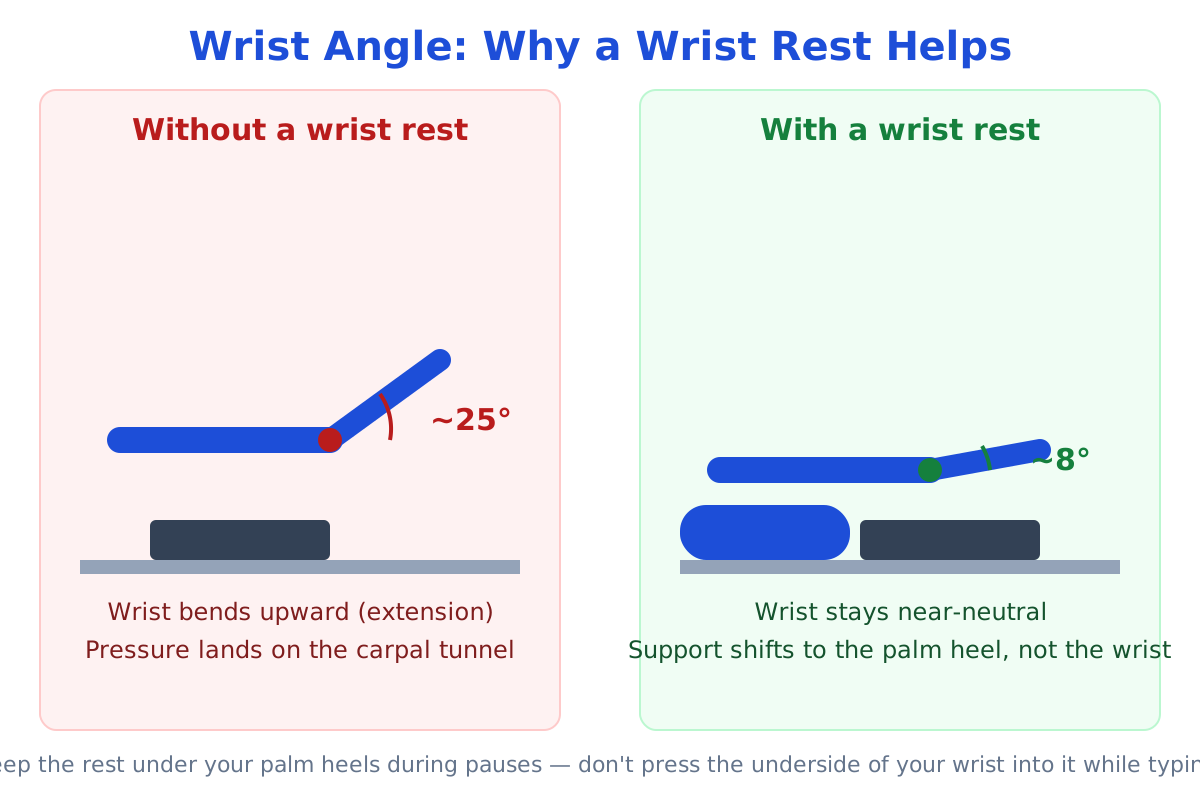
Split separates the left and right key clusters, letting your hands sit at shoulder width instead of squeezed together. This straightens the wrists sideways, eliminating ulnar deviation — the sideways bend that compresses the carpal tunnel.
Tenting raises the inner edges of the keyboard so the key surface slopes like a shallow roof. This rotates the forearms out of full pronation (palms flat down) toward the neutral handshake posture, easing the constant rotational strain on the forearm muscles.
Negative tilt slopes the keyboard so the front edge sits higher than the back — the opposite of the flip-out feet on standard boards. This keeps the wrists flat rather than bent upward, which is the position ergonomists recommend for long typing sessions.
A curved board like the Wave Keys gives you a fixed dose of all three. A true split like the Freestyle2 lets you tune each one. Either beats a flat rectangle.
How long does it take to adjust to an ergonomic keyboard?
Plan on three to seven days of slightly slower typing, then normal speed with less fatigue. The curve is real but short — and you can flatten it:
- Start on a light day. Do not unbox a split keyboard on deadline Monday. A Friday afternoon or a slow week gives your muscle memory room to adapt.
- Keep your old keyboard plugged in. Knowing you can switch back removes the anxiety that makes adaptation feel worse than it is.
- Type normally; do not hunt and peck. Your fingers already know the layout — trust them and let the new angles settle in.
- Adjust the tenting and tilt on day two, not day one. Learn the split first, then tune the angles once the basics feel familiar.
- Give it two full work weeks before judging. Day-three frustration is universal and meaningless; week-two comfort is the real verdict.
Pair the new board with a proper wrist rest for keyboard and mouse during the transition — supporting the wrists while the angles feel strange speeds up adaptation noticeably.
When is the best time to buy an ergonomic keyboard?
Keyboards follow the same sale calendar as most PC accessories: modest discounts year-round, real ones on Black Friday and Prime Day. The K860 and Wave Keys typically drop 20–30% during sale weeks, which can mean $30+ off the K860.
If you’re not in a hurry, Black Friday week (Nov 27–30) is when keyboard prices hit their yearly floor — our Black Friday home office deals guide tracks the discount bands to expect.
But wrist pain does not wait for sales. If your hands are sore now, the $20–$30 you might save by waiting two months is a bad trade against eight weeks of discomfort. Buy the board, start the adaptation, and let the sale hunters keep their coupons.
Frequently asked questions
Are ergonomic keyboards actually better for your wrists?
Yes — split and curved keyboards measurably reduce the wrist bending and forearm rotation that cause fatigue, though no keyboard treats medical conditions.
The mechanism is straightforward: angled keyframes keep wrists straighter and forearms closer to neutral, which lowers sustained muscle load over an 8-hour day. If you have persistent pain, numbness, or tingling, see a clinician — a keyboard is prevention and comfort, not treatment.
Split vs curved keyboard: which should I choose?
Choose a curved one-piece board (Wave Keys, K860) for zero learning curve; choose a true split (Freestyle2) if you want to tune width, angle, and tenting to your body.
Curved boards feel familiar within an hour and fix the most common issues. True splits take a few days to learn but adapt to unusual body proportions, existing injuries, or very wide shoulders in a way fixed boards cannot.
Do I need the tenting accessory for a split keyboard?
Not at first — start with the flat split, then add tenting if your forearms still feel twisted.
Tenting helps most when flat typing leaves your palms facing fully downward and your forearms ache by afternoon. The 5-degree setting is subtle; 10–15 degrees is where the handshake posture really arrives. It is an upgrade, not a prerequisite.
Are wireless ergonomic keyboards reliable for office work?
Yes — modern Bluetooth and Logi Bolt connections are stable for typing, with multi-year battery life on the Logitech boards.
The remaining argument for wired is simplicity: no batteries, no pairing, no dongle to lose. In practice, wireless dropouts during typing are rare enough that most office workers should choose by comfort and price, not connection type.
How do I clean an ergonomic keyboard with a fabric palm rest?
Wipe the palm rest with a damp cloth and mild soap; use compressed air or a soft brush between the keys.
The K860’s stain-resistant coating handles coffee splashes better than bare fabric, but no palm rest survives daily skin oil without occasional cleaning. Removable-rest designs (Freestyle2 accessories) can be washed separately — a small but real maintenance advantage.
Prices are typical US street prices as of October 2026 and change frequently — the linked listings show current pricing.