

Best Under-Desk Cable Trays for Home Offices (2026)
For most home offices in 2026, the best under-desk cable tray is the Univivi 36-inch no-drill tray at about $38: it spans a full desk in one run, clamps on without drilling, and hides a power strip plus laptop bricks inside a fabric sleeve. For a small desk or a permanent mount, the screw-in VIVO DESK-AC06-1C is the best compact pick at about $30.
As an Amazon Associate I earn from qualifying purchases.
TL;DR — Our 2026 under-desk cable tray picks, by use case
- Best overall: Univivi 36″ No-Drill Tray — 36 in, clamp or screw, ~$37.99
- Best screw-in compact tray: VIVO DESK-AC06-1C — 16.5 in steel, 11 lb rating, ~$30
- Best compact clamp-on: Cinati 13.4″ Clamp Tray — 10 lb rating, 2-year warranty, ~$20
- Best budget clamp-on: Litwaro 13.38″ Clamp Tray — carbon steel mesh, ~15 lb rating, ~$17.99
- Best mid-length clamp-on: Mzmaxy 25″ Clamp Tray — two-section steel mesh, ~15 lb rating, ~$23.99
Method: we compared published specs, November 2026 prices, and verified owner feedback — no hands-on testing.
What is an under-desk cable tray — and how is it different from a cable management box?
An under-desk cable tray is a basket or rack mounted under your desk, holding your power strip, adapters, and excess cable off the floor. It differs from a cable management box, which sits on the desk or floor and hides a strip inside a lidded container; a tray hangs underneath and keeps everything out of sight.
A tray frees floor space and keeps cables away from chair wheels. A box is easier to reach — you lift the lid to plug something in — but it still occupies surface or floor space. If your problem is a tangle under the desk, buy a tray; if your problem is a strip sitting visibly on the desk, read our best cable management box guide instead. On a standing desk, everything in the tray rises with it, so cables never tug at the wall outlet.
Which mounting type fits your desk?
Two mounts hold a real load, and your desk decides which one is possible — check your desk before you check prices. (Adhesive tape mounts exist, but they are the weakest option; none of our five picks relies on adhesive.)
Clamp-on mounts grip the desk edge with C-clamps. They need a flat edge about 0.4 to 2.4 inches thick, work on wood, glass, and metal, and suit renters and standing desks best — nothing is drilled, and the tray moves with the desk.
Screw-in mounts bolt into the desk underside. They need a wood or particle-board top at least 0.75 inches thick with clear space for the screws — no frame rails or drawer hardware in the way. They hold the most weight and never slip, but leave holes if removed.
The quick decision: renters and standing-desk owners should buy clamp-on; a fixed wood desk you own suits screw-in. Glass tops rule out screw-in; a thick metal frame under the edge can block clamps — measure before ordering.
Clamp-on vs screw-in: what actually holds?
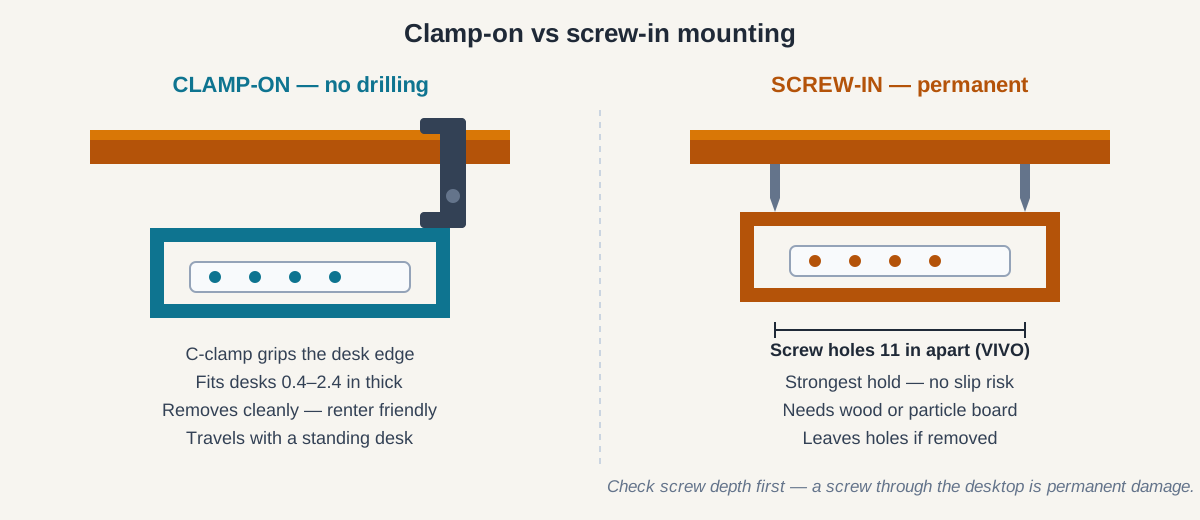
Load ratings are manufacturer claims, not certified results — treat them as a rough ranking. Compact clamp trays here are rated for 10 to 15 pounds and the screw-in VIVO for 11 pounds, while a normal load weighs about 4 to 6 pounds. What actually fails is rarely the tray: clamps slip on thin edges, and over-long screws poke through the desktop. Prevent both by measuring your desk edge against the clamp range (Cinati 0.4–2.4 in; Litwaro and Mzmaxy 0.4–2 in) and spreading the load.
Best compact clamp-on: Cinati 13.4″ Clamp Tray — about $20
The Cinati is the clamp-on pick for small and medium desks: a 13.4-by-4.6-by-3.1-inch steel basket, clamping to edges 0.4 to 2.4 inches thick, rated for up to 10 pounds. It ships with four cable clips and six cable ties, and carries a 2-year warranty — the only one among the compact picks here. Its limit is length: a 12-inch strip plus a laptop brick will not both fit. Check the Cinati tray price on Amazon.
Best budget clamp-on: Litwaro 13.38″ Clamp Tray — $17.99
The Litwaro is the cheapest proper clamp-on tray, at $17.99 as of November 2026. Its carbon-steel mesh basket is 13.38 inches long, holds about 15 pounds per the listing, and clamps to flat edges 0.4 to 2 inches thick. The mesh lets cables pass through anywhere and air flow around warm bricks — but 13.38 inches fits one standard strip and little else. Check the Litwaro tray price on Amazon.
Best screw-in compact tray: VIVO DESK-AC06-1C — about $30
The VIVO is the pick for a desk you own and plan to keep: a 16.5-by-3-inch steel rack that screws into a wood or particle-board desktop, mounting holes 11 inches apart, rated for up to 11 pounds. The partially enclosed design hides the strip from straight-on view while the open front lets you add or remove cables without unmounting anything. At 3 inches deep it sits nearly flush — but that depth can reject bulky bricks, so check your biggest adapter first. VIVO also sells it as a two-pack (DESK-AC06-2C), one per zone. Check the VIVO tray price on Amazon.
How long a tray do you need?
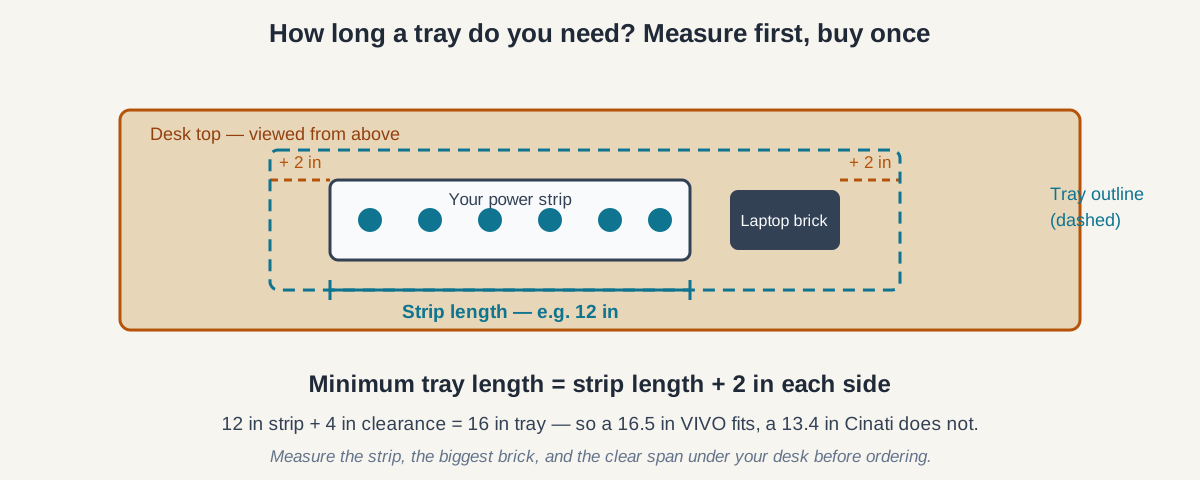
Length is the measurement most buyers get wrong, because they measure the desk instead of the gear. The tray must fit the strip, the biggest brick, and a little slack — not match the desk.
Our rule for every pick: minimum tray length equals your strip’s length plus 2 inches of clearance on each side. A 12-inch strip needs at least a 16-inch tray; a 15-inch surge protector needs at least a 19-inch tray.
Two more measurements decide the buy: the clear span under your desk — frame rails and drawer boxes eat into it — and the biggest brick, typically 5 to 6 inches long, which must fit lying flat.
Length also decides the format: compact trays around 13 inches suit one strip and a charger; mid-length trays around 16 to 25 inches suit a strip plus two or three bricks; full-width trays at 36 inches suit a strip, a dock, adapters, and a hub in one run — no second tray, no gap where cables droop.
Best mid-length clamp-on: Mzmaxy 25″ Clamp Tray — $23.99
The Mzmaxy is the long no-drill option for desks with a clear 25-inch span under the edge: a metal-mesh tray assembled from two sections joined with screws, clamping to edges 0.4 to 2 inches thick, rated for about 15 pounds. At 25 inches it fits a long surge protector plus a laptop brick with room to spare. The catch is assembly: the two halves must be screwed together first, so it is a ten-minute install rather than a three-minute one. Check the Mzmaxy tray price on Amazon.
Best overall: Univivi 36″ No-Drill Tray — $37.99
The Univivi is the best under-desk cable tray for most home offices because it solves the whole problem in one buy. At 36 inches long and 5.5 inches wide and deep, it spans a standard 48- to 60-inch desk in one run, holding a strip, adapters, a dock, and a laptop brick with room to spare. It is made from 600D Oxford fabric rather than steel mesh, so it wraps the bundle into a sleeve that hides cables completely — the only pick here that fully conceals its contents. Both clamp and screw hardware are included. The trade-offs: it needs about 5.3 inches of clear edge space, and the clamp hardware stays partly visible. At $37.99 as of November 2026, it costs roughly twice a compact clamp tray — but it replaces a second tray. Check the Univivi tray price on Amazon.
The five best under-desk cable trays of 2026, side by side
| Tray | Length | Mount | Load rating | Material | Price (Nov 2026) |
|---|---|---|---|---|---|
| Univivi 36″ No-Drill | 36 in | Clamp or screw | Not stated | 600D Oxford fabric | $37.99 |
| VIVO DESK-AC06-1C | 16.5 in | Screw-in | 11 lb | Steel | ~$30 |
| Cinati 13.4″ Clamp | 13.4 in | Clamp | 10 lb | Steel | ~$20 |
| Litwaro 13.38″ Clamp | 13.38 in | Clamp | ~15 lb | Carbon steel mesh | $17.99 |
| Mzmaxy 25″ Clamp | 25 in | Clamp | ~15 lb | Steel mesh | $23.99 |
Load ratings are manufacturer claims; prices change often.
What goes in the tray — and what should stay out?
A tray is storage hardware, not a cure for unsafe wiring. Put the power strip, laptop bricks, monitor adapters, and cable slack in the tray, and keep the strip’s switch reachable without unmounting anything.
Three things should stay out. First, daisy-chained power strips: plugging one strip into another overloads the first strip’s circuit, and a tray hides the hazard. Use one strip with enough outlets — see our best power strip for a desk setup if yours is short on sockets. Second, tightly coiled cables around a hot brick: coiled cables trap heat, so let cables lie loose. Third, anything you reach for daily: a USB hub you plug into often belongs on the desk, not under it.
Ventilation is the safety point owners overlook most: bricks and strips generate heat, and a full tray restricts airflow. Mesh trays ventilate best; don’t pack a fabric tray tight.
How much should you spend — and when should you wait to buy?
A good under-desk cable tray costs $18 to $38, and price differences track length and mounting options more than quality: compact clamp trays run $18 to $20, mid-length clamp trays $24 to $30, and the full-width Univivi $38. Above $40 there is no meaningful quality jump for a home office — the expensive trays are longer, not better made.
If you are not in a hurry, Black Friday week (Nov 27–30) is when desk-accessory prices hit their yearly floor — our Black Friday desk accessories deals guide tracks the discount bands to expect. The same $18–$38 trays here typically drop 20–30%, making the Univivi a sub-$30 buy and the Litwaro a sub-$15 one. If you need the tray now, buy it now. Our desk cable management ideas cover clips, raceways, and spines that pair with a tray.
Frequently asked questions
Do I need to drill holes to install an under-desk cable tray?
No. Clamp-on trays like the Cinati, Litwaro, Mzmaxy, and Univivi grip the desk edge with C-clamps and install in minutes. Screw-in trays like the VIVO need drilling, but suit a permanent setup on a wood desk you own.
Will a clamp-on tray work on a standing desk?
Yes — clamp-on trays are the best choice for standing desks. The tray travels with the desktop, so cables never tug at the wall outlet, and nothing is drilled into a desk that may be under warranty. Check the clamp range against your desktop thickness and the frame’s clear span.
What size cable tray do I need for a power strip?
Measure the strip and add 2 inches of clearance on each side. A 12-inch strip needs at least a 16-inch tray, which makes the 16.5-inch VIVO the smallest sensible fit and the 25-inch Mzmaxy or 36-inch Univivi the comfortable one. Measure your biggest power brick too — it must fit lying flat.
Is an under-desk tray better than a cable management box?
It depends on where the mess is. A tray mounts under the desk and hides cables while freeing floor space, which suits a fixed setup with a standing desk. A box sits on the desk or floor and hides a strip behind a lid, which suits setups where you plug things in and out often.
The bottom line
Buy the mount first and the length second: renters and standing-desk owners should buy clamp-on; a fixed wood desk suits the screw-in VIVO. Then measure the strip, add 2 inches per side, and pick the shortest tray that clears that number. For most home offices that is the Univivi 36-inch tray at about $38 — one tray, no drilling, every cable off the floor.
Prices are Amazon US prices as of November 2026 — check the listing before ordering.