Best Small Printers for Home Offices (2026)
The best small printer for most home offices is the Brother HL-L2460DW: a compact monochrome laser that fits a 14-inch square of desk, prints 36 pages per minute, and costs about 3 cents a page. Need color? The Epson EcoTank ET-2800 is cheapest to run; the HP DeskJet 2755e is cheapest to buy.
As an Amazon Associate I earn from qualifying purchases.
The short version: Brother HL-L2460DW is the best overall small printer — fast, compact, and the cheapest per page. HP LaserJet M110w is the physically smallest laser for truly tiny desks. HP DeskJet 2755e is the budget all-in-one under $90. Canon PIXMA TR4720 adds a document feeder and fax for home businesses. Epson EcoTank ET-2800 costs the most upfront but prints color for about a penny a page.
Laser or inkjet: which is better for a low-volume home office?
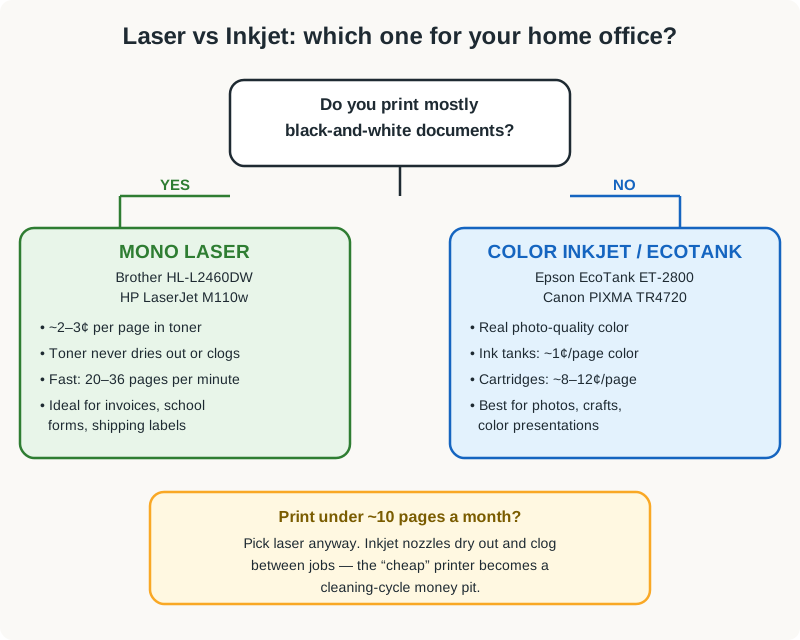
This is the decision that matters more than the brand. Most home offices print fewer than 50 pages a month — and that low volume is exactly where the two technologies behave very differently.
A laser printer uses dry toner powder. It never dries out, never clogs, and wakes up after three idle weeks as if you printed yesterday. If you print invoices, school forms, shipping labels, or contracts — mostly black text — a monochrome laser is the rational choice. Running costs land around 2–6 cents per page, and you replace toner roughly once a year.
An inkjet sprays liquid ink through microscopic nozzles. It prints beautiful color, but nozzles dry out between jobs — a printer idle for a month can burn a cleaning cycle’s worth of ink just getting the heads working again. For low-volume users, the “cheap” $80 inkjet quietly becomes the expensive printer.
The honest rule: if your printing is mostly black-and-white documents, buy a laser; if you regularly print color photos or graphics, buy an inkjet — and if you print almost nothing, still buy a laser, because a laser doesn’t punish you for ignoring it.
What counts as a “small” printer — and will one fit your desk?
“Compact” is a marketing word, not a measurement. Here’s what the five printers on this list actually occupy:
| Printer | Footprint (W × D) | Height | Weight |
|---|---|---|---|
| Brother HL-L2460DW | 14.0 × 14.2 in | 7.2 in | 15.9 lb |
| HP LaserJet M110w | 13.6 × 11.0 in | 7.7 in | 8.6 lb |
| HP DeskJet 2755e | 16.7 × 12.0 in | 6.0 in | 7.5 lb |
| Canon PIXMA TR4720 | 17.2 × 13.7 in | 7.9 in | 12.9 lb |
| Epson EcoTank ET-2800 | 14.8 × 13.7 in | 9.2 in | 9.4 lb |
All prices below are typical US street prices as of October 2026.
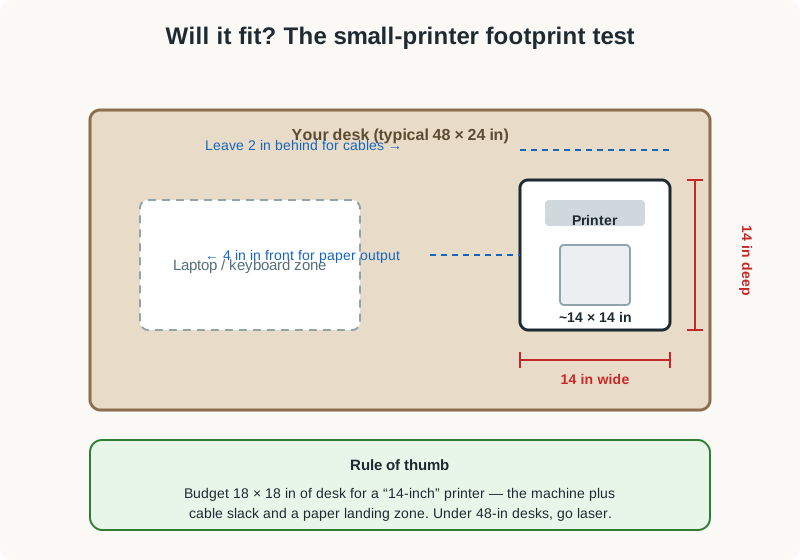
A 14-inch-square printer sounds small until it’s on your desk. Measure the real estate: the printer needs its footprint plus about 2 inches behind for cables and 4 inches in front where pages land. Budget an 18 × 18-inch zone for a nominally “14-inch” printer — on a 48-inch desk, that’s more than a third of the surface, which is why many owners slide the printer onto a printer stand beside the desk.
The 5 best small printers for home offices in 2026
Five printers made this list, from the $80 budget all-in-one to the $200 tank that costs a penny a page. Every one below connects over Wi-Fi, prints from a phone, and fits a genuinely small desk.
| Printer | Type | Print / scan / copy | Speed (black) | Typical price (Oct 2026) |
|---|---|---|---|---|
| Brother HL-L2460DW — best overall | Mono laser | Print only | 36 ppm | ~$110–$150 |
| HP LaserJet M110w — smallest laser | Mono laser | Print only | 20 ppm | ~$100–$140 |
| HP DeskJet 2755e — budget pick | Color inkjet | Print, scan, copy | 7.5 ppm | ~$70–$90 |
| Canon PIXMA TR4720 — best for home business | Color inkjet | Print, scan, copy, fax | 8.8 ppm | ~$70–$100 |
| Epson EcoTank ET-2800 — cheapest to run | Color supertank | Print, scan, copy | 10 ppm | ~$180–$230 |
Brother HL-L2460DW — best overall
The HL-L2460DW is the printer most home offices should buy. It’s a compact monochrome laser — 14 inches square, under 16 pounds — that prints at 36 pages per minute with automatic two-sided printing, which is roughly four times faster than any inkjet on this list. Wireless, Ethernet, and USB connectivity cover every setup, and the Brother Mobile Connect app handles phone printing without a computer in the loop.
The economics are the real story. The high-yield TN-830 XL toner prints about 3,000 pages — roughly 3 cents a page — and because it’s toner, not ink, it sits for months without drying out. Brother includes a Refresh subscription trial in the box, but you can ignore it and buy toner when the printer asks.
Check price: Brother HL-L2460DW on Amazon
HP LaserJet M110w — smallest laser for tiny desks
HP markets the M110w as the world’s smallest laser printer in its class, and the tape measure backs it up: 13.6 × 11 inches of desk, under 9 pounds. If your desk is a 40-inch compact model or a wall-mounted folding desk, this is the laser that fits where the Brother can’t.
The trade-offs are real but honest. Print speed is 20 ppm instead of 36, there’s no automatic duplexing, and the paper tray holds 150 sheets instead of 250. The W1420A toner cartridge yields about 950 pages, putting running costs near 5–6 cents a page — roughly double the Brother, still far below any cartridge inkjet. Setup runs through the HP Smart app with AirPrint, Mopria, and Wi-Fi Direct. Buy this when desk space is the binding constraint and everything you print is black and white.
Check price: HP LaserJet M110w on Amazon
HP DeskJet 2755e — best budget all-in-one
At around $80, the DeskJet 2755e is the cheapest way to get print, scan, and copy in one box. It’s a color inkjet, so it handles the occasional photo, school project, or color chart that a mono laser can’t. Dual-band Wi-Fi, the HP Smart app, and a 6-month Instant Ink trial come in the box.
Go in with open eyes about the ink. The standard HP 67 cartridges yield roughly 120 black and 100 color pages — 8–12 cents a page, the highest running cost on this list. The Instant Ink subscription (from about $1.49 a month for 10 pages) suits steady low-volume printing, since HP ships cartridges before you run out.
Check price: HP DeskJet 2755e on Amazon
Canon PIXMA TR4720 — best for home businesses
The TR4720 is the only printer on this list with an automatic document feeder and a built-in fax — features that matter if you run a business from home and still deal with multi-page contracts, medical forms, or government paperwork. It scans and copies stacks through the ADF instead of one page at a time on the glass, and it prints double-sided automatically.
Print quality is a strength: 8.8 ppm black and 4.4 ppm color won’t win races, but Canon’s output looks sharper than the HP DeskJet’s at the same price. The PG-275 and CL-276 cartridges cost about the same per page as HP’s (8–12 cents), so this is not a cheap printer to run — it’s a capable one.
Check price: Canon PIXMA TR4720 on Amazon
Epson EcoTank ET-2800 — cheapest to run long-term
The EcoTank is the printer for people who hate buying ink. Instead of cartridges, it has four refillable tanks you top up from bottles — and the bottles in the box print up to 4,500 black and 7,500 color pages. Replacement bottles cost around $13–$16 each, which works out to roughly 0.3 cents per black page and about a penny per color page. No cartridge printer on earth comes close.
The catch is the $180–$230 purchase price and the size: at 14.8 × 13.7 × 9.2 inches it’s the tallest printer here. But the break-even math is compelling — at 100 pages a month, the EcoTank’s ink savings versus a cartridge inkjet pay back the premium in about a year, and after that you’re printing nearly free.
Check price: Epson EcoTank ET-2800 on Amazon
How much does each printer really cost to run?
The sticker price is the down payment; the ink or toner is the mortgage. Here’s the two-year math for a typical home office printing 50 pages a month (1,200 pages total), using typical US street prices as of October 2026:
| Printer | Purchase price | Cost per page | 2-year ink/toner cost | 2-year total |
|---|---|---|---|---|
| Epson EcoTank ET-2800 | ~$200 | ~0.3¢ black, ~1¢ color | ~$10 (bottles in box last years) | ~$210 |
| Brother HL-L2460DW | ~$130 | ~3¢ | ~$36 (one XL toner) | ~$166 |
| HP LaserJet M110w | ~$120 | ~5–6¢ | ~$65–$70 (one toner) | ~$185–$190 |
| HP DeskJet 2755e | ~$80 | ~8–12¢ | ~$96–$144 (cartridges or Instant Ink) | ~$176–$224 |
| Canon PIXMA TR4720 | ~$85 | ~8–12¢ | ~$96–$144 | ~$181–$229 |
Two things jump out. First, the “cheap” $80 inkjet is the most expensive printer here over two years — the EcoTank beats it despite costing 2.5× more upfront. Second, the Brother HL-L2460DW is the cheapest total package for black-and-white printing, which is what most home offices actually do.
Paper and filing are the other half of the cost picture: a filing cabinet for your home office keeps printed pages from colonizing your desk.
Should you wait for Black Friday to buy a printer?
Printer prices follow one of the most predictable discount calendars in tech. If you’re not in a hurry, Black Friday week (Nov 27–30) is when printers hit their yearly floor — our Black Friday home office deals guide tracks the discount bands to expect. Entry-level inkjets like the DeskJet 2755e and PIXMA TR4720 typically drop $15–$25, laser models like the Brother HL-L2460DW and HP M110w see $20–$40 cuts, and the EcoTank ET-2800 has historically dipped $30–$50.
One caution: stick to the exact five models on this list rather than a Black Friday doorbuster variant you’ve never heard of — sale-only models often ship with cheaper cartridges that erase the discount in ink costs.
Frequently asked questions
Is a laser or inkjet printer better for a home office that prints rarely?
A laser. Toner is dry powder that never dries out or clogs, so a laser prints perfectly after months of sitting idle — an inkjet left unused can waste a full cleaning cycle of ink just unclogging its nozzles.
How small is a compact printer, really?
The smallest laser here (HP M110w) is 13.6 × 11 inches; the largest pick (Canon TR4720) is 17.2 × 13.7 inches. Budget an 18 × 18-inch desk zone for any of them once you add 2 inches of cable slack behind and 4 inches of paper-output space in front.
Do I need a printer with a scanner?
Only if you regularly digitize paper. The DeskJet 2755e, PIXMA TR4720, and EcoTank ET-2800 all scan and copy; the two lasers on this list print only. A phone scanning app covers occasional receipts and single pages surprisingly well.
Why do inkjet printers seem to run out of ink so fast?
Two reasons: small cartridge yields (often 100–200 pages) and automatic cleaning cycles that flush ink through the nozzles to prevent clogs — each cleaning can consume as much ink as several printed pages, and low-volume printers clean most often.
Can all five of these printers print from a phone?
Yes. Every printer on this list supports wireless phone printing — AirPrint for iPhones, Mopria or the manufacturer’s app for Android — with no computer required.
When is the cheapest time of year to buy a printer?
Black Friday week (late November) historically brings the deepest discounts, typically $15–$50 off depending on the model, with a smaller secondary dip in January when retailers clear holiday stock.