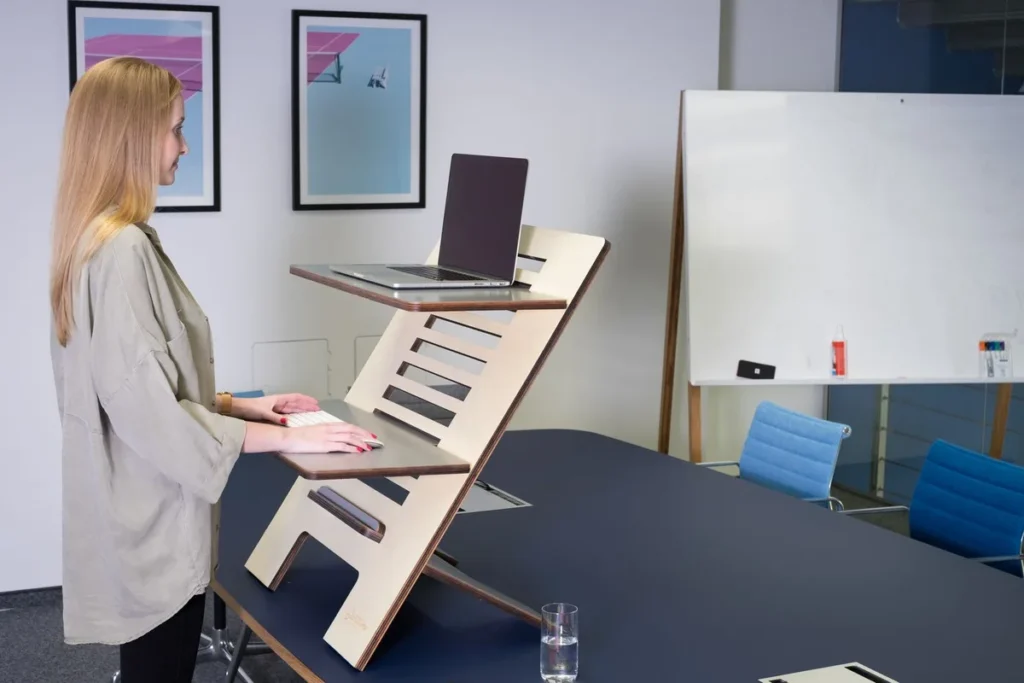
The best anti-fatigue mat for a standing desk in 2026 is the Ergodriven Topo (~$119 as of October 2026): its contoured “calculated terrain” surface keeps your feet moving instead of standing still — which is what actually prevents fatigue. On a budget, the Sky Solutions 20″×39″ (~$31–48) delivers genuine 3/4-inch cushioning with a lifetime replacement warranty.
As an Amazon Associate I earn from qualifying purchases.
Best Anti-Fatigue Mats for Standing Desks (2026)
TL;DR — The 6 best anti-fatigue mats for standing desks:
- Best overall: Ergodriven Topo (~$119) — calculated-terrain surface, 29″×26.25″, 7-year warranty.
- Best budget: Sky Solutions 20″×39″ (~$31–48) — 3/4″ thick, lifetime replacement warranty.
- Best compact: ComfiLife 20″×32″ (~$40–58) — memory foam, OEKO-TEX certified, lifetime guarantee.
- Most sizes and colors: GORILLA GRIP (~$35–50) — 7 sizes, 10+ colors, waterproof pebbled top.
- Best commercial-grade: Imprint CumulusPRO 24″×36″ (~$69–100) — Cushion-Core polyurethane, NFSI certified.
- Best premium eco pick: NewLife by GelPro 18″×30″ (~$99.95) — plant-based foam, made in USA, 5-year warranty.
The quotable rule: a mat only works if it’s at least 3/4 inch thick and invites movement.
| Model | Size | Thickness | Core material | Surface | Price (Oct 2026) |
|---|---|---|---|---|---|
| Ergodriven Topo | 29″×26.25″ | 0.85″ (2.7″ peaks) | Polyurethane foam | Calculated-terrain pebbled | ~$119 |
| Sky Solutions | 20″×39″ | 3/4″ | High-density PU (“Sky Core”) | Diamond-textured, stain-resistant | ~$31–48 |
| ComfiLife | 20″×32″ | 3/4″ | Memory foam | Flat, wipe-clean | ~$40–58 |
| GORILLA GRIP | 7 sizes | 3/4″ | High-density foam | Pebbled, waterproof | ~$35–50 |
| Imprint CumulusPRO | 24″×36″ | 3/4″ | Cushion-Core polyurethane | Textured, antimicrobial | ~$69–100 |
| NewLife by GelPro | 18″×30″ | 3/4″ | Plant-based bio-foam | Matte textured | ~$99.95 |
What Makes an Anti-Fatigue Mat Different From a Regular Mat?
An anti-fatigue mat is a thick, high-density foam pad you stand ON — not a desk-top pad or a chair mat.
The term “mat” covers three completely different products, and mixing them up is the most common buying mistake:
- Anti-fatigue standing mats (this article): 3/4-inch to 1-inch thick cushioned foam pads placed on the floor under your feet at a standing desk. They spread pressure across your whole foot and encourage subtle weight-shifting movements that reduce leg and lower-back fatigue.
- Desk-top mats (desk pads): thin pads that sit ON your desk under your keyboard and mouse. They protect the desk surface and give your wrists a smoother surface — they do nothing for your feet. Our desk mat guide covers those separately.
- Chair mats (rolling mats): hard plastic or tempered-glass pads placed under office chairs so casters roll on carpet or protect hardwood floors. You sit and roll on them; you never stand on them.
If your goal is comfortable standing, you want the first category. Check the thickness spec when shopping: anything under 1/2 inch thick is not a real anti-fatigue standing mat, whatever the listing title claims.
How Thick Should an Anti-Fatigue Mat Be?
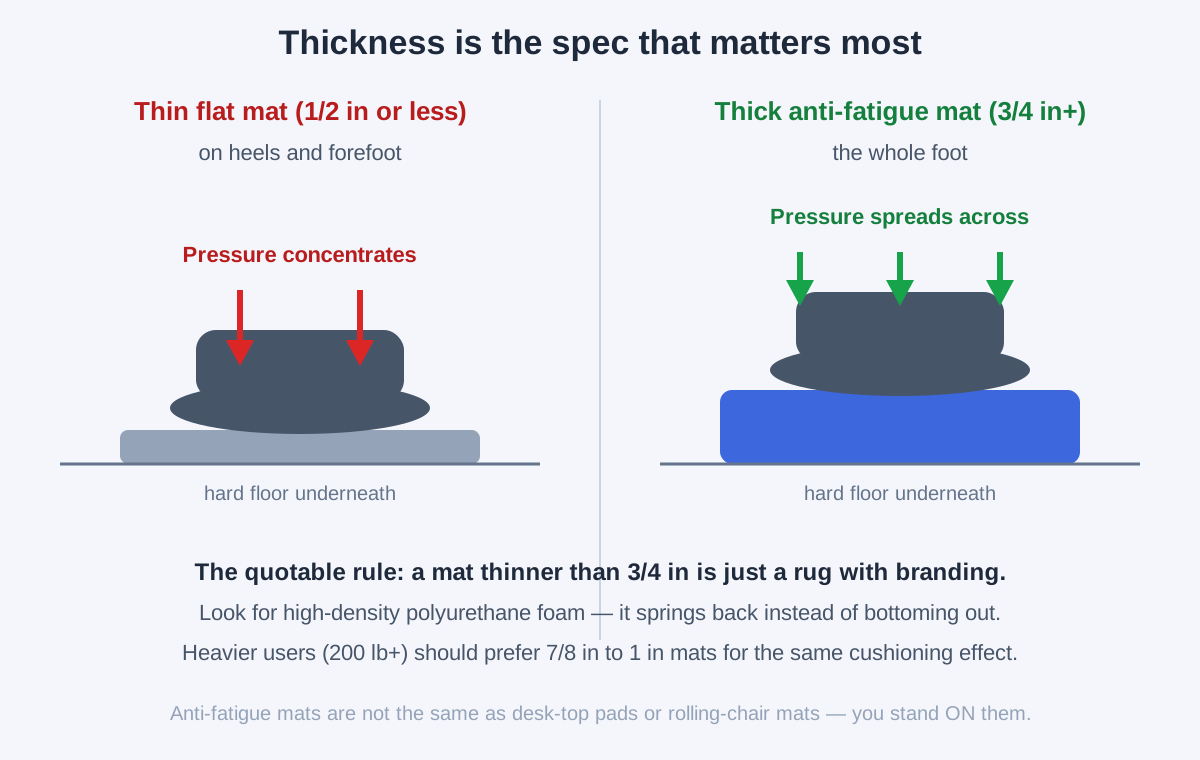
At least 3/4 inch (19 mm). Thinner mats are functionally just rugs.
Thickness is the single most predictive spec. On a thin mat, your heel compresses the foam to the hard floor within minutes. A true anti-fatigue mat uses high-density polyurethane foam that compresses partially and springs back, spreading your weight across the whole foot.
The practical tiers:
- 1/2 inch or less: Not anti-fatigue. This is kitchen-decor territory — fine for washing dishes, useless for 2+ hours of standing at a desk.
- 3/4 inch: The sweet spot for most people. Genuine pressure relief, stable enough that the mat doesn’t feel wobbly underfoot, and it slides under a desk frame without tripping you when you sit back down.
- 7/8 inch to 1 inch: Better for heavier users (200 lbs+). The trade-off is a slightly less stable feel and a bigger tripping lip — beveled edges matter more here.
The quotable rule: a mat thinner than 3/4 inch is just a rug with branding. Every pick below clears that bar.
What Size Mat Do I Need for a Standing Desk?
20 inches deep by 32–39 inches wide covers most standing desks — you want room to shift your stance.
Size matters for a different reason than thickness: it determines whether you can actually move. The whole point of an anti-fatigue mat is that it invites micro-movements — rocking forward, stepping back, widening your stance — and a mat that’s exactly foot-sized locks you into one static position, defeating the purpose. (Source: Mayo Clinic)
- 20″ × 32″: The compact standard. Fits under most 48-inch desks and in small home offices. Fine if you mostly stand in place.
- 20″ × 36–39″: The comfort zone. Wide enough to shift your stance side to side and step forward/back without a foot landing off the mat. The most popular size in this roundup.
- 24″ × 36″ and up: For taller users (6’2″+) or a generous stance. Check it fits — a mat jutting into a walkway becomes a tripping hazard.
Match the mat to your desk width: on a 48-inch desk, a 32–36-inch mat leaves the legs clear; on a 60-inch desk, go 36–39 inches. And if you use a standing desk converter rather than a full standing desk, measure the floor area in front of it — converter setups often have less depth to work with.
Best Overall: Ergodriven Topo
The Ergodriven Topo is the only mat here designed around a real insight: fatigue comes from standing still, not from standing. Its “calculated terrain” — a massage-ball mound, raised rails, and flat plains across a 29″×26.25″ surface — gives your feet places to go, so you rock, stretch, and shift without thinking about it. The polyurethane foam is 0.85″ at neutral (2.7″ at the peaks), pebbled for grip, and backed by a 7-year warranty.
The trade-off is the ~$119 price and a learning curve: the terrain feels odd for the first day. If you want pure flat cushioning instead of terrain, the CumulusPRO below is the move.
Best Budget: Sky Solutions Anti-Fatigue Mat
The Sky Solutions 20″×39″ is the value king: a genuine 3/4-inch high-density foam mat for ~$31–48 with a lifetime replacement warranty — unheard of at this price. The diamond-textured top resists stains, beveled edges won’t curl, and the 39-inch width gives real room to shift stance.
The trade-off: it’s flat, so it cushions rather than invites movement — pair it with the weight-shifting habit from the posture guide above. At this price with that warranty, no better entry point exists.
Best Compact: ComfiLife Anti-Fatigue Floor Mat
The ComfiLife 20″×32″ is the small-space pick: 3/4-inch memory foam, a flat wipe-clean surface, OEKO-TEX certification, and a non-slip bottom — all for ~$40–58 with a lifetime guarantee. The 32-inch width fits under 48-inch desks and in tight home-office corners where 39-inch mats won’t.
The trade-off: memory foam feels softer and bottoms out sooner for users over ~200 lbs, and the flat surface doesn’t prompt movement. Great as a kitchen/desk dual-use mat; heavy standers should prefer the CumulusPRO.
Most Sizes and Colors: GORILLA GRIP
The GORILLA GRIP anti-fatigue mat wins on choice: 7 sizes and 10+ colors at ~$35–50, with a waterproof pebbled top that survives coffee spills and pet traffic. The 3/4-inch foam cushions ankles and feet, beveled edges lie flat, and the rubber-style backing grips hard floors.
The trade-off: it’s a generalist — good cushioning, but neither the movement-focused design of the Topo nor the commercial-grade density of the CumulusPRO. Buy it when you want the mat to match your room.
Best Commercial-Grade: Imprint CumulusPRO
The Imprint CumulusPRO 24″×36″ is the commercial-grade option (~$69–100): a one-piece solid polyurethane mat with a Cushion-Core high-density core that’s engineered to never lose its shape, NFSI-certified traction, an antimicrobial top, and a lifetime 100% satisfaction guarantee. The 24-inch depth suits taller users with a wider stance.
The trade-off: commercial-grade means firmer — it supports rather than sinks. If you stand 4+ hours daily and want a mat that outlasts the desk, this is it.
Best Premium Eco Pick: NewLife by GelPro
The NewLife by GelPro 18″×30″ (~$99.95) is the premium eco option: a plant-based “bio-foam” polyurethane core with genuine energy return — it pushes back instead of just absorbing — in a matte textured mat made in the USA with a 5-year warranty. It never bottoms out, which is exactly what cheaper foam fails at.
The trade-off: 18″×30″ is the smallest size here, and ~$100 is steep for a flat mat. Worth it if eco materials and a made-in-USA build matter to you.
How Long Should You Stand on an Anti-Fatigue Mat Each Day?
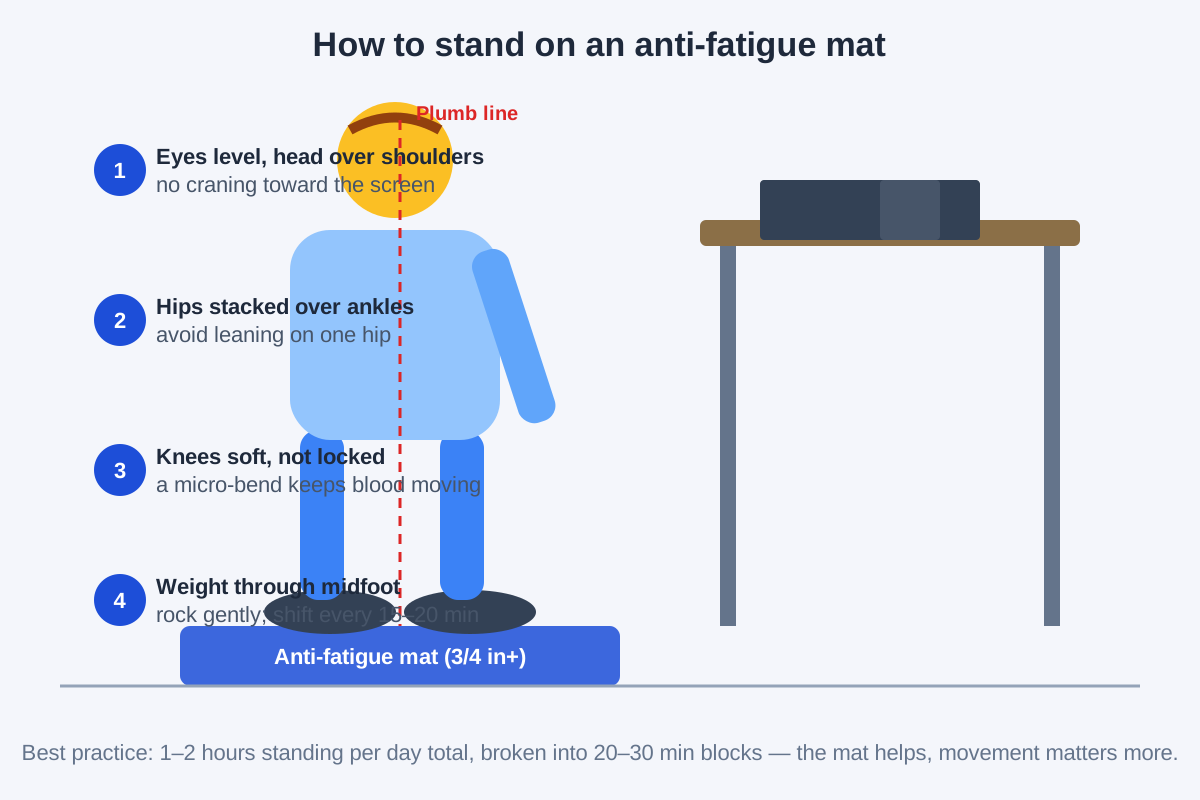
Build to 2–4 hours total, broken into 20–30-minute blocks — the mat reduces fatigue, but movement is what keeps you healthy.
A common mistake is treating a good mat as permission to stand all day. Research links 4+ continuous hours of static standing to leg swelling and joint compression of its own. The consensus is alternation: sit 20–30 minutes, stand 20–30 minutes, and move during both.
Three habits that multiply what the mat does:
- Shift weight deliberately. Rock forward onto your toes, back onto your heels, and side to side every few minutes. Textured “calculated terrain” mats (like the Topo below) exist specifically to invite this — the bumps give your feet something to do.
- Keep knees soft. Locked knees reduce blood return from your legs. A micro-bend — not a squat, just unlocked — is the single best posture cue for standing work.
- Pair the mat with a footrest. Resting one foot on a low footrest and alternating every 15 minutes changes the hip angle just enough to reset lower-back fatigue. It’s the cheapest upgrade to any standing setup.
An anti-fatigue mat plus these habits turns a standing desk from an endurance test into a sustainable routine. Pair it with a well-chosen standing desk under $500 and you’ve covered the two biggest upgrades.
Frequently Asked Questions
Can I use a kitchen anti-fatigue mat at my standing desk?
Yes — if it’s at least 3/4 inch thick, non-slip, and large enough for your stance. Several picks above (Sky Solutions, ComfiLife, GORILLA GRIP) are marketed as kitchen mats and work identically at a desk; just confirm the size fits your floor space.
Do anti-fatigue mats actually work?
They reduce perceived leg and back fatigue versus hard floors, through pressure distribution plus the micro-movements a cushioned surface invites. (Source: CDC NIOSH) They don’t replace movement: alternating sitting and standing matters more than any mat.
Should I stand barefoot or wear shoes on the mat?
Both work. Barefoot (or socks) pairs best with textured or terrain mats like the Topo, giving your feet the most feedback. Shoes are fine too, though very hard soles slightly blunt the cushioning effect.
How long do anti-fatigue mats last?
Two to five years depending on foam quality and hours. High-density polyurethane (Topo, CumulusPRO, GelPro) outlasts cheap foam that compresses permanently — lifetime warranties from Sky Solutions, ComfiLife, and Imprint are the strongest quality signal here.
Can an anti-fatigue mat replace a footrest?
No — they do different jobs. The mat cushions both feet; a footrest elevates one foot at a time to change your hip angle and reset lower-back fatigue. Together they’re the best cheap standing upgrade you can buy.
Is a thicker mat always better?
Not past about 1 inch. Beyond that, mats get wobbly underfoot and the edge becomes a tripping lip. The functional range is 3/4 inch to 1 inch; heavier users should pick the top of that range rather than going thicker.
The Bottom Line
Buy the mat that keeps your feet moving, not the thickest one on the page.
The Ergodriven Topo (~$119) is the default answer — it’s the only mat designed to make you move. The Sky Solutions (~$31–48) is the budget no-brainer, the CumulusPRO (~$69–100) is the buy-it-for-years commercial pick, and the NewLife by GelPro (~$99.95) is the premium eco choice.
Whichever you pick, pair it with a footrest and the 20–30-minute sit/stand rhythm — and remember this is a floor mat, not a desk-top pad: it belongs under your feet, not under your keyboard.