
Best Standing Desks Under $500 (2026): Dual-Motor Picks
The best standing desk under $500 in 2026 is the FlexiSpot E2 Pro, at roughly $180–$250: it has dual motors, a 275-lb capacity, a 22.8–48.4-inch height range, and four memory presets — specs that cost $500+ just a few years ago. If you want maximum stability and warranty, step up to the FlexiSpot E7. All five desks below stay under $500 with dual motors (one budget wildcard is single-motor).
See our complete standing desk guide.As an Amazon Associate I earn from qualifying purchases.
Prices as of October 2026.
TL;DR — Our top picks:
- Best value dual-motor: FlexiSpot E2 Pro (~$200) — dual motors, 275-lb capacity, memory presets with a USB charging port.
- Best premium under $500: FlexiSpot E7 (~$300 on sale) — 355-lb capacity, 3-stage legs, 15-year warranty.
- Best with storage: FEZIBO Dual Motor with drawer (~$200) — 176-lb capacity, 3 presets, built-in drawer.
- Best DIY frame: VIVO DESK-E-200W dual-motor frame (~$250) — 220-lb capacity, bring your own top.
- Budget wildcard: SHW 55×28 (~$190) — the best-selling budget desk, but single-motor with a 110-lb limit.
Why Do Dual Motors Matter on a Standing Desk?
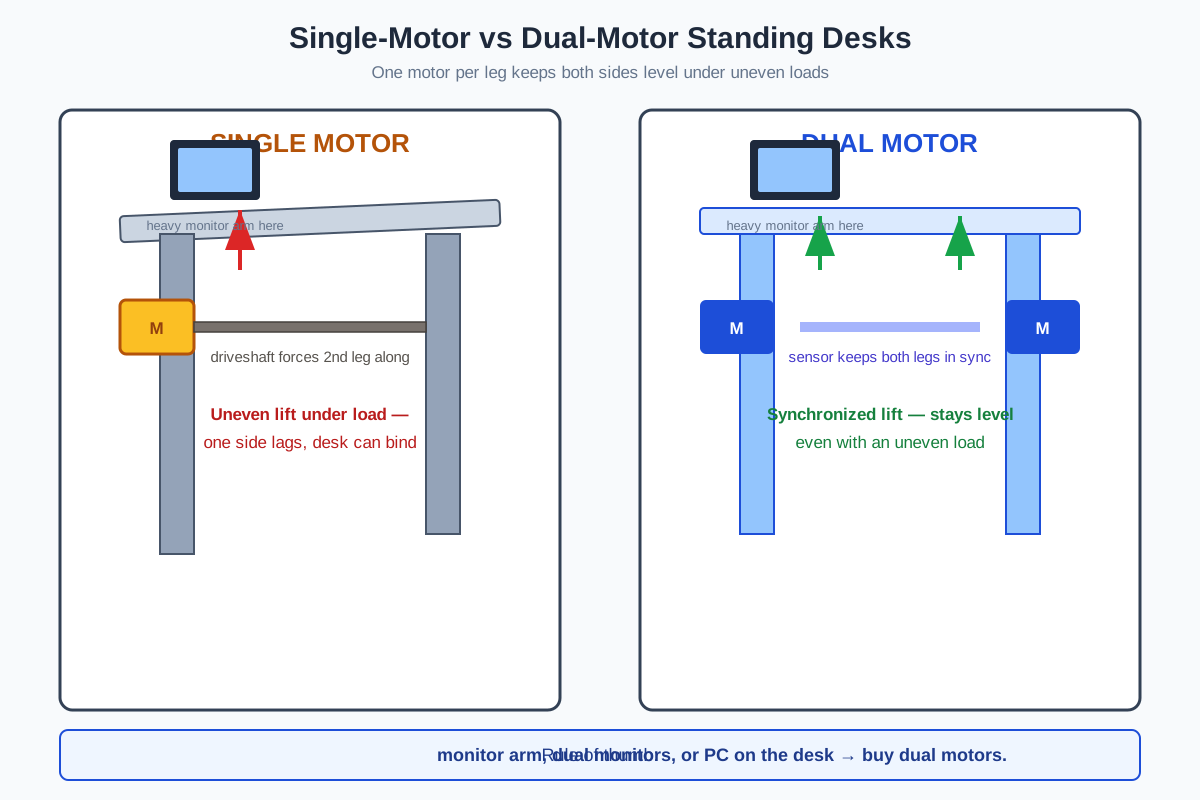
A single motor drives one leg directly and forces the second leg along with a driveshaft. Under an uneven load — say a monitor arm clamped to one side — the shaft lags, one side rises slightly faster, and the desk binds, wobbles, or wears out faster. Two motors, one per leg, lift both sides in sync with a sensor keeping them level. That means quieter operation, a higher weight capacity, and a desk that still moves smoothly when it’s loaded unevenly.
Dual motors also unlock features single-motor desks rarely get: memory presets, anti-collision sensors, and lower noise (typically under 50 dB — quieter than a normal conversation).
The quotable rule: if a desk will carry two monitors, a monitor arm, or a PC tower, buy dual motors. Single-motor desks are fine for a laptop and a notebook — but not for a full battle station.
What Are the Best Dual-Motor Standing Desks Under $500?
We compared desks actually selling in the US in October 2026 with real listings: dual motors, full standing desks (or a frame worth knowing about), and street prices under $500. Every spec below comes from manufacturer or current retail listings.
FlexiSpot E2 Pro — Best Value Dual-Motor Desk
The E2 Pro is the sweet spot of the entire under-$500 market. It’s a true dual-motor desk with a height range of 22.8–48.4 inches and a 275-lb weight capacity — enough for two monitors on an arm, a desktop PC, and everything else. The keypad has four memory presets plus a genuinely useful USB-A charging port, and anti-collision detection stops the lift if it meets an obstacle.
At roughly $180–$250 depending on sales, it does everything a $500 desk did two years ago. Noise stays under 50 dB, and FlexiSpot’s warranty and support are among the best in this price tier. If you buy one desk from this list blind, make it this one.
Best for: most buyers — dual monitors, a monitor arm, or anyone who just wants the safe default.
FlexiSpot E7 — Best Premium Pick Under $500
The E7 is FlexiSpot’s flagship frame, and it’s the one to buy when you plan to load the desk heavily or keep it for a decade. Dual motors on a 3-stage lifting column give it a 355-lb capacity and rock-solid stability even at full standing height. It ships with a 15-year warranty on the frame and motor — unheard of under $500.
The E7 lists around $499.99 on FlexiSpot’s own site but is frequently on sale for roughly $300, as of October 2026. At the sale price, it’s the clearest upgrade per dollar in this roundup. The tradeoff is size and weight — you’ll want a second pair of hands for assembly.
Best for: heavy setups (three monitors, a tower PC on the desk), tall users, and buyers who want a 15-year warranty.
FEZIBO Dual Motor Standing Desk — Best with Storage
FEZIBO’s dual-motor model (the 55×24-inch version with the built-in drawer is the one to look for) pairs dual motors with features the FlexiSpot desks skip at this price: a storage drawer, three memory presets, anti-collision, and sub-50 dB operation. The steel frame is rated for 176 lbs — plenty for dual monitors and a laptop dock.
Height range is 28.3–46.5 inches, fitting users from about 5’2″ to 6’1″. It typically sells around $200 — the best dual-motor option for anyone who wants a tidy desk without buying a separate drawer unit later.
Best for: home offices where the desk doubles as storage; buyers who want drawers included rather than added later.
VIVO DESK-E-200W Dual-Motor Frame — Best for DIY
If you already own a desktop you love — a solid-wood slab, a butcher block, a 72-inch top — the VIVO DESK-E-200W is the smartest way to go standing. It’s a dual-motor frame only (no top included), rated for 220 lbs, with a frame height range of 28.5–47.3 inches and three memory presets on a push-button controller. At roughly $250, it’s the cheapest way to get dual motors under a heavy custom top.
The frame accepts tops from 40 to 85 inches long and 23 to 43 inches wide — from a compact 48-inch desk to a full 72-inch workstation. Leveling feet handle uneven floors.
Best for: DIYers and upgraders who want to keep an existing top and only replace the legs.
SHW 55×28 Electric Desk — Budget Wildcard (Single Motor)
The SHW is the best-selling electric desk on Amazon for a reason — over 21,000 owner reviews, more than anything else in this price band. With a 55×28-inch top, a built-in drawer, a cable-management tray, two utility hooks, grommets, and four memory presets for roughly $190, no desk gives you more desk per dollar.
One honest caveat: it’s single-motor, not dual, and the 110-lb capacity is the lowest here. For a laptop, two 24-inch monitors, and the usual clutter, it never struggles — but don’t put a tower PC and three monitors on it. The 28–45-inch range covers users up to about 6’1″.
Best for: first-time buyers with a light setup who want the most complete desk (drawer + cable tray included) for under $200.
How Do the Five Desks Compare?
Every cell below stands on its own — no cross-referencing needed.
| Desk | Motors | Top size | Height range | Weight capacity | Memory presets | Typical price (Oct 2026) |
|---|---|---|---|---|---|---|
| FlexiSpot E2 Pro | Dual | varies by config (e.g., 55×28 in) | 22.8–48.4 in | 275 lbs | 4 + USB port | ~$180–$250 |
| FlexiSpot E7 | Dual | varies (fits 47–80 in tops) | 3-stage column | 355 lbs | 4 | ~$300 on sale (lists ~$500) |
| FEZIBO Dual Motor | Dual | 55×24 in | 28.3–46.5 in | 176 lbs | 3 | ~$200 |
| VIVO DESK-E-200W | Dual | frame only (fits 40–85 in tops) | 28.5–47.3 in (frame) | 220 lbs | 3 | ~$250 |
| SHW 55×28 (OD-93A) | Single | 55×28 in | 28–45 in | 110 lbs | 4 | ~$190 |
What Height Range Do You Actually Need?
Measure this before you buy. The wrong height range is the #1 reason people return standing desks.
Your sitting desk height should be roughly your elbow height seated — about 28–30 inches for most adults. Your standing height should be about elbow height standing: roughly 42 inches at 5’4″, 44 at 5’8″, 46 at 6’0″, and 48+ at 6’3″. Add your monitor arm’s lift if you use one.
Three rules from the table above:
- Under 5’2″ or over 6’2″: pick the widest range you can. The FlexiSpot E2 Pro (22.8–48.4 in) covers both extremes; the SHW (28–45 in) does not.
- Add 2 inches of margin above your measured standing elbow height — desks sag slightly under load, and you’ll want room for a keyboard tray.
- Tall users should skip 2-stage legs. Three-stage columns (FlexiSpot E7) stay noticeably more stable above 45 inches than two-stage legs.

How Much Weight Capacity Do You Really Need?
Add up everything that will live on the desk, then add 20% headroom:
- Two 24-inch monitors on a dual arm: ~25–30 lbs (arm included)
- Laptop on a dock: ~5 lbs
- Desktop PC tower: ~20–35 lbs
- Keyboard, mouse, lamp, speakers, clutter: ~10–15 lbs
Is a Standing Desk Worth It at All?
Yes — if you’ll actually stand. Alternating sitting and standing is linked to less lower-back pain and better afternoon energy than sitting all day, but a standing desk that stays at sitting height is just an expensive desk. The memory presets on every desk above exist to remove the friction: one tap returns to your exact standing height.
Start with 20–30 minutes of standing per hour and build up. An anti-fatigue mat ($30–$50) does more for standing comfort than any desk feature. For the full case, read our are standing desks worth it breakdown.
What About Small Spaces?
Standing desks are bigger than they look in product photos — a 55×28-inch top dominates a small bedroom. If your room is tight, measure the footprint with the chair pushed back before ordering. Two starting points:
- Our best standing desks for small spaces covers compact 40–48-inch models that fit apartments.
- Our narrow standing desk guide is for desks under 24 inches deep — the trick for hallway and bedroom-corner offices.
All five desks above come in, or can be paired with, smaller tops; the VIVO frame is the most flexible since you choose the top yourself.
What is the best standing desk under $500 in 2026?
The FlexiSpot E2 Pro at roughly $180–$250. It offers dual motors, a 275-lb capacity, a 22.8–48.4-inch height range, four memory presets, and anti-collision — the best spec-to-price ratio in the under-$500 category as of October 2026.
Are dual-motor standing desks worth the extra money over single-motor?
Yes, if your desk carries more than a laptop. Dual motors lift both legs in sync, so the desk stays level under uneven loads like monitor arms, runs quieter (usually under 50 dB), and lasts longer. The price gap has shrunk to about $30–$50 — the FlexiSpot E2 Pro costs roughly what good single-motor desks cost.
How much should a good standing desk cost?
$180–$350 buys a genuinely good dual-motor desk in 2026. Below $150 you’re in single-motor territory with lower capacities and no memory presets; above $500 you mostly pay for bigger tops, premium materials, and longer warranties rather than better lifting.
Can a standing desk hold two monitors and a PC?
Yes, if the capacity is at least 175 lbs. Two monitors on an arm plus a tower PC total roughly 80–110 lbs with accessories, so the FlexiSpot E2 Pro (275 lbs), E7 (355 lbs), FEZIBO (176 lbs), and VIVO frame (220 lbs) all handle it. The SHW (110 lbs) does not — keep the PC on the floor with that one.
Do I need memory presets on a standing desk?
Strongly recommended. Without presets you’ll eyeball the height every time, find it slightly wrong, and stop adjusting — which defeats the point. Every desk in this roundup has at least three presets; one tap returns to your exact sit and stand heights.
What is a good cheap standing desk for a small apartment?
The SHW 55×28 (~$190) for budget, or a 48-inch FlexiSpot E2 Pro (~$200) for dual motors in a smaller footprint. Both fit the most common apartment layouts, and our narrow standing desk guide covers even tighter spaces.
The Bottom Line
Dual motors stopped being a premium feature — in 2026 they’re the default at this price, and you should treat them that way. Buy the FlexiSpot E2 Pro (~$200) if you want the safe, do-everything pick. Buy the FlexiSpot E7 on sale (~$300) if you’ll load it heavily or keep it a decade. Buy the FEZIBO if you want storage built in, the VIVO frame if you have a top you love, and the SHW if your setup is light and your budget is tight. Whichever you choose, set the memory presets on day one — that’s the feature that decides whether the desk actually gets used.