
Best Laptop Cooling Pads for Home Offices (2026)
The best laptop cooling pad for a home office in 2026 is the Havit HV-F2056: three quiet 110 mm fans, a slim metal-mesh deck, and a price around $28–$32, with enough airflow for a 15.6-inch or 17-inch work laptop. The KLIM Wind is the quietest budget pick at under 26 dB, and the Thermaltake Massive 20 RGB is the best choice for a big 17–19-inch machine.
As an Amazon Associate I earn from qualifying purchases.
The short version: Havit HV-F2056 is the best overall pick — quiet, cheap, and sized for the laptops most people use. KLIM Wind is the best quiet budget pad at roughly $20–$25. Kootek’s 5-fan pad is the best stand-cooler hybrid, with six height settings up to 5.4 inches. Targus Chill Mat is the best lap-friendly pad. Thermaltake Massive 20 RGB is the best pad for large 17–19-inch laptops.
How do the best laptop cooling pads for home offices compare?
Prices are as of October 2026.
| Cooling pad | Fans | Noise level | Laptop size | Height settings | USB passthrough | Price (Oct 2026) |
|---|---|---|---|---|---|---|
| Havit HV-F2056 | 3 x 110 mm | Quiet (no dB rating) | 15.6–17 in | 2 levels | 1 extra port | ~$28–$32 |
| KLIM Wind | 4 fans, 1200 RPM | Under 26 dB | 11–19 in | 2 levels | 1 extra port | ~$20–$25 |
| Kootek 5-fan (LCP04) | 1 large + 4 small | Quiet (no dB rating) | 12–17 in | 6 levels, up to 5.4 in | 2 ports | ~$26–$30 |
| Targus Chill Mat (AWE55US) | 2 fans | Quiet (no dB rating) | Up to 17 in | 4 levels | 4-port USB hub | ~$35–$45 |
| Thermaltake Massive 20 RGB | 1 x 200 mm, 800 RPM | 30 dB(A) | 10–19 in | 3 levels (3°, 9°, 13°) | No | ~$60–$75 |
What is the best laptop cooling pad for a home office overall?
The Havit HV-F2056 Laptop Cooling Pad, 15.6–17 inch (3 fans) is the best laptop cooling pad for most home offices: it gets the basics right and costs about $28–$32 as of October 2026. Three 110 mm fans push air up through a metal-mesh deck, and at 1.18 inches thick it disappears under a laptop.
The 14.96 x 11.02-inch deck weighs 1.54 pounds, fits a 15.6-inch laptop with room to spare and a 17-inch laptop edge to edge, and its extra USB port means it does not steal your laptop’s only free port. It is Amazon’s number-one bestseller in laptop cooling pads, with 39,000+ ratings averaging 4.4 stars. The only real weakness is the lack of fan-speed control: one switch runs the fans and blue LEDs together.
For a work laptop running Zoom, spreadsheets, and a browser full of tabs, the Havit is quiet enough that callers will not hear it, and it typically drops chassis temperatures by a few degrees — enough to keep the laptop’s own fans quiet.
Which laptop cooling pad is the quietest for video calls?
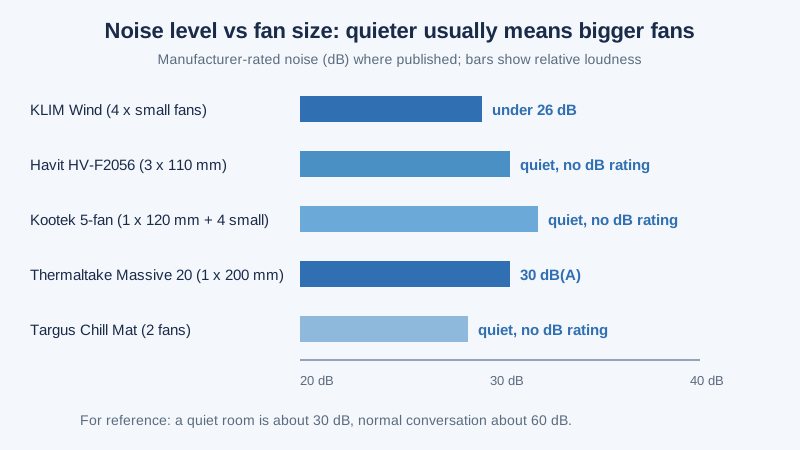
The KLIM Wind Laptop Cooling Pad (4 fans, 1200 RPM) is the quietest pad in this roundup on paper: KLIM rates it at under 26 dB, roughly a whisper, and TechRadar’s testing found its fans barely audible over a laptop’s own cooling. At about $20–$25 as of October 2026, it is also the cheapest pad here.
Four fans spin at up to 1200 RPM under a metal-mesh surface, and the 15.78 x 10.71-inch pad fits laptops from 11 to 19 inches — the widest range here — at 1.58 pounds. Two tilt levels set a 16-degree typing angle, the extra USB port covers the port the pad uses, and KLIM backs it with a 5-year warranty, unusually long for a $20 accessory.
The trade-off is cooling power. TechRadar’s review called the cooling “mediocre” under heavy load: four small fans move air gently, so a gaming laptop or video-editing workstation will still heat up. The build is light and plasticky, and the flip-up rests can dig into your wrists during long typing sessions.
Which cooling pad doubles as the best ergonomic laptop stand?
The Kootek Laptop Cooling Pad, 5 quiet fans, 12–17 inch (LCP04) is the best cooling pad if you also want a real laptop stand. Six height settings raise the back up to 5.4 inches, lifting the screen much closer to eye level than any other pad here. It typically sells for about $26–$30 as of October 2026.
The fan layout is unusual: one large central fan (about 120 mm, 1400 RPM) plus four small fans (2400 RPM) switchable in groups — one, four, or all five. Two USB ports beat most pads for connectivity, and the 15 x 11.6-inch deck fits laptops from 12 to 17 inches. At 2.55 pounds it is the heaviest pad here, but that weight keeps it stable at its highest setting.
The honest downside is thickness: at 1.38 inches tall before you raise it, the Kootek adds noticeable bulk, and the small fans are audible when all five run at once. Use the one-fan or four-fan mode for calls and save all five for heavy work. If you want a dedicated riser instead, our best laptop stand for desk guide compares fan-free stands.
Which cooling pad is best for working from the couch or lap?
The Targus 17 Inch Dual Fan Lap Chill Mat (AWE55US) is the best cooling pad for anyone who works away from the desk — on a couch, in an armchair, or in bed. A soft neoprene base cushions your legs, the open mesh top lets air move, and four rubber stops keep the laptop from sliding. It fits laptops up to 17 inches and sells for $35–$45 as of October 2026.
Its secret weapon is connectivity: a built-in 4-port USB hub, so the pad gives back more ports than it takes. Two fans disperse heat, the tilt has four height levels, and hook-and-loop straps keep cables tidy. At 15 x 11.75 inches and 1.99 pounds it carries easily room to room, with 6,000+ ratings averaging 4.4 stars after a decade on sale.
The trade-off is cooling strength: two small fans and a fabric-covered base move less air than the metal-mesh pads above, so this is a comfort and heat-protection pad, not a performance cooler. Buy the Targus if your laptop lives on your lap; buy the Havit if it lives on a desk.
Which cooling pad is best for a large 17–19-inch laptop?
The Thermaltake Massive 20 RGB Laptop Cooling Pad, single 200 mm fan (CL-N014-PL20SW-A) is the best cooling pad for a big laptop: one enormous fan instead of several small ones. A single 200 mm fan at 800 RPM moves a large volume of air — rated at 478.8 gallons per minute — at 30 dB(A), quieter than most multi-fan pads at full speed. It typically sells for about $60–$75 as of October 2026.
The 18.54 x 13.96-inch steel-mesh deck supports laptops from 10 to 19 inches, so even a 17-inch workstation fits with room to spare. Three height settings (3°, 9°, and 13°) adjust the typing angle, a control knob sets the fan speed, and the RGB ring has five modes and switches off entirely — useful in a professional home office. Thermaltake covers it with a 2-year warranty.
The honest downsides are size and ports. At 3.4 pounds and nearly 19 inches wide, it is a desk fixture, not a travel accessory, and it has no USB passthrough: it needs one or two USB connections for power and gives none back. If your laptop is 15.6 inches or smaller, the Havit cools just as well for half the money.
How do you choose a laptop cooling pad?
Start with noise, because a cooling pad sits inches from your microphone: under 30 dB is safe for video calls, above 35 dB will show up on a call. Big fans are the shortcut to quiet cooling — one 200 mm fan at 800 RPM moves more air with less noise than four small fans at 2400 RPM.
Next, check airflow and fan control. Manufacturers rarely publish CFM figures, so compare fan size and RPM instead, and prefer a speed knob or switchable fan modes — the Kootek’s one/four/five-fan modes and the Thermaltake’s control knob let you trade cooling for silence during calls.
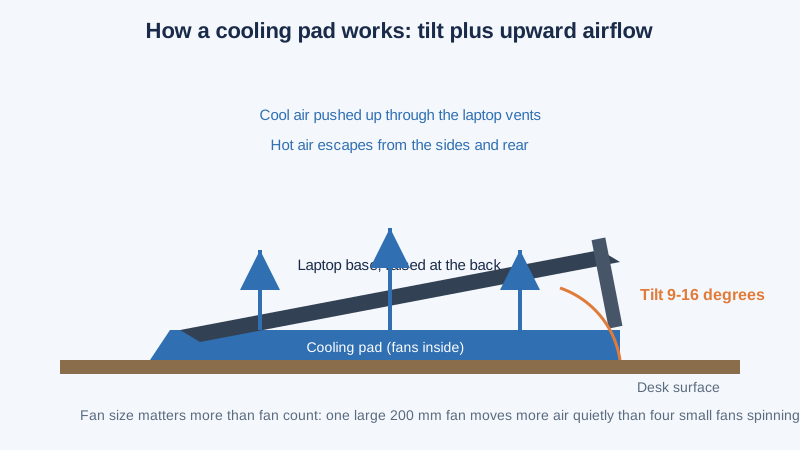
Then check ergonomics and fit. A pad should be at least as wide as your laptop, and its tilt should raise the screen without forcing your wrists into an awkward angle — 9–16 degrees works for most people.
Finally, count USB ports: a pad consumes one port for power. Pads with a passthrough port (Havit, KLIM Wind, Kootek) or a built-in hub (Targus, 4 ports) leave you whole; the Thermaltake gives nothing back.
When does a cooling pad actually help, and when is a stand better?
A cooling pad helps when your laptop’s own fans run loud or the chassis gets hot during normal work — video calls, large spreadsheets, photo editing, or a laptop on a soft surface like a bed, where the vents are blocked. Its fans push cool air into the base and its tilt opens an air gap underneath, typically lowering temperatures by 3–8°C under sustained load — enough to delay thermal throttling.
A pad does not help much when the laptop is already cool — a modern ultrabook doing email barely warms up, and a pad adds noise and clutter for nothing. It also cannot fix a laptop clogged with dust: clean the vents with compressed air first.
A plain laptop stand is the better buy when your only problem is posture: it lifts the screen to eye level and opens the same air gap underneath, dropping temperatures a degree or two with zero noise and zero USB ports used. Choose a cooling pad when heat is the problem, a stand when neck strain is the problem, and a pad with six height settings, like the Kootek, when it is both.
When is the best time to buy a laptop cooling pad?
Cooling pads follow the same sale calendar as the rest of home-office gear: the deepest discounts land in November. If you’re not in a hurry, Black Friday week (Nov 27–30) is when desk-accessory prices hit their yearly floor — our Black Friday laptop-accessory deals guide tracks the discount bands.
Outside November, watch back-to-school sales and Amazon’s Prime Day events, when pads here routinely drop 20–30%. The Thermaltake is the one most worth waiting for: 25% off a $70 pad saves more than the entire KLIM Wind.
If your laptop’s fans are the real noise problem, our best desk fan for home office guide covers fans that cool you — not the laptop.
Frequently asked questions
What is the best laptop cooling pad for a home office?
The Havit HV-F2056: its three quiet 110 mm fans cool a 15.6–17-inch laptop well for about $28–$32. The KLIM Wind at $20–$25 is the quietest budget option.
Do laptop cooling pads really work?
Yes, for laptops that run hot: a pad typically lowers temperatures by 3–8°C under sustained load, keeping the laptop’s own fans quieter and delaying thermal throttling. It will not fix dust-clogged vents.
How loud is a laptop cooling pad on video calls?
A pad rated under 30 dB is inaudible on most calls: the KLIM Wind is rated under 26 dB and the Thermaltake Massive 20 RGB at 30 dB(A).
What size cooling pad do I need for a 17-inch laptop?
Buy a pad at least 15 inches wide and rated for 17 inches, like the Havit HV-F2056 (14.96 inches wide, rated 15.6–17 inches) or the Thermaltake Massive 20 RGB (18.54 inches wide, rated up to 19 inches). A narrower pad blocks airflow at the overhanging edges.
Is a cooling pad better than a laptop stand?
A cooling pad is better when heat is the problem — hot chassis, loud internal fans, thermal throttling. A stand is better when posture is the only problem: it lifts the screen to eye level with no noise and no USB port used. A pad with tall height settings, like the Kootek at up to 5.4 inches, does a bit of both.
The verdict
Buy the Havit HV-F2056 for the best all-round home-office pad: quiet, cheap, and sized for the laptops most people use. Buy the KLIM Wind if silence on video calls is your top priority and your workload is light. Buy the Kootek if you want a cooler that doubles as a tall ergonomic stand. Buy the Targus Chill Mat if you work from the couch or your lap, and the Thermaltake Massive 20 RGB if your laptop is 17 inches or bigger and you want the strongest quiet cooling available.
The rule that matters most is simple: big fans, low RPM, under 30 dB. Get that right and the pad disappears into your setup. And if your hands get warm too, our best wrist rest for keyboard and mouse guide covers the rests that pair with a tilted laptop.