Best LED Strip Lights for Desk Setups (2026)
The best LED strip for most desk setups is the Govee RGBIC 16.4ft: segmented color control, app-based scenes, and music sync for around $30. The Philips Hue Lightstrip is the premium pick with the most accurate colors and smart-home integration. The LIFX Lightstrip needs no hub, while Nexillumi and Daybetter cover budget setups under $25.
As an Amazon Associate I earn from qualifying purchases.
The short version: Govee RGBIC is the best overall — segmented multi-color effects, a great app, and a $30 price. Philips Hue Lightstrip is the premium pick for color accuracy and Alexa/Google/HomeKit integration. LIFX Lightstrip is the best hub-free smart strip with true Wi-Fi. Nexillumi is the best ultra-budget pick at around $20. Daybetter is the classic budget strip with a simple remote.
Do LED strips actually help, or are they just decoration?
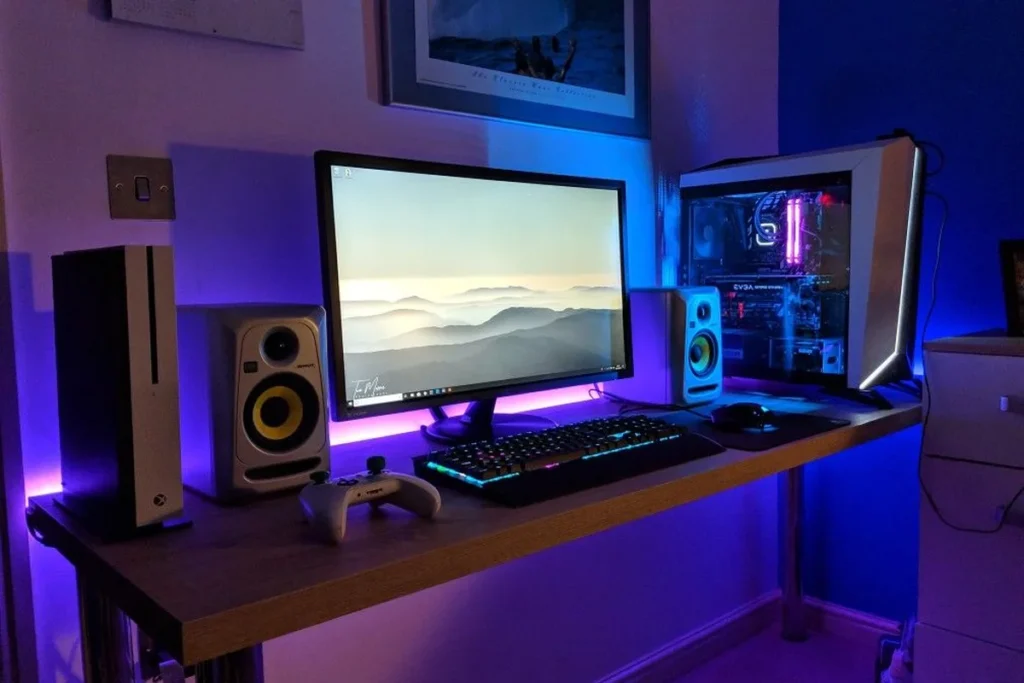
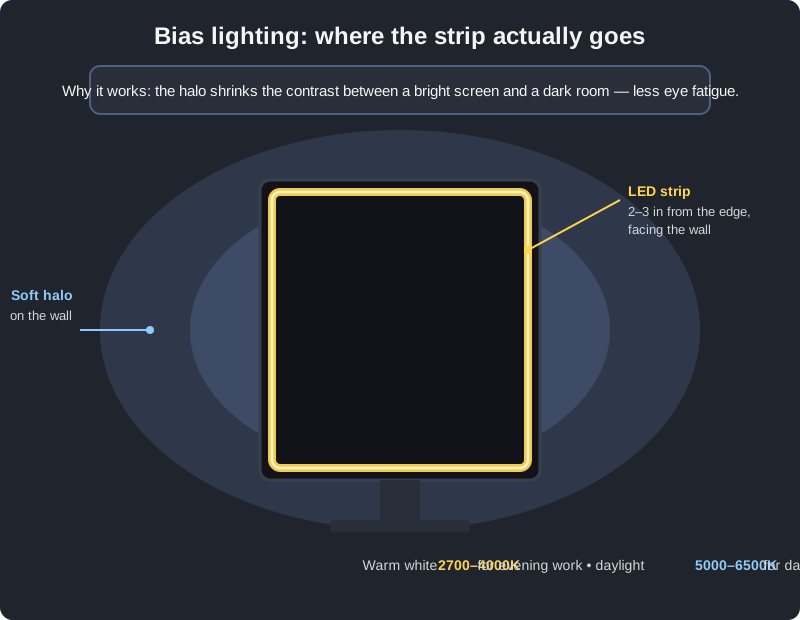
Both — and the helpful part has a name: bias lighting. When you work in a dark room, your eyes constantly adapt between a bright screen (200+ nits) and a near-black wall behind it. That contrast forces your pupils to work overtime, which is a genuine contributor to evening eye fatigue. A soft halo of light behind the monitor shrinks that contrast: the wall glows gently, your pupils relax, and late sessions feel less punishing.
The research backing is modest but consistent — bias lighting reduces perceived glare and subjective eye strain versus a bright screen in a dark room. It doesn’t fix bad posture or dry eyes; it just removes one avoidable stressor. The aesthetic side is real too: a warm glow behind the monitor looks intentional on video calls.
One honest caveat: bias lighting works best with neutral white light (2700–4000K). Rainbow chase effects look great in photos and do nothing for your eyes. Use white for work, colors for play.
What should you look for in a desk LED strip?
Not all strips are built for desks. The specs that actually matter:
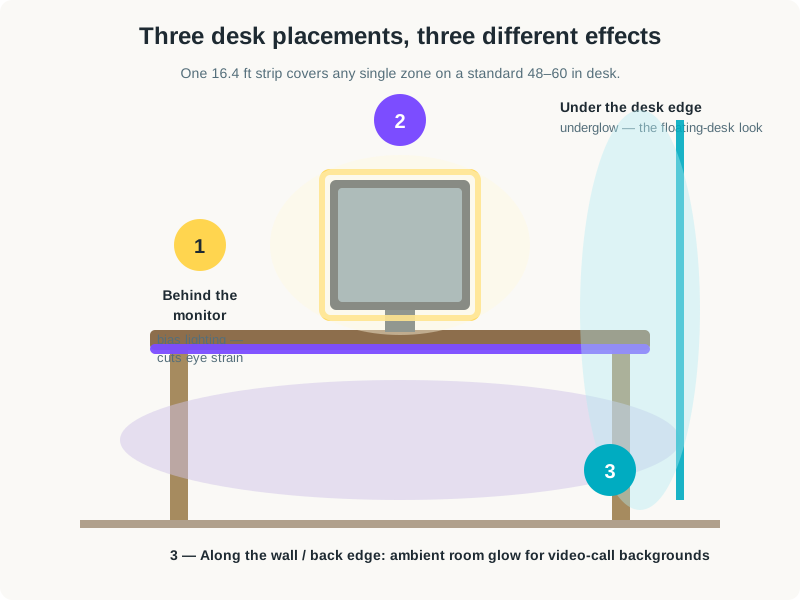
- Length: 16.4 ft (5 m) is the desk standard. It wraps the back of a 27–34 inch monitor with length to spare, or runs the rear edge of a 48–60 inch desk. Shorter 6.6 ft strips (like LIFX’s) suit monitor-only bias lighting; 32.8 ft rolls cover monitor plus desk perimeter.
- Addressability: RGBIC beats RGB. Standard RGB shows one color along the whole strip. RGBIC (independent control) chips show multiple colors and gradients on a single strip — the flowing rainbow and segmented effects you see in setup photos. Worth the small premium.
- Color temperature range for white light. For bias lighting you want warm-to-neutral white (2700–4000K). RGB-only strips fake white with mixed diodes and it looks harsh; RGBWW or tunable-white strips do it properly.
- Control: app vs remote vs voice. App control (Govee, Hue, LIFX) gives scenes, schedules, and music sync. A 44-key IR remote (Daybetter) is simpler but needs line of sight. Voice control needs Alexa/Google/HomeKit support — check before assuming.
- Power: USB vs wall adapter. USB-powered strips (5V) are convenient for monitor-back mounting but dimmer; 12V/24V wall-powered strips are brighter and better for room-filling glow. For bias lighting alone, USB is plenty.
- Adhesive quality. The unglamorous spec that decides whether your strip is still up in six months. 3M-backed strips hold; no-name adhesive peels within weeks, especially above a warm monitor.
All prices below are typical US street prices as of October 2026.
The 5 best LED strip lights for desk setups in 2026
Five strips made this list, from the $20 budget classic to the $80 smart-home flagship. Every one below mounts behind a monitor or along a desk edge with adhesive backing.
| Strip | Length | Color tech | Control | Smart home | Typical price (Oct 2026) |
|---|---|---|---|---|---|
| Govee RGBIC — best overall | 16.4 ft | RGBIC segmented | App + Bluetooth | Alexa/Google (Wi-Fi models) | ~$25–$35 |
| Philips Hue Lightstrip — premium pick | 10 ft | RGBWW, best color accuracy | Hue app + Bluetooth | Alexa, Google, HomeKit | ~$70–$90 |
| LIFX Lightstrip — best hub-free | 6.6 ft | Polychrome, 8 zones | App + Wi-Fi | Alexa, Google, HomeKit | ~$50–$70 |
| Nexillumi — best ultra-budget | 50 ft | RGB | App + remote | None | ~$15–$25 |
| Daybetter — classic budget | 32.8 ft | RGB | 44-key IR remote | None | ~$15–$25 |
Govee RGBIC — best overall
Govee owns the desk-setup LED category for a reason. The RGBIC 16.4 ft strip (model H617A) puts independently controlled segments along the whole run, so one strip shows gradients, flowing effects, and multi-color scenes that single-color RGB strips can’t touch. The Govee Home app is the best in the business at this price: dozens of scene modes, DIY color painting, timers, and a music-sync mode that pulses with your audio.
The honest limitations: the base H617A model is Bluetooth-only — no Wi-Fi, no Alexa voice control. Brightness is good for bias lighting and accent glow but won’t light a room. At $25–$35 street, nothing else delivers this combination of effects, app quality, and reliability.
Check price: Govee RGBIC LED Strip Lights on Amazon
Philips Hue Lightstrip — premium pick
The Hue Lightstrip is the connoisseur’s choice. Its RGBWW diodes produce the most accurate colors and the cleanest whites of any strip here — reds look red, and the 2700–6500K white range is genuinely tunable, which matters for bias lighting that doesn’t tint your wall pink. Build quality is a step above: thicker PCB, better diffusion, adhesive that actually holds.
The Hue ecosystem is the real product. Schedules, away-from-home control, music and game sync via the Hue Sync app, and rock-solid Alexa/Google/HomeKit integration all work through the Hue Bridge (the current Solo strip also pairs over Bluetooth for basic control without one). At $70–$90 for 10 feet, you’re paying 3× the Govee price for refinement, not brightness.
Check price: Philips Hue Lightstrip on Amazon
LIFX Lightstrip — best hub-free smart strip
LIFX is the answer to “I want Hue features without a Hue Bridge.” The current Lightstrip (the successor to the discontinued LIFX Z) connects directly over Wi-Fi — no hub, no bridge — with Polychrome technology dividing the 6.6 ft strip into 8 individually addressable zones. Colors are vivid, whites are clean, and it talks to Alexa, Google, and HomeKit out of the box.
At 6.6 feet it’s the shortest strip on this list: perfect for wrapping a single monitor for bias lighting, tight for a full desk perimeter (extension kits exist). Brightness per foot is the highest here. Typical street price is $50–$70. One caution: LIFX’s app and firmware updates have a spottier reputation than Hue’s, so expect occasional troubleshooting.
Check price: LIFX Lightstrip on Amazon
Nexillumi — best ultra-budget pick
Nexillumi is the “I just want my desk to glow” strip. Fifty feet of RGB LEDs with app and remote control, music sync via a built-in mic, and a price around $15–$25 — the cheapest way to light a monitor, a desk perimeter, and a shelf from one purchase. Installation is straightforward, and for pure decoration it delivers 80% of the Govee experience at half the price.
The corners cut are visible if you look: single-color RGB (no segments or gradients), whites that skew blue-pink, and no smart-home integration at all. But as a first strip — or for a kid’s room, a dorm, or a streaming background — the value is undeniable.
Check price: Nexillumi LED Strip Lights on Amazon
Daybetter — classic budget strip
Daybetter’s 32.8 ft kit is the original budget LED strip — the one that launched a thousand desk setups. Two 16.4 ft rolls, a 44-key IR remote, 300 LEDs, and a 12V power supply for $15–$25. No app, no Wi-Fi, no accounts: point the remote, pick a color, done. For a monitor backlight or under-desk underglow, that simplicity is a feature.
Expectations, set honestly: basic RGB with no addressable effects, and the remote needs line of sight to the receiver. But it’s also the most repairable strip here — standard connectors, widely available accessories — and at this price you can outfit an entire battlestation for less than a pizza. If “cheap and cheerful” is the brief, Daybetter wrote it.
Check price: Daybetter LED Strip Lights on Amazon
How to install LED strips for bias lighting in 10 minutes
Mounting a strip behind your monitor is a ten-minute job if you do it in the right order:
- Clean the mounting surface. Wipe the monitor’s back edges with isopropyl alcohol and let them dry. Adhesive bonds to clean plastic; it peels off dusty plastic within days.
- Dry-fit before peeling. Hold the strip around the monitor’s back perimeter (2–3 inches from the edge) and mark where it ends. For a 27-inch monitor, one 6.6–16.4 ft strip covers three sides with room to spare.
- Start at the power end. Peel a foot of backing, press the strip’s start near where your power source is (monitor USB port or wall outlet), and work around — pressing firmly for 10 seconds per foot.
- Round the corners loosely. Don’t crease the strip at 90 degrees; leave a gentle loop at each corner. Sharp folds damage the traces and create dead segments.
- Set white first. Before playing with colors, set a warm white (around 3000–3500K) at 50–70% brightness and check the wall halo. That’s your work mode — save the rainbow for after hours.
Should you wait for Black Friday to buy LED strips?
If you’re not in a hurry, Black Friday week (Nov 27–30) is when lighting and desk accessories hit their yearly floor — our Black Friday home office deals guide tracks the discount bands to expect. Govee strips typically drop to the low $20s, the Hue Lightstrip has seen $15–$20 cuts, and the budget strips (Nexillumi, Daybetter) often dip under $15. LED strips are also classic stocking-stuffer territory, so December brings bundle deals if November misses you.
A strip or two is also the cheapest meaningful upgrade in our desk accessories for productivity roundup — and if cable clutter is the real eyesore behind your monitor, a desk organizer drawer does more for the look than any lighting.
Frequently asked questions
Do LED strips behind a monitor really reduce eye strain?
They help with one specific cause: the contrast between a bright screen and a dark room. The soft halo (bias lighting) lets your pupils relax instead of constantly adapting. It won’t fix dry eyes, bad posture, or excessive screen time — it’s one stressor removed, not a cure.
What color temperature is best for bias lighting?
Warm-to-neutral white, 2700–4000K. That’s close to evening indoor light and doesn’t tint your wall. Save saturated colors for decoration — rainbow effects look great in photos and do nothing for eye comfort.
How long an LED strip do I need for my desk?
A 16.4 ft (5 m) strip is the desk standard: it wraps a 27–34 inch monitor’s back with length to spare, or runs the rear edge of a 48–60 inch desk. Measure your monitor’s perimeter or desk edge and add a foot for corners.
RGB vs RGBIC — what’s the difference?
Standard RGB shows one color across the whole strip at a time. RGBIC (independent control) chips divide the strip into segments that show different colors simultaneously — gradients, flowing effects, and multi-color scenes. For desk aesthetics, RGBIC is visibly better and worth the small premium.
Can I cut an LED strip to fit?
Yes — all five strips here have marked cut lines (usually every 3 LEDs). Cut only on the lines, and note that the severed far section won’t light without a connector or soldering. Measure twice, cut once.
Do I need a Hue Bridge for the Philips Hue Lightstrip?
Not for basics: the current Solo strip pairs over Bluetooth for on/off, dimming, and color. The Bridge unlocks the good stuff — schedules, away-from-home control, voice assistants, and Hue Sync with music and games. Budget for one if you want the full ecosystem.