As an Amazon Associate I earn from qualifying purchases.
Desk Setup Accessories That Actually Boost Productivity
Noise-canceling headphones, a monitor light bar, and a laptop stand have real evidence behind them; RGB trinkets and blue-light glasses do not. The seven accessories below earned their spots by solving documented problems — distraction, eye fatigue, or bad posture — with concrete products and prices as of October 2026.
How Do We Know an Accessory Actually Boosts Productivity?
An accessory made the list only if (1) there is real ergonomic or cognitive research supporting its mechanism, (2) it solves a problem most home-office workers actually have, and (3) the benefit is practical — something noticeable within a week of use.
The quotable rule: if an accessory removes friction, strain, or distraction, it pays for itself; if it only adds novelty, it doesn’t. That’s the dividing line for everything below. This guide is the evidence-driven companion to our broader best desk accessories roundup — read that one for the full catalog, this one for what the research says.
Does a Monitor Light Bar Actually Reduce Eye Fatigue?
Yes — because it fixes the most common home-office lighting mistake. Most people light their desk with an overhead bulb or a lamp shining directly at the screen, which creates glare and reflections. A monitor light bar sits on top of your monitor and throws light downward onto the desk — the work area gets lit, the screen stays clean, and you squint less. Less squinting means less contrast strain and fewer end-of-day headaches.
The product that defined the category is the BenQ ScreenBar (~$99 as of October 2026). It clamps onto any monitor 15 inches or wider, runs on USB power, and includes an ambient-light sensor that auto-dims to match the room. It outputs up to 500 lux of asymmetric light — aimed only at the desk surface, never at the screen — the key detail cheaper USB light bars get wrong. It takes zero desk space.
For the full breakdown of light bars and alternatives, see our best monitor light bars guide.
Is a Task Lamp Worth It If You Already Have Good Overhead Light?
Yes, for evening and early-morning work. A dedicated task lamp gives you controllable, high-CRI light exactly where you look — at paper and notebooks beside the screen. Proper task lighting around 500 lux with a warm color temperature reduces perceived evening eye strain without the glare of a cold overhead bulb.
The BenQ WiT e-Reading Desk Lamp (~$130 as of October 2026) is built around a wide, curved 27-inch lighting panel designed to illuminate a whole desk — not a spotlight pool like most cheap lamps. It adjusts from 2700K to 5700K so you can run warm light at night. Cheaper alternatives are in our best desk lamps guide.
A task lamp only earns its desk space if you regularly read paper.
Does a Laptop Stand Really Help, or Is It Just Desk Furniture?
It helps, because it fixes the single worst laptop posture. A laptop on a flat desk puts the screen 6–8 inches below your eye level, forcing your neck into a permanent downward tilt. Ergonomics guidelines consistently recommend the top of the screen at or slightly below eye level — and a stand is the cheapest way to get a laptop there.
The Nulaxy C3 Laptop Stand (~$25 as of October 2026) is the best-selling laptop stand on Amazon for a reason: solid aluminum, six height settings (up to 6.3 inches of lift), fits 10–15.6-inch laptops, and folds nearly flat. Pair it with an external keyboard and mouse — a stand without one just trades neck pain for wrist pain. Our keyboard and mouse positioning guide covers the correct setup angles.
Do Large Desk Mats Change Anything Beyond Looks?
More than you’d expect — they define your workspace boundaries. A large mat (around 35×16 inches or bigger) gives your keyboard and mouse one consistent, smooth surface, which means fewer tiny tracking corrections when you mouse. More importantly, it draws a visual border around your work zone: everything on the mat is work, everything off it is clutter. Defined visual boundaries cut distraction — which is why tidy-desk research keeps finding organized desks correlate with better focus.
Get one in PU leather with a stitched edge — they wipe clean, don’t curl like PVC mats, and cost $15–$25 on Amazon for the 35×16-inch size. A mat is the cheapest item on this list and the one most people keep the longest.
Are Wrist Rests Worth It?
Yes, with one important correction to how most people use them. A wrist rest is for resting — you lean on it between typing bursts, not while actively typing. Resting your wrists on the sharp front edge of a desk while typing compresses the carpal tunnel area; a soft rest removes that pressure and keeps your wrists in a neutral, straight position during pauses. Used correctly, it reduces the wrist-extension strain that builds up over an 8-hour day.
The Gimars Gel Memory Foam Wrist Rest Set (~$12 as of October 2026) includes both a keyboard rest (17 inches, fits full-size keyboards) and a mouse rest with a nonslip base. Gel memory foam strikes the best balance between softness and support. Just remember the rule: float your wrists while you type, rest them on the pad while you think.
Does an Under-Desk Footrest Help, or Is It a Crutch?
It helps when your chair is too tall for your legs. If your feet dangle or rest flat only at an awkward angle, a footrest lets you plant your feet, which stabilizes your pelvis and reduces lower-back rocking through the day. Ergonomists recommend feet flat and thighs roughly parallel to the floor; a footrest is simply the tool that makes that possible when your desk height is fixed.
The Everlasting Comfort Memory Foam Foot Rest (~$40 as of October 2026) is the category bestseller: dual-sided (flat rest or rocking surface), 17×9.5 inches, with a washable cover. The rocking mode lets you fidget with your feet without bouncing your whole body — the low-level movement that keeps afternoon fatigue down. If your feet already rest flat and comfortable on the floor, skip this one; it only earns its price when the fit is wrong.
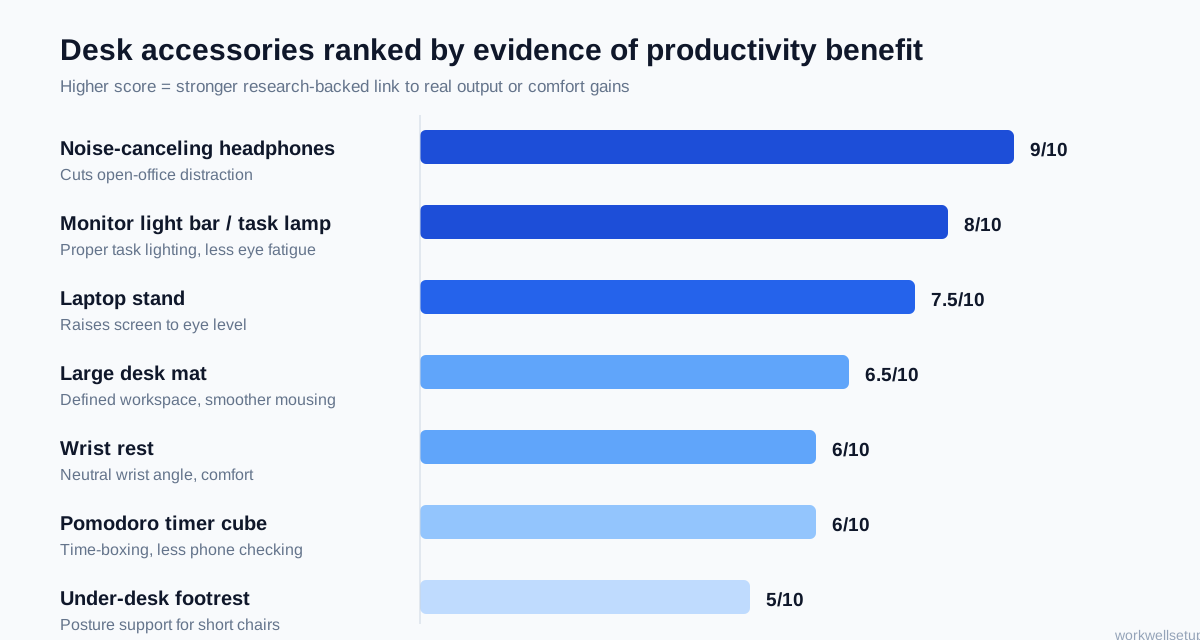
How Do the Accessories Compare?
Every cell below stands on its own — no cross-referencing needed.
| Accessory | What it fixes | Evidence strength | Typical price (Oct 2026) | Key spec |
|---|---|---|---|---|
| Sony WH-1000XM5 headphones | Open-office and home noise | Strong — noise measurably raises error rates and cognitive load | ~$398 | Industry-leading ANC, 30-hour battery, multipoint Bluetooth |
| BenQ ScreenBar light bar | Screen glare and poor task lighting | Strong — 500-lux asymmetric light with zero desk footprint | ~$99 | Auto-dimming sensor, USB-powered, fits 15″+ monitors |
| Nulaxy C3 laptop stand | Low screen causing neck tilt | Strong — raises screen toward recommended eye level | ~$25 | Aluminum, 6 heights, fits 10–15.6″ laptops |
| BenQ WiT e-Reading lamp | Uneven or harsh evening light | Moderate — controllable warm light reduces perceived strain | ~$130 | 27″ curved panel, 2700–5700K, e-reading mode |
| Large desk mat | Clutter and visual distraction | Moderate — defined workspace reduces visual distractions | ~$15–$25 | 35×16″ PU leather, stitched edge, non-curl |
| Gimars wrist rest set | Wrist-extension strain from desk edges | Moderate — neutral wrist position during rest breaks | ~$12 | Gel memory foam, 17″ keyboard rest + mouse rest |
| TickTime Cube timer | Time blindness and phone checking | Moderate — time-boxing improves self-reported focus | ~$39 | Flip-to-set presets (1/3/5/10/15/25/45/60 min), silent/vibration modes |
| Everlasting Comfort footrest | Dangling feet and unstable sitting | Modest — posture support, but only needed if the fit is wrong | ~$40 | Dual flat/rocker surface, 17×9.5″, washable cover |
Can a Timer Cube Actually Make You Focus Better?
Yes — the mechanism is embarrassingly simple, which is why it works. The Pomodoro Technique (25 minutes on, 5 off) works because a physical timer makes time visible and removes the decision to “check the phone real quick.”
The TickTime Cube Pomodoro Timer (~$39 as of October 2026) is the one designed for this: flip the cube so the 25-minute face is up and the countdown starts — no menus, no buttons, no setup. That zero-friction start is the entire point: the technique fails when starting the timer is itself a distraction.
Do Noise-Canceling Headphones Improve Productivity?
Yes — this is the strongest evidence on the list. Decades of workplace research show that background noise, especially intelligible speech, increases error rates and mental workload. In a noisy apartment or open office, good active noise cancellation doesn’t just make work nicer — it measurably reduces the interruptions your brain has to process. Wearing them is also a social signal: coworkers and family interrupt less when the headphones are on.
The Sony WH-1000XM5 (~$398 as of October 2026) remains the benchmark: eight microphones driving the noise cancellation, 30 hours of battery life, multipoint Bluetooth for laptop-plus-phone, and comfort for all-day wear at 250 grams. If your environment is noisy, no $20 accessory on this list moves the needle like these. For quiet homes, save your money — a cheap closed-back pair does the same “do not interrupt” signaling job.
Which Desk Accessories Are Gimmicks to Skip?
Not everything marketed as “ergonomic” or “productivity-boosting” earns its desk space. Skip these:
- Blue-light glasses as a cure-all. The evidence that screens’ blue light damages eyes is weak; most “blue-light fatigue” is just ordinary eye strain from staring too long. A light bar and the 20-20-20 rule do more than tinted lenses.
- Posture-corrector braces worn all day. They can reduce muscle activation over time, making posture worse when you take them off. Strengthening your back beats strapping it.
- USB mug warmers and RGB desk gadgets. Comfortable and fun — but nothing in them moves any productivity metric. Buy them for joy, not output.
- “Air-purifying” desk plants. Plants are lovely; the claim that one pothos meaningfully cleans office air comes from a misread of a 1989 NASA study done in sealed chambers, not open rooms.
- Balance boards as “active work.” They’re exercise equipment, not productivity tools — typing on one is a great way to do two things badly.
The quotable rule: if the marketing leans on a single mysterious mechanism (“ionizes,” “aligns,” “purifies”), the product is selling a story, not a result.

Where Should Each Accessory Go on Your Desk?
Placement matters — accessories only work when they’re where the problem is:
- Light zone (monitor area): the ScreenBar mounts on top of the monitor; a task lamp sits on the opposite side of your dominant hand so it doesn’t cast shadows while you write.
- Posture zone (your body): the laptop stand centers the screen at eye level, the wrist rest sits at the desk’s front edge, and the footrest goes directly under your chair.
- Focus zone (your periphery): the TickTime cube lives just left of the keyboard where a glance reads the countdown; headphones hang on a stand or hook within arm’s reach; the desk mat underlies all of it, defining the zone.
Start with the zone matching your biggest problem — most people see the biggest gains from two or three accessories, not all seven.
Frequently Asked Questions
What is the single most productive desk accessory?
Noise-canceling headphones. Distraction is the largest measurable productivity drain in shared spaces; the Sony WH-1000XM5 (~$398 as of October 2026) fights it both by blocking sound and by signaling “do not interrupt.”
Do I need all seven accessories on this list?
No — start with the two that match your biggest problem. Eye fatigue calls for the BenQ ScreenBar; neck pain calls for the Nulaxy laptop stand; distraction calls for the TickTime cube or headphones. Add more only if the first two don’t fix it.
Are expensive ergonomic accessories worth it over cheap ones?
Only where precision matters. The ScreenBar’s asymmetric optics and the XM5’s noise cancellation justify their prices because cheap versions fail at the core mechanism. A $12 wrist rest or $25 desk mat performs about as well as a $50 one — the material doesn’t change the mechanism.
Can desk accessories replace a good chair?
No. A quality ergonomic chair is the foundation. Accessories fix lighting, posture details, and distraction, but none compensate for a chair that wrecks your lower back — if your budget covers one upgrade, spend it on the chair.
How long until I notice a difference?
About a week of consistent use. Lighting and noise changes show up within days; posture changes take 1–2 weeks as muscles adapt. The timer cube works on day one — its effect is behavioral, not physical.
The Bottom Line
The desk accessories that actually boost productivity all share one trait: they remove something — glare, noise, neck strain, time blindness. Start with the BenQ ScreenBar (~$99) if your lighting is bad, the Nulaxy C3 stand (~$25) if your neck hurts, or the Sony WH-1000XM5 (~$398) if your world is loud. Add the TickTime cube, a wrist rest, a desk mat, or a footrest only where they match a real problem you have — and leave the gimmicks section above for someone who hasn’t read this far.