The Ergonomic Office Chair Guide: What to Buy, What to Skip, and How to Fit It
An ergonomic office chair is worth it when it supports your lower back, keeps your hips and knees near 90 degrees, and adjusts to your body. (Source: Mayo Clinic) Skip chairs with fixed arms, no lumbar support, or no seat-depth adjustment. The six features that matter most: adjustable lumbar, seat depth, recline tension, armrest height, seat height, and a stable base.
This guide is the hub of our chair series. It covers what makes a chair ergonomic, how to fit one to your body, and where to go next — whether you need the best office chair for lower back pain, a full back pain chair roundup, or a budget pick under $300.
What makes a chair ergonomic?
A chair is ergonomic only if it lets you sit in a neutral posture without effort. (Source: OSHA) Padding and a curved backrest are marketing cues, not ergonomics. The real test: can you sit back, have the lumbar support land on your lower back, keep your feet flat, and stay there for hours without fidgeting?
Most cheap “ergonomic” chairs fail on one or two specifics: the lumbar support is a decorative bump that sits too high, or the seat is too deep for shorter users so they perch on the edge — which defeats the backrest entirely.
The honest rule: an ergonomic chair is a fitting tool. The more of your body it can be tuned to, the more ergonomic it actually is.
Which adjustments matter most?
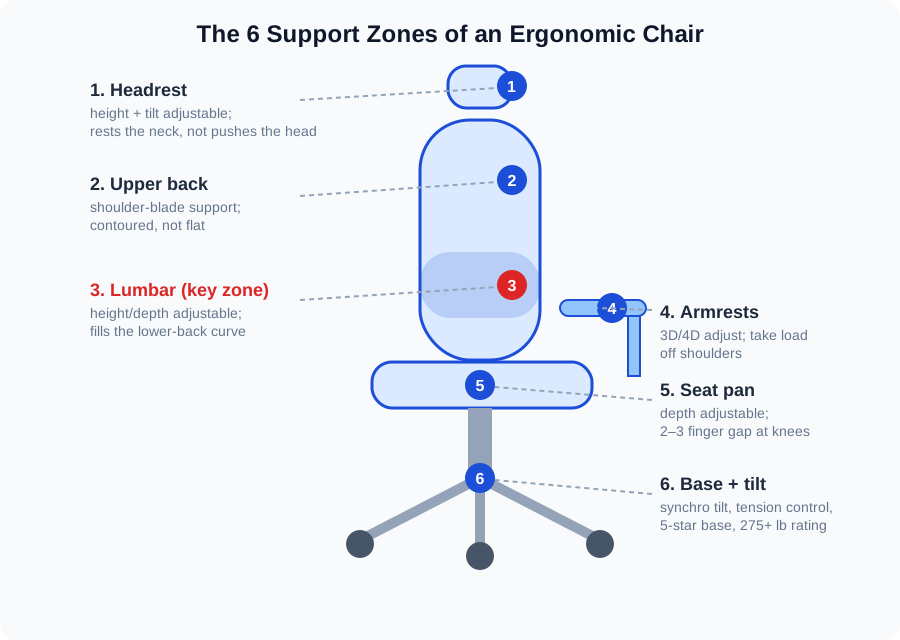
Six zones do the heavy lifting. Check them in order of importance.
1. Lumbar support (the dealbreaker). Your lower back has an inward curve, and it needs something that fills it. Look for lumbar that moves up/down and in/out. A fixed lumbar pad that hits your mid-back is worse than none — it pushes you out of the chair.
2. Seat depth. You should be able to sit all the way back with 2–3 finger-widths of clearance between the seat edge and the backs of your knees. Too deep and pressure builds behind the knees; too shallow and your thighs lose support. Sliding seat pans solve this.
3. Recline and tilt tension. Your chair should support you as you lean, not dump you backward or fight you. A synchro-tilt mechanism (backrest and seat move in ratio) plus adjustable tension is the gold standard in home-office chairs.
4. Armrests. 2D armrests adjust up/down and forward/back; 3D adds inward/outward pivot; 4D adds width. Height adjustment is the essential one — armrests should let your shoulders drop, not hold them up. If they block you from getting close to the desk, flip them up or look for 4D arms.
5. Seat height. A pneumatic cylinder with enough range for your leg length. Standard range is roughly 16–21 inches, which suits most people between about 5’4″ and 6’1″. Outside that range, check the specs before you buy.
6. Base and build. A five-star base with smooth casters and a published weight rating (275 lbs or higher on quality chairs). Wobble is a comfort killer and a durability red flag.
How should an ergonomic chair fit your body?
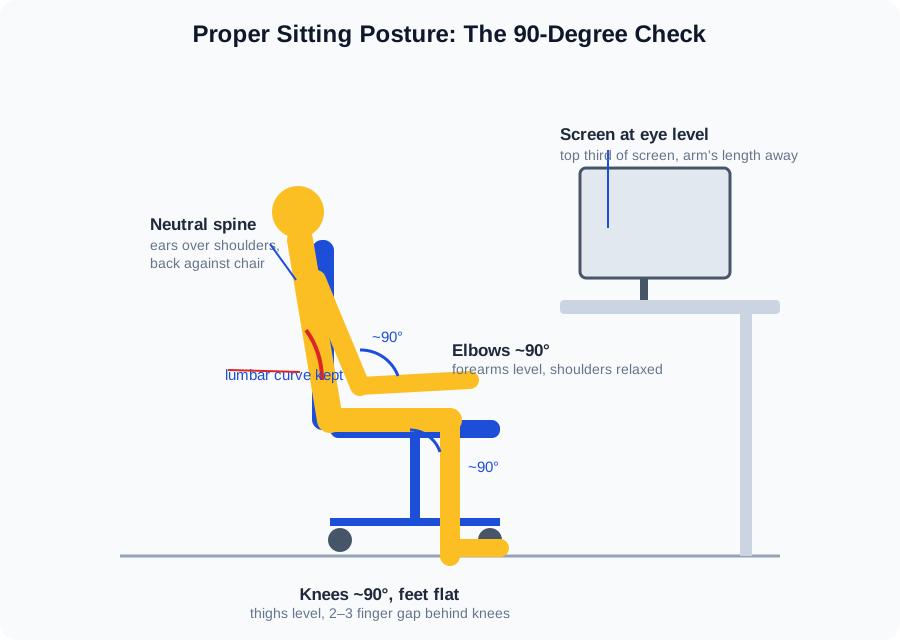
Fitting takes ten minutes and changes everything. Sit all the way back, then run this checklist:
- Feet flat, knees ~90°. Adjust seat height until your feet rest flat and your thighs are roughly level. If your feet dangle, add a footrest.
- 2–3 finger gap behind the knees. Slide the seat pan until there’s clearance between the seat edge and your knees.
- Lumbar on the lower back. Move the lumbar support up or down until you feel it fill your lower-back curve — not your ribs.
- Armrests at elbow height. Elbows near 90°, forearms roughly level with the desk, shoulders relaxed.
- Recline slightly. A 100–110° backrest angle reduces disc pressure compared to sitting bolt upright. Lock the recline or set tension so the chair holds you there.
The one-sentence version: sit back, support the lumbar curve, keep hips and knees near 90 degrees, and let the chair hold your weight instead of your muscles doing it.
We cover chairs for short people in our guide.
Do you need a different chair if you have lower back pain?
Usually you need a different fit, not necessarily a different price tier. Lower-back pain at a desk is most often a fit problem: the lumbar support lands in the wrong place, the seat pushes you forward, or the recline never supports your weight. Our guide on what an ergonomic chair needs to do for lower back pain walks through the adjustment patterns that help — and the mistakes that make pain worse.
Some chairs genuinely support the lower back better than others. If you want a shortlist of models picked specifically for lumbar support, see our roundup of the best back support office chairs, where each pick is judged on real lumbar adjustability, not marketing language. For the full comparison across more body types and budgets, our best office chairs for back pain guide covers the category end to end.
One honest caveat: no chair fixes pain caused by the rest of the workstation. If your desk is too high or your monitor forces you to crane forward, fix those too — the chair can only do its job when the setup around it cooperates.
Can you get a good ergonomic chair under $300?
Yes — with tradeoffs you should understand going in. Under $300 (as of October 2026), you can reliably get height-adjustable arms, basic lumbar support, and a tilt mechanism. What you usually give up: seat-depth adjustment, fine lumbar tuning, and the longer warranties that come with $500+ chairs.
Our two budget guides split the field clearly. The best desk chairs under $300 covers comfortable all-rounders for typical home-office use. The best ergonomic office chair under $300 is stricter — it only lists chairs that earn the “ergonomic” label through real adjustability, not styling. Read both if your budget is tight; the overlap is small and the difference is what you get for your lower back.
A useful budget rule: spend on adjustability before materials. A mesh chair with real lumbar tuning beats a plush leather-look chair with fixed everything.
Chairs in this tier routinely drop 25–35% during Black Friday week — see our Black Friday ergonomic chair deals guide.
Which chair guides should you read next?
The guides below go deep on each subtopic. Each is self-contained, so start wherever your situation fits.
Replacement caster wheels are worth considering — our guide covers the best options. We round up the best drafting chairs for standing desks in our guide.
| Guide | Best for | What it answers |
|---|---|---|
| Ergonomic chair for lower back pain | Pain tied to posture | The adjustment patterns that relieve lumbar strain, and the setup mistakes that undo a good chair |
| Best back support office chair | Lumbar-focused shoppers | Shortlist of chairs judged on real lumbar adjustability, with spec-level fit notes |
| Best office chairs for back pain | Broad comparison | Full category roundup across body types and budgets, from mid-range to premium |
| Best desk chairs under $300 | Tight budgets | Comfortable all-rounders that don’t sacrifice the basics at a lower price |
| Best ergonomic office chair under $300 | Value ergonomics | Budget chairs that keep genuine adjustability — lumbar, arms, and tilt that actually work |
What should you avoid when chair shopping?
Gaming-style racing chairs. Most are bucket seats designed for looks: fixed lumbar pillows, no seat-depth adjustment, and bolsters that squeeze your hips. A few gaming chairs now add real ergonomics, but the category average is poor.
“Ergonomic” with no spec sheet. If the product page won’t tell you the adjustment ranges, the weight rating, or what moves and what doesn’t, assume it doesn’t move. Real ergonomic chairs publish this.
Chasing the famous name on a budget. Entry-level models from premium brands often carry the logo without the adjustments. Judge the chair in front of you, not the brand.
Buying for the seat cushion. Firmness preference is real, but cushions compress and bodies adapt. Adjustability is what still matters in year three.
How can you test a chair before buying?
If you can sit in it, do three things. First, sit all the way back and feel where the lumbar support lands — it should press into your lower back, not your mid-back. Second, check the seat depth: slide the seat pan until you have that 2–3 finger gap behind your knees. Third, lean back and see whether the chair supports your weight or drops you.
Buying online? Read the return policy before the reviews. A 30-day (or longer) free-return window is effectively your fitting room — and if a listing hides its adjustment ranges, treat that as your answer about quality.
FAQ
How long should an ergonomic office chair last?
A quality ergonomic chair should last 7–10 years of daily home-office use. Chairs in the $500+ range typically carry 10–12 year warranties, which is the strongest signal of expected lifespan. Budget chairs under $300 more realistically last 3–5 years before the mechanism or casters wear out.
Is mesh or cushioned upholstery better for an ergonomic chair?
Mesh is better for most people — it breathes and keeps its shape longer. Cushioned seats feel softer at first but compress over time and trap heat. Choose cushioned only if you strongly prefer the feel and are willing to replace or re-pad it sooner.
How high should my chair be relative to my desk?
Set chair height so your elbows sit at roughly 90° with forearms level at the keyboard. For most people and standard 29–30 inch desks, that means feet flat and thighs roughly level. If the desk is fixed and too high, a footrest closes the gap instead of raising the chair and dangling your feet.
Do I really need a headrest on an ergonomic chair?
A headrest is a nice-to-have, not a must-have. It helps during reclined breaks and phone calls, but it does nothing for your posture during active typing. Prioritize lumbar support, seat depth, and armrests first — add the headrest if your budget allows.
How often should I get up from my ergonomic chair?
Stand or move briefly about every 30–60 minutes. No chair, however good, replaces movement. Set a timer, walk to get water, or do a minute of stretching. Microbreaks do more for back comfort over a workday than any single chair feature.
Can an ergonomic chair help with neck and shoulder pain?
Yes, mainly through armrest and monitor positioning rather than the backrest. Set armrests so your shoulders can drop and your forearms rest level, and keep the screen at eye level so you stop craning. Neck pain that persists despite a good setup is worth discussing with a clinician.