Best Single Monitor Arms for Deep Desks (2026)
The best single monitor arm for a deep desk is the Ergotron LX: about 25 inches of extension, 7–25 lb capacity, and a tall pole that keeps the screen at eye level even at the back of a 30-inch desk. On a budget, the Amazon Basics single arm (built by Ergotron) performs nearly identically for half the price. For deep desks, arm extension matters more than weight capacity — a short arm strands your monitor at the back.
See our monitor desk setup guide for the full setup walkthrough.As an Amazon Associate I earn from qualifying purchases.
TL;DR — the short list:
- Best overall: Ergotron LX Desk Monitor Arm (~$180–$220) — 25″ extension, 7–25 lbs, the reference standard.
- Best value: Amazon Basics Single Monitor Arm (~$100–$130) — Ergotron-built, nearly identical performance.
- Best for heavy/ultrawide: Ergotron HX (~$300–$350) — handles 20–42 lbs, built for 34″+ ultrawides.
- Best budget gas-spring: HUANUO HNDS6 (~$60–$80) — smooth adjustment, USB ports in the base.
- Best budget pole: VIVO STAND-V001 (~$35–$50) — rock-solid fixed-height pole, dead simple.
- Cheapest decent arm: North Bayou F80 (~$35–$45) — gas spring on a shoestring.
Prices as of October 2026.
Why Does Desk Depth Change Which Monitor Arm You Need?
A deep desk — 28 to 36 inches front-to-back — puts the monitor 8 to 12 inches farther from your eyes than a standard 24-inch desk. That extra distance suits larger screens, but it breaks most cheap monitor arms.
The problem is reach. A budget arm with 16 inches of extension can barely pull a monitor to the front edge of a deep desk, and at full extension it sits at the very end of its leverage — exactly where wobble and sag show up. A deep desk demands at least 20 inches of extension, ideally 24 or more.
Height is the second issue: pushing the monitor back means the pole needs enough height to keep the screen top at or slightly below eye level. For a 30-inch desk, look for a pole of at least 13 inches or a gas-spring arm with 10+ inches of vertical travel.
Should You Get a Pole Mount or a Gas-Spring Arm?
Pole mounts (like the VIVO STAND-V001) slide the monitor up and down a vertical steel pole and lock with a bolt. They’re simple, extremely rigid, and cheap — but height adjustment means loosening the bolt and muscling the screen into position. Fine if you set it once and never touch it.
Gas-spring arms (like the Ergotron LX or HUANUO HNDS6) use a pressurized strut that counterbalances the monitor’s weight, so you can raise, lower, tilt, and swing the screen with one finger. The trade-off: the spring must be tensioned to match your monitor’s weight. Too light a screen and the arm drifts upward; too heavy and it sags.
For a deep desk, a gas-spring arm is usually the better buy — only a gas spring makes pushing the monitor back and pulling it close a one-handed habit. A pole mount makes sense only if the monitor never moves and the budget is tight.
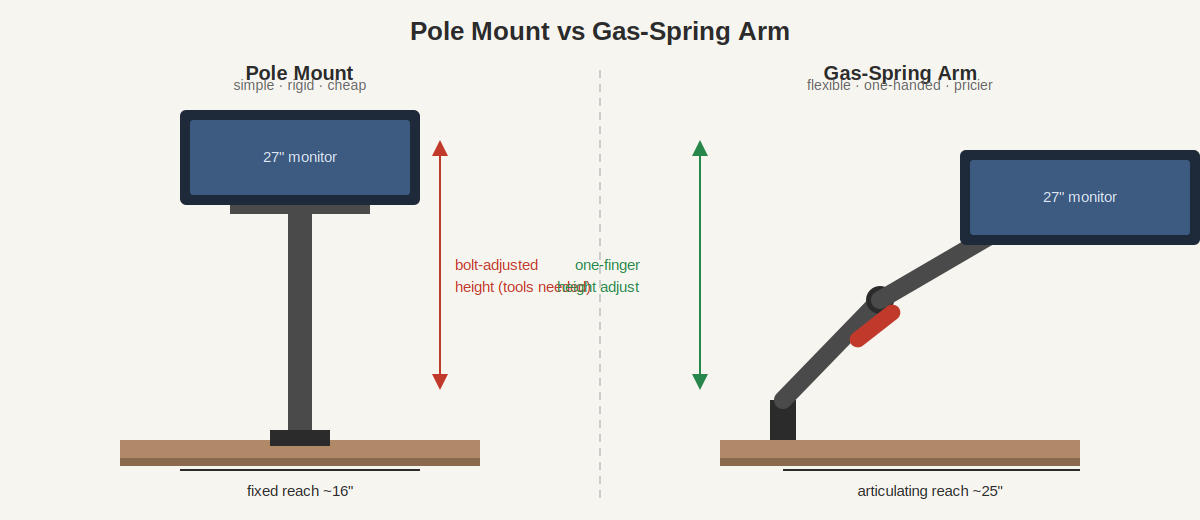
One more consideration: gas-spring arms have more joints, and every joint is a potential wobble point at full extension. Cheap gas-spring arms feel fine on a shallow desk but shaky on a deep one — the Ergotron LX earns its price largely through joints that stay tight at 25 inches of reach.
How Much Weight Capacity Do You Actually Need?
Weigh your monitor before you shop — the panel itself, without the factory stand. A 27-inch Dell Ultrasharp is about 9 lbs panel-only; a 34-inch ultrawide is typically 14–18 lbs; a 32-inch 4K panel runs 12–16 lbs.
Then add a margin: gas-spring arms work best mid-range, not at the edges. A 19 lb ultrawide on an arm rated 4.4–19.8 lbs needs maximum tension and may still drift. Aim for a monitor weighing 50–80% of the arm’s maximum rating.
VESA pattern matters just as much. Nearly every monitor under 34 inches uses 75×75mm or 100×100mm mounting holes; larger ultrawides sometimes use 200×100mm. Every arm on this list includes 75/100 plates; only the Ergotron HX ships ready for bigger patterns. No VESA holes at all (some Dell and Samsung consumer models)? You’ll need an adapter bracket — read our VESA mount explained guide first.
Desk Clamp or Grommet Mount — Which Is Better for a Deep Desk?
Both attach the arm to the desk, and both work on deep desks, with different trade-offs.
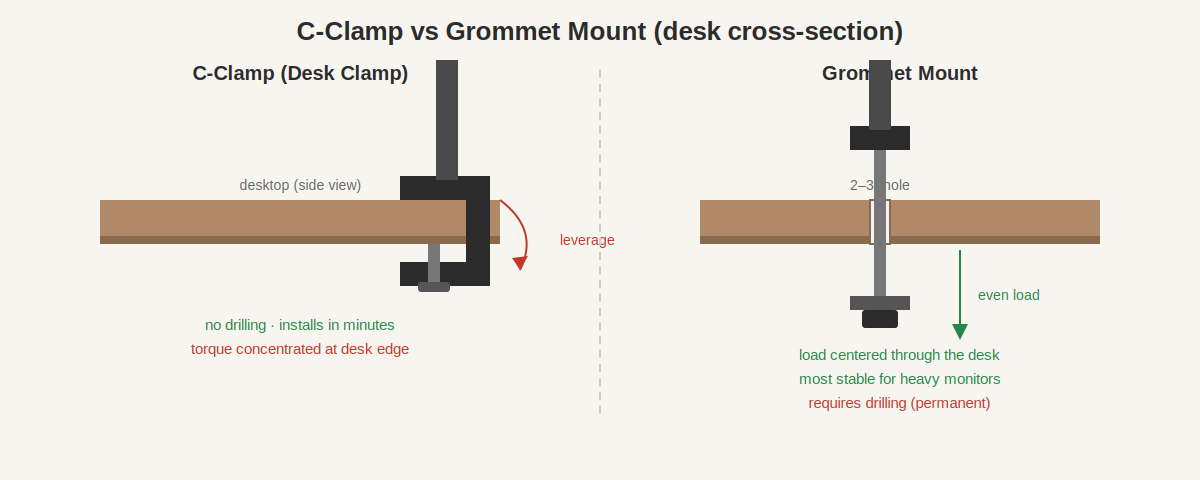
Desk clamp (C-clamp) grips the desk edge with a screw-down bracket. It installs in minutes with no drilling, and fits edges up to 3–4 inches thick. The downside on a deep desk: the clamp sits at the very back edge, and a heavy monitor at full extension puts serious torque on that single point — fine on solid wood, risky on thin particleboard.
Grommet mount drops a bolt through a hole in the desktop (many desks already have a cable grommet hole; otherwise you drill one). It centers the load through the desk — meaningfully more stable for heavy ultrawides at full extension. The cost is permanence: you’re drilling a 2–3 inch hole.
For deep desks holding monitors under 20 lbs, a clamp is fine and keeps your options open. For 34-inch ultrawides or anything over 20 lbs at full extension, the grommet mount’s stability is worth the hole.
The 6 Best Single Monitor Arms for Deep Desks, Compared
| Arm | Type | Screen size | Weight rating | Max extension | Mount | Price (Oct 2026) |
|---|---|---|---|---|---|---|
| Ergotron LX | Gas spring | 13–34″ | 7–25 lbs | ~25″ | Clamp + grommet | $180–$220 |
| Amazon Basics Single | Gas spring | up to 32″ | up to 25 lbs | ~25″ | Clamp + grommet | $100–$130 |
| Ergotron HX | Gas spring | 20–42″ | 20–42 lbs | ~23″ | Clamp + grommet | $300–$350 |
| HUANUO HNDS6 | Gas spring | 13–32″ | 4.4–19.8 lbs | ~19″ | Clamp + grommet | $60–$80 |
| VIVO STAND-V001 | Pole | 13–32″ | up to 22 lbs | ~16″ (fixed) | Clamp + grommet | $35–$50 |
| North Bayou F80 | Gas spring | 17–30″ | 4.4–19.8 lbs | ~18″ | Clamp + grommet | $35–$45 |
1. Ergotron LX Desk Monitor Arm — best overall (~$180–$220)
The LX is the arm everything else is measured against. The 25-inch extension reaches the front edge of a 30-inch desk with room to spare, the 13-inch pole keeps screens at eye level, and the 7–25 lb range covers everything from a 24-inch panel to a 34-inch ultrawide. Joints stay tight after years of daily repositioning — no slow sag like cheaper arms develop.
Includes clamp and grommet hardware, VESA 75/100 plates, and cable clips. The only real complaint is the price — which is why pick #2 exists.
2. Amazon Basics Single Monitor Arm — best value (~$100–$130)
An Ergotron LX in disguise — Amazon Basics licensed the design, and the castings, joints, and spring mechanism come from the same tooling. Same ~25-inch extension and 25 lb capacity for roughly half the LX’s price.
Differences are minor: shorter warranty, plainer finish, simpler cable management. For a deep desk, extension and weight rating are what matter — identical where it counts. Best arm per dollar by a wide margin.
3. Ergotron HX Desk Monitor Arm — best for heavy and ultrawide (~$300–$350)
For monitors over 25 lbs — a 38-inch ultrawide, a heavy 32-inch 4K, a curved 49-inch super-ultrawide — the LX taps out and the HX takes over. Its 20–42 lb range and reinforced joints are built for exactly this class, with ~23 inches of extension that still suits deep desks.
A specialist tool: skip it for a 27-inch monitor, since the spring can’t tension down far enough. For big heavy panels, nothing under $400 comes close.
4. HUANUO HNDS6 — best budget gas-spring (~$60–$80)
The budget gas-spring arm that doesn’t embarrass itself: 13–32 inch monitors, 4.4–19.8 lbs, one-handed adjustment once tensioned, plus two USB 3.0 ports in the base for a dongle or phone cable.
The honest limit is extension — ~19 inches suits a 28-inch desk but falls short for a 34-inch ultrawide on a 32-inch-deep desk. Under 20 lbs on moderately deep desks, it’s the value king of the budget tier.
5. VIVO STAND-V001 — best budget pole mount (~$35–$50)
A steel pole on a heavy base: slide the VESA bracket to your height, tighten the bolt, done. Holds up to 22 lbs across 13–32 inch screens, includes clamp and grommet mounts, and has nothing to wear out or sag.
The trade-off: height changes need tools and two hands, and ~16 inches of fixed reach keeps the monitor near the back of a deep desk. Buy it when the monitor never moves and budget rules — for set-and-forget, rigidity beats adjustability.
6. North Bayou F80 — cheapest decent arm (~$35–$45)
The floor of what’s worth buying: a real gas spring, 4.4–19.8 lbs, 17–30 inch screens, for the price of a pizza. Proves you don’t need $100 for one-handed adjustment.
Compromises: ~18-inch extension (tight on truly deep desks), joints that loosen faster than premium arms, a clamp that wants a solid desktop. For a light 24–27 inch monitor on a desk up to 28 inches deep, genuinely good — beyond that, step up to the HUANUO or Amazon Basics.
How to Measure Your Desk Before You Buy
- Measure desk depth front edge to back edge. Under 26 inches is standard; 28–36 inches is deep and needs 20+ inches of arm extension.
- Measure desk thickness at the mounting point. Most clamps handle 0.4–3.5 inches; glass or thin tops under 0.5 inches may need a reinforcement plate.
- Weigh your monitor panel-only (bathroom scale works: weigh yourself holding it, then without). Target an arm rated at least 20% above that number.
- Check your VESA pattern — the four-hole square on the monitor’s back. 75×75 and 100×100mm are standard; no holes means you need an adapter (see our VESA mount explained guide).
- Confirm edge access — the clamp needs 3–4 inches of clear desk edge at the back. A modesty panel or crossbar blocking it means a grommet mount instead.
If you’re still deciding between an arm and a stand, our monitor stand vs monitor arm breakdown covers the trade-offs — and dual-monitor setup ergonomics has the positioning math once the screen is mounted.
Will a single monitor arm hold a 34-inch ultrawide on a deep desk?
Yes, if rated for it — you need at least 20 lbs of capacity and 20+ inches of extension. The Ergotron LX (7–25 lbs, ~25″ reach) and Amazon Basics arm handle most 34-inch ultrawides; over 25 lbs, step up to the Ergotron HX.
How far can a monitor arm actually extend?
Budget arms reach 16–19 inches; mid-range and premium arms reach 23–26 inches. On a 30-inch-deep desk, that gap decides whether the monitor sits at a comfortable viewing distance or stays stranded at the back.
Can I mount a monitor arm on a glass desk?
Only with caution — most manufacturers exclude glass from warranty, and a clamp concentrates a heavy monitor’s torque on a small area. Use a reinforcement plate on both sides of the glass, keep the monitor under 15 lbs, or choose a freestanding monitor stand that doesn’t clamp at all.
Do I need to drill a hole for a grommet mount?
Only if your desk lacks one — many desks ship with a cable grommet hole that doubles as a mount point, so check first. If you do drill, a 2–2.5 inch hole saw through wood or MDF takes minutes; measure twice.
Gas spring or pole mount for a heavy monitor?
Gas spring, provided it’s rated for the weight — one-handed adjustment is worth it. Choose a pole only when the monitor truly never moves and every dollar counts.
Will my monitor wobble at full extension?
Some wobble is physics — a 15 lb screen at the end of a 25-inch lever moves if you bump the desk. Premium arms (Ergotron LX/HX) minimize it with tighter joint tolerances; budget arms show more. A grommet mount and a solid (non-particleboard) desktop both reduce it.
The Bottom Line
For a deep desk, arm extension matters most, and the Ergotron LX’s ~25 inches of reach makes it the default — with the Amazon Basics arm delivering the same reach for about half the money. Heavy ultrawides graduate to the Ergotron HX; tight budgets land on the HUANUO HNDS6 or VIVO pole. Measure your desk depth, weigh your monitor, confirm the VESA pattern, and you’ll buy once. If a second screen is in your future, our best dual monitor arm guide picks up where this one leaves off.