Best Monitors for Home Office Under $200 (2026)
The best home office monitor under $200 is the Dell S2421H: a 24-inch 1080p IPS display at around $140–$170 with accurate colors, wide viewing angles, and a clean design that looks right on a video call. If you want a bigger screen, the Acer SB272 gives you 27 inches of 1080p IPS for roughly $130–$160. Under $200, a 24-inch 1080p IPS monitor is the sweet spot — 1440p only becomes realistic at the very top of this budget.
See our monitor desk setup guide for the full setup walkthrough.As an Amazon Associate I earn from qualifying purchases.
<
The Short Answer: Top Picks at Each Price
Best overall: Dell S2421H (~$140–$170) — 24″ 1080p IPS, 75Hz. The safest recommendation at this price: good colors, slim bezels, reliable brand.
Best for work + casual gaming: ASUS VP249QGR (~$150–$180) — 24″ 1080p IPS, 144Hz. Silky scrolling and a 144Hz panel that makes everything feel faster, not just games.
Best under $130: LG 24MR400-B (~$100–$130) — 24″ 1080p IPS, 100Hz. Nearly everything the Dell does, for less money.
Best 27-inch budget pick: Acer SB272 (~$130–$160) — 27″ 1080p IPS, 75Hz. Maximum screen real estate per dollar.
Cheapest worth buying: AOC 24B2XH (~$90–$110) — 24″ 1080p IPS, 75Hz. The floor for “good enough” — don’t go cheaper than this.
Best 1440p under $200: KOORUI 27E1QA (~$170–$200) — 27″ 1440p, 144Hz. Sharper text and more screen space, if your desk is deep enough.
All prices as of October 2026; street prices move $10–$30 with sales.
What Do You Actually Get Under $200?
Honesty first: a sub-$200 monitor will not match a $500 Dell UltraSharp. You get no USB hub, a tilt-only stand, no calibration report, and ~250 nits brightness instead of 350–400. For documents, spreadsheets, email, and video calls, none of that matters as much as marketing suggests.
What you do get in 2026 is genuinely good: every pick here is an IPS (or equivalent) panel with wide viewing angles, so the image doesn’t wash out when you lean back. Five years ago $150 bought a washed-out TN panel; today it buys a display that’s pleasant for eight hours straight.
The real decisions under $200 are just four: resolution (1080p vs 1440p), panel (IPS vs VA), size (24″ vs 27″), and refresh rate (75Hz vs 144Hz). Get those right and you’ll love a $130 monitor; get them wrong and a $190 one will annoy you daily.
1080p vs 1440p: Does Resolution Matter at This Price?
Yes, but size decides whether it matters — what counts is pixel density, not the raw number.
A 24-inch 1080p screen packs about 92 pixels per inch. Text looks crisp at arm’s length, and Windows and macOS render everything at a comfortable size with no scaling tweaks. This is why 24″ 1080p remains the default: it just works.
Stretch 1080p over 27 inches and density drops to about 82 PPI. Text looks slightly soft up close — noticeable next to a laptop screen, easy to ignore otherwise. It’s the main compromise of every budget 27-inch display.A 27-inch 1440p panel jumps to about 109 PPI: visibly sharper text and genuinely more room for side-by-side windows. It’s the biggest quality-of-life upgrade in the budget monitor world.
The catch: real 1440p under $200 barely exists. The KOORUI 27E1QA hovers at $170–$200 with fluctuating stock. Hard $200 ceiling? Buy 24-inch 1080p and keep text sharp. Find the KOORUI in stock? 27-inch 1440p is the best value in this guide.
Quotable rule: at 24 inches buy 1080p; at 27 inches, 1080p is a compromise and 1440p is the goal.
IPS vs VA vs TN: Which Panel Should You Pick?
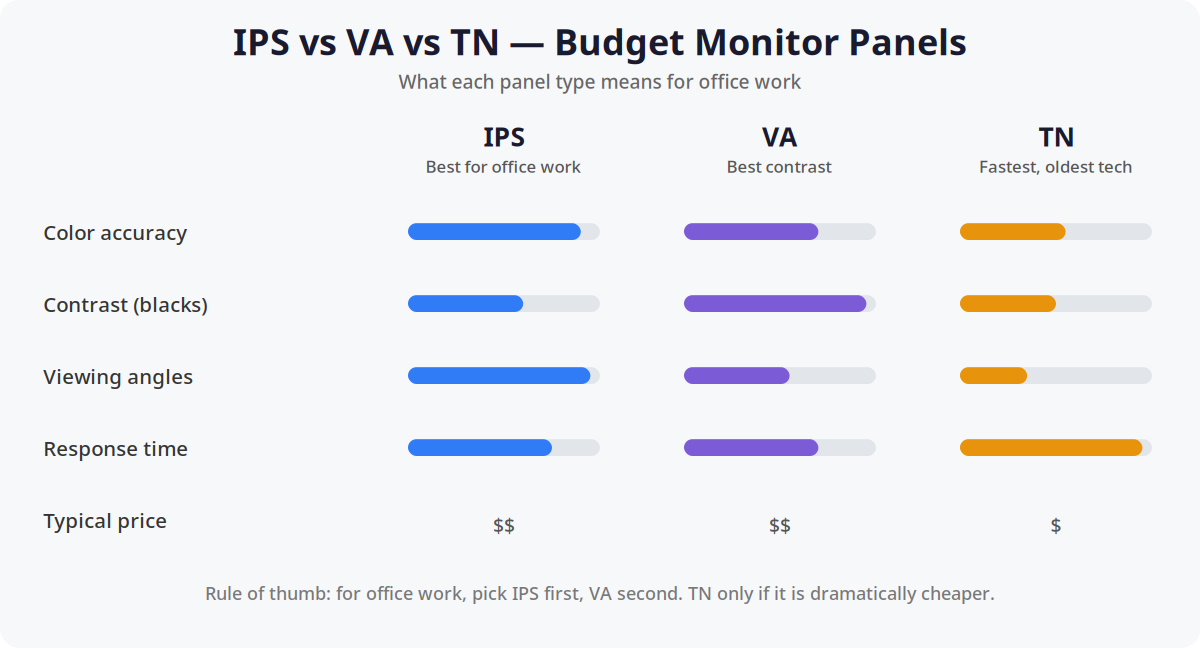
For office work the ranking is simple: IPS first, VA second, TN last.
IPS keeps colors accurate and consistent at an angle. Lean back, swivel your chair, glance from the side — the image doesn’t shift. That consistency is what keeps a monitor comfortable over a full workday. In 2026 IPS costs barely more than the alternatives, which is why nearly every pick here is IPS.
VA wins on contrast — blacks look black instead of dark gray, lovely for evening work. The tradeoff is narrower viewing angles and occasionally smeary text on cheap implementations. VA suits dim rooms and after-hours video.
TN is the oldest, cheapest LCD tech: fast, but poor at everything else. Colors shift the moment you move your head. Don’t buy TN for office work unless it’s dramatically cheaper than an equivalent IPS — which it rarely is.
Ignore contrast-ratio numbers on the box. Every budget monitor claims an absurd “20,000,000:1 dynamic contrast.” Real static contrast is around 1000:1 for IPS and 3000:1 for VA, and no marketing number changes that.
24″ vs 27″: What Size Fits a Home Office?
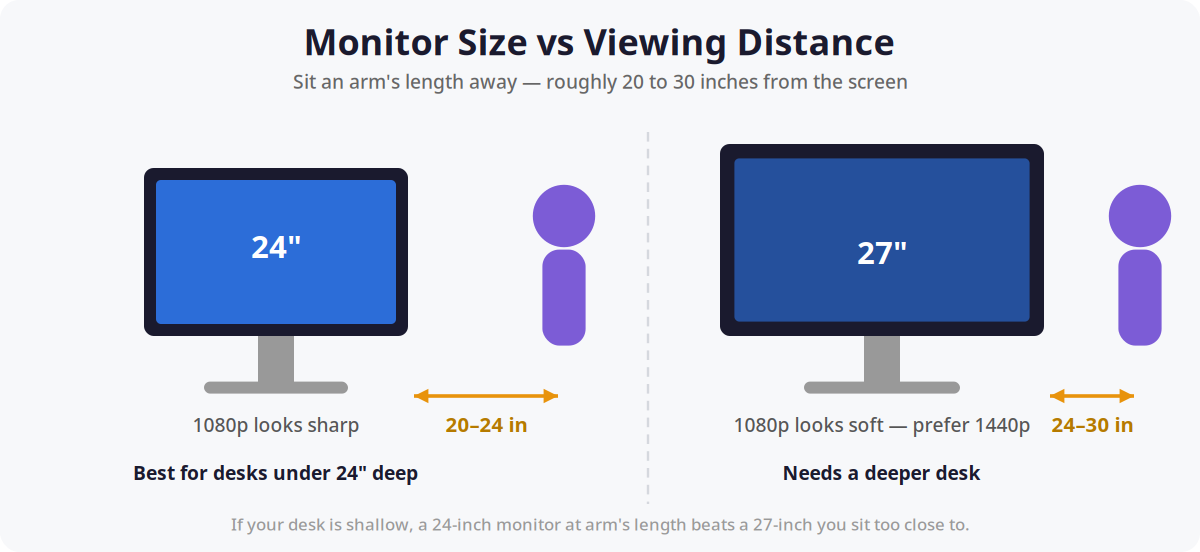
Size is really a question about your desk. A monitor should sit an arm’s length away — 20 to 30 inches from your eyes, top of the screen at or slightly below eye level. (Our dual-monitor ergonomics guide covers exact positioning.)
Choose 24 inches if your desk is under 24 inches deep — most compact home-office desks. At arm’s length it fills your view, text stays sharp, and you never turn your head for the corners.
Choose 27 inches if your desk is 28+ inches deep and you want more room for side-by-side windows. But respect the resolution rule: 27-inch 1080p looks soft up close, so sit further back or step up to 1440p.
Budget strategy worth knowing: two 24-inch 1080p monitors ($220–$280 total) beat one 27-inch 1440p for productivity, because two screens eliminate window juggling. Pair them with a dual monitor arm to reclaim the desk space.
The Ranking: 6 Monitors Under $200
| Monitor | Size / Resolution / Panel | Refresh | Ports | Street price* |
|---|---|---|---|---|
| Dell S2421H — best overall | 24″ / 1080p / IPS | 75Hz | 2× HDMI | $140–$170 |
| ASUS VP249QGR — work + play | 24″ / 1080p / IPS | 144Hz | DP, HDMI, DVI | $150–$180 |
| LG 24MR400-B — best under $130 | 24″ / 1080p / IPS | 100Hz | HDMI, VGA | $100–$130 |
| Acer SB272 — best 27″ budget | 27″ / 1080p / IPS | 75Hz | HDMI, VGA | $130–$160 |
| AOC 24B2XH — cheapest worth buying | 24″ / 1080p / IPS | 75Hz | HDMI, VGA | $90–$110 |
| KOORUI 27E1QA — best 1440p | 27″ / 1440p / VA-type | 144Hz | DP, HDMI | $170–$200 |
*Street prices as of October 2026; expect $10–$30 swings with sales.
1. Dell S2421H — best overall (~$140–$170)
The S2421H is the default answer for a reason: Dell’s budget line inherits conservative, office-friendly tuning. Colors look natural out of the box, and slim bezels don’t scream “budget” on video calls. The 75Hz refresh is a real upgrade over 60Hz — scrolling looks noticeably smoother.
The stand only tilts, the standard compromise at this price. If the screen sits below eye level, budget $30–$40 for a basic arm — the S2421H uses the standard 100×100mm VESA pattern (see VESA mount explained).
Who it’s for: anyone who wants to buy once and never think about monitors again. The safe pick.
2. ASUS VP249QGR — best for work + casual gaming (~$150–$180)
The monitor for people whose home office doubles as a gaming setup after 6 PM. The 144Hz IPS panel makes everything feel more responsive — scrolling documents, dragging windows, even the cursor. Once you’ve used 144Hz, 60Hz feels broken, and the premium over a 75Hz display is only about $20–$30.
For office work it’s every bit as good as the Dell: same 24″ 1080p IPS sharpness, decent color, DisplayPort plus HDMI. The on-screen menu is fiddly, but you set it once and forget it.
Who it’s for: work-from-home gamers, or anyone who wants one display to do everything.
3. LG 24MR400-B — best under $130 (~$100–$130)
Proof of how far budget monitors have come: 24-inch 1080p IPS, 100Hz, barely over $100. Color and sharpness sit in the same league as monitors costing $50 more. The savings show in the details — chunkier stand, VGA instead of a second HDMI, forgettable speakers.
At this price it’s the rational choice for a second screen, a homework station, or a home office where the monitor budget met reality. Two of these ($200–$260) make a superb dual setup.
Who it’s for: budget-first buyers and anyone buying two monitors.
4. Acer SB272 — best 27-inch budget pick (~$130–$160)
The biggest screen $200 buys: 27 inches of IPS for the price of most 24-inch displays. Spreadsheets, movies, and side-by-side windows all benefit.
Remember the tradeoff: 1080p over 27 inches looks soft closer than about 28 inches. Fine on a deep desk; on a shallow one, stick with 24 inches. Skip the built-in speakers on every monitor here — $25 desktop speakers beat them all.
Who it’s for: spreadsheet warriors, three-window multitaskers, and deep-desk owners wanting maximum screen per dollar.
5. AOC 24B2XH — cheapest worth buying (~$90–$110)
The floor. Below $90, monitors start hurting: TN panels, wobbly stands, dead-pixel roulette from no-name brands. The 24B2XH stays above the line — real 24″ 1080p IPS, 75Hz, slim bezels, and AOC’s 3-year warranty. The monitor to buy when the budget is tight but you refuse junk.
Be realistic: no height adjustment, no USB ports, no usable speakers, and a stand you’ll eventually replace with a $30 arm.
Who it’s for: students, temporary setups, second monitors. An honest $100 display.
6. KOORUI 27E1QA — best 1440p under $200 (~$170–$200)
The budget brand that keeps landing in “best cheap monitor” roundups. The 27E1QA puts 1440p on a 27-inch screen — 109 PPI versus 82 on 1080p 27-inch — so text is visibly sharper with real room for side-by-side documents. 144Hz is a bonus office buyers didn’t expect at this price.
Two caveats: stock and pricing bounce — above $200 it loses to the Dell/LG value case, so buy on sale. And the panel is VA-type, so viewing angles are narrower; fine head-on, less ideal swiveled toward a client. Confirm your PC outputs 1440p over HDMI or DisplayPort first — most machines from the last five years do.
Who it’s for: writers, coders, and analysts who want the sharpest image under $200 and own a deep desk.
What Should You Avoid Under $200?
No-name brands with no warranty. If the brand looks like a keyboard smash and the warranty is 30 days, walk away. A monitor is a 5-year purchase; buy from companies that will exist in 5 years.
“Gaming” TN panels for office use. A $120 165Hz TN display looks like a deal until colors shift every time you lean back. Refresh rate doesn’t fix a bad panel for office work.
4K under $200. It doesn’t exist from legitimate brands. Listings that claim it are lying about the panel or selling warranty-less refurbs. Real 4K starts around $250–$300.
Curved monitors at this price. Budget curves use VA panels with uniformity issues, and the curve adds nothing for spreadsheets. Flat is better under $200.
Monitors without VESA holes. Some ultra-cheap displays skip the 100×100mm pattern to save pennies, locking you out of monitor arms forever. Check the specs — our VESA mount guide decodes the numbers in two minutes.
Is a $150 monitor good enough for office work?
Yes. A $150 24-inch 1080p IPS monitor in 2026 is genuinely good for documents, spreadsheets, email, and calls — panel tech that cost $300 five years ago now costs half. Spend more only for 1440p sharpness, 27-inch size, or 144Hz smoothness.
Should I get a 24-inch or 27-inch monitor for my home office?
Get 24 inches if your desk is under 24 inches deep; 27 inches if it’s 28+ inches deep. At 1080p, 24-inch text stays sharp at arm’s length while 27-inch looks slightly soft — pair 27 inches with 1440p when the budget allows.
Do I need 1440p for office work?
No, but it’s the nicest upgrade under $200. 1080p handles office tasks fine; 1440p on 27 inches fits more on screen with sharper text. If you read and write all day, the stretch to around $180 is worth it.
Are cheap monitors bad for your eyes?
Price isn’t what strains eyes — brightness, glare, and bad positioning are. Any monitor here is fine if you match brightness to the room, sit at arm’s length, and keep the screen top at eye level. For evenings, a monitor light bar helps more than a pricier panel.
Can I mount a budget monitor on a monitor arm?
Almost always yes. Every pick here uses the standard 100×100mm VESA pattern, fitting virtually all monitor arms — check the spec sheet before buying, and see VESA mount explained if the numbers confuse you.
The Bottom Line
Under $200, the winning formula is boring on purpose: 24 inches, 1080p, IPS. The Dell S2421H is the safest buy, the LG 24MR400-B the value king, the ASUS VP249QGR the pick if your office doubles as a battlestation. Go 27 inches only with a deep desk — and if you can stretch to $180–$200, the KOORUI 27E1QA’s 1440p panel is the sharpest image in the class. Whatever you choose, mount it right: a good monitor arm and ergonomic positioning beat $70 extra on the panel.