Monitor Light Bar vs Desk Lamp: Which Is Better for Your Home Office?
A monitor light bar is better for most home offices: it lights your desk without causing screen glare and takes up zero desk space. A desk lamp is better when you want broader room light, adjustable task light for paperwork, or a solid option under $40. We compared the two head-to-head using manufacturer specs and verified owner reviews.
As an Amazon Associate I earn from qualifying purchases.
How do a monitor light bar and a desk lamp actually differ?
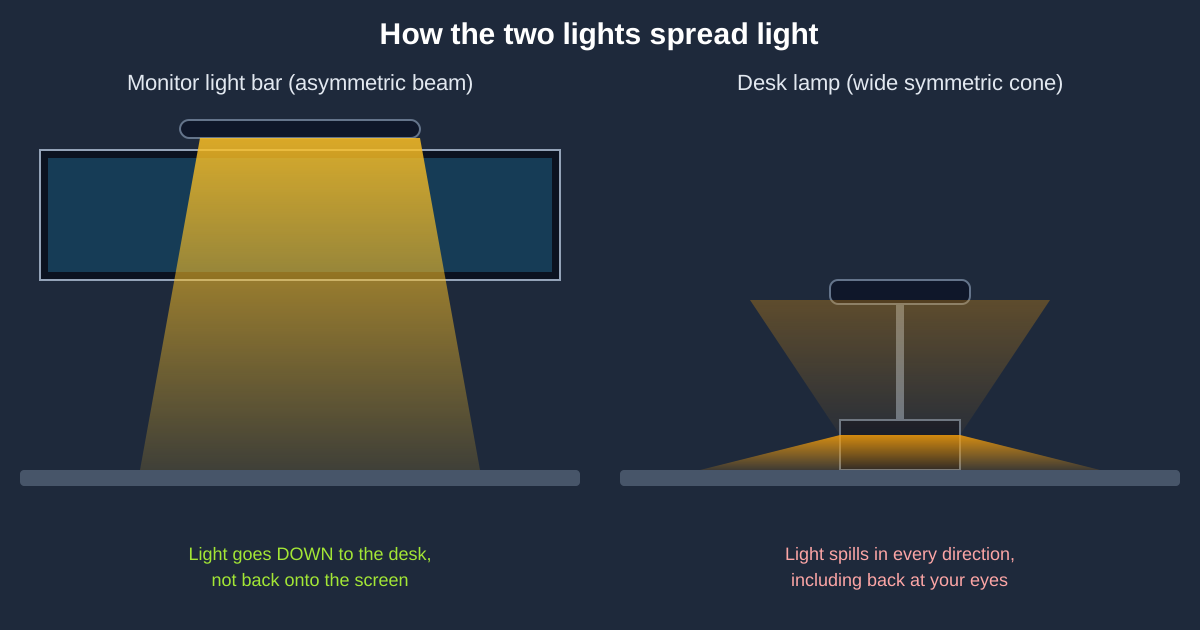
The difference is where they sit and where the light goes. A monitor light bar is a slim LED bar that hangs on top of your monitor on a weighted clip. It shines light downward onto your desk with an asymmetric beam — most of the light lands in front of the monitor, and almost none bounces back onto the screen itself. A desk lamp sits on your desk (or clamps to it) and throws a wider cone of light in whatever direction you aim it.
This one design difference drives almost every practical trade-off. The light bar exists to fix a specific problem: bright monitors in dark rooms create eye-straining contrast, and putting a lamp behind or beside the monitor usually adds glare to the screen. The desk lamp exists to solve a broader problem: putting light wherever you need it — on a notebook, a keyboard tray, or the corner of the room.
Which is better for reducing screen glare?
The monitor light bar wins this round, and it is not close. Because its asymmetric beam points downward and slightly forward, the light never crosses the plane of your screen. That is the whole point of the category: you get a brightly lit workspace with the screen reflection-free zone the manufacturers call a no-glare design.
A desk lamp can reduce glare too — indirect bounce light off a wall behind the monitor works well — but most people end up placing the lamp beside the screen, and any light source aimed across the display creates reflections. If glare is your main complaint, read our guide to reducing monitor glare in your home office, then consider a light bar first.
One caveat: a light bar does nothing for glare that comes from a window. If sunlight hits your screen directly, no lamp of any kind will fix it — reposition the desk or add a blind first.
Which saves more desk space?
The light bar wins again. It clips onto your monitor and draws power from a USB port, so its desk footprint is literally zero. If your desk is 48 inches wide or smaller — which most compact home-office desks are — that saved space is the difference between a clear work surface and a crowded one.
Desk lamps cost real estate. Even a small base model occupies a footprint of 4–7 inches square, and architect-style lamps need clearance behind the desk for the arm to swing. The one exception is clamp lamps, which grab the desk edge and stay mostly out of the way, but they still need a clamp point.
Which is easier on your eyes during long workdays?
Either one can be easy on your eyes, but they reduce strain in different ways. The key principle, per Mayo Clinic’s eyestrain guidance, is to balance the brightness of your surroundings with the brightness of your screen — a very bright screen in a very dark room forces your eyes to constantly adapt, which contributes to fatigue and headaches.
A monitor light bar targets this exact imbalance: it raises the brightness of your desk area without raising the brightness of the screen, keeping the luminance ratio between screen and surroundings comfortable. BenQ cites research conducted with the National Taiwan University of Science and Technology suggesting the surrounding area should stay within an ANSI-standard 3:1 ratio with the screen, and the light bar’s auto-dimming sensor is built to chase that balance as your room light changes.
A desk lamp achieves the same balance with less precision. It raises ambient brightness in a general way, which helps with the same screen-to-surroundings contrast problem. What it cannot do is keep light off the screen itself — and light on the screen forces you to crank up display brightness, which is another fatigue driver. OSHA’s computer workstations guidance recommends controlling glare and matching task lighting to the work, which is exactly where a targeted, dimmable light outperforms a general one.
Neither option is medical treatment for eye strain. If you have persistent headaches, blurred vision, or dry eyes, see an eye-care professional — lighting helps comfort, not diagnosis.
How much does each option cost?
Monitor light bars run from budget to premium. The Quntis Monitor Light Bar PRO+ — 20 inches wide, wireless remote, stepless dimming, auto-dimming sensor, and a 2-hour timer — goes for around $60 on Amazon as of October 2026. The BenQ ScreenBar, the original that started the category, sits around $109. The flagship BenQ ScreenBar Halo 2, with front and rear lighting, a wireless controller, and motion-sensor auto on/off, lists at $199 and typically sells closer to $180.
Good desk lamps cost less. The Honeywell H01 Pro Sunturalux — CRI ≥95, 500 lumens, three color temperatures, stepless dimming, and USB-A + USB-C charging ports in the base — runs about $40 as of October 2026, and deal trackers have caught it near $32 during sales. Well-reviewed architect and gooseneck lamps generally land between $30 and $70.
If you’re not in a hurry, Black Friday week (Nov 27–30) is when desk lighting hits its yearly floor — our Black Friday desk lighting deals guide tracks the discount bands to expect. Lighting accessories are classic doorbuster-category items, with 20–40% drops routine on the BenQ and Quntis bars and the sub-$40 lamps often hitting their all-time lows.
Head-to-head spec comparison
| Factor | Monitor light bar | Desk lamp |
|---|---|---|
| Glare on screen | None by design — asymmetric beam points down and forward, away from the screen | Possible — side or rear placement can reflect on the display |
| Desk footprint | Zero square inches — clips onto the monitor and powers over USB | 4–7 inch base, or needs a clamp point; arm lamps need rear clearance |
| Light coverage | Even wash across the keyboard and desk directly in front of the monitor | Wide adjustable cone — lights paperwork, walls, and room corners |
| Eye comfort (per manufacturer specs) | Auto-dimming models target a comfortable screen-to-desk brightness ratio (BenQ cites a 3:1 ANSI luminance-ratio guideline) | Raises general ambient light; cannot keep light off the screen itself |
| Color accuracy (top models) | BenQ ScreenBar Halo 2: full-spectrum LED with color fidelity Rf over 96 (as of October 2026) | Honeywell H01 Pro: CRI ≥95 full-spectrum LED (as of October 2026) |
| Price range (as of October 2026) | Around $60 for the Quntis PRO+, around $109 for the BenQ ScreenBar, around $199 MSRP for the Halo 2 | Around $30–$70 for well-reviewed models; Honeywell H01 Pro around $40 |
| Power | USB from your monitor or PC — one less wall outlet used | Wall adapter; some models add USB charging ports for your devices |
| Best for | Screen-focused workers, small desks, evening/night shifts | Paperwork, reading, ambient room mood, tight budgets |
When should you choose a desk lamp instead?
Pick the desk lamp when your lighting needs go beyond the monitor. If you read physical documents, write in notebooks, do crafts, or sketch on paper, a light bar’s downward wash over the keyboard area is too narrow — you need a head you can aim. The same goes for room ambience: a desk lamp with warm 3000K light doubles as mood lighting in the evening, while a light bar only ever lights the desk in front of the screen.
Budget is the other clear case. At around $40, the Honeywell H01 Pro costs less than half of the original BenQ ScreenBar and delivers comparable color quality (CRI ≥95) for general tasks. If you are furnishing a whole room — say, a desk plus a reading corner — two good lamps cost less than one premium light bar.
Versatility matters too. A lamp moves with you to the sofa, the bedroom nightstand, or the kitchen table. A light bar only ever works clipped to a monitor. For renters and anyone who rearranges often, that portability is worth something.
Can you use a light bar and a desk lamp together?
Yes, and it is a legitimate setup — as long as you manage placement. The light bar handles the screen zone: glare-free task light over the keyboard and desk in front of the monitor. The desk lamp handles everything else: paperwork off to the side, background ambience, and fill light for video calls.
The rule is simple: keep the lamp’s light off the screen. Aim a desk lamp at the wall behind the monitor (indirect bounce light) or at the opposite side of the desk from where you sit. Two dimmable sources beat one bright one, because you can tune each zone separately — cool, bright light on the keyboard area for focus work, warm low light on the side for winding down.
Watch the total brightness, though. Piling on lumens defeats the purpose of balanced lighting. Start both at 50% and adjust up only until the desk feels comfortable.
The verdict: which one should you buy?
Buy a monitor light bar if your work is screen-centric, your desk is small, or glare is your top complaint. Based on specs and owner feedback, the BenQ ScreenBar remains the benchmark at around $109, the Quntis Monitor Light Bar PRO+ delivers roughly 80% of the experience for around $60, and the BenQ ScreenBar Halo 2 is the no-compromise pick for designers and night-shift workers at around $199. See our full monitor light bar roundup for the complete field.
Buy a desk lamp if you need flexible, aimable light for paperwork and reading, want ambient room light, or want to spend under $50. The Honeywell H01 Pro Sunturalux is the value pick at around $40 with eye-friendly CRI ≥95 output and device charging built in. We put six desk lamps through this same comparison if you want more options.
Buy both if you split your day between deep screen work and paper tasks — light bar on the monitor, lamp on the side, aimed away from the screen.
Frequently asked questions
Do monitor light bars damage your monitor?
No. A monitor light bar clamps or rests on top of the monitor bezel with a weighted or padded clip and does not touch the screen itself. It draws only USB power (5V) and adds no heat worth mentioning to the display.
Is a light bar better than a lamp for a curved monitor?
Yes. Light bars designed for curved monitors — like the BenQ ScreenBar Halo 2, which supports 1000R–1800R curves — follow the screen’s arc, while a desk lamp beside a curved display creates uneven reflections across the curve’s surface.
Can a monitor light bar replace my room light?
No. A light bar only illuminates the desk area directly in front of your monitor. It does not light the room. For evening work, pair it with a low ambient light behind you so the room is not pitch black around a lit desk.
What color temperature is best for a home office light?
For daytime focus work, 4000K–5500K (neutral to cool) keeps you alert. For evening sessions, switch to 2700K–3000K (warm) to reduce the stimulating effect of cool light before bed. All four products compared here offer adjustable color temperature, so you can match the light to the time of day.
Do I need a light bar if I have a desk lamp?
Not necessarily. If your desk lamp is positioned behind or beside the monitor without creating screen glare, and your desk area is comfortably lit, a light bar adds little. The upgrade makes sense when the lamp’s position causes reflections, takes up needed desk space, or cannot dim low enough for late-night work.