Best Budget Home Office Setup for Remote Workers (2026)
The best budget home office setup for remote workers costs about $300: a sturdy IKEA LAGKAPTEN desk, an ergonomic Hbada chair, a 21.5-inch Acer IPS monitor, a Logitech K120/M185 keyboard-and-mouse pair, and an IKEA TERTIAL lamp. Stretch to ~$650 for an electric standing desk and IKEA MARKUS chair, or ~$900 for a 27-inch 4K Dell monitor plus a proper webcam and microphone.
As an Amazon Associate I earn from qualifying purchases.
TL;DR — the three complete setups:
- Starter (~$325): IKEA LAGKAPTEN desk ($70), Hbada ergonomic chair ($100), Acer SB220Q 21.5″ monitor ($95), Logitech K120 + M185 ($30), phone-as-webcam (free), IKEA TERTIAL lamp ($15), cable tray ($15).
- Comfort (~$650): SHW 55″ electric standing desk ($200), IKEA MARKUS ($220), ASUS VA24DQF 24″ 100Hz monitor ($115), Logitech K380 ($30) + M185 ($15), NexiGo N60 webcam ($40), TERTIAL lamp ($15), cable tray ($15).
- Premium (~$910): 55″ electric standing desk ($200), IKEA MARKUS ($220), Dell S2721QS 27″ 4K monitor ($250), Logitech K380 ($30) + Logitech M720 ($45), Logitech C920s ($65), FIFINE K669B mic ($40), Quntis light bar ($30), cable tray + desk mat ($30).
All prices are typical US retail as of October 2026 and move a few dollars with sales.
How Much Does a Decent Budget Home Office Setup Cost?
Less than most people fear. A complete, ergonomic, video-call-ready home office costs between $300 and $900 — and the desk and chair eat roughly half of every budget, because they decide whether your back survives the week.
The $300 starter tier covers everything you need for a full workday; $650 upgrades the desk and chair; $900 adds a bigger, sharper monitor and call gear.
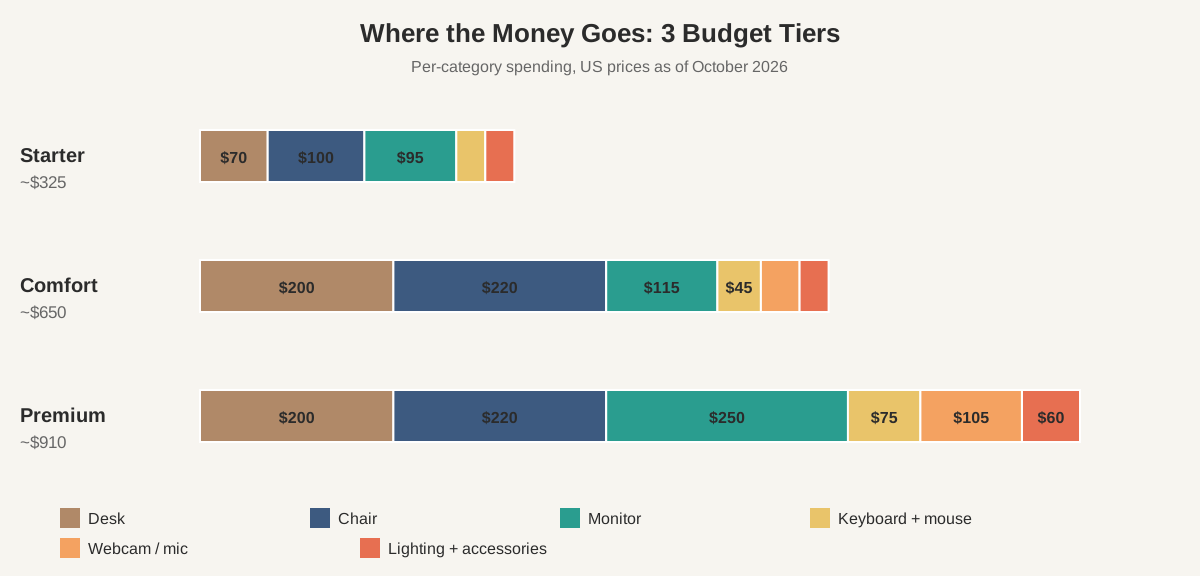
Rule of thumb: if you can only afford one upgrade beyond the starter tier, make it the chair. If you can afford two, add the standing desk.
For a leaner angle on the same problem, see our home office setup under $500 guide, which trims the starter tier even further.
Which Desk Should You Buy on a Budget?
The IKEA LAGKAPTEN tabletop with ADILS legs — roughly $70 total — is the budget desk everything else is measured against. The 55×25-inch top fits a monitor, keyboard, and notebook with room to spare, and the steel leg frames are sturdier than the wobbly all-in-one desks that cost the same on Amazon. One honest limitation: it’s a fixed 29-inch height, so confirm the fit against our home office ergonomics checklist before you buy.
The meaningful upgrade is a sit-stand desk, and it costs less than it used to. The SHW 55-inch electric standing desk (about $200) and the FlexiSpot EN1 (about $200–$250) both adjust from roughly 28 to 48 inches and hold 150+ lbs — and at $200 a standing desk is now cheaper than most decent chairs.
A quotable line worth pinning down: spend at least a quarter of your total budget on the surface you work on and the chair you sit in, because cheap there costs more in pain than it saves in money.
Is the Chair Really the Most Important Purchase?
Yes — and it’s the one place where “budget” needs a hard floor. A bad chair advertises itself within a week: lower-back ache by lunch, shoulder tension by Friday. A decent budget chair does not.
At about $100, the Hbada ergonomic office chair is the cheapest chair worth buying: adjustable lumbar support, a breathable mesh back, and flip-up armrests — the three features that separate a real office chair from a dining chair with wheels. Add a $20 memory-foam seat cushion if you sit long hours.
At about $220, the IKEA MARKUS is the budget sweet spot: full-spine mesh back, smooth tilt mechanism, and a 10-year warranty unmatched at this price.
Whatever you buy, set it up right: feet flat on the floor, knees at roughly 90 degrees, lumbar support in the small of your back. Our home office ergonomics checklist covers the full 5-minute fitting.
What Monitor Gives You the Most for the Money?
The monitor is the second-best place your budget can go, and IPS panels have made the cheap end genuinely good. Buy IPS (not TN) for viewing angles that don’t wash out when you lean back, and treat 24 inches as the minimum for all-day text work.
At about $95, the Acer SB220Q (21.5″, 1080p, IPS, 75Hz) is the cheapest monitor that doesn’t punish you: thin bezels and a panel that looks right on color. It fits the starter tier without breaking the budget math.
At about $115, the ASUS VA24DQF (24″, 1080p, IPS, 100Hz) is the value peak of the whole market. The 100Hz refresh makes scrolling feel dramatically smoother, and 24 inches gives you real two-window space. This is the monitor to buy if you’re building the $650 tier.
At about $250, the Dell S2721QS (27″, 4K, IPS) is the biggest quality-of-life jump in the $900 tier. 4K at 27 inches renders text crisply enough to reduce eye fatigue over long writing days, and the screen real estate replaces a dual-monitor habit for many. Dell’s 3-year advance-exchange warranty is the best support story among budget monitors.
Which Keyboard and Mouse Should Remote Workers Buy?
Typing gear matters less than the desk, chair, and monitor — but it’s the category where “cheap and good” is easiest to find.
At the starter tier, the Logitech K120 keyboard ($15) and M185 mouse ($15) are the definition of adequate: a full-layout quiet membrane keyboard and a small wireless mouse that runs a year on one AA battery.
At about $30, the Logitech K380 is the keyboard upgrade that makes the most sense for remote workers: it types on three devices (laptop, tablet, phone) with a button press, it’s quiet enough for shared apartments, and the round keys have a pleasant scissor feel. Pair it with the M185 or the Logitech M720 ($45) — hyper-fast scrolling and two-device Bluetooth.
Whatever keyboard you choose, position it right: elbows at about 90 degrees, wrists straight and floating — not resting on the desk edge. The 3-minute drill is in keyboard and mouse positioning.
Webcam and Microphone: Where Does Cheap Become Too Cheap?
Audio matters more than video here — a bad webcam makes you look unprofessional; a bad microphone makes people want to hang up. Upgrade the mic before the camera.
At $0, your phone is a perfectly good webcam. DroidCam (free) or Camo turn a modern phone into a 1080p USB webcam that beats every $40 dedicated camera, because phone sensors are simply better.
At about $40, the NexiGo N60 (1080p, dual noise-canceling mics, privacy shutter) is the cheapest dedicated webcam worth owning: mounts on any monitor, works without drivers, and handles normal room light fine.
At about $65, the Logitech C920s is the remote-work standard: consistent 1080p, autofocus that doesn’t hunt, and a privacy shutter. It has been the default meeting-room webcam for a decade, and nothing under $100 has unseated it.
At about $40, the FIFINE K669B USB microphone is the cheapest audio upgrade with a real return. A dedicated USB condenser mic sits inches from your mouth and sounds like a podcast; laptop and webcam mics sit feet away and sound like a tunnel. Plug-and-play, no drivers. If you take more than a few calls a week, this $40 spends better than almost anything else on the list.
How Should You Light Your Home Office Desk?
Lighting is the most overlooked budget item, and the cheapest to fix: enough light on your face for calls, no glare on your screen.
The IKEA TERTIAL work lamp ($15–$20) is the budget classic: a clamp-on articulated arm that lights exactly where your hands are, freeing the desk surface.
For video calls specifically, the lamp that matters is the one in front of you, not above you. A window or lamp positioned behind your monitor, facing your face, is the difference between “clearly visible colleague” and “mysterious silhouette.” Our best desk lamp for video calls guide covers the placement geometry.
At about $30, the Quntis monitor light bar is the $900-tier upgrade: it clips onto the monitor, washes the desk in asymmetric light with zero screen glare, and takes up no desk space.
What Accessories Are Actually Worth Buying?
The four cheap items with real returns:
- Cable management tray ($15): a metal tray under the desk that hides the power strip and charger brick. The fastest visual upgrade in this entire guide.
- Desk mat ($15): a 35×16-inch mat under the keyboard and mouse. Protects the desk and evens out mouse tracking.
- Laptop stand ($25): an aluminum riser that lifts a laptop screen to eye level as a second screen. A laptop flat on the desk is a neck-pain machine.
- USB-C hub ($25–$35): one cable into the laptop, and the monitor, keyboard dongle, and mic all stay connected. Anker’s 7-in-1 hubs are the reliable default.
Skip: desk toys, RGB strips, and any “ergonomic” gadget under $10. Every dollar that doesn’t go to desk, chair, monitor, or audio is a dollar that could.
The Complete Shopping Lists: All Three Tiers Side by Side
| Category | Starter (~$300) | Comfort (~$650) | Premium (~$900) |
|---|---|---|---|
| Desk | IKEA LAGKAPTEN + ADILS legs — $70 | SHW 55″ electric standing desk — $200 | FlexiSpot EN1 48″ electric standing desk — $200 |
| Chair | Hbada ergonomic chair — $100 | IKEA MARKUS — $220 | IKEA MARKUS — $220 |
| Monitor | Acer SB220Q 21.5″ IPS 75Hz — $95 | ASUS VA24DQF 24″ IPS 100Hz — $115 | Dell S2721QS 27″ 4K IPS — $250 |
| Keyboard | Logitech K120 — $15 | Logitech K380 — $30 | |
| Mouse | Logitech M185 — $15 | Logitech M185 — $15 | Logitech M720 — $45 |
| Webcam | Phone via DroidCam — free | NexiGo N60 1080p — $40 | Logitech C920s — $65 |
| Microphone | Webcam/phone mic — free | Webcam mic — free | FIFINE K669B USB mic — $40 |
| Lighting | IKEA TERTIAL lamp — $15 | IKEA TERTIAL lamp — $15 | Quntis monitor light bar — $30 |
| Accessories | Cable tray — $15 | Cable tray — $15 | Cable tray + desk mat — $30 |
| Total | ~$325 | ~$650 | ~$910 |
How Do You Set It All Up So Your Back Doesn’t Complain?
Buying the gear is half the job; the other half is a 10-minute fitting. The diagram below shows the five positions that matter — get them right and even the $300 tier feels like a real office.
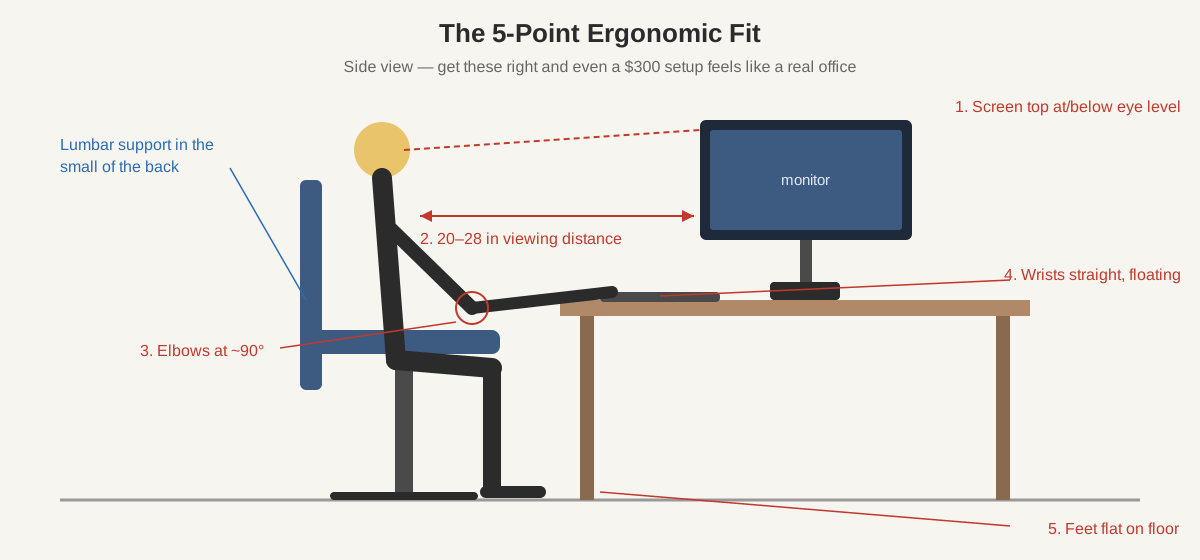
The five checkpoints: screen top at or just below eye level (a stack of books works as a free riser), 20–28 inches of viewing distance, elbows at ~90°, wrists straight, feet flat on the floor. Recheck after a week — chairs and bodies settle in.
Frequently Asked Questions
Can you really build a home office for under $300?
About $325 buys a complete setup: IKEA LAGKAPTEN desk, Hbada chair, Acer 21.5″ IPS monitor, Logitech keyboard and mouse, TERTIAL lamp, and cable tray. Your phone (free, via DroidCam) covers the webcam and beats a $40 camera.
What should you buy first if you can only afford one upgrade?
The chair. A bad chair causes back pain within days, and no monitor or keyboard compensates. Next comes the desk surface, then the monitor. Ergonomics is a hierarchy: seat, surface, screen.
Is a standing desk worth it on a budget?
Yes, now that electric models cost about $200. The SHW 55-inch and FlexiSpot EN1 adjust from roughly 28 to 48 inches, hold over 150 lbs, and let you alternate sitting and standing. Skip manual crank desks — the $50 savings isn’t worth the daily hassle.
Are cheap office chairs bad for your back?
A genuinely bad chair is — dining chairs and racing-style gaming seats lack lumbar support and encourage slouching. But the $100 Hbada has real lumbar support and a mesh back, and the $220 IKEA MARKUS is a decade-proven ergonomic chair. The danger zone is under $70, where lumbar support disappears.
Do you need a 4K monitor for remote work?
No — 1080p at 24 inches is plenty for documents and calls. 4K earns its $250 only if you read text all day, where the Dell S2721QS renders crisper, easier-on-the-eyes type.
The Bottom Line
The best budget home office setup for remote workers is the one you can afford today and upgrade piece by piece: start with the $300 tier — good desk, real chair, IPS monitor — and let the chair and desk carry the load. When money frees up, buy in this order: MARKUS chair, electric standing desk, 100Hz monitor, FIFINE mic.