
Best Monitors for Programming & Coding (2026): 5 Sharp Picks for Long Coding Days
The best monitor for programming in 2026 is the Dell UltraSharp U2723QE. Its 27-inch 4K IPS Black panel packs about 163 pixels per inch, so small code fonts stay razor-sharp all day, and a single USB-C cable drives a laptop while charging it at up to 90W. Street price runs about $450–$550 as of November 2026.
As an Amazon Associate I earn from qualifying purchases.
TL;DR — Our 2026 coding monitor picks
- Best overall: Dell UltraSharp U2723QE — 27″ 4K IPS Black, USB-C 90W dock, ~$450–$550
- Best budget 4K: LG UltraFine 27UP850N-W — 27″ 4K, USB-C 90W, ~$350–$400
- Best 1440p for creators: ASUS ProArt PA278CV — 27″ QHD, factory-calibrated color, ~$250–$300
- Best high-refresh: Gigabyte M27Q — 27″ QHD 170Hz with KVM, ~$220–$300
- Best 32-inch: BenQ GW3290QT — 31.5″ QHD, eye-care suite, USB-C 65W, ~$350–$400
Method: we compared published specs, November 2026 street prices, and verified owner feedback across thousands of reviews. No hands-on lab testing.
How did we compare coding monitors?
Programmers care about different things than gamers or video editors, so we weighted the comparison accordingly: text sharpness and pixel density (30%), screen real estate for window tiling (20%), connectivity and ergonomics (20%), eye comfort (15%), and price-to-value (15%).
For each model, we compared published specs, checked November 2026 street prices, and read verified owner reviews to catch real-world quirks — wobbly stands, finicky KVM switches, USB-C ports that miss their advertised wattage. We also cross-checked independent reviewer measurements rather than marketing sheets alone.
One honesty note: we did not run a hands-on test lab — every pick below is based on specs, prices, and owner feedback.
Why does text sharpness matter so much for code?
Programmers read small glyphs 6–10 hours a day; fuzzy text makes eyes work harder. The American Optometric Association recommends the 20-20-20 rule (every 20 minutes, look 20 feet away for 20 seconds) to relieve the digital eye strain that long screen sessions cause.
Text sharpness comes down to pixel density, measured in pixels per inch (PPI): at 27 inches, a 4K panel (3840×2160) delivers about 163 PPI and a 1440p panel (2560×1440) about 109 PPI; a 31.5-inch 1440p panel drops to about 93 PPI. At roughly 109 PPI and above, a 10–11pt editor font looks crisp at arm’s length; below about 100 PPI, small characters start showing soft edges.
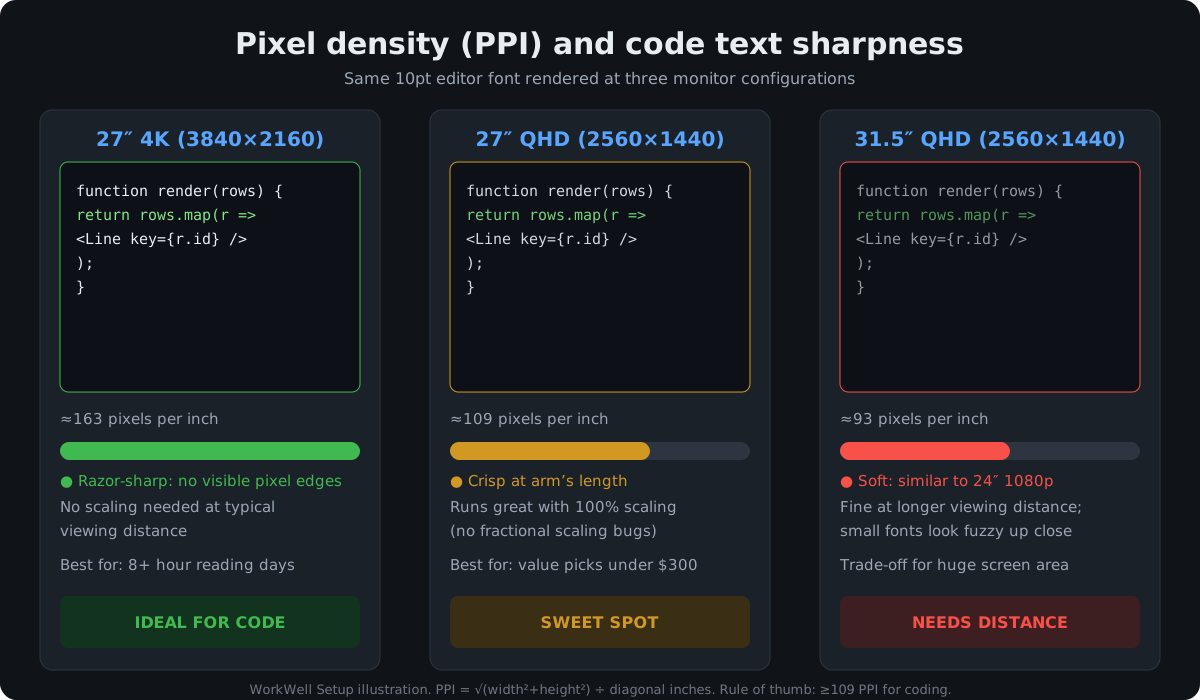
Here’s the takeaway in one quotable line: text sharpness is the single biggest monitor upgrade a programmer can buy — resolution-per-inch matters more than raw screen size.
The 5 best monitors for programming and coding in 2026
1. Dell UltraSharp U2723QE — Best overall monitor for programming
The U2723QE is the closest thing to a default answer in this category. Its 27-inch 4K IPS Black panel doubles contrast to 2000:1 versus conventional IPS, so dark-mode editors look genuinely dark instead of washed-out gray. At 163 PPI, code text is razor-sharp, and 98% DCI-P3 coverage stays accurate enough for occasional UI work.
The connectivity is the real draw. One USB-C cable carries video, data, and up to 90W of charging, while the built-in hub adds DisplayPort 1.4 output (for daisy-chaining a second 4K display), a wired RJ45 Ethernet port, four USB-A ports, and a KVM mode that shares your keyboard and mouse between two connected PCs.
Dimensions with stand: about 24.1 × 15.1–21.0 × 7.6 inches, with height, tilt, swivel, and pivot adjustment.
Pricing as of November 2026: the $779.99 list price is rarely what buyers pay — it has repeatedly sold in the $450–$550 band, and owner feedback rates it 4.4 out of 5 across roughly a thousand Amazon ratings, with text clarity the most praised trait.
Best for: programmers who want one premium do-everything monitor and a single-cable laptop dock.
Check the Dell U2723QE price on Amazon
2. LG UltraFine 27UP850N-W — Best budget 4K monitor for coding
Want the same 163-PPI text sharpness as the Dell for roughly $150 less? The LG 27UP850N-W is a 27-inch 4K IPS panel with 95% DCI-P3 coverage, DisplayHDR 400, and — importantly — USB-C with 90W power delivery, the same one-cable docking story as monitors costing far more. It also carries DisplayPort, two HDMI ports, and two USB-A downstream ports.
The trade-offs versus the Dell are contrast and extras: this is a conventional IPS panel (not IPS Black), so dark themes won’t look as inky, and there’s no Ethernet port or KVM. But for pure code reading, the sharpness is identical on paper — same size, same resolution, same PPI.
Pricing as of November 2026: expect $350–$400 (the closely related 27UP850-W was tracked at $370 in late October 2026). Dimensions with stand are about 24.2 × 14.4–22.2 × 9.4 inches, . If your budget is even tighter, our budget monitor guide covers cheaper 1440p alternatives.
Best for: coders who want 4K sharpness and USB-C docking without paying the premium tier.
Check the LG 27UP850N-W price on Amazon
3. ASUS ProArt PA278CV — Best 1440p monitor for programmers who design
The PA278CV is aimed at creators, but it’s quietly excellent for code: a 27-inch 1440p (2560×1440) IPS panel with 100% sRGB and 100% Rec.709 coverage, factory-calibrated to Delta E < 2 and Calman Verified. If you split time between a code editor and Figma, the color accuracy is a genuine bonus at this price.
The coding-relevant spec is 109 PPI at 100% display scaling. Unlike 4K panels, you can run this monitor at native scaling on Windows and Linux with zero fractional-scaling weirdness — a real-world win, since fractional scaling still causes blurry apps on some Linux desktops.
Connectivity includes USB-C with 65W power delivery, DisplayPort daisy-chaining, HDMI, and a USB hub. Dimensions: about 24.2 × 14.7–20.6 × 9.0 inches with a fully adjustable stand.
Pricing as of November 2026: around $250–$300 (tracked at $268 in late October 2026, with a $199 all-time low) — remarkable for a Calman-verified panel with USB-C.
Best for: frontend developers and designer-developers who need trustworthy color alongside crisp text.
Check the ASUS ProArt PA278CV price on Amazon
4. Gigabyte M27Q — Best high-refresh monitor for code (and play)
The M27Q looks like a gaming monitor — 27-inch 1440p, 165Hz native (170Hz overclocked), 0.5ms response — but its best coding feature is the built-in KVM switch. If you juggle a work laptop and a personal desktop, the KVM lets both share one keyboard, mouse, and display with a single button press, which is a cleaner setup than a separate USB switcher.
The SuperSpeed IPS panel runs 109 PPI with 92% DCI-P3 coverage and DisplayHDR 400. High refresh rate is underrated for coding: scrolling through long files and stack traces looks noticeably smoother at 165Hz than at 60Hz, with less motion blur as lines fly by.
Pricing as of November 2026: around $220–$300 on Amazon (tracked at about $281 in early November 2026, with past dips under $220). Dimensions with stand are roughly 24.2 × 14.5–18.4 × 7.6 inches, with height and tilt adjustment.
Best for: developers who want buttery-smooth scrolling by day and a gaming-capable panel by night.
Check the Gigabyte M27Q price on Amazon
5. BenQ GW3290QT — Best 32-inch monitor for programmers (eye-care pick)
Sometimes the best coding upgrade is simply more room. The GW3290QT is a 31.5-inch 1440p IPS panel (99% sRGB, 350 nits, 75Hz) built for long work sessions: BenQ’s Brightness Intelligence auto-adjusts brightness to ambient light, Low Blue Light Plus and flicker-free backlighting are TÜV-certified, and it even includes a noise-cancelling microphone and noise-filter speakers for standups.
The 93-PPI density is the honest trade-off — sit a bit farther back (OSHA suggests 20–28 inches) and small fonts stay comfortable. What you gain is a huge canvas: editor, terminal, and browser side by side without alt-tabbing.
Connectivity includes USB-C with 65W power delivery, DisplayPort daisy-chain support, a USB hub, and a fully ergonomic stand (height, tilt, swivel, pivot). Dimensions are about 28.1 × 17.4–23.3 × 9.1 inches with the stand.
Pricing as of November 2026: $350–$400 against a $379.99 list price, making it the cheapest way to get USB-C plus a 32-inch canvas.
Best for: programmers who tile three windows side by side and want maximum screen area with eye-care features.
Check the BenQ GW3290QT price on Amazon
Quick comparison: all five coding monitors side by side
| Monitor | Size / resolution / PPI | Standout coding feature | USB-C power | Typical price (Nov 2026) |
|---|---|---|---|---|
| Dell UltraSharp U2723QE | 27″ 4K / 163 PPI | IPS Black contrast; 90W dock; daisy-chain DP out | 90W | $450–$550 |
| LG UltraFine 27UP850N-W | 27″ 4K / 163 PPI | Same 4K sharpness for ~$150 less | 90W | $350–$400 |
| ASUS ProArt PA278CV | 27″ QHD / 109 PPI | Calman-verified color; clean 100% scaling | 65W | $250–$300 |
| Gigabyte M27Q | 27″ QHD / 109 PPI | 170Hz smooth scrolling; built-in KVM | — (USB hub) | $220–$300 |
| BenQ GW3290QT | 31.5″ QHD / 93 PPI | Huge tiling canvas; eye-care suite | 65W | $350–$400 |
What should you prioritize when buying a coding monitor?
Start with pixel density, not screen size. Aim for at least 109 PPI at your normal viewing distance — that’s a 27-inch 1440p panel — and step up to 163 PPI (27-inch 4K) if you read small fonts all day. Skip 27-inch 1080p entirely: at about 81 PPI, code text looks visibly soft.
Get USB-C with at least 65W power delivery if you use a laptop. One cable for video, peripherals, and charging removes a dock from your desk. The 90W ports on the Dell and LG handle even power-hungry 16-inch laptops; 65W covers most 13–14-inch ultrabooks. Our dual-monitor setup guide walks through wiring a two-screen coding station.
Don’t skip the stand. Height adjustment is how you keep the screen top at or below eye level, about an arm’s length away. All five picks include height-adjustable stands in the box.
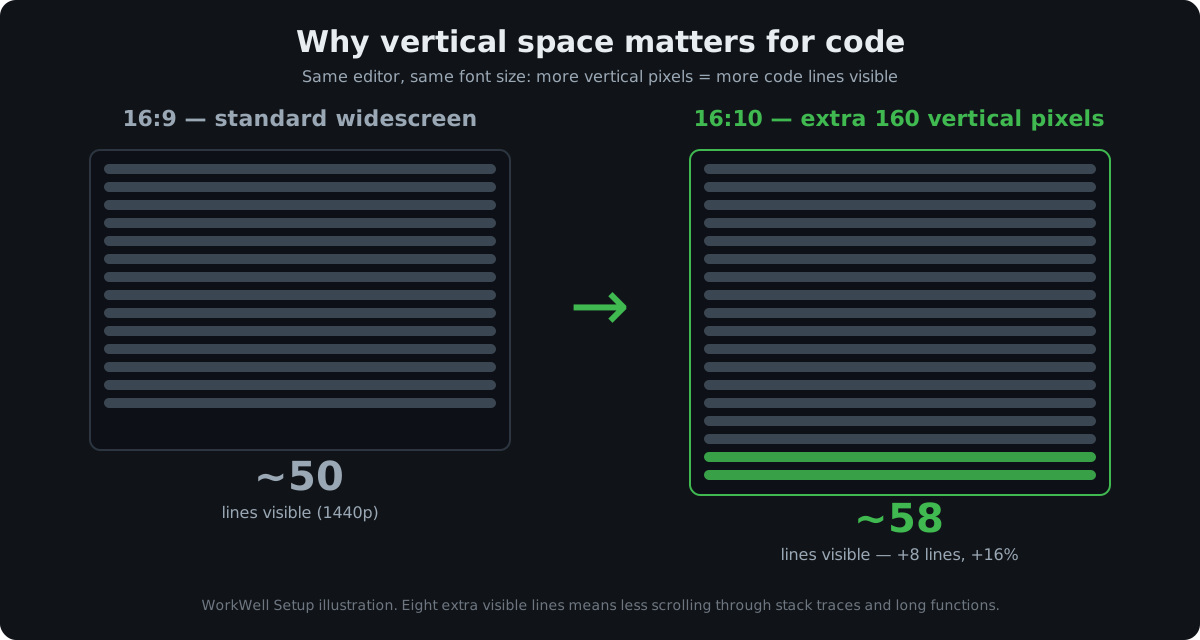
Consider 16:10 for extra vertical space. A 16:10 panel gives roughly 11% more vertical pixels than 16:9 at the same width — several more visible lines of code and less scrolling. None of our five picks is 16:10, but it’s worth filtering for if vertical space is your top priority.
Time your purchase if you can. Monitor prices are seasonal, and the floor usually arrives during sale season. If you’re not in a hurry, Black Friday week (Nov 27–30) is when monitor prices hit their yearly floor — our Black Friday monitor deals guide tracks the discount bands to expect. The Dell U2723QE, for example, has repeatedly dropped 30%+ during past sale events.
FAQ: monitors for programming
Is 4K worth it for coding?
Yes on a 27-inch monitor, where 4K’s ~163 PPI makes small fonts visibly sharper than 1440p. On 24-inch screens the difference is subtle; on 32-inch 4K you may want display scaling to keep text readable.
Should I get a 27-inch or 32-inch monitor for programming?
Choose 27-inch 4K for the sharpest text, or 32-inch 1440p for maximum window-tiling space — with the latter, sit slightly farther back to keep text comfortable.
Is a curved monitor good for programming?
A gentle curve can help on 32-inch and larger screens by keeping the edges at a more even viewing distance, but for 27-inch coding panels a flat screen is simpler and cheaper. If you’re curious, our curved monitor guide breaks down when the curve actually helps.
How much USB-C power delivery do I need for a coding setup?
65W covers most 13–14-inch laptops; 90W or more is safer for 15–16-inch machines. Match or exceed your laptop’s included charger wattage.
Is a high refresh rate worth it for coding?
Nice-to-have, not a must-have: 120Hz+ makes scrolling through code feel noticeably smoother, but prioritize resolution, size, and ergonomics first.
The bottom line
For most programmers in 2026, the Dell UltraSharp U2723QE is the safest all-round pick: 4K text sharpness, a true one-cable USB-C dock, and strong owner feedback. Tight budget? The LG 27UP850N-W keeps the 4K sharpness for less. And if your workflow is really three windows tiled side by side, the 32-inch BenQ GW3290QT buys you the canvas to do it comfortably.