Best Curved Monitors for Home Offices (2026)
The best curved monitor for a home office in 2026 is the Dell S3422DWG: a 34-inch ultrawide with a gentle 1800R curve, 3440×1440 resolution, a 144Hz refresh rate and a 3-year warranty, typically around $350. If your desk is laptop-first, the Samsung ViewFinity S65UA is the better pick because its USB-C port charges your laptop at 90W over a single cable.
As an Amazon Associate I earn from qualifying purchases.
The short version: Dell S3422DWG for the safest all-round pick, Samsung S65UA if you dock a laptop daily, LG 34WP65C-B if you also game after work, Gigabyte G34WQC A for the most monitor per dollar. All four are 34-inch VA ultrawides at 3440×1440.
How do the best curved monitors for home offices compare?
Every monitor below is a 34-inch ultrawide at 3440×1440 — one screen replacing two 27-inch monitors, with no bezel in the middle. Prices are as of October 2026.
| Monitor | Curve | Panel | Refresh rate | USB-C | Speakers | Price (Oct 2026) |
|---|---|---|---|---|---|---|
| Dell S3422DWG | 1800R | VA | 144Hz | No | 2 x 5W | ~$320–$370 |
| Samsung ViewFinity S65UA | 1000R | VA | 100Hz | Yes, 90W PD | None | ~$300–$400 |
| LG 34WP65C-B | 1800R | VA | 160Hz | No | 2 x 7W | ~$350–$400 |
| Gigabyte G34WQC A | 1500R | VA | 144Hz | No | 2 x 2W | ~$300–$350 |
What is the best curved monitor for a home office overall?
The Dell S3422DWG is the pick we recommend to most people, because it gets every office-relevant detail right and none of them wrong. It is a 34-inch VA panel with a gentle 1800R curve, 3440×1440 resolution, a 144Hz refresh rate, and VESA DisplayHDR 400 certification. The 3000:1 contrast ratio makes text and spreadsheets look noticeably deeper than on a typical IPS office monitor, and the 90% DCI-P3 color coverage is good enough for casual photo work.
The 1800R curve is the gentlest here, so it feels almost like a flat monitor — a plus if you share your screen on video calls, where a tight curve looks distorted from an angle.
Dell backs it with a 3-year Advanced Exchange warranty and a Premium Panel Exchange promise: find one bright pixel and Dell sends a replacement. The stand adjusts for height and tilt, two 5W speakers handle calls, and the ports cover two HDMI 2.0, one DisplayPort 1.4 and a USB 3.2 hub. The one gap is USB-C — laptop users need a separate charger or a dock. It typically sells for $320–$370 as of October 2026 against a $499.99 list price.
Which curved monitor is best for a laptop-first desk?
The Samsung ViewFinity S65UA is the only monitor in this roundup with USB-C, and for a laptop-first desk that single feature outweighs everything else. One USB-C cable carries the 3440×1440 video signal and delivers 90W of charging power, which is enough for a MacBook Air, a Dell XPS 13, or most thin-and-light Windows laptops.
The panel is a 34-inch VA display with a tight 1000R curve — the most aggressive curve here. At a normal desk viewing distance of 70–90 cm, the curve wraps the screen around your field of vision and makes the edges genuinely easier to read than on a flat panel. The trade-off: sit more than a meter away, or watch from the side, and the image distorts. The 100Hz refresh rate is plenty smooth for office work, though the lowest here.
At 350 nits with HDR10 support and a 4000:1 contrast ratio, it is also the highest-contrast panel here. The weakness is audio: there are no built-in speakers at all, so budget for a small speaker or use headphones on calls. It hit $299.99 in October 2026, an all-time low, and typically sits in the $300–$400 range.
Which curved monitor is best for mixed work and gaming?
The LG 34WP65C-B is the fastest monitor in this roundup, with a 160Hz refresh rate and a 1ms motion blur reduction mode, so it is the pick if your office monitor doubles as your evening gaming screen. It is still a 34-inch VA panel at 3440×1440 with a gentle 1800R curve, 300 nits of brightness, a 3000:1 contrast ratio and 99% sRGB coverage — solid office specs that happen to come with gaming speed attached.
The practical advantage for work is the speakers: two 7W speakers with MAXXAUDIO tuning are the loudest and clearest in this group, loud enough for video calls and background music without a separate speaker on the desk. LG’s on-screen control software splits the ultrawide into preset window layouts, which is useful when you want email, a spreadsheet and a browser side by side.
The gaps are the same as the Dell’s: no USB-C port, so a laptop needs its own charger, and no Ethernet. It typically sells for $350–$400 as of October 2026. If you never game, the Dell is the better buy for the same money; if you do, the LG’s speed and speakers win.
Which curved monitor gives the best value under $350?
The Gigabyte G34WQC A is the value pick: it matches the Dell on the specs that matter — 34-inch VA panel, 3440×1440, 144Hz, DisplayHDR 400, 90% DCI-P3 — and it costs less. It was on sale for $300 on Amazon in October 2026 and typically sells for $300–$350, which makes it the cheapest way into a proper 34-inch curved ultrawide.
Its curve is 1500R, the middle ground between the Samsung’s tight 1000R and the Dell and LG’s gentle 1800R. For most desks that is the sweet spot: you can feel the curve wrapping the screen toward you, but it never feels like the monitor is bending around your head. Ports are the best here — two HDMI 2.0 and two DisplayPort 1.4 — so a work laptop and a personal desktop can both stay plugged in.
The compromises are small but real. The speakers are two 2W units — audible for calls, useless for music. And there is no USB-C, like the Dell and LG. If your budget is firm at $300–$350 and you do not need USB-C, this is the monitor to buy.
How curved should a home office monitor be?
The number after the R is the radius, in millimetres, of the circle the curve belongs to — so 1000R is a tighter curve than 1800R. The right choice depends mostly on how far you sit from the screen.
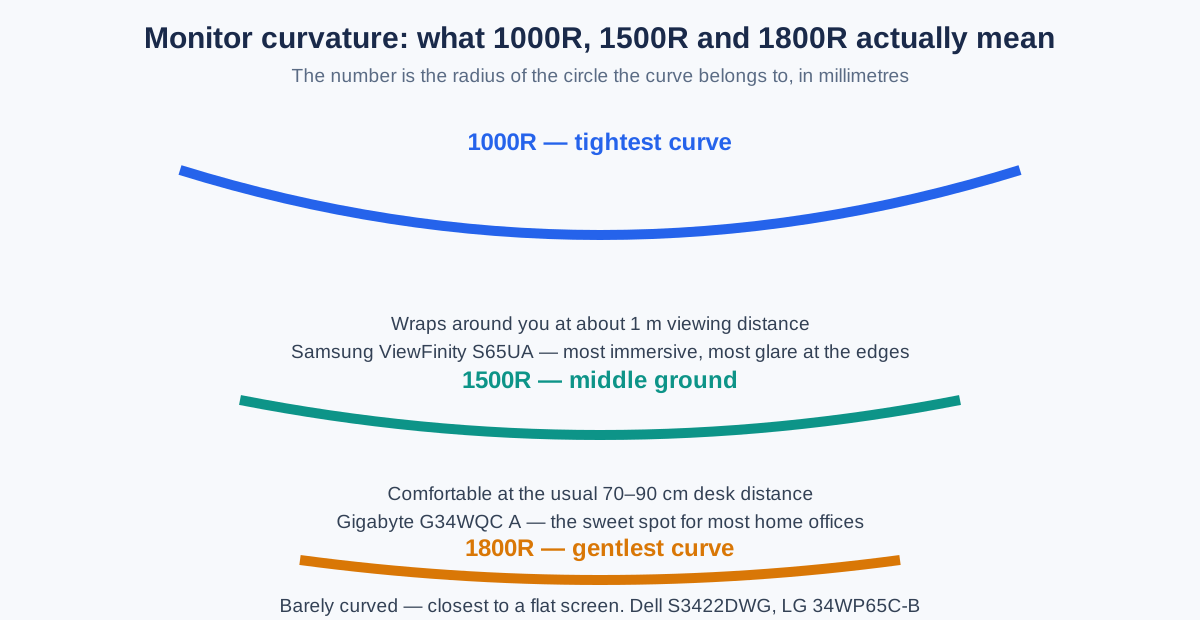
- 1000R: The tightest curve. Best if you sit close (60–80 cm) and want maximum immersion, but the worst choice if other people regularly look at your screen.
- 1500R: The middle ground. Comfortable at the usual 70–90 cm desk distance. The safest choice if you are unsure.
- 1800R: The gentlest curve. Closest to a flat screen. Best if you sit further back or share your screen often.
It needs a desk at least 60 cm deep so the stand and the panel’s arc fit with room for a keyboard. Our best monitor arm for ultrawide guide covers arms rated for the 7–10 kg weight of these 34-inch panels, which is worth checking because a cheap arm will sag under an ultrawide.
Do you need USB-C on a curved monitor?
USB-C with Power Delivery is the single most useful port on an office monitor, and only the Samsung S65UA in this roundup has it. With USB-C, one cable carries video and charges your laptop; without it, you need a separate laptop charger on the desk and a second cable to plug in every morning.
If your computer is a desktop tower or a mini PC that lives under the desk, USB-C adds nothing. If your computer is a laptop that you dock and undock daily, USB-C is worth paying roughly $50 extra for. One caution: check the wattage, not just the presence of USB-C. The Samsung delivers 90W, which charges almost every thin-and-light laptop at full speed, while some cheaper USB-C monitors deliver only 15W or 65W.
Will a 34-inch curved monitor fit your desk?
A 34-inch ultrawide is about 32 inches (81 cm) wide and needs a desk at least 100 cm wide to look right, with 120 cm being comfortable. Depth matters more than width: you want at least 60 cm of desk depth so the screen sits 70–90 cm from your eyes, which is where the curve is designed to work.
If your desk is narrower than 100 cm, or shallower than 60 cm, a 34-inch curved monitor will dominate the desk and sit too close to your face. In that case a 27-inch flat monitor is the better buy — our best monitor for home office under $200 guide covers smaller screens that fit tight desks. If you are torn between one ultrawide and two separate screens, our dual monitor setup guide walks through the trade-offs.
Glare is the other desk-fit question: a curved panel catches window light across a wider angle than a flat one, so angle the monitor with the window to the side — our reduce monitor glare guide covers the other cheap fixes.
How much should you pay for a curved monitor in 2026?
A good 34-inch curved ultrawide for home office work costs $300–$400 in 2026. Below $300 you are usually looking at a 1080p panel or a no-name brand with a one-year warranty. Above $450 you are paying for gaming features or professional color accuracy that office work does not need.
All four monitors in this guide sit in that $300–$400 band, and all four have been on sale inside it repeatedly through 2026. The practical rule is simple: if the monitor you want is above $400, wait for a sale rather than paying full price.
If you’re not in a hurry, Black Friday week (Nov 27–30) is when monitor prices hit their yearly floor — our Black Friday monitor deals guide tracks the discount bands to expect. The 34-inch ultrawides in this guide have historically dropped $50–$100 below their normal sale prices during the event.
What are the downsides of curved monitors?
Curved monitors are not for everyone, and the honest downsides are worth knowing before you buy.
- VA smearing. All four monitors here use VA panels, which have deep blacks and high contrast but slower pixel response in dark scenes. In office work you will almost never notice it.
- Text at the edges. On a tight 1000R curve, text at the far edges can look slightly stretched when you sit off-center. Sit centered and the problem disappears.
- Screen sharing. A curved screen looks normal to you and slightly distorted to anyone watching your shared screen from an angle. For design reviews, share a window rather than the full screen.
- Wall mounting. The curve adds depth, so a curved monitor sits further from the wall than a flat one. Check the arm’s depth rating, not just its weight rating.
None of these is a reason to avoid curved monitors — they are reasons to pick the gentle 1800R curve if you are unsure, and to buy from a retailer with a good return policy.
Best curved monitor for home office — FAQ
What is the best curved monitor for a home office? The Dell S3422DWG is the best all-round pick: a 34-inch 1800R ultrawide at 3440×1440 with 144Hz, DisplayHDR 400 and a 3-year warranty, typically around $350 as of October 2026.
Is a curved monitor good for working from home? Yes, at 34 inches and above: the curve keeps the far edges of a wide screen at an equal distance from your eyes, which reduces head-turning and eye strain during long workdays.
What size curved monitor is best for a home office? 34 inches at 3440×1440: it replaces two 27-inch monitors, fits a 100–120 cm desk, and costs $300–$400 as of October 2026.
Is 1000R or 1800R better for office work? 1800R for most offices: the gentler curve looks normal on shared video calls; 1000R only if you sit close and want maximum immersion.
Do curved monitors need a special monitor arm? Yes: 34-inch curved monitors weigh 7–10 kg, so use an arm rated for at least 10 kg with VESA 100×100 mounting.
Is USB-C important on a curved monitor? Yes, if you dock a laptop daily: one USB-C cable carries video and charges the laptop, and 90W (as on the Samsung S65UA) suits most thin-and-light laptops.
The verdict
Buy the Dell S3422DWG for the safest all-round curved monitor. Buy the Samsung S65UA if a laptop is your main computer. Buy the LG 34WP65C-B if the same screen must handle evening gaming. Buy the Gigabyte G34WQC A if your budget stops at $350. Whichever you choose, get a 34-inch 3440×1440 panel, a curve of 1500R or gentler, and a desk at least 100 cm wide.