
Best Vertical Laptop Stands for Desks (2026): 5 Upright Docks That Free Your Desk
The best vertical laptop stand for most desks in 2026 is the HumanCentric Vertical Laptop Stand. Its automatic-grip slot holds laptops up to 1 inch thick without adjustment screws, and it costs about $40–$45 as of November 2026. For two laptops, the OMOTON Double at about $25 is the better buy.
As an Amazon Associate I earn from qualifying purchases.
TL;DR — Our 2026 vertical laptop stand picks
- Best overall: HumanCentric — auto-grip, up to 1″ thick, ~$40–$45
- Best for two laptops: OMOTON Double — two slots, ~$25
- Best for heavy 16-inch: OMOTON Single — slot to 2.71″, ~$16–$20
- Best for MacBook: Twelve South BookArc — fitted inserts, ~$10–$23
- Best budget: UGREEN — 12,000+ ratings at 4.7 stars, ~$20
Method: we compared published specs, November 2026 prices, and verified owner feedback — no hands-on testing.
When does a vertical stand beat a regular laptop riser?
A vertical stand and a laptop riser solve different problems, and buying the wrong one is the most common mistake here. A riser lifts an open laptop toward eye level so you can type on it; a vertical stand stores a closed laptop on its edge, like a book on a shelf.
A vertical stand wins when your laptop doesn’t need its own screen. If you work at an external monitor with a separate keyboard and mouse, your laptop’s display is a second screen you never look at — and a closed laptop standing upright takes up roughly the footprint of a hardcover book.
A riser wins when the laptop screen is still your main screen — our best laptop stands guide covers those.
Here’s the one-sentence rule: if your external monitor does the looking and your keyboard does the typing, store the laptop vertically; if the laptop screen does the looking, raise it on a riser instead.
How do you set up a closed-laptop (clamshell) desk?
A vertical stand only earns its keep as part of a closed-laptop setup — Apple calls it clamshell mode. It takes about ten minutes and one cable if your monitor has USB-C.
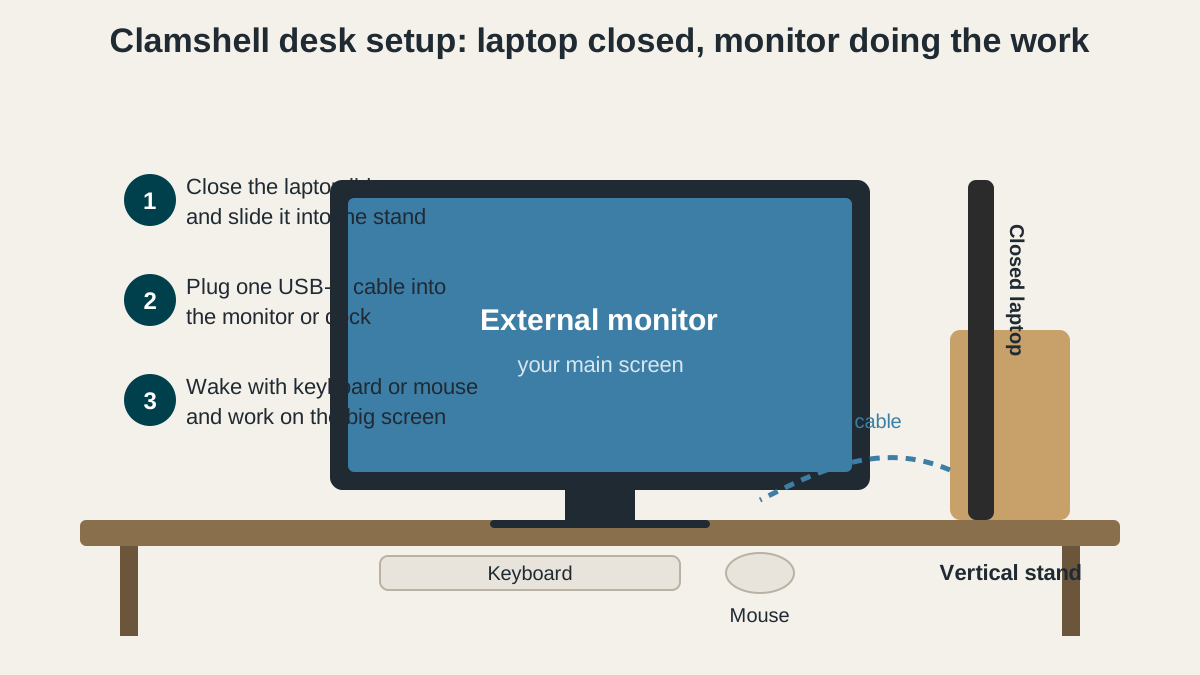
- Close the laptop and slide it into the stand. Seat it fully so the bottom edge rests on the stand’s base — a laptop that sits crooked creeps out of the slot over a few days.
- Connect one USB-C cable from the laptop to the monitor or a dock. The cable carries video and, on most modern monitors, charging power too. Without USB-C on the monitor, use HDMI for video and keep the charger plugged in.
- Wake the laptop with your keyboard or mouse. On a Mac, any keypress wakes a closed MacBook with power and an external display attached. On Windows, set “When I close the lid” to “Do nothing” first, or the machine sleeps.
- Set the external monitor as your main display. Drag the menu bar (Mac) or set “Make this my main display” (Windows) so new windows land on the big screen.
- Leave a gap for air. A closed laptop still makes heat, especially while charging. Keep the slot clear of papers and leave an inch behind it. If your machine runs hot while docked, our laptop cooling pad guide covers when extra airflow helps.
Leave the USB-C cable plugged into the monitor, so docking is one motion — slide the laptop in, plug in one cable. The second-monitor setup walkthrough covers the Windows and Mac display settings in more detail.
What should you check before buying a vertical laptop stand?
Four specs decide whether a stand fits your laptop — check them before you order.
- Slot width versus laptop thickness. Measure your laptop closed, at its thickest point, including any case or skin. A MacBook Air is about 0.44 inches; a 16-inch MacBook Pro is about 0.66 inches; a chunky gaming laptop can reach 1 inch or more. The slot must be at least as wide as the laptop — a slot that grips too tightly scratches the lid over time.
- Weight and base stability. A vertical laptop is a lever: a heavy 16-inch machine in a light plastic stand tips the dock when you bump the desk. Aluminum stands hold heavy laptops without drama; plastic stands are fine for a MacBook Air but risky for anything over 4 pounds.
- Silicone lining. The slot walls touch your laptop’s lid every day. Bare metal or hard plastic leaves fine scratches over months; every pick below is silicone-lined.
- Ventilation and port access. A closed laptop vents through its hinge and keyboard gaps, so the stand must not block the rear edge. Check that the slot doesn’t cover the charging port — some stands sit deep enough that a USB-C cable can’t plug in.
Price is the last filter, not the first. Stands cluster between $10 and $50, and the difference between a $16 stand and a $45 stand is mostly the grip mechanism and the finish. Buy the cheapest stand that fits your laptop, then spend the savings on the monitor cable.
The 5 best vertical laptop stands for desks in 2026
1. HumanCentric Vertical Laptop Stand — Best overall for a single laptop
The HumanCentric is the only stand here you never have to adjust. Its automatic-grip mechanism closes around the laptop when you slide it in, fitting anything up to 1 inch thick — a MacBook Air, a 14-inch MacBook Pro, a Dell XPS 13 — with no screws, no inserts, and no measuring. Solid aluminum with silicone pads throughout. The trade-off is the 1-inch limit: most 16-inch gaming laptops are thicker, and this stand won’t take them. Pricing as of November 2026: about $40–$45, rated about 4.4 out of 5 by owners.
Best for: anyone with one laptop under 1 inch thick who wants a set-and-forget dock.
Check the HumanCentric Vertical Laptop Stand price on Amazon
2. OMOTON Double Vertical Laptop Stand — Best for two laptops
If you juggle a work laptop and a personal laptop, or a laptop and a tablet, the OMOTON Double is the obvious pick. Two adjustable slots sit side by side in one aluminum block, each adjustable from 0.55 to 1.65 inches thick, and the unit handles laptops up to 17.3 inches. Two machines dock in about 5.9 by 4.7 inches of desk. Owner feedback is the strongest here: about 4.8 out of 5 across more than 10,000 ratings. The double-nut design on the adjustment screw is the detail owners praise most — once you set the slot width, it stays set, where cheaper stands drift loose over weeks. The compromise is bulk: at 1.85 inches tall, it looks chunkier than the single-slot stands. Pricing as of November 2026: $24.99, with dips to about $17.
Best for: two-laptop households, work-plus-personal setups, and laptop-plus-tablet desks.
Check the OMOTON Double Vertical Laptop Stand price on Amazon
3. OMOTON Single Vertical Laptop Stand — Best for heavy 16-inch laptops
The single-slot OMOTON is the workhorse of this list, and it earns its place on one spec: its slot adjusts from 0.55 inches all the way to 2.71 inches thick. No other stand here comes close. That range covers everything from a MacBook Air to a 17.3-inch gaming laptop — the machines every other stand on this page rejects. The rest is the same proven design as the Double: sandblasted anodized aluminum, silicone lining, and a screw-set width that holds its position. Owner feedback rates it about 4.8 out of 5 across more than 9,000 ratings. The trade-off is the adjustment: changing slot width means flipping the stand over and turning a screwdriver. Pricing as of November 2026: typically around $16–$20.
Best for: heavy 16- and 17-inch laptops, gaming machines, and anyone whose laptop is over 1 inch thick.
Check the OMOTON Single Vertical Laptop Stand price on Amazon
4. Twelve South BookArc — Best vertical stand for MacBook
The BookArc is the only stand here designed for one brand, and that focus shows. Instead of an adjustable screw, it uses swappable silicone inserts shaped to specific MacBook models — slide in the insert that matches your MacBook Air or MacBook Pro, and the laptop sits in a cradle molded to its exact thickness, with zero wobble and no adjustment to drift. It is also the smallest stand here: a compact arc of aluminum with a weighted base that takes up barely more desk than the laptop itself. The limit is compatibility: this is a MacBook stand, and a Windows laptop might fit an insert by luck, but Twelve South doesn’t promise it. Pricing as of November 2026: usually about $20–$23, with sale drops to about $10 — it was spotted at $9.99 in early November 2026. Owner feedback: about 4.5 out of 5.
Best for: MacBook-only desks where the stand should look as considered as the laptop.
Check the Twelve South BookArc price on Amazon
5. UGREEN Vertical Laptop Stand — Best budget vertical stand
The UGREEN is the cheapest way to get a genuinely good vertical stand. Its single slot adjusts to fit laptops up to 17.3 inches, with a slot range up to about 1.5 inches thick, in a compact aluminum body that weighs just over 6 ounces. Silicone pads protect the lid and keep the base from sliding. What sets it apart at this price is the review record: more than 12,000 ratings averaging 4.7 out of 5 — a budget stand with a structural flaw doesn’t survive 12,000 owners. The trade-offs are modest: a simple screw adjustment rather than the OMOTON’s double-nut design, and a lighter body that deserves a gentle hand with a heavy 16-inch laptop. Pricing: about $20.
Best for: tight budgets, first-time clamshell setups, and light laptops up to 17.3 inches.
Check the UGREEN Vertical Laptop Stand price on Amazon
Quick comparison: all five vertical laptop stands side by side
| Stand | Slots | Slot width range | Max laptop size | Typical price (Nov 2026) |
|—|—|—|—|—|—|
| HumanCentric | 1 | Auto-grip, up to 1″ | 16″ | $40–$45 |
| OMOTON Double | 2 | 0.55–1.65″ per slot | 17.3″ | $24.99 |
| OMOTON Single | 1 | 0.55–2.71″ | 17.3″ | $16–$20 |
| Twelve South BookArc | 1 | Fitted MacBook inserts | MacBook models | $10–$23 |
| UGREEN | 1 | Adjustable, up to ~1.5″ | 17.3″ | $20 |
When should you buy a vertical laptop stand?
Any of these five stands is a small purchase, so timing matters less than fit — but the discounts are real: the BookArc has dropped to about $10, less than half its usual price, and the OMOTON Double has repeatedly dipped to about $17. Time your purchase if you can. If you’re not in a hurry, Black Friday week (Nov 27–30) is when desk accessories prices hit their yearly floor — our Black Friday desk accessories deals guide tracks the discount bands to expect. If you need one now, buy on fit, not on price: measure your laptop’s closed thickness, match it to the slot range in the table above, and pick the cheapest stand that covers your machine.
FAQ: vertical laptop stands for desks
Will a vertical stand damage my laptop?
No, if the slot is lined and the width is right: silicone lining protects the lid, and a slot matched to your laptop’s thickness holds it without pressure. A bare-metal slot squeezed too tight is what causes scratches.
Can I use a vertical stand with the laptop lid open?
No — vertical stands are designed for closed laptops only. An open laptop in a vertical slot stresses the hinge and blocks the vents. If you want the laptop screen visible, use a riser instead.
Do vertical laptop stands work with gaming laptops?
Yes, if the slot is wide enough: most gaming laptops are 0.9 to 1.2 inches thick, so the OMOTON Single with its 0.55–2.71 inch range is the safe pick. Check your exact model’s thickness first.
The bottom line
For most single-laptop desks, the HumanCentric is the easiest buy: no adjustment, no measuring, just slide the laptop in. Two laptops? The OMOTON Double at about $25. A thick gaming machine? The OMOTON Single, the only stand here that takes laptops up to 2.71 inches thick. MacBook-only desks get the BookArc, and the UGREEN covers every budget setup for about $20. Measure your laptop first — the right slot width is the whole decision.