
The best power strip for a desk setup in 2026 is the Anker Nano Power Strip (10-in-1, 70W, Clamp) (~$70): it clamps to the desk edge with 6 AC outlets, 70W USB-C laptop charging, and 1,500J surge protection. Budget setups should get the Addtam AD313C2 (~$17).
As an Amazon Associate I earn from qualifying purchases.
Best Power Strips for Desk Setups (2026)
TL;DR — The 6 best power strips for desk setups:
- Best overall: Anker Nano Power Strip (10-in-1, 70W, Clamp) (~$70) — desk-edge clamp, 6 AC outlets, 2 USB-C (70W max), 1,500J surge.
- Best value: Addtam AD313C2 (~$17) — 5 AC outlets, 4 USB, 1,080J surge, 10-ft cord, wall-mountable.
- Best smart: Kasa Smart KP303 (~$30) — 3 app-controlled outlets + 2 USB, Alexa/Google, no hub.
- Best surge protection: Belkin BE108230-12 (~$57) — 8 outlets, ~3,400J surge, 12-ft cord, $200,000 equipment warranty.
- Best long cord: NTONPOWER 15-ft Power Strip (~$31) — 6 outlets, 2 USB, 15-ft cord, 1,080J surge.
- Best edge-mount compact: SH001-01Pro (price varies) — 3 AC + 4 USB (30W) in a triangular desk-edge mount, 4.9-ft cord.
The quotable rule: a desk-setup power strip is furniture, not an accessory — buy it for how it mounts and where the wall outlet is, not just for how many outlets it has.
| Model | AC outlets | USB ports | Surge (J) | Cord | Mount style | Price (Oct 2026) |
|---|---|---|---|---|---|---|
| Anker Nano (10-in-1, 70W, Clamp) | 6 | 2 USB-C + 2 USB-A (70W max) | 1,500 | 5 ft | Desk-edge clamp (0.6–1.8″ edges) | ~$70 |
| Addtam AD313C2 | 5 | 4 USB | 1,080 | 10 ft | Keyhole wall/under-desk | ~$17 |
| Kasa Smart KP303 | 3 (smart) | 2 USB-A | Surge-protected, ETL | — | Desktop | ~$30 |
| Belkin BE108230-12 | 8 | 0 | ~3,400 | 12 ft | Desktop/floor, cord clip | ~$57 |
| NTONPOWER Long Cord (15 ft) | 6 | 2 USB | 1,080 | 15 ft | Keyhole wall/under-desk | ~$31 |
| SH001-01Pro | 3 | 3 USB-A + 1 USB-C (30W) | Overload-protected | 4.9 ft | Desk-edge clamp/screw | Varies |
What Should a Desk-Setup Power Strip Actually Have?
A mount that hides the strip, a cord long enough to reach the wall, and USB-C that can actually charge a laptop.
Outlet count is the least important spec on a desk strip. What matters:
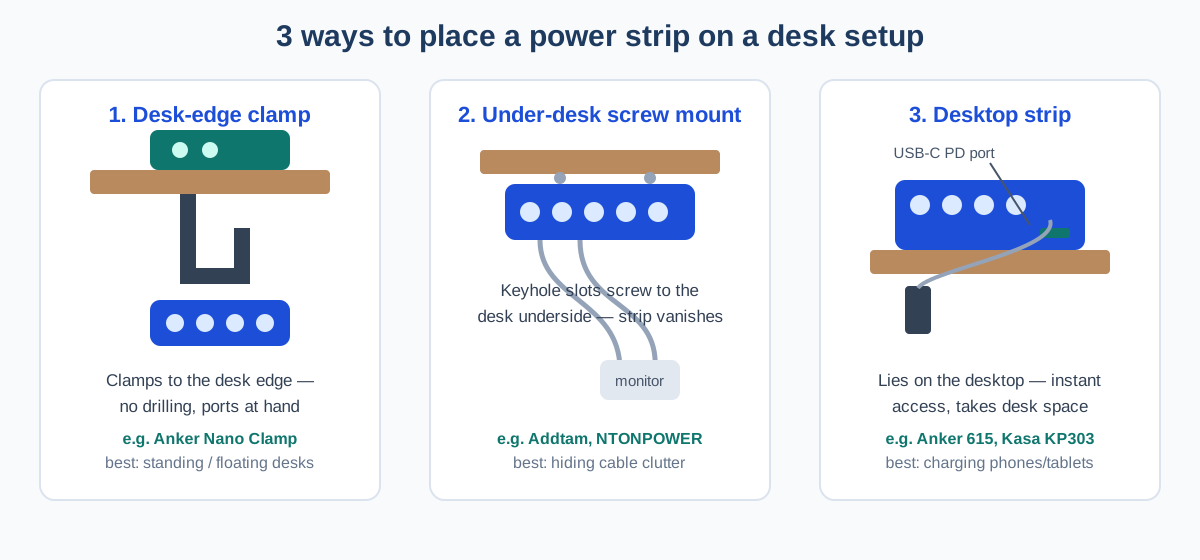
- Mounting style. Desk-edge clamps (Anker Nano) put ports at hand without drilling. Keyhole slots (Addtam, NTONPOWER) screw under the desk and make the strip disappear. Desktop strips (Kasa KP303) sit on the desk. Pick by how much you rearrange.
- Cord length. Measure desk to wall outlet first. A 5-ft cord works when the outlet is behind the desk; across the room needs 10–15 ft.
- USB-C wattage. 15W ports charge phones slowly and can’t sustain a laptop. A 70W port (Anker Nano) fast-charges most ultrabooks, removing one power brick.
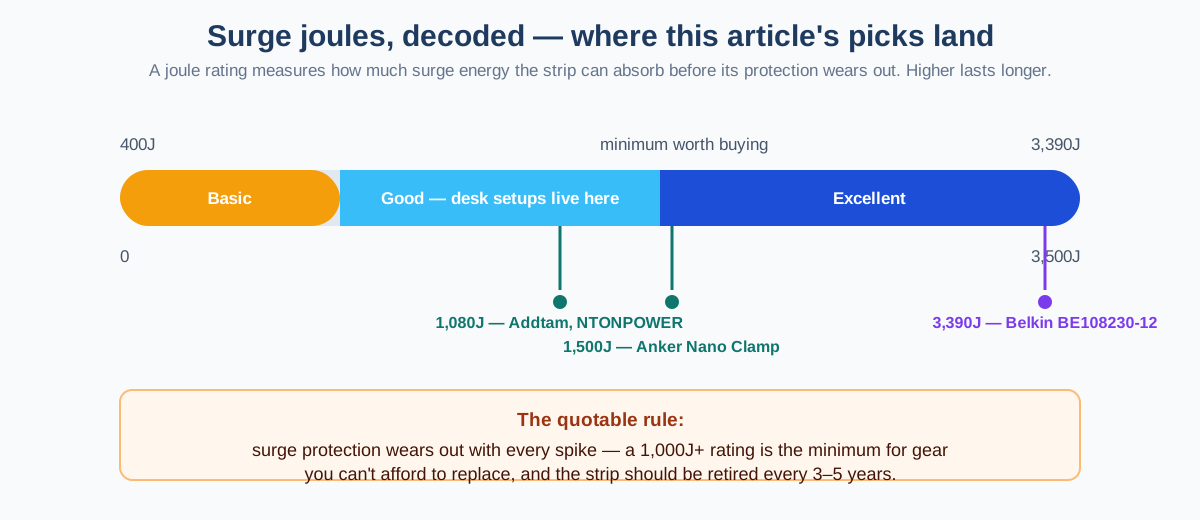
- Surge joules. For gear you can’t afford to replace, 1,000J+ is the minimum (diagram below).
Pair the strip with a real cable-routing plan — our DIY desk cable management guide covers trays, sleeves, and where each cable should run.
Best Overall: Anker Nano Power Strip (10-in-1, 70W, Clamp)
The Anker Nano Power Strip (10-in-1, 70W, Clamp) is the first power strip designed for desks rather than floors: a two-part clamp grips the desk edge (0.6–1.8 inches thick) so the slim 0.75-inch upper section sits above the desk with 2 AC outlets, 2 USB-C, and 2 USB-A ports, while 4 more AC outlets hide beneath the surface for monitors, docks, and speakers.
The headline spec is 70W USB-C: one port delivers up to 70W alone — enough to replace most laptop bricks (a MacBook Pro 14″ charges to 50% in about 37 minutes). Use both USB-C ports at once and the 70W splits 45W + 25W, so pair a laptop with a phone, not a second laptop. Protection is solid: 1,500J surge protection, overload and short-circuit protection, temperature monitoring, 1,875W / 15A AC rating, a 5-ft cord, and a 24-month warranty.
At ~$70 (it dipped to $56 during fall Prime Day in October 2026), it’s the priciest pick here — but the only one that solves power and clutter at once. The caveats: the clamp skips glass desks and edges thicker than 1.8 inches, so measure first. At 24.7 oz it’s heavier than it looks — a feature once clamped, enabling one-handed plug/unplug with zero sliding.
Best Value: Addtam AD313C2
The Addtam AD313C2 is the under-$20 workhorse: 5 widely spaced AC outlets plus 4 USB ports, a 10-ft cord, 1,080J surge protection with overload protection, a flat plug, and keyhole slots for screwing it under a desk or onto a wall.
The 10-ft cord is the real value proposition. In most home offices the wall outlet is behind furniture or across the room, and a short-cord strip forces an extension-cord daisy-chain — or worse, a surge protector plugged into an extension cord, a genuine fire-safety no-no. The 45-degree flat plug sits nearly flush so the desk can push back against the wall.
The trade-offs at ~$17 are honest: 1,080J is fine for a desk but not fortress-grade, and the USB ports are standard 5V (phone/tablet charging, not laptop PD). For a desk where the laptop keeps its own brick, keyhole-mount it under the desk and it disappears.
Best Smart: Kasa Smart Power Strip KP303
The Kasa Smart Power Strip KP303 turns three outlets into smart-home citizens: each of the 3 AC outlets is individually controllable from the Kasa app, by voice, or on a schedule — no hub needed. Two always-on USB-A ports (5V/2.4A) charge phones without burning a smart outlet.
This is the strip for the desk that doubles as a smart-home zone: schedule the desk lamp to come on before your workday, kill the monitor and speakers from the app when you leave (a typical monitor + speaker combo sips 5–15W idling), and check from anywhere that everything is off. It carries ETL-certified surge protection and a 2-year TP-Link warranty.
The limits: only 3 smart outlets (USB ports are always-on), and it needs your 2.4 GHz router within range. At ~$30 it’s the most expensive pick per outlet.
Best Surge Protection: Belkin BE108230-12
The Belkin BE108230-12 is the protection-first pick: 8 AC outlets with ~3,400J of surge suppression — 6 of them widely spaced for bulky adapters — plus coaxial and RJ-11 phone-line protection. Belkin backs it with a limited lifetime warranty and a $200,000 connected-equipment warranty, the strongest guarantee on this list.
The 12-ft, 14-gauge cord is the other desk-relevant detail: long enough to route properly, and the right-angle flat plug fits behind desks pushed against walls. Sliding safety covers on every outlet, a green “protected” indicator plus a red “not grounded” warning, and a cord-management clip round out a very grown-up package.
At ~$57 (Best Buy listed it at $56.73 in October 2026), it’s the most expensive non-smart strip here, and it has zero USB ports. Buy the Belkin when your desk holds gear that would hurt to replace: the workstation PC, audio interface, NAS, or expensive monitors. For a laptop-plus-phone setup, the Addtam’s 1,080J at ~$17 is plenty.
Best Long Cord: NTONPOWER 6-Outlet Long Cord Power Strip
The NTONPOWER Long Cord Power Strip exists for the room where the wall outlet is nowhere near the desk: a 15-ft heavy-duty cord, 6 AC outlets, 2 USB charging ports, 1,080J surge protection with a 15A breaker switch, and two keyhole mounting holes.
Fifteen feet is a lot of cord, which is exactly the point. Standing desks complicate power routing — a desk that rises 20 inches needs slack or the cord yanks the strip — and this length covers standing-desk travel plus an outlet two furniture-pieces away. The flat plug, fireproof housing, and auto-cutoff breaker are done right.
The trade-offs: USB ports are phone-grade (no laptop PD), and 1,080J is the desk-grade minimum. At ~$31 (NTONPOWER lists the 15-ft variant at $31–37 by color as of October 2026), it costs about double the Addtam — you’re paying for the 5 extra feet and heavier-duty housing. If your outlet is within 10 ft, get the Addtam instead.
Best Edge-Mount Compact: SH001-01Pro Desk Edge Power Strip
The SH001-01Pro is the smallest-footprint pick: a triangular desk-edge unit with 3 AC outlets plus 4 USB ports (3 USB-A and 1 USB-C, 30W shared) that clamps or screws to the desk edge. The 4.9-ft cord and full 125V/15A/1875W rating make it a real power strip, not a USB toy.
This is the pick for nightstands, small desks, and student setups where a full-size strip is overkill: the USB-C port at up to 30W fast-charges phones and tablets (not laptops), and overload protection plus tamper-resistant outlets cover the safety basics.
The limits are capacity: 3 AC outlets run out fast, and there’s no published surge-joule rating — don’t plug a $3,000 workstation through it. Pricing fluctuates, so check the page; it’s a specialist pick for tight spaces, not the default answer.
How Do You Mount a Power Strip Under a Desk?
Two screws and the keyhole slots on the back of the strip — 10 minutes.
Under-desk mounting is the single biggest clutter win: the strip vanishes, cables drop straight into it, and only one cord runs to the wall. The Addtam and NTONPOWER have keyhole slots for exactly this:
- Hold the strip under the desk (rear third, cord side facing the wall) and pencil-mark the two keyhole positions.
- Drive two #8 wood screws, leaving heads ~1/4 inch proud. Pre-drill hardwood to avoid splits.
- Slide the keyholes over the screw heads and pull snug — it shouldn’t move.
- Route the incoming cord to the wall in a tray or raceway. Our DIY cable management guide has the routing plan.
One safety rule: never let a standing desk’s frame pinch the cord during height changes — route with slack. And never daisy-chain surge protectors; one protected strip per wall outlet.
Do I Need USB-C PD on a Power Strip?
Yes if you want to retire a laptop brick; no if your laptop keeps its own charger.
The Anker Nano’s 70W USB-C can genuinely replace most laptop chargers (MacBook Air/Pro 13–14″, most Windows ultrabooks under 70W) — deleting one bulky adapter and one cable. That’s the real value of PD on a strip: one fewer brick, not just “fast charging.”
For phones, tablets, earbuds, and lamps, standard 5V USB ports (Addtam, NTONPOWER, Kasa) are fine and cost a fraction. A phone charging in 2 hours instead of 90 minutes is not worth $50.
The smart play: one PD strip for the laptop, and a value strip for everything else. Don’t pay for laptop-grade USB-C on a strip whose only job is feeding monitor adapters.
If the strip is part of a bigger desk organization push, our best desk organizer drawers and the desk accessories guide cover the rest of the desktop.
Frequently Asked Questions
What’s the best power strip for a desk setup?
The Anker Nano Power Strip (10-in-1, 70W, Clamp) (~$70) — its clamp puts ports at hand, a 70W USB-C charges most laptops, and 1,500J surge protection guards the gear.
How many joules should a desk power strip have?
At least 1,000 joules for gear you care about: 1,080J (Addtam, NTONPOWER) is the minimum, 1,500J (Anker Nano) is comfortable, and ~3,400J (Belkin) is maximum protection.
Is it safe to mount a power strip under a desk?
Yes — use the strip’s keyhole slots with two wood screws and keep the vents clear. Never daisy-chain two surge protectors together.
Should I plug a surge protector into an extension cord?
No — plug the surge protector directly into the wall outlet. Chaining cords violates the strip’s UL listing; buy a 10–15 ft strip instead.
What’s better for a desk: a clamp strip or an under-desk strip?
Clamp strips put ports at hand with no drilling and survive rearranging; under-desk keyhole mounts hide the strip completely but are semi-permanent. Clamps win for renters and tinkerers.
The Bottom Line
Buy the mount, not the outlet count.
The Anker Nano Clamp Power Strip (~$70) is the best power strip for a desk setup in 2026: ports where you can reach them, a laptop-grade USB-C port, and no floor clutter. Value buyers get the Addtam AD313C2 (~$17) and screw it under the desk. Smart-home desks get the Kasa KP303 (~$30); irreplaceable gear gets the Belkin BE108230-12 (~$57).
Whichever you pick, mount it before you plug anything in — a strip on the floor is a strip you’ve already lost to the cable nest. Then tackle the cables themselves: our DIY desk cable management guide shows where each one should go.
Pingback: 19 Desk Cable Management Ideas That Actually Hide Everything - WorkWell Setup