
As an Amazon Associate I earn from qualifying purchases.
DIY Desk Cable Management: 11 Cheap Fixes That Work
The best DIY desk cable management costs under $60 total and takes about 30 minutes: mount your power strip under the desk, bundle everything with reusable Velcro ties, route runs through a cable tray or raceway, and sleeve the trunk down to the outlet. The fixes below run from free to roughly $25 each, and eight of the eleven cost $15 or less.
Prices as of October 2026.
TL;DR — the 30-minute version:
- Free wins first: mount the power strip under the desk, label every cable, and re-coil long cables before spending a cent.
- Best $11: VELCRO Brand ONE-WRAP Cable Ties (100-pack) — reusable, cut-to-length, the highest-ROI purchase in cable management.
- Best under-desk anchor: an IKEA SIGNUM cable tray (~$25) or any mesh wire basket gets the power strip off the floor.
- Cleanest visible run: a D-Line 39-inch cord cover (~$18) turns the desk-to-wall run into one neat line.
- The whole kit: every fix in this guide runs about $60–75 total if you buy them all.
Why Bother With Cable Management at All?
Because you touch this desk every day. Cables pooling on the floor collect dust, snag your feet, and turn every equipment change into a ten-minute archaeology dig. A tidy under-desk also photographs better — which matters when your setup is your video-call background.
The quotable rule: cable management is 80% routing and 20% buying. A plan beats a shopping cart.
What Do You Need Before You Start?
Less than you think. Gather these before you unplug anything:
- Phone camera — photograph every connection first. Free insurance against the “where did this cable go” panic.
- Reusable Velcro ties — the VELCRO ONE-WRAP 100-pack (8 x 1/2 inch, ~$11–13) is the workhorse. Zip ties work, but you’ll re-do bundles several times, so reusability wins.
- Scissors and a trash bag — you will find at least one dead cable and one charger for a phone you no longer own.
- Cleaning wipes — adhesive sticks far better to a wiped desk underside than a dusty one.
Which Fixes Give the Biggest Result Per Dollar?
| Fix | Typical cost (Oct 2026) | Effort | Best for |
|---|---|---|---|
| Mount power strip under desk | $0–10 | 5 min | Getting everything off the floor |
| Label every cable | $0 | 10 min | Never unplugging the wrong thing |
| Re-coil and shorten long cables | $0 | 10 min | Killing slack loops |
| Binder-clip cable catchers | $0–4 | 3 min | Keeping chargers on the desk edge |
| Adhesive cable clips (6-pack) | ~$7 | 5 min | Charging cables within reach |
| Velcro reusable ties (100-pack) | ~$11–13 | 10 min | Bundling everything neatly |
| Zippered cable sleeve (4-pack) | ~$11 | 5 min | One trunk run to the outlet |
| D-Line 39-inch cord cover | ~$18 | 15 min | Visible desk-to-wall runs |
| Under-desk cable tray (IKEA SIGNUM) | ~$25 | 15 min | Power strip + brick storage |
| Cable management box | ~$25 | 5 min | Hiding bricks on the floor |
| D-Line 6ft floor cord cover | ~$25–38 | 10 min | Cables that cross the floor |
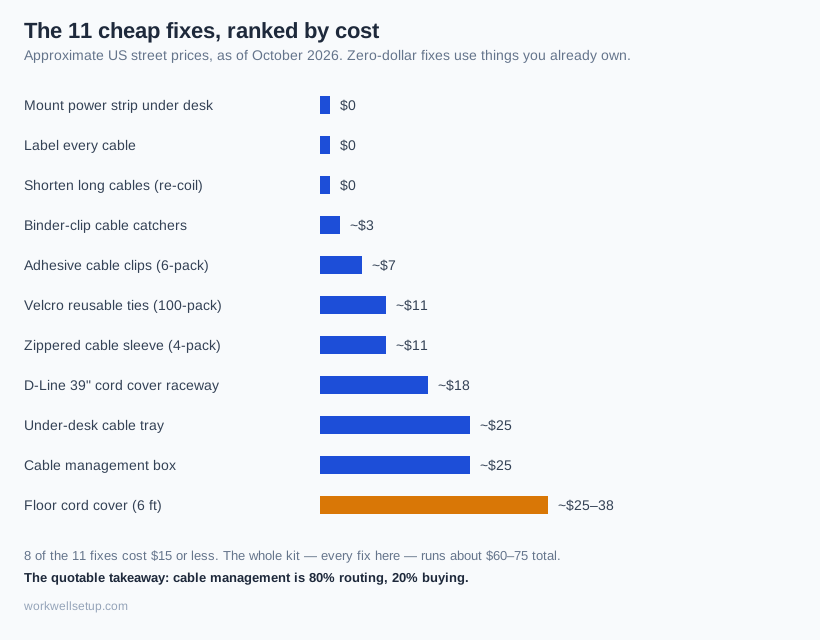
The pattern: the free fixes handle slack and routing, and the paid ones buy containment — a tray, a box, a raceway — that keeps the routing permanent. For the aesthetic side of the same problem, see our desk cable management ideas.
What Are the 11 Cheap Fixes That Actually Work?
Do them in order. Each fix removes cables from the mess the next fix has to handle.
1. Mount the power strip under the desk — $0 to $10
The single biggest visual upgrade, for nearly nothing. Most strips have keyhole slots on the back: hold the strip against the desk underside, mark the holes, drive two short wood screws. No keyholes? A pair of large Command strips holds a typical 6-outlet strip and removes cleanly later.
Mount it toward the back center, outlets facing down, so cables drop straight in instead of snaking across the floor.
2. Label every cable before you unplug anything — $0
Painter’s tape and a marker. Wrap a small flag around each cable near the plug end: “monitor power,” “dock USB-C,” “lamp.” This is the fix people skip and regret most — six months from now, when you swap monitors, you’ll thank yourself.
3. Re-coil long cables and kill the slack — $0
Most spaghetti is slack, not cables. A 6-foot monitor power cable on a 3-foot run leaves 3 feet of loop doing nothing. Coil the excess into a neat 4–6 inch loop, cinch it with a Velcro tie, tuck it out of sight.
The quotable rule: buy shorter cables before you buy cable organizers.
4. Binder clips as cable catchers — $0 to $4
Clip a large binder clip to the desk’s back edge, thread a charger through the metal handles, and the plug stays parked instead of sliding behind the desk. About $3–4 for a box, or free from the junk drawer. Utilitarian-looking, but unbeatable for cables you grab daily.
5. Corral daily chargers with adhesive clips — ~$7
Where binder clips look rough, a 6-pack of Blue Key World adhesive cable clips (~$7) looks finished: small rubber rounds with strong adhesive pads that stick to the desk edge or wall and hold each charging cable in its own slot.
Put them where your hands naturally reach — phone charger left, headphone cable right. The cables you touch most should be the most accessible, not buried behind the desk.
6. Bundle everything with reusable Velcro ties — ~$11–13
Now the main event. The VELCRO Brand ONE-WRAP Cable Ties (100-pack, 8 x 1/2 inch, ~$11–13) wrap around a bundle and grip themselves — reusable for years, and 100 ties last through multiple desks.
Group cables by destination, not type: everything to the monitor in one bundle, everything to the dock in another. Tie every 12–18 inches, snug but not strangling.
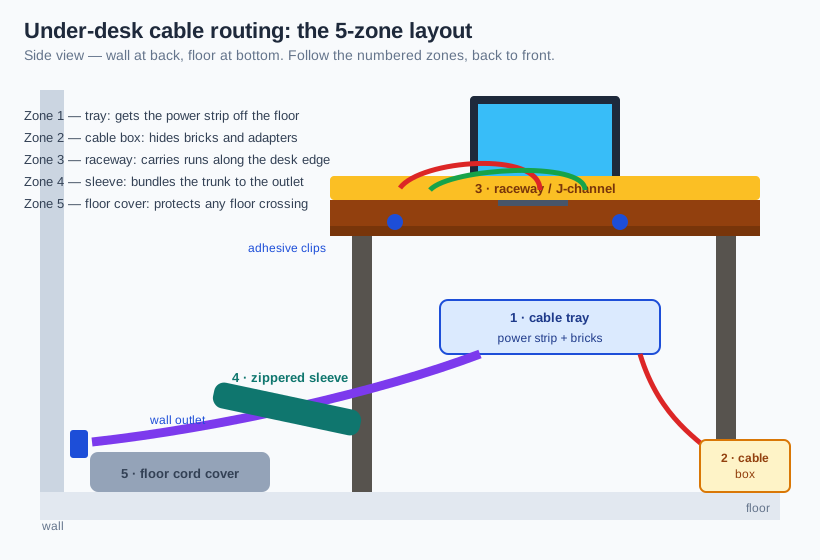
7. Sleeve the trunk run from desk to outlet — ~$11
After bundling, you’ll have one thick “trunk” dropping to the wall outlet. A JOTO zippered cable sleeve 4-pack (~$11, 19–20 inches each, flexible neoprene) zips that trunk into a single tube. Each sleeve holds 8–10 cables at a 1.2-inch zipped diameter, and two sleeves zip together for longer runs.
The zipper is the point: unlike spiral wrap, you can open it, pull one cable, and close it again. Cut a small slit anywhere along the sleeve to let a cable exit mid-run.
8. Run a raceway along the desk edge — ~$18
For horizontal runs — monitor cables traveling sideways to the tray, or desk to wall — a D-Line 39-inch cord cover (~$18) is the cleanest cheap option: a 2-inch-wide, 1-inch-tall half-round channel with self-adhesive backing. Press it to the desk edge or wall, drop cables in, snap the lid shut.
It cuts to length with a hacksaw and takes paint, so it disappears against a white wall or dark desk. For the full under-desk treatment — tray placement and mistakes to avoid — our under-desk cable hiding guide goes deeper.
9. Add an under-desk cable tray — ~$25
The IKEA SIGNUM cable management tray (~$25, 27⅝ inches of powder-coated steel, screws included) bolts under the desk and swallows the strip, bricks, and bundled slack. It’s the most recommended tray in home offices because it’s deep enough for chunky laptop bricks.
No IKEA nearby? A wire mesh basket (~$12) screwed under the desk does 80% of the job. The tray just needs to be ventilated — mesh or open steel beats a solid box.
10. Hide floor bricks in a cable management box — ~$25
For gear that still lives on the floor — a PC power brick, a printer adapter, a UPS — a lidded cable box (~$25, large ventilated) hides them with slots for cables to enter and exit.
Safety note: never seal a running power brick in an airtight box. Warm is normal; hot in a sealed box is a fire risk.
11. Protect any run that crosses the floor — ~$25–38
The last crime scene: the run from wall to desk crossing open floor. A D-Line 6-foot floor cord cover (~$25–38) lays over the cables on a ribbed, non-slip base — no adhesive needed — and cuts to size with a utility knife. The inner channel (0.63 x 0.31 inches) fits two standard power cables.
This also matters for standing desks, where the trunk moves all day: a floor cover anchors the bottom of the run so nothing drags. Our standing-desk cable management guide covers the moving-cable problem in full.
In What Order Should You Do the Fixes?
The 30-minute sequence, assuming ties and one tray or box on hand:
- Photograph everything (2 min) — every connection, wide and close.
- Unplug and clean (5 min) — wipe the desk underside; toss dead cables.
- Mount the strip (5 min) — under the desk, back center, outlets down.
- Label and coil (8 min) — tape flags on every cable; coil the slack.
- Bundle and route (8 min) — Velcro by destination, sleeve the trunk, clip the chargers.
- Contain (5 min) — tray or box in place, bricks inside.
- Floor run last (5 min) — cover anything still crossing the floor.
A laptop-only desk may need just fixes 1, 4, 5, and 6 — ten minutes and under $20.
How Do You Keep It Tidy Long-Term?
Cable management decays because new devices arrive. The maintenance rule is one sentence: every new cable gets a label and a tie the day it arrives. Five Velcro ties in the desk drawer make it a 30-second habit instead of a weekend project. Revisit the whole under-desk once a year. And if you’re building the full setup on a budget, our budget home office setup guide keeps the entire desk — furniture included — under financial control.
DIY Cable Management FAQ
How much does DIY cable management really cost?
About $60–75 buys every fix here, but most desks need three or four: Velcro ties (~$11), adhesive clips (~$7), and a tray or box (~$25) cover the typical setup for under $45.
Can you do cable management without drilling?
Yes. Command strips hold a power strip, adhesive-backed clips and raceways stick to the desk underside, and floor covers need no fasteners at all — only heavy trays genuinely benefit from screws.
How do you hide cables on a glass desk?
Route everything along the back edge in a raceway matched to the frame color and use clear adhesive clips. The underside will be visible through glass, so the goal becomes neat and parallel rather than invisible.
Is it safe to bundle power cables tightly?
Bundling data and low-voltage cables tightly is fine. For mains power, keep bundles loose with air between cables and never seal a running brick in an airtight box — warm is normal, hot means you need ventilation.
What is the cheapest cable management trick that actually works?
Mounting the power strip under the desk: $0 with two screws you already own, five minutes, and it removes the single ugliest element — the strip on the floor with cables radiating from it.