Best Desk Fans for Home Office (2026)
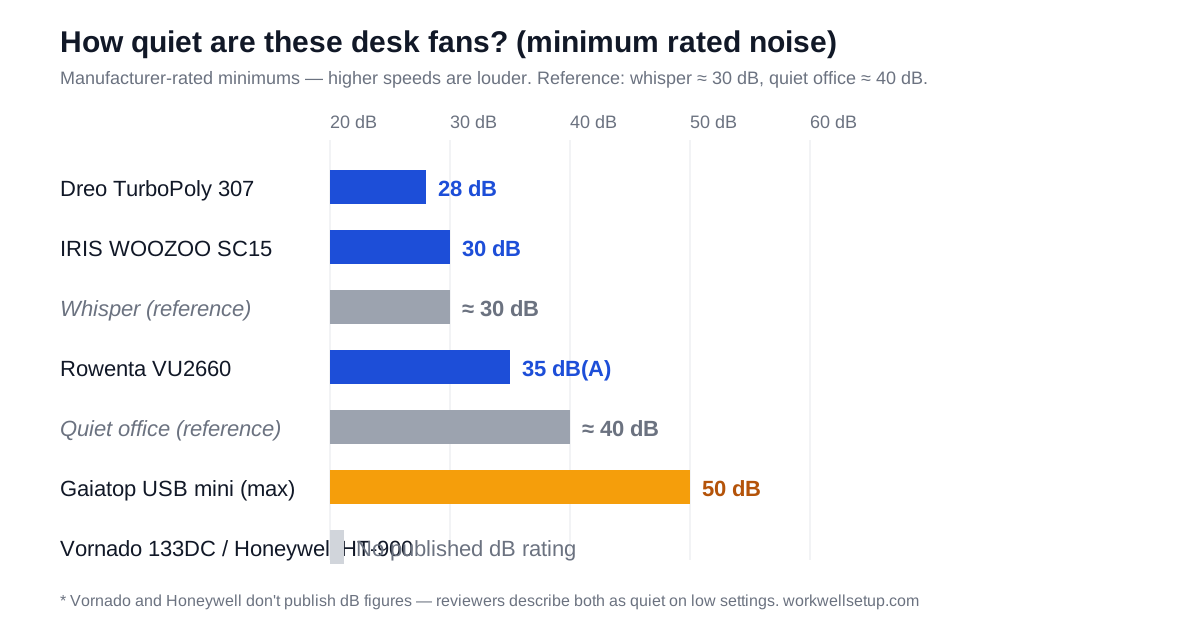
The best desk fan for a home office is the Rowenta Turbo Silence Extreme VU2660 if call quietness matters most (rated 35 dB(A) on its lowest setting), or the Dreo TurboPoly Table Fan 307 if you want a strong, near-silent breeze for around $35. Shop by noise rating first: anything above roughly 45 dB will eventually show up on your microphone.
As an Amazon Associate I earn from qualifying purchases.
TL;DR — the 6 best desk fans for home offices (2026)
- Best overall / quietest: Rowenta Turbo Silence Extreme VU2660 — 35 dB(A) minimum, 5 speeds, Silent Night mode, remote included.
- Best budget: Dreo TurboPoly Table Fan 307 — 28 dB rated, 40-ft air reach, 3 speeds, about $35.
- Best variable speed: Vornado 133DC Energy Smart — brushless DC motor with precise dial control, 5-year warranty.
- Best classic under $20: Honeywell HT-900 TurboForce — 11-inch circulator, 3 speeds, 185 CFM, 2.6 lbs.
- Best remote-control mid-range: IRIS USA WOOZOO PCF-SC15 — 5 speeds, remote, 30 dB rated, 82-ft reach.
- Best USB-powered: Gaiatop USB mini desk fan — plugs into your laptop or dock, 3 speeds, about $10.
| Pick | Size | Min. rated noise | Air reach | Speeds | Price (Oct 2026) |
|---|---|---|---|---|---|
| Rowenta VU2660 | 12″ head, 21.3″ tall | 35 dB(A) | Up to 1,695 CFM | 5 + Silent Night + Turbo Boost | ~$110–130 |
| Dreo TurboPoly 307 | 11″ head | 28 dB | 40 ft | 3 | ~$35 |
| Vornado 133DC | 8.7″ tall, 2.1 lbs | Not published | 30 ft | Variable dial | ~$45–80 |
| Honeywell HT-900 | 11″ head, 2.6 lbs | Not published | 185 CFM | 3 | ~$18–20 |
| IRIS WOOZOO SC15 | 8.27″ globe | 30 dB | 82 ft | 5 | ~$50–65 |
| Gaiatop USB mini | 4.6″ wide, 6 oz | 50 dB (max) | Personal range | 3 | ~$10 |
What actually matters in a desk fan for a home office?
Four things decide whether a desk fan earns its place on your work surface — and noise is the one most buyers underestimate.
Noise rating (dB). Your microphone hears turbulence before you feel it. A fan rated 35 dB or under on its lowest setting disappears into a normal room; at 50 dB it competes with your voice. Manufacturers publish minimum-noise figures (measured at the lowest speed), so treat them as the best case and assume +5–10 dB at the speed you’ll actually use.
DC vs. AC motor. Brushless DC motors (Vornado 133DC, Dreo models) run quieter and use less power than old-style AC motors, and they usually offer more speed steps. AC fans like the Honeywell HT-900 are cheaper and proven, but louder per unit of airflow.
Size and footprint. A 12-inch fan on a 24-inch-deep desk eats a third of your depth. Measure your free desk area before ordering: compact globes (WOOZOO, Gaiatop) fit beside a monitor; full table fans (Rowenta) want their own corner.
Power source. USB fans draw ~5W from your laptop or dock and travel well. Wall-plug fans move more air but add a cable and need an outlet within reach. If your /desk-accessories-productivity/ setup already runs a powered dock, a USB fan slots in with zero extra wiring.
One quotable truth worth remembering: a desk fan’s job is cooling you, not the room — buy airflow aimed at your chair, not cubic feet for the whole house.
Which desk fan is quietest for video calls?
Rowenta Turbo Silence Extreme VU2660 — Best overall
The VU2660 is the quietest name-brand desk fan you can buy without stepping into bladeless-fan prices. Rowenta rates it at 35 dB(A) on its lowest setting — roughly a whisper — and pairs that with a 5-speed range topped by Silent Night (near-inaudible) and Turbo Boost (up to 1,695 CFM when you need real power). The 12-inch head with 5 blades oscillates, the remote stores on board, and the carry handle makes it easy to move between rooms.
At 11.02 × 13.77 × 21.25 inches and 8 lbs it’s the largest pick here, so give it a corner of the desk or a side table rather than wedging it between your monitors. It typically runs ~$110–130 depending on retailer, as of October 2026. For anyone who takes calls all day, this is the one to beat: you can leave it on Silent Night through back-to-back meetings and nobody will know it’s running.
Check the Rowenta Turbo Silence Extreme VU2660 price on Amazon
Dreo TurboPoly Table Fan 307 — Best budget
The TurboPoly 307 is the value standout: a manufacturer-rated 28 dB, an 11-inch head, and a 40-foot air reach for about $35. Dreo’s TurboSilent blade design pushes a claimed 800 CFM — whole-room circulation figures from a fan that fits on a desk. Three speeds on a simple knob, a 120° manual tilt range, and a handle that doubles as a wall-mount hook keep it unfussy.
The trade-off at this price is features, not noise: no remote, no oscillation, no smart anything. If you want Dreo’s Wi-Fi models, the TurboPoly Table Fan 714S ($98.99 at dreo.com) adds app and voice control — but for pure quiet cooling at a desk, the 307 gives you 90% of the experience for a third of the money. Usually under $45 on Amazon, as of October 2026.
Check the Dreo TurboPoly Table Fan 307 price on Amazon
Vornado 133DC Energy Smart — Best variable speed
Vornado’s 133DC replaces the classic AC-powered 133 with a brushless DC motor: up to 80% more energy efficient, with a variable-speed dial instead of two fixed speeds. That dial is the whole point for home offices — you can find the exact setting where the airflow is strong but the mic doesn’t notice, instead of choosing between “too weak” and “too loud.”
The 133DC is genuinely compact (8.7 × 7.4 × 5.9 inches, 2.1 lbs), tilts to aim, throws air up to 30 feet via Vornado’s Vortex Action, and carries Vornado’s 5-year satisfaction guarantee. Vornado publishes no dB figure, but the DC motor is audibly calmer than the AC original. Expect ~$45–80 depending on retailer, as of October 2026.
Check the Vornado 133DC price on Amazon
Honeywell HT-900 TurboForce — Best classic under $20
The HT-900 has been the default budget desk fan for over a decade, with 4.6 stars from 131,000+ Amazon ratings. It’s an 11-inch air circulator: 3 speeds, a 90° pivoting head, 185 CFM, and a frame that sits on a desk or mounts to a wall. At 6.3 × 8.94 × 10.9 inches and 2.6 lbs, it’s small enough for any desk and cheap enough (~$18–20, as of October 2026) to be an impulse buy.
What you don’t get: a published noise rating or DC-motor quietness. Reviewers describe it as fine on low and audible on high — acceptable for general WFH comfort, not the pick for a call-heavy day. Think of it as the reliable baseline every other fan on this list improves on.
Check the Honeywell HT-900 price on Amazon
IRIS USA WOOZOO PCF-SC15 — Best remote-control mid-range
The WOOZOO is the globe-shaped Japanese-designed circulator that keeps showing up in “quiet fan” roundups. The PCF-SC15 runs 5 speeds with a remote, is rated at 30 dB, reaches 82 feet, and oscillates both horizontally (90°) and vertically (65°) — the multi-axis motion spreads air without the back-and-forth whoosh of a single-axis oscillator.
At 8.27 inches cubed it’s compact for its reach, and the remote means you never lean across your keyboard mid-meeting to adjust it. It usually sells for ~$50–65 on Amazon, as of October 2026 (Costco has run it as low as $27 in-warehouse during sales). If you want set-and-forget airflow with a remote and don’t need the Rowenta’s raw power, this is the sweet spot.
Check the IRIS USA WOOZOO PCF-SC15 price on Amazon
Gaiatop USB mini desk fan — Best USB-powered
Sometimes the answer is a $10 fan plugged into your laptop. The Gaiatop mini is 4.6 × 3 × 5.4 inches, weighs about 6 oz, runs on 5V USB (laptop, dock, or power bank), and offers 3 speeds with a 30° tilt. It draws roughly 5W — your laptop won’t notice.
Be realistic about the physics: this cools the person sitting 18 inches away, not the room. Its 50 dB top-speed rating is the loudest number on this list, but at arm’s length on low speed it’s a personal breeze, not a room fan. For hot-deskers, dorm rooms, or anyone whose office is a laptop at a kitchen table, it’s the cheapest comfort upgrade there is.
Check the Gaiatop USB mini desk fan price on Amazon
Where should you place a desk fan during video calls?
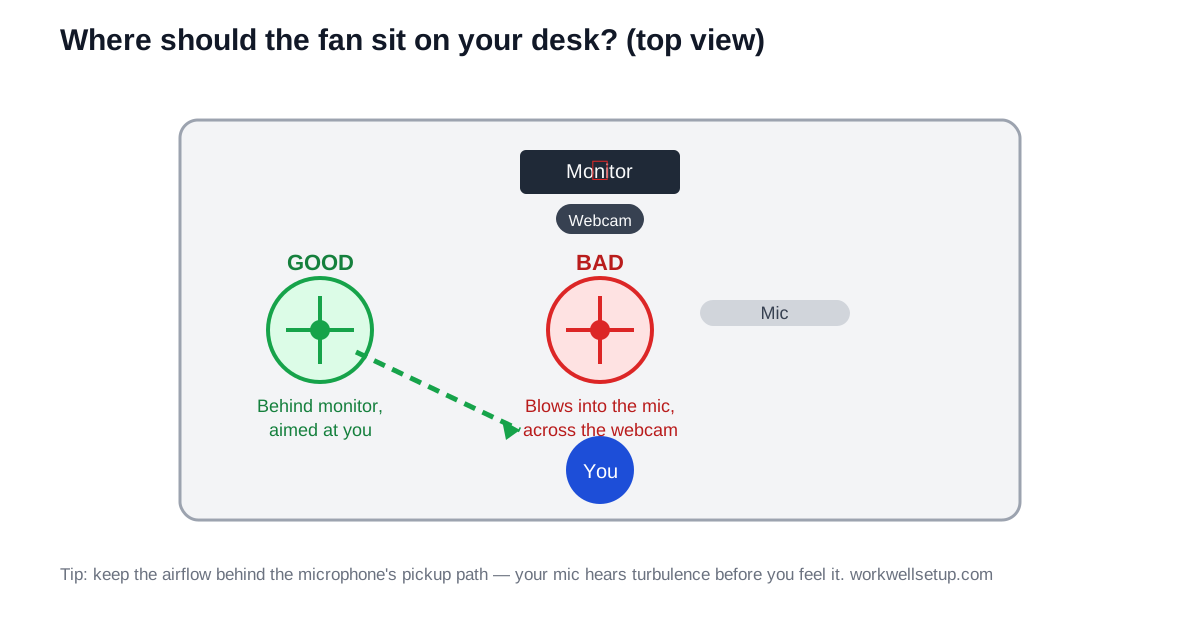
Placement matters as much as the dB rating. Your microphone — especially a condenser or headset mic — picks up air turbulence as a low roar that noise suppression only partly removes. Two rules fix most of it.
First, put the fan behind your monitor, off to the side, aimed at you — never between you and the mic. The monitor blocks direct airflow from hitting a boom or webcam mic, and the side angle keeps turbulence out of the mic’s pickup path. Second, prefer directional over oscillating during calls: a steady stream is both quieter to the mic and more comfortable than air that sweeps in and out.
If you’re rethinking your whole desk layout around call quality, the /monitors-desk-setup-guide/ covers monitor and webcam positioning — fan placement is the missing third piece of that puzzle.
Is a USB desk fan or a wall-plug fan better?
It depends on how much air you need. USB fans (5V, ~5W) are personal coolers: they excel within a 2-foot bubble around your chair and add no cables to manage if you have a powered dock. Wall-plug fans (35–60W) move 5–10x more air and can cool your whole side of the room, but they need an outlet and a speed you can tolerate all day.
The practical split: USB for laptop-first setups and travel, wall-plug for a dedicated desk where you sit 8 hours. Several people end up with both — a Gaiatop-class mini for the laptop bag and a Rowenta-class fan for the home desk.
Are desk fans worth it if you already have AC?
Yes, and for a reason most people miss: moving air makes you feel 3–4°F cooler at the same room temperature, which means you can set the thermostat higher and still be comfortable. A desk fan aimed at your chair does this for pennies of electricity a day, while the AC does less work.
Fans also fix the specific WFH problem AC doesn’t: the still-air pocket around a desk hemmed in by monitors, shelves, and a wall. If your /home-office-setup-guide/ layout has you boxed in, a small circulator breaks up that dead zone better than cranking the whole house’s cooling.
An air purifier is worth considering — our guide covers the best options.
Frequently asked questions
Will my desk fan be heard on video calls?
Not if it’s rated 40 dB or under on the speed you use and sits behind your monitor, off the mic’s pickup path — your mic hears turbulence, so placement matters as much as the rating.
Is a USB desk fan powerful enough for a home office?
For personal cooling at arm’s length, yes — a USB fan moves enough air to cool the person at the desk, though it won’t cool the room.
How loud is 35 dB, really?
About a whisper or a quiet library; normal conversation is around 60 dB, so a 35 dB fan is roughly one-quarter as loud as talking.
Should my desk fan oscillate or point straight at me?
Point it at you during calls — a steady directional stream is quieter on microphones and feels more consistent than oscillating sweeps.
Do desk fans use a lot of electricity?
No — USB models draw about 5W and plug-in models 35–60W, which costs a few cents per workday even at high electricity rates.
The bottom line
Buy the Rowenta Turbo Silence Extreme VU2660 if you want the quietest proven desk fan for a call-heavy workday, the Dreo TurboPoly 307 if you want near-silent airflow for ~$35, or the Gaiatop USB mini if your whole office is a laptop and a kitchen table. Whichever you pick, remember the two rules that matter more than the spec sheet: shop by the noise rating, and keep the airflow out of your microphone’s path.
Pingback: How to Keep Your Home Office Warm in Winter (2026 Guide)
Pingback: Best Space Heaters for Home Offices (2026): 6 Quiet WFH Picks