Best Portable Monitors for Remote Work (2026)
The best portable monitor for remote work in 2026 is the ASUS ZenScreen MB16ACV: a 15.6-inch Full HD IPS display that weighs 0.83 kg, connects with a single USB-C cable, and typically costs $170–$200. If you travel constantly, the 570-gram Lenovo ThinkVision M14 is lighter, and the battery-powered ASUS MB16AHP runs for hours away from outlets.
As an Amazon Associate I earn from qualifying purchases.
The short version: ASUS ZenScreen MB16ACV for the best all-round pick, Lenovo ThinkVision M14 for the lightest travel screen, ViewSonic VG1655 for the best built-in stand and ports, Arzopa Z1FC for the best budget pick under $130, and ASUS ZenScreen MB16AHP for the only one with a built-in battery.
How do the best portable monitors for remote work compare?
Every monitor below is a Full HD IPS portable display. Prices are as of October 2026.
| Monitor | Size | Weight | Brightness | Battery | USB-C power | Price (Oct 2026) |
|---|---|---|---|---|---|---|
| ASUS ZenScreen MB16ACV | 15.6-inch | 0.83 kg | 250 nits | No | Yes, single cable | ~$170–$200 |
| Lenovo ThinkVision M14 | 14-inch | 0.57 kg | 300 nits | No | Yes, dual ports | ~$185–$230 |
| ViewSonic VG1655 | 15.6-inch | 0.82 kg | 250 nits | No | Yes, 60W two-way | ~$180–$250 |
| Arzopa Z1FC | 16.1-inch | 0.78 kg | 300 nits | No | Yes, single cable | ~$97–$130 |
| ASUS ZenScreen MB16AHP | 15.6-inch | 0.86 kg | 220 nits | Yes, 7,800mAh | Yes, single cable | ~$280–$330 |
What is the best portable monitor for remote work overall?
The ASUS ZenScreen MB16ACV is the pick we recommend to most remote workers, because it gets the balance right: a full-size 15.6-inch screen, a weight under a kilogram, and a price that leaves room in the budget for a decent stand. Its Full HD IPS panel runs at 1920×1080 with 178-degree viewing angles, so a spreadsheet stays readable even from the side of a cafe table.
The MB16ACV weighs 0.83 kg and is 10.5 mm thick, so it slides into a laptop bag next to a 14-inch laptop without changing which bag you carry. The fold-out kickstand props it up on any flat surface, and a quarter-inch threaded hole on the back lets you mount it on a standard tripod. One USB-C cable carries both video and power from your laptop, and a driver from ASUS also enables USB-A connections for older machines that lack a full-function USB-C port.
The panel is rated at 250 nits with a flicker-free backlight and a low-blue-light mode, which is enough for indoor work but not for direct sunlight. There are no built-in speakers, so video calls run through your laptop speakers or headphones. ASUS backs it with a 3-year warranty, and it typically sells for $170–$200 as of October 2026.
Which portable monitor is lightest for frequent travel?
The Lenovo ThinkVision M14 is the lightest monitor in this roundup at 570 grams, and that 260-gram saving over the ASUS matters when every gram counts in a carry-on. It is a 14-inch Full HD IPS display, just 4.4 mm thick at its thinnest point, with a 300-nit panel that is the brightest here alongside the Arzopa.
The M14 has two USB-C ports, one on each side, so the cable never has to cross your desk awkwardly. Its power passthrough design lets you plug your laptop charger into the monitor and charge both devices from one adapter. The adjustable foot tilts from minus 5 degrees to 90 degrees and flips the screen into portrait mode, which is genuinely useful for reading long documents or reviewing code.
The trade-offs are the smaller screen and the price. At 14 inches, the M14 shows less of a spreadsheet than the 15.6-inch models, and it has no HDMI port, no speakers and no touchscreen. It lists at $249.99 and typically sells for $185–$230 as of October 2026. If you fly weekly and your laptop bag is already full, the M14 is the screen that disappears into it.
Which portable monitor has the best stand and ports?
The ViewSonic VG1655 is the most desk-friendly portable monitor here. Its integrated folding stand holds the screen steady at a wide range of angles, the magnetic cover doubles as a screen protector in your bag, and a tripod mount on the back gives you a third mounting option.
Connectivity is the VG1655’s real advantage. It has two USB-C ports with 60W two-way power delivery, so it can draw power from your laptop or pass a charger’s power through to the laptop, plus a mini-HDMI port for devices that cannot output video over USB-C. Two 0.8W speakers handle video calls without headphones, which none of the other picks except the Arzopa and the MB16AHP can do.
The panel is a 15.6-inch Full HD IPS display at 250 nits with an anti-glare coating, and the whole unit weighs 0.82 kg. ViewSonic covers it with a 3-year warranty. It lists at $274.08 and typically sells for $180–$250 as of October 2026, with past drops to $159.99.
Which portable monitor is best on a budget?
The Arzopa Z1FC is the cheapest way to add a big second screen, and it is also the biggest and fastest screen in this roundup. Its 16.1-inch Full HD IPS panel runs at 144Hz with 300 nits of brightness and a claimed 106% sRGB color coverage.
At 780 grams and 9.3 mm thick, the Z1FC is lighter than the ASUS models despite the larger screen, and its built-in kickstand supports both landscape and portrait orientations. Ports cover two USB-C connections and a mini-HDMI input, and two 1W speakers are built in. It works with laptops, phones, game consoles and the Steam Deck over a single cable.
The compromises are honest ones for the price. There is no headphone jack, no adaptive sync for gaming, and reviewers consistently call the kickstand flimsy compared with the Lenovo’s foot. There is also no wall adapter in the box, so you charge it from your laptop or a USB-C charger you already own. It lists at $129.99 and was selling for around $97 on Amazon in late October 2026, close to its all-time low.
Which portable monitor works without a power outlet?
The ASUS ZenScreen MB16AHP is the only monitor in this roundup with a built-in battery, and that single feature changes where you can work. Its 7,800mAh battery runs the 15.6-inch Full HD IPS panel for up to 4 hours on its own, according to ASUS, so you can set up on a park bench, a train seat or a client meeting room with no outlet in sight.
That battery also protects your laptop’s battery life, because the monitor stops drawing power from your laptop the moment you unplug it from the wall. The rest of the package is classic ZenScreen: a 15.6-inch Full HD IPS panel, a USB-C port plus a micro-HDMI input, two 1W speakers, a smart case that folds into a stand, and a 3-year warranty.
The cost of the battery is brightness and weight. The panel is rated at 220 nits, the dimmest here, and the unit weighs 0.86 kg, the heaviest in the group. It typically sells for $280–$330 as of October 2026, roughly double the Arzopa. If your workday regularly happens somewhere without a spare outlet, the MB16AHP pays for itself the first week; if you always work near a plug, the cheaper MB16ACV is the better buy.

How do you set up a portable monitor with one USB-C cable?
Setting up a portable monitor takes about a minute once you know the two things that can go wrong. First, your laptop’s USB-C port must support DisplayPort Alt Mode, which lets a USB-C port carry video — most laptops made since 2019 have it, but some budget models do not, so check your laptop’s spec sheet before you buy. Second, if the screen flickers or stays dark, plug your laptop charger into the monitor’s second USB-C port: on the Lenovo and ViewSonic models, that port passes power through to both devices.
The setup itself is three steps:
- Plug the USB-C cable into your laptop and into the monitor’s USB-C port.
- Wait a few seconds for your laptop to detect the display, then open display settings and choose Extend.
- Drag the portable monitor’s position in display settings to match where it sits on your desk, so your mouse moves naturally between screens.
Pairing the monitor with a raised laptop makes the biggest ergonomic difference of all. Our best laptop stand for desk guide shows how to lift your laptop screen to eye level, which puts both screens at the same height and stops the neck strain that comes from looking down at one screen and up at another.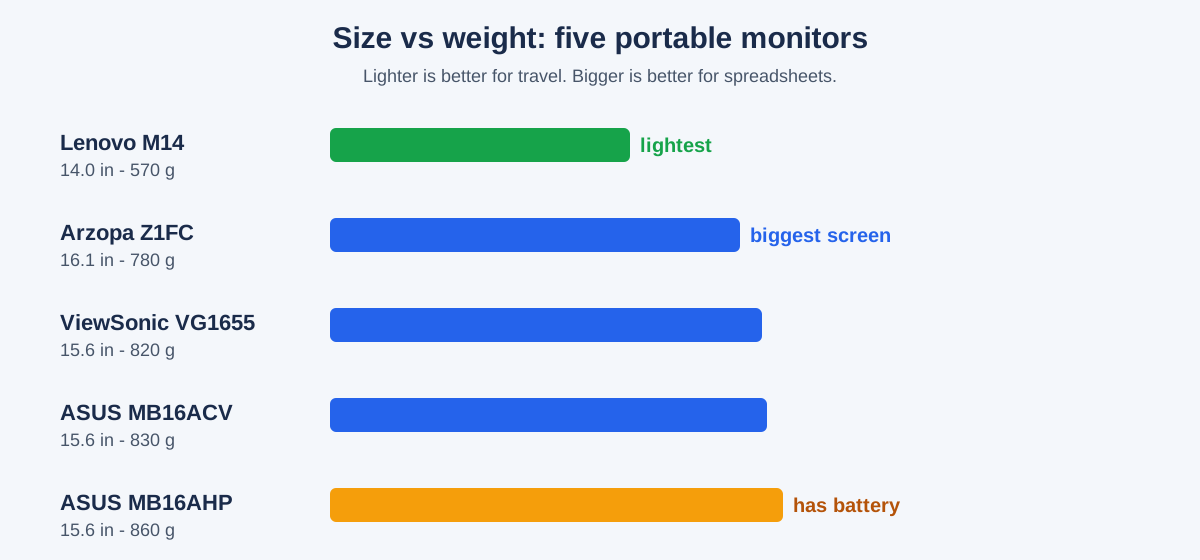
What should you check before buying a portable monitor?
Four checks separate a good purchase from a return. First, confirm your laptop’s USB-C port supports DisplayPort Alt Mode, or buy a model with HDMI if it does not. Second, decide the screen size honestly: a 14-inch monitor fits any bag, but a 15.6-inch or 16.1-inch panel shows meaningfully more of a spreadsheet. Third, weigh the monitor against your real travel pattern — a 570-gram screen is worth paying more for if you fly weekly, and worth nothing if the monitor never leaves your desk. Fourth, check the stand: a monitor with a flimsy kickstand will wobble through every video call.
If you plan to use the portable monitor as part of a permanent two-screen desk rather than a travel setup, our dual monitor setup for working from home guide covers positioning, scaling and cable routing for a fixed desk. And if your laptop only has one free USB-C port, a hub solves that: our best USB-C docking station for dual monitors guide explains how to drive two screens and charge your laptop from a single dock.
When is the best time to buy a portable monitor?
Portable monitors are one of the most discounted monitor categories of the year, and the timing matters more than the model. The Arzopa Z1FC dropped to around $97 in late October 2026, and the ViewSonic VG1655 has sold for as low as $159.99 in past sales. If you are not in a hurry, Black Friday week (Nov 27–30) is when portable monitor prices hit their yearly floor — our Black Friday portable monitor deals guide tracks the discount bands to expect.
Outside sale season, the price order is stable: the Arzopa under $130, the ASUS MB16ACV and ViewSonic VG1655 in the $170–$250 range, the Lenovo M14 at $185–$230, and the battery-powered MB16AHP at $280–$330. Portable monitors have no yearly refresh cycle, so buying during a sale and keeping it for three or four years is the best value play.
Which portable monitor should you buy?
Buy the ASUS ZenScreen MB16ACV for the safest all-round pick, the Lenovo ThinkVision M14 if you travel constantly, the ViewSonic VG1655 if your monitor mostly lives on a desk, the Arzopa Z1FC if your budget is under $130, and the ASUS ZenScreen MB16AHP if you regularly work away from power outlets. Any of the five turns a laptop into a real two-screen workstation.
Frequently asked questions
Do portable monitors need a separate power adapter?
No. Most portable monitors draw all the power they need from your laptop through a single USB-C cable, and models with a second USB-C port can pass your laptop charger’s power through to both devices.
Will a portable monitor work with a MacBook?
Yes. Every MacBook sold since 2016 has a USB-C or Thunderbolt port that outputs video natively, so all five monitors here work with them without drivers.
Can I use a portable monitor as my only monitor?
Yes, but it is a compromise. A portable monitor works as a sole display for a mini PC or a laptop with a broken screen, but its 250–300-nit brightness and small size make it a second screen first and a primary screen second.
How much does a good portable monitor cost in 2026?
A good portable monitor costs $97–$330 as of October 2026: budget picks like the Arzopa Z1FC sell for around $97–$130, mid-range models cost $170–$250, and battery-powered models cost $280–$330.
Is a 14-inch or 15.6-inch portable monitor better for remote work?
A 15.6-inch portable monitor is better for most remote workers because it shows more of a document at readable text size. A 14-inch monitor wins only if you travel constantly and need the lightest possible bag.