The Complete Standing Desk Guide (2026): How to Choose, Set Up & Actually Use One
A standing desk is the rare home-office purchase that people either swear by or quietly abandon — and the difference almost never comes down to the brand. It comes down to fit: the right size for your room, the right lift mechanism for your habits, and a setup that respects your body. This hub is the starting point for everything on this site about standing desks.
The Short Answer
A standing desk is worth buying if you will actually alternate between sitting and standing through the day. Pick an electric model with a weight rating comfortably above your gear, a width that fits your room with space to spare, and set it up so your elbows rest at roughly 90 degrees and your monitor top sits at eye level. Budget for roughly $300–$700 for a solid electric desk as of October 2026, and plan a two-week ramp-up before judging it.
What Is a Standing Desk, Really?
A standing desk is any desk whose work surface adjusts between sitting and standing height. The name undersells it: nobody serious recommends standing all day. The real product is a sit-stand desk, and its job is to make changing position effortless enough that you actually do it. Four mechanisms make that possible — and the one you choose shapes everything from the price to how often you will bother moving the desk.
Which Type of Standing Desk Should You Buy?
Every standing desk on the market falls into one of these four families. Your budget, how often you plan to switch, and how much gear the desk must lift decide the winner.
| Type | How it adjusts | Typical price (Oct 2026) | Best for | Watch out for |
|---|---|---|---|---|
| Electric | Push-button motor(s) in the legs, often with memory presets | $300–$700 for a reliable full-size model | Daily sit-stand switching; heavy multi-monitor setups | Cheapest models may wobble at full height or lift slowly |
| Manual crank | Hand crank on the frame, gears raise the surface | $150–$300 | Occasional height changes; budget buyers who do not mind effort | Cranking gets old fast — owners switch less often |
| Pneumatic | Gas-spring counterbalance with a paddle lever | $200–$450 | Fast, frequent adjustments without power | Weight rating is strict; overloading makes it sag or stick |
| Desktop converter | A riser unit that sits on an existing fixed desk | $100–$300 | Renters and anyone unsure they will stick with standing | Limited surface area; keyboard tray can feel cramped |
The pattern we see across owner reviews is consistent: the easier the desk is to move, the more it gets moved. If your budget allows, an electric model with programmable presets is the safest bet, because switching becomes a one-button habit instead of a chore. If you are testing the waters on a tight budget, our picks for the best standing desks under $500 show where the value actually is.
Are Standing Desks Worth It?
The honest version: standing desks are worth it for people who use them to break up sitting, not for people hunting a health miracle. Research consistently finds that sit-stand desks cut daily sitting time by roughly half an hour to two hours per workday, and owners commonly report less afternoon stiffness and steadier energy. What the research does not support is standing all day — prolonged static standing brings its own downsides, including leg fatigue and foot discomfort.
The full evidence review and the real pros and cons live in our dedicated article: are standing desks worth it. Read it before you spend anything.
What Size Standing Desk Do I Need?
Measure your room before you fall in love with a desk. The most common regret we hear is a desk that crowds the room or a desktop too small for the gear. Width is the dimension that matters most; depth is usually fine at 24 inches for most setups.
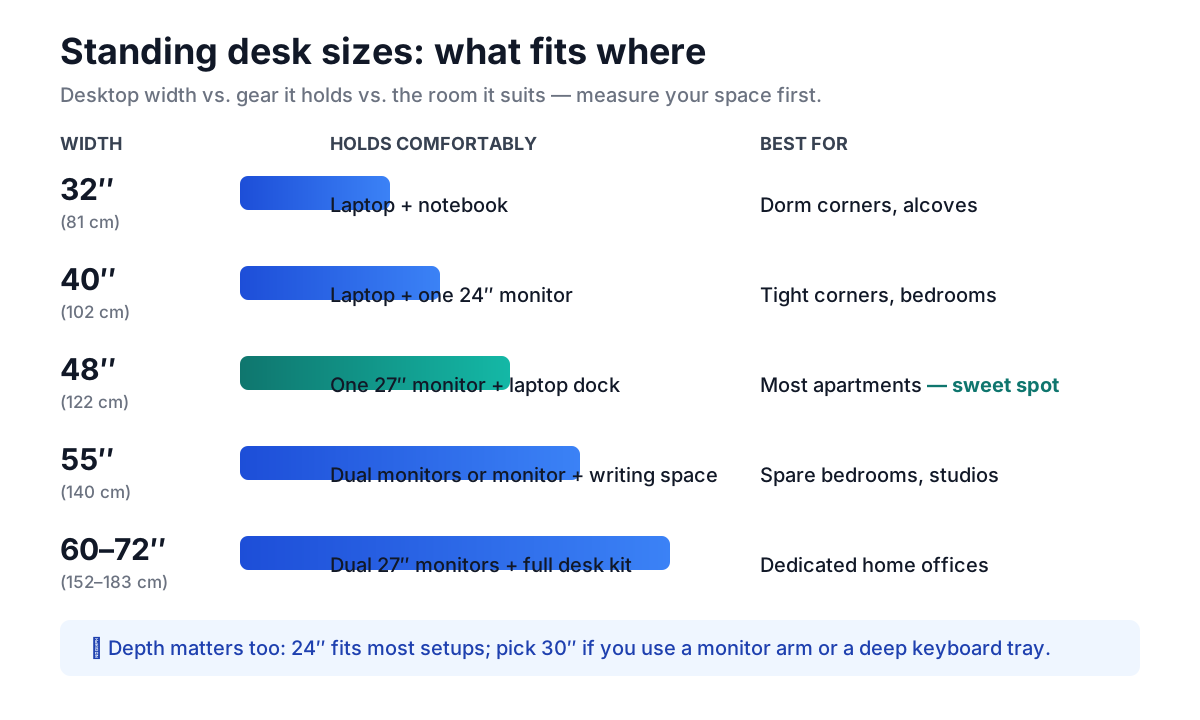
A few rules of thumb:
- Leave clearance behind the desk. A standing desk needs roughly the same floor space as a fixed desk, plus room for your chair to roll back.
- Think in zones, not inches. Map your gear — monitors, keyboard, mouse, lamp — before committing. If two monitors barely fit on paper, they will not fit in practice.
- Small space does not mean no standing desk. This is the most searched corner of the topic, and manufacturers have responded with genuinely good compact options. If your room is tight, start with our roundup of the best standing desks for small spaces, then look at purpose-built space-saving standing desk designs that fold or tuck against walls.
- Apartments have their own constraints. Motor noise matters when walls are thin, and delivery size matters when hallways are narrow. We cover both in our guides to small adjustable standing desks made for apartments and setting up a standing desk in a small apartment.
- Narrow desks are a category now. If your available wall is under 40 inches, a standard desk simply will not fit — but a narrow standing desk built for tight footprints will, and most still lift a laptop-plus-monitor setup without complaint.
When in doubt, tape the footprint on your floor with painter’s tape and live with the outline for a day. It takes five minutes and prevents the most expensive mistake in this purchase.
How Should I Set Up a Standing Desk for Good Ergonomics?
A standing desk set to the wrong height is just an expensive way to be uncomfortable. (Source: OSHA) The ergonomics rules are simple and identical whether you sit or stand — only the desk height changes.
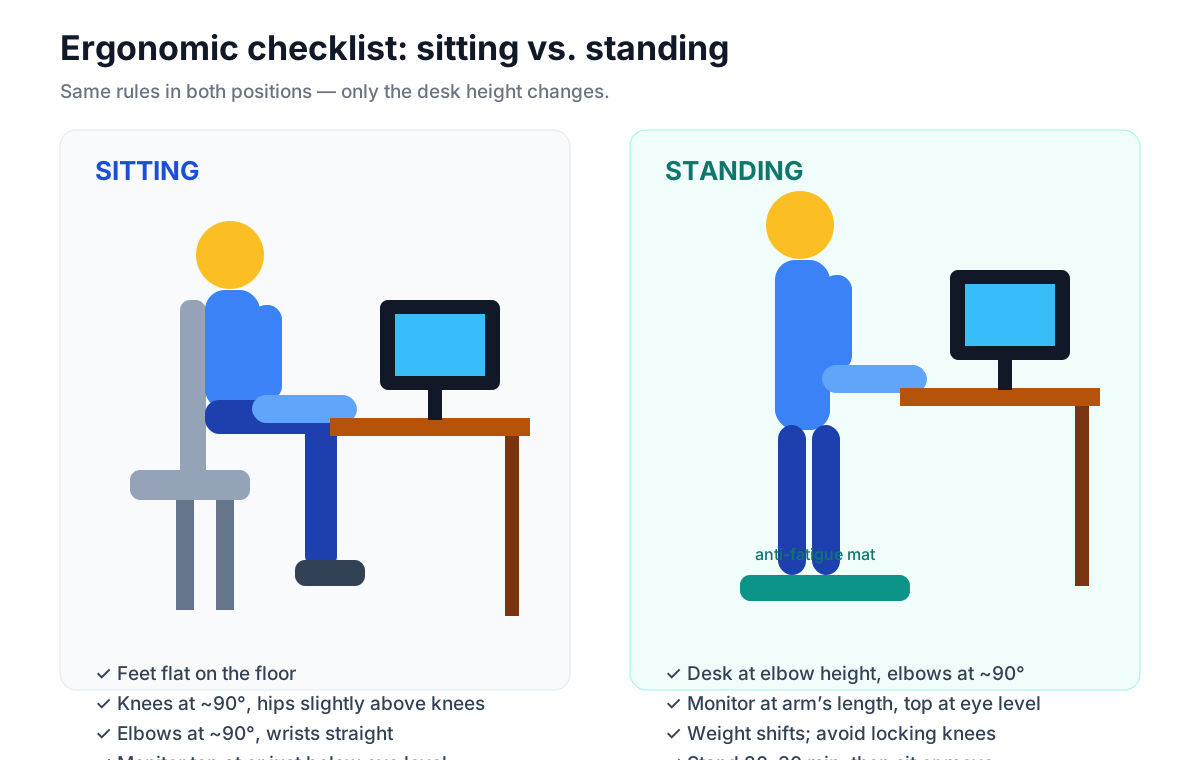
The four checkpoints:
- Monitor at eye level. The top of your screen should sit at or just below eye level, about an arm’s length away. A monitor arm helps enormously, since factory monitor stands rarely reach the right height on a standing desk.
- Elbows at roughly 90 degrees. Adjust the desk — not your shoulders — until your forearms rest parallel to the floor. This is your standing height; save it as a preset.
- Feet grounded, weight shifting. Stand with feet flat on an anti-fatigue mat and shift your weight every few minutes. Never lock your knees.
- Plan for cable travel. Every cable must have enough slack to ride the full height range. Cables that go taut at standing height yank ports or tip power strips. Our walkthrough of cable management for standing desks covers trays, sleeves, and the slack-loop trick that prevents 90% of problems.
Set the sitting preset first (you already know your sitting height), then stand and raise the desk until your elbows hit 90 degrees. Save both. Done in five minutes, comfortable for years.
What Goes Well With a Standing Desk?
The desk is the platform; the accessories decide whether standing feels good or gets abandoned by week three.
- An anti-fatigue mat. Non-negotiable for regular standers — hard floors punish static standing.
- A footrest. Resting one foot on a low platform shifts your hip angle and relieves lower-back pressure. See our picks for the best footrest for under-desk use.
- An under-desk treadmill. Walking slowly while working is the logical endpoint of the “less sitting” idea. It is not for everyone — typing accuracy dips at first — but for calls and reading it is excellent. Our guide to the best under-desk treadmills covers noise, speed ranges, and which desks handle the vibration.
- A monitor arm. Frees desk depth and puts the screen exactly at eye level.
Buy the mat first. Add the rest after a month of actually using the desk — most abandoned accessories were bought on day one.
A balance board is worth considering — our guide covers the best options. A drafting chair for a standing desk is worth considering — our guide covers the best options.
How Do I Start Standing Without Hurting Myself?
Almost every “standing desks hurt my back” story is a ramp-up story. Your body needs time to adapt to the new load on your feet, legs, and lower back. Follow this schedule:
- Days 1–3: Stand 15–20 minutes at a time, two or three times a day. Sit the rest.
- Days 4–7: Extend to 30-minute standing blocks. If your feet ache, you are going too fast — drop back a step.
- Week 2: Aim for roughly a 1:2 ratio of standing to sitting. Alternate with a timer if you forget to switch.
- Week 3+: Settle into whatever ratio feels sustainable. Many long-term owners land around 30–60 minutes of standing per few hours of sitting — there is no prize for more.
- Every day: Wear supportive shoes or stand barefoot on the mat, keep water nearby, and sit down the moment something hurts rather than pushing through.
Soreness in the first week is normal adaptation. Sharp or joint pain is not — sit down, reassess your heights against the ergonomics checklist above, and ramp more slowly. (Source: CDC NIOSH)
Sit-stand schedules are worth considering — our guide covers the best options.
Standing Desk FAQs
How long should you stand at a standing desk each day?
There is no official target; most ergonomists suggest starting with 15–30 minute blocks and building toward roughly 2 hours total across the workday, always alternating with sitting.
Is it bad to stand all day at a standing desk?
Yes — prolonged static standing is linked to leg fatigue, foot pain, and vascular discomfort in the legs, which is why the research favors alternating positions over standing continuously.
What is the best height for a standing desk?
Whatever height puts your elbows at roughly 90 degrees with relaxed shoulders — for most adults that lands in the low-to-mid 40-inch range, but your body, not a chart, is the authority.
Do I need a special chair with a standing desk?
No — any comfortable chair that reaches both your sitting preset and tucks under the desk works; many owners add a drafting stool or perch chair for in-between moments.
Can you put a standing desk on carpet?
Yes, though thick carpet can make lighter desks slightly less stable at full height; a flat chair mat or rug under the base solves most wobble complaints.
Are cheap standing desks worth buying?
Sometimes — budget electric desks have improved a lot, but check the weight rating, warranty length, and stability reviews at full height before trusting a bargain; our under-$500 picks separate the genuine values from the traps. — and if you can wait, Black Friday week (Nov 27–30) drops these prices 20–30%: see our Black Friday standing desk deals guide.
How much weight can a standing desk hold?
It varies widely by model, from under 100 lbs on light converters to 300+ lbs on dual-motor frames — add up your monitors, PC, and everything on the desk, then buy a rating comfortably above that total.
Do standing desks use a lot of electricity?
No — the motor only draws power during the few seconds of height adjustment, so the energy cost is negligible; unplug it if the standby LED bothers you.
Where to Go Next
This guide is the hub; the spokes go deep. Still deciding? Read are standing desks worth it. Short on space? See the best standing desks for small spaces, space-saving standing desk designs, narrow standing desks, and our small-apartment setup guide. On a budget? Start with the best standing desks under $500. Once the desk arrives, nail cable management for standing desks on day one — then consider a footrest or an under-desk treadmill after your first month of standing.