Best Monitor Light Bars for Home Office Desks (2026): BenQ ScreenBar Alternatives
The monitor light bar might be the most elegant solution to ever hit the desk-lighting world. It clips onto the top of your monitor, washes your desk in even light, and takes up exactly zero desk space. No base, no arm, no clamp – just light, exactly where you need it.
As an Amazon Associate I earn from qualifying purchases.
BenQ’s ScreenBar pioneered the category and remains the reference point, but it’s no longer the only option. A wave of alternatives — from Xiaomi’s popular mid-range bar to budget-friendly brands like Quntis — has made the category accessible at nearly every price. This guide breaks down what to look for and the best options worth considering in 2026.
How Monitor Light Bars Work
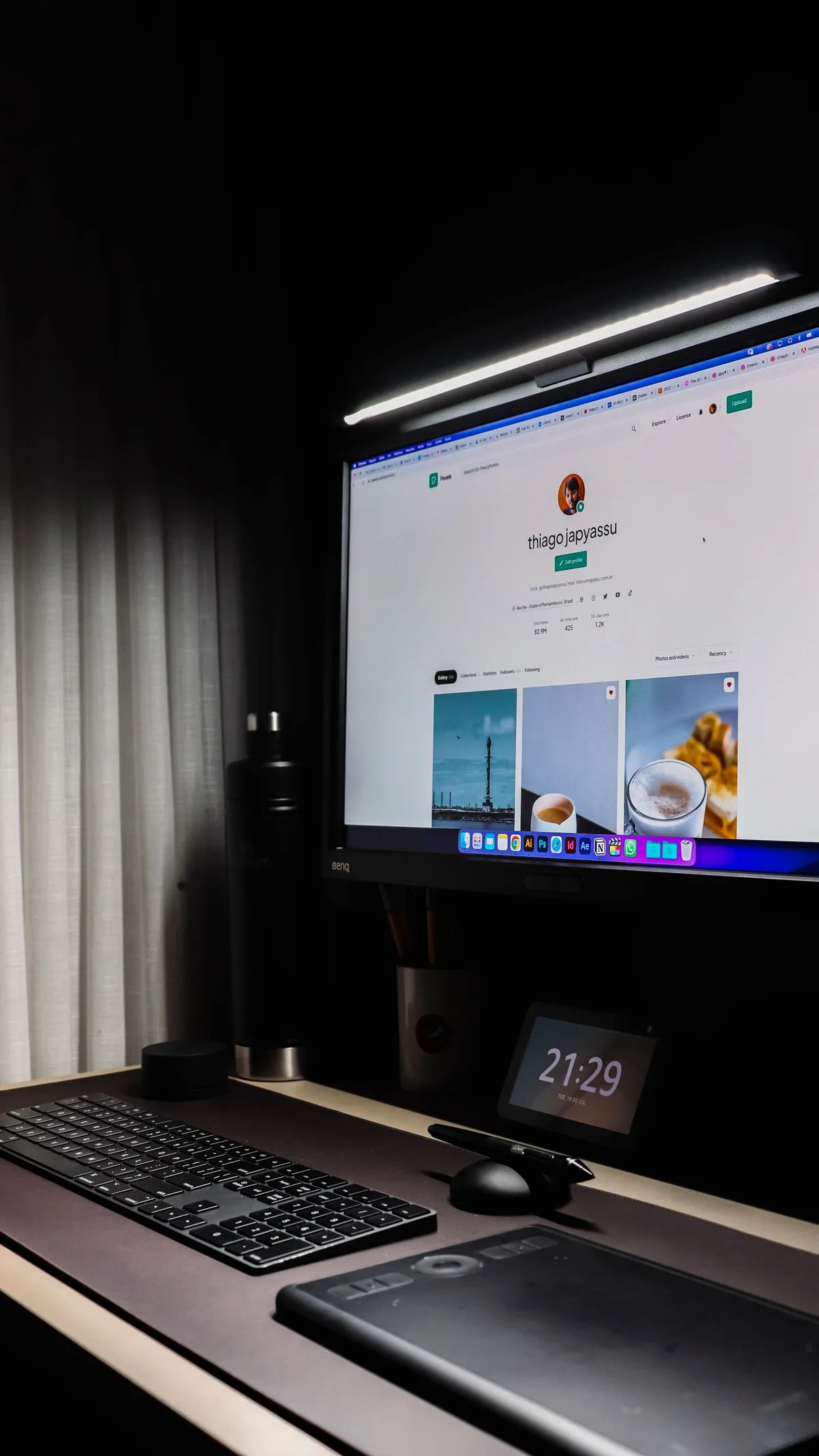
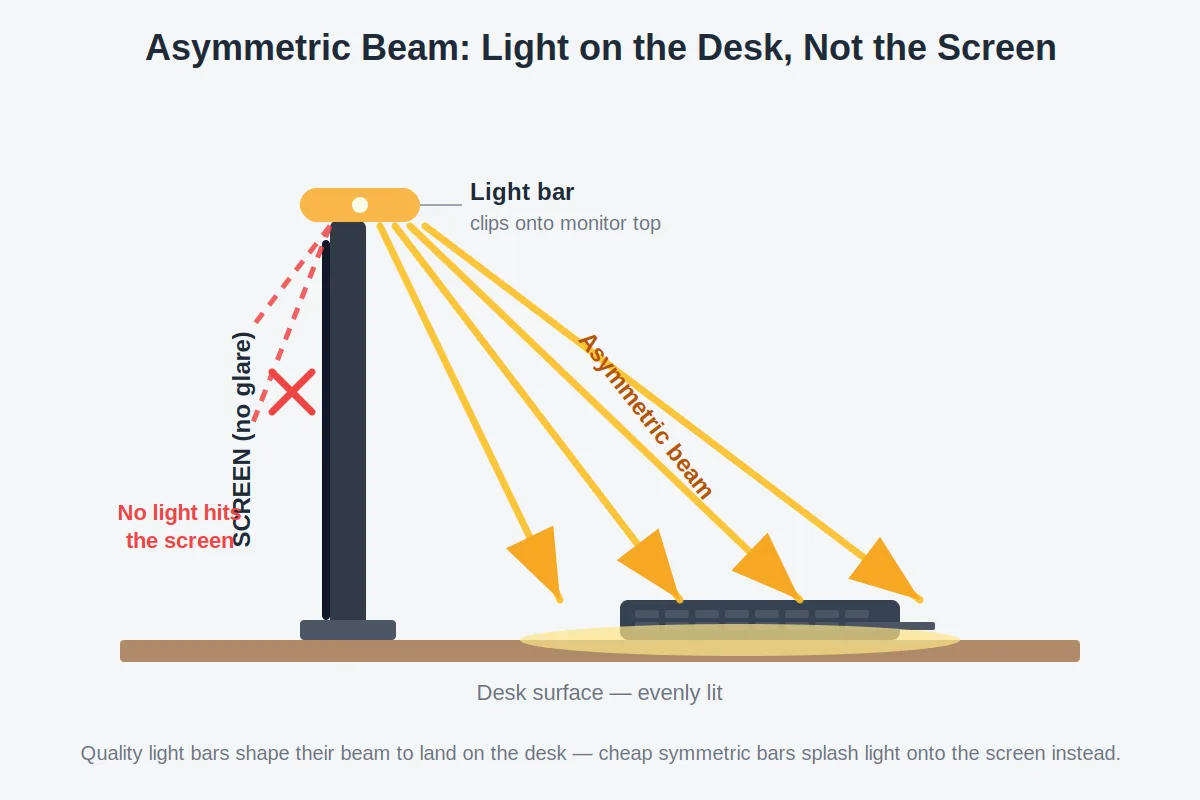
A monitor light bar is a slim LED strip that mounts on the top bezel of your monitor and shines downward and forward onto your desk. The clever part is the optics: quality bars use an asymmetric beam designed to throw light onto the work surface while keeping it off the screen itself — even desk illumination with no screen glare and no lamp base eating your desk.
Most are USB-powered and include dimming plus adjustable color temperature. Higher-end models add an ambient light sensor that auto-adjusts brightness to the room.
If you’re still deciding between this form factor and a traditional lamp, our head-to-head monitor light bar vs desk lamp comparison covers the tradeoffs in depth.
What to Look for in a Monitor Light Bar
Asymmetric Optics
This is the defining feature of the category — and the main thing cheap knockoffs get wrong. A proper light bar’s beam is shaped to land on your desk, not your screen. Symmetric or poorly aimed bars will splash light onto the display, creating the exact glare problem they were supposed to solve. When comparing options, asymmetric optical design is the single most important quality marker.
Brightness and Dimming Range
You want a bar that’s bright enough for focused work but dimmable way down for evening use. Stepless (smooth) dimming is nicer than stepped levels — you’ll actually use the in-between settings.
Color Temperature Adjustment
Most decent bars let you shift between warm light (relaxing, evening-friendly) and cool daylight (alert, daytime work). It sounds minor until you use it — warm light after sunset makes a real difference in how a home office feels at night.
Auto-Dimming Sensor
An ambient light sensor that adjusts brightness to match the room is the closest thing to a “set it and forget it” desk light. Walk in during the day, it stays low; work past sunset, it ramps up. Not all bars have this — it’s one of the clearest dividing lines between premium and budget models.
Controls
Touch controls on the bar itself are standard. Some models add a separate dial or remote puck, which is genuinely more convenient — reaching up to tap the top of your monitor gets old.
Mounting Compatibility
Light bars mount by clipping or resting on the monitor’s top bezel, usually with a counterweight hanging behind. This works great on flat monitors with a reasonably thin top bezel. It gets tricky with curved ultrawides (the clip may not sit flat), monitors with protruding webcams or thick top bezels, and some all-in-one designs. Before buying, check the manufacturer’s compatibility notes against your specific monitor — this is the number one cause of buyer’s remorse in the category.
Power Source
Nearly all bars run on USB. Many people power them from a USB port on the monitor itself, which means the bar turns on and off with the display — tidy and automatic. Any phone charger brick or powered USB hub works too. Power draw is minimal, so this is rarely a concern.
Flicker-Free Dimming
Cheap LED dimming can introduce invisible flicker that contributes to eye fatigue over long sessions. Quality bars advertise flicker-free operation – one more reason to favor established brands, or at least sellers with generous return policies.
The 5 Best Monitor Light Bars for Home Offices
| Light Bar | Key Feature | Typical Price Range | Best For |
|---|---|---|---|
| BenQ ScreenBar Plus | Asymmetric optics, auto-dimming, desktop dial controller | $120–$150 | Best overall |
| BenQ ScreenBar Halo | Adds rear backlight glow and wireless dial | $160–$200 | Best premium pick |
| Xiaomi Mi Computer Monitor Light Bar | Popular mid-range bar with magnetic rotation | $40–$60 | Best mid-range alternative |
| Quntis ScreenLinear | Budget-friendly bar with solid core features | $25–$40 | Best budget brand-name |
| Generic USB light bars | Cheapest entry point, quality varies widely | $15–$30 | Cheapest option |
Prices shift frequently — treat ranges as approximate and check current listings.
1. BenQ ScreenBar Plus — Best Overall
The ScreenBar is the product that created this category, and the Plus remains the benchmark everything else is measured against. Its asymmetric optical design is genuinely well-engineered — light lands on the desk in an even pool with essentially none hitting the screen. The ambient light sensor auto-adjusts brightness, and the separate desktop dial (the “Plus” part) makes adjustments effortless without reaching for the monitor.
It’s expensive for what looks like a simple LED strip. But the light quality, glare control, and dimming refinement are all a step above the budget alternatives. If you want the category done right and don’t mind paying for it, this is the safe choice.
2. BenQ ScreenBar Halo — Best Premium
The Halo takes the ScreenBar concept and adds a rear-facing backlight that casts a soft glow on the wall behind your monitor — bias lighting, which reduces the contrast between your bright screen and a dark room. It also upgrades to a wireless dial controller and generally warmer, more refined light modes.
Is it worth the premium over the Plus? For most people, probably not — the core desk-lighting job is the same. But if you work in a dark room and care about ambiance, the backlight is a lovely touch. Think of it as the enthusiast’s choice rather than the rational one.
3. Xiaomi Mi Computer Monitor Light Bar — Best Mid-Range Alternative
Xiaomi’s entry is the most popular ScreenBar alternative for a reason: it nails the fundamentals at a fraction of the price. You get adjustable brightness and color temperature, a clean minimalist design, and a clever magnetic rotating mount that makes angle adjustment easy. The asymmetric optics aren’t quite at BenQ’s level, but they’re good enough that most users won’t notice the difference in daily use.
The main thing you give up is the auto-dimming sensor — you’ll adjust brightness manually. For the price difference, that’s a tradeoff most buyers are happy to make. This is the pick for anyone who wants most of the ScreenBar experience at roughly a third of the cost.
4. Quntis ScreenLinear — Best Budget Brand-Name
Quntis has become the go-to budget brand in this space, and the ScreenLinear line covers the essentials: USB power, stepless dimming, adjustable color temperature, and a clip mount that fits most flat monitors. Build quality is plasticky rather than premium, and the optics are decent rather than exceptional — you may notice slightly less even coverage than the pricier options.
But it does the core job (light on desk, not on screen) well enough for most home offices, and the price makes it an easy experiment. If you’re curious about light bars but not ready to commit real money, start here rather than with a random no-name bar — at least there’s a brand standing behind it.
5. Generic USB Light Bars — Cheapest Option
Search any marketplace for “monitor light bar” and you’ll find dozens of unbranded options in the $15–$30 range. Some are perfectly serviceable; others have symmetric beams that glare right onto your screen, flickery dimming, or clips that don’t fit standard bezels. It’s a lottery.
If you go this route, buy from a seller with easy returns and check recent buyer reviews mentioning glare and mounting — the two failure modes. For most people, the small step up to the Quntis is worth it for consistency alone.
Monitor Light Bar vs. Desk Lamp: The Short Version
This question comes up constantly, so here’s the condensed take: a light bar wins on desk space (zero footprint) and automatic glare control. A desk lamp wins on versatility — it can aim at your face for video calls, light the room, and adapt to other tasks.
They’re genuinely complementary rather than competitive. Many of the nicest home office setups use both: the bar for the desk surface, a small lamp for the person. For the full breakdown, read our monitor light bar vs desk lamp comparison — and if you lean toward the lamp side, our best desk lamps guide covers the top options.
A light bar won’t replace a good home office desk lamp if you also need flattering light for video calls.
Setup Tips for Your Light Bar
- Power it from your monitor’s USB port if it has one. The bar will turn on and off with your display — one less thing to think about, and one less cable to route.
- Check the fit before you commit. Keep the packaging until you’ve confirmed the clip sits securely on your specific monitor, especially with curved or thick-bezel displays.
- Don’t max out the brightness. Match the desk light to the room — a blazing desk in a dark room causes more eye fatigue than moderate, balanced light.
- Go warm in the evening. If your bar has adjustable color temperature, shift warmer after sunset. Your eyes (and your sleep) will thank you.
- Combine with bias lighting for dark rooms. A light bar only lights the desk. If your room is pitch black otherwise, add a soft light behind the monitor or in the room to reduce screen-to-room contrast.
Frequently Asked Questions
Do monitor light bars work on curved monitors?
Sometimes. Gentle curves are usually fine, but aggressive ultrawide curves can prevent the clip from sitting flat, leaving the bar tilted or unstable. Some manufacturers sell curved-monitor adapters. Check compatibility notes for your specific monitor model before buying — this is the most common fitment issue in the category.
Will a light bar damage my monitor?
No. They use padded clips or gravity-based counterweight mounts designed specifically for monitor bezels, and they’re lightweight. They don’t block screen vents on most monitors, though it’s worth leaving airflow in mind on models with top ventilation slots.
Can I use a monitor light bar with a laptop?
It depends on the lid. Most light bars are designed for desktop monitor bezels and are too wide or heavy for a thin laptop lid. For portable setups, a small USB desk light or clip-on light is usually more practical.
Do light bars help with eye strain?
They can, the same way any good task light helps: even, flicker-free illumination matched to the room reduces the contrast your eyes constantly adjust to. But a light bar isn’t magic — if your room is pitch black, add some ambient light too. Eye comfort comes from the total lighting picture, not one product.
Are budget light bars worth it, or should I just get the BenQ?
The honest answer: the mid-range options (Xiaomi, Quntis) deliver most of the experience for much less money. The BenQ’s advantages — better optics, auto-dimming, refinement — are real but incremental. If lighting quality is a top priority, the ScreenBar Plus is the benchmark. If you want great value, the mid-range alternatives are the sweet spot.
Can a light bar replace my desk lamp completely?
For lighting the desk surface, yes. But it can’t aim at your face for video calls, light the room around you, or adapt to non-desk tasks. If any of those matter, keep a lamp in the mix — they complement each other well.
The Bottom Line
The monitor light bar earned its popularity honestly: it’s the cleanest way to light a desk, with zero footprint and genuinely clever glare-free optics. The BenQ ScreenBar Plus remains the benchmark if you want the best execution of the concept, the Halo adds ambiance for enthusiasts, and the Xiaomi and Quntis alternatives prove you don’t need to spend premium money to get most of the benefit.
Whichever you choose, remember the two things that determine satisfaction: asymmetric optics (light on the desk, not the screen) and a mount that fits your monitor.