
How to Set Up a Home Office in a Closet (Cloffice Guide 2026)
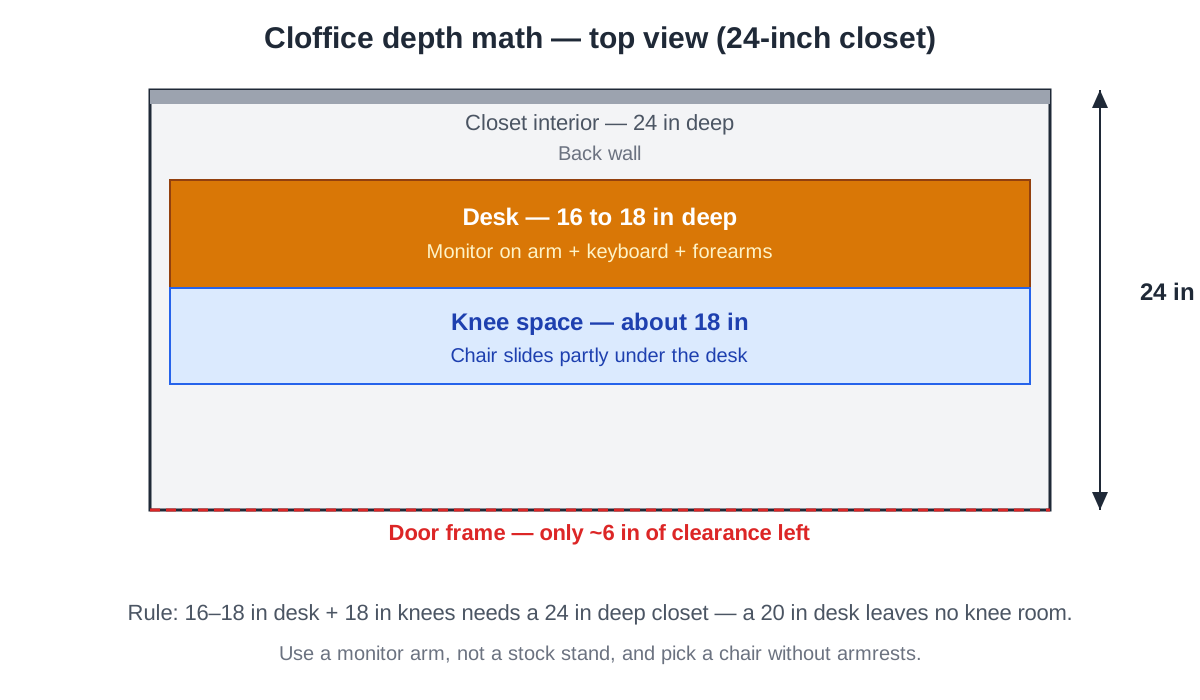
A cloffice — a home office built inside a closet — works when the closet is at least 24 inches deep and 36 inches wide: a 16- to 18-inch-deep shelf desk, a laptop or a single monitor on an arm, and a chair that slides fully under the desk. Measure the depth first, because depth, not width, decides whether a cloffice is comfortable or a daily squeeze.
Will a desk actually fit in your closet?
Most reach-in closets fit a desk, but not every closet fits a person working at it. Measure three numbers: interior depth, interior width, and height to the first fixed shelf. A standard reach-in closet is 24 inches deep and 48 to 60 inches wide — the sweet spot for a cloffice. A 20-inch-deep closet can still work for a laptop-only setup, but anything under 20 inches is a standing nook, not a sit-down office.
Width matters less than people think. A laptop setup needs about 30 inches of width; a single 24-inch monitor with a keyboard needs 36 to 42 inches. Depth is the constraint, because it is split three ways: the desk surface, your knees, and the chair.
| Closet type | Typical size | Cloffice verdict |
|---|---|---|
| Reach-in, single door | 24 in deep x 48 in wide | Best candidate; laptop or one monitor |
| Reach-in, double door | 24 in deep x 60 in wide | Roomiest; monitor plus a printer shelf |
| Shallow linen closet | 16-18 in deep x 36 in wide | Laptop-only; 14-inch shelf desk |
| Walk-in closet | 5 x 5 ft or larger | Full office; 48-inch desk and storage |
| Under-stair closet | Sloped ceiling, 24 in deep | Only if seated headroom clears 48 in |
Check headroom too: sit in a chair and confirm your head clears the shelf above by at least 6 inches.
How deep does a cloffice desk need to be?
A cloffice desk lives or dies on 24 inches of depth. A laptop needs about 11 inches of desk depth, a full-size keyboard needs another 7 to 8 inches, and your forearms need 4 to 6 inches of resting space — roughly 20 inches total. A 16-inch-deep shelf desk feels cramped with a separate keyboard and fine with a laptop alone.
A monitor setup is tighter. A 24-inch monitor on its stock stand eats 8 to 9 inches of depth, leaving 7 inches on a 16-inch shelf for a keyboard — not enough. The fix is a monitor arm: it clamps to the back edge, lifts the screen off the surface, and returns the full depth of the desk to you. On a cloffice desk, a monitor arm is what makes the desk usable.
Your knees need about 18 inches from the front edge of the desk to the back wall, and the chair must slide at least partly under the desk. In a 24-inch closet with an 18-inch desk, 6 inches remain — enough for a slim armless chair, tight for one with armrests.
What kind of desk works best in a closet?
Four desk styles dominate cloffice builds; the right one depends on whether you rent, your budget, and whether the desk must disappear after hours.
| Desk style | Cost as of November 2026 | Best for | Watch out for |
|---|---|---|---|
| Floating shelf desk | $40-$120 in materials | Small closets; custom depth | Needs studs or heavy-duty anchors |
| Freestanding narrow desk | $80-$200 | Renters; no drilling | Legs eat floor space; verify depth |
| Fold-down wall desk | $100-$250 | Closets that must revert to storage | Usually rated for only 20-30 lbs |
| Butcher-block shelf on brackets | $60-$150 | A permanent, sturdy setup | Heavy; brackets must hit studs |
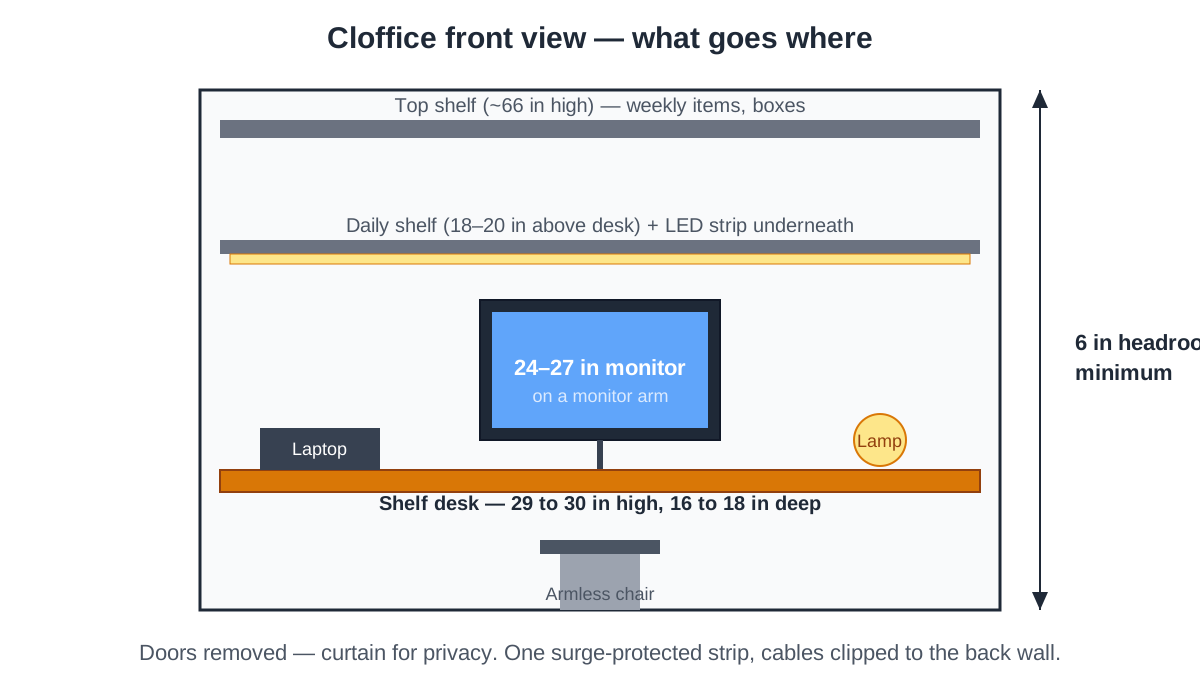
The floating shelf desk is the classic cloffice build. A 1.5-inch-thick shelf board cut to the closet’s interior width, mounted on two or three heavy-duty brackets screwed into studs, gives you a desk at exactly the height and depth you want — usually 29 to 30 inches high and 16 to 18 inches deep. As of November 2026, a 48-inch butcher-block shelf board runs about $60 to $90, and a pair of rated brackets about $20 to $40.
A freestanding narrow desk is the no-drill option for renters. Look for desks marketed as 18 inches deep rather than standard 24-inch desks — a standard desk in a 24-inch closet leaves you sitting in the doorway. Measure the assembled desk before you buy.
How do you light a closet office?
A closet has no window, so lighting is not decoration in a cloffice — it is the difference between a workspace and a cupboard. The single ceiling bulb, if there is one, sits behind you and throws your shadow across the desk.
Layer two light sources. First, an LED strip or puck light mounted under the shelf above the desk, aimed down at the work surface. It costs about $15 to $30 for a strip kit as of November 2026. Choose a warm-to-neutral color temperature, 2700K to 4000K — cooler strips above 5000K feel clinical in a small enclosed space. Our LED strip light guide covers brightness, color temperature, and mounting in detail.
Second, a small task lamp on the desk for video calls. A closet’s overhead light puts your face in shadow on camera; a compact lamp aimed at your face from the side fixes that for about $20.
Avoid two things: a bare bulb hanging in the closet, which creates harsh shadows and glare on the screen, and any light mounted behind the monitor, which turns the screen into a mirror. Light the desk and your face, never the screen.
How do you handle ventilation and power safely?
A closet office has two safety issues a normal desk does not: heat builds up fast, and every device shares one or two outlets.
A closed closet door plus a laptop, a monitor, and a human generates real heat — expect the space to run 5 to 10 degrees warmer than the room after an hour with the door shut. The simplest fix is to work with the doors open or removed entirely; most cloffice owners take the doors off and hang a curtain instead. If you keep the doors, leave them open while you work and add a small USB fan.
Your devices add up fast: laptop charger (45-65W), monitor (25-40W), lamp (10-15W), and a phone charger total roughly 150W — well within a single 15-amp household circuit, which handles about 1,800W. The risk is not the total load; it is daisy-chaining power strips behind a desk you cannot reach. Use one surge-protected power strip, plug it directly into the wall outlet, and never plug a second strip into the first.
Run cables along the back wall with adhesive clips, not across the floor where the chair rolls over them. If the closet has no outlet at all — common in older homes — have an electrician add one rather than running an extension cord under a door; a cord pinched by a door is a fire risk.
Never put a space heater in a closet office. The enclosed space, the proximity of clothes and paper, and the limited airflow make it genuinely dangerous here. If the closet is cold, warm the room, not the closet.
Where does everything go?
A cloffice has no drawers unless you build them in, so storage has to be vertical: the wall above the desk and the wall beside it. The shelf spanning most closets, usually 12 inches deep and mounted about 66 inches up, becomes top storage for boxes and anything you reach for once a day.
Mount a second shelf 18 to 20 inches above the desk for daily items: notebooks, headphones, a charging station. Keep it shallow — 10 to 12 inches deep — so it does not block the LED strip or crowd your head. A pegboard on one side wall holds small tools, and stackable trays handle the paper.
Under the desk, a rolling drawer unit uses the dead space where your feet are not. Our desk drawer organization guide covers sorting systems that fit in a single pedestal. The rule is simple: daily items live within arm’s reach; weekly items on the top shelf; anything less often does not live in the closet.
What fits in a cloffice — and what doesn’t?
The space rewards laptop-first work and punishes anything wide, hot, or noisy.
| Fits well | Fits with compromises | Does not fit |
|---|---|---|
| Laptop + external keyboard | Single 24-inch monitor on an arm | Dual monitors side by side |
| Single 24-27 inch monitor | Small laser printer on a shelf | Full-size desktop PC tower |
| Noise-cancelling headphones | Compact all-in-one printer | Large inkjet printer |
| Laptop riser + keyboard | Mechanical keyboard (noise echoes) | Freestanding bookshelf |
| Webcam + ring light | Rolling chair without armrests | Standard chair with armrests |
Dual monitors are the most common disappointment. Two 24-inch screens need about 44 inches of width and 20 inches of viewing distance — a closet gives you the width but not the distance. One 27-inch monitor, or one 24-inch monitor plus a laptop screen as the second display, is the practical ceiling.
A laser printer fits on a shelf, but it needs ventilation and rattles a small space. If you print daily, the cloffice is the wrong room for the printer — put it on a shelf in the bedroom and walk the ten steps.
A cloffice suits focused single-task work: writing, coding, calls, admin. It is a poor fit for jobs that spread out — crafts, large-format design, paper stacks.
How do you build a cloffice in a weekend?
The project fits in a weekend if you measure first and buy once.
- Empty the closet and measure. Record depth, width, and height to the first shelf. Mark stud locations on the back wall with painter’s tape.
- Decide the desk style. Floating shelf for a permanent build, freestanding narrow desk if you rent, fold-down if the closet must revert to storage.
- Remove the doors. Take bifold or sliding doors off their tracks and store them. Hang a curtain rod if you want to hide the office after hours.
- Paint the interior. One coat of bright white on the back and side walls. Let it dry overnight.
- Mount the desk and shelves. Desk at 29 to 30 inches high, shelf 18 to 20 inches above the desk, brackets into studs.
- Install lighting. LED strip under the shelf above the desk, task lamp on the desk. Check for screen glare before fixing anything permanently.
- Run power and cables. One surge-protected strip into the wall outlet, cables clipped along the back wall, nothing across the floor.
- Move in the chair and test a full workday. Sit, type, take a call, and check the heat after an hour.
Total cost for a typical reach-in build runs $150 to $350 as of November 2026, depending on whether you already own a chair and a monitor arm. The shelf desk is the cheapest part; the chair and lighting are where the money goes.
Frequently asked questions
Do I need to remove the closet doors?
Removing the doors is the single biggest improvement you can make. Doors trap heat, block light, and force you to sit half in the doorway. Take them off, store them, and hang a curtain if you want to close the office off after hours.
Can I put a monitor in a closet office?
Yes, one monitor up to 27 inches works well on a monitor arm, which frees the desk surface and sets the correct viewing distance. Two monitors side by side do not work — the closet gives you the width but not the viewing distance.
Is it safe to work in a closet all day?
Yes, with the doors open or removed for airflow and one surge-protected power strip plugged directly into the wall. Never use a space heater in a closet office, and never daisy-chain power strips behind the desk.
What if my closet is too small even for a laptop?
Use the narrowest option — a 14-inch-deep folding shelf — or move the desk to the bedroom wall instead. Our small-bedroom desk guide covers rooms where even a closet conversion does not fit, and our shared home office guide covers splitting a room for two people.
A closet office is a trade: you give up storage space and elbow room, and you get a dedicated workspace you can close at the end of the day. Measure the depth, mount the desk into studs, light the work surface, and keep the doors open while you work.