
How to Set Up a Shared Home Office for Two (2026)
A shared home office for two works when each person gets a dedicated 4-by-2-foot zone, screens face away from each other, and sound is separated with headsets or a divider. Plan for 2 wall outlets per workstation, a shared printer or storage zone on a neutral wall, and a call schedule so overlapping video meetings never collide.
Sharing one room for work sounds simple until Tuesday morning, when your partner’s standup starts thirty seconds after your client call. The trick isn’t a bigger room — it’s a layout that separates sight lines and sound, enough power and network for two workstations, and a handful of house rules.
How Much Space Does a Shared Home Office Need?
The honest minimum is 10 by 10 feet (100 sq ft) — enough for two 48-inch desks, chairs, and a walkway. 10 by 12 is comfortable, fitting two full setups plus shared storage and elbow room.
Go below 100 square feet and you’ll need one long shared desk along the longest wall or a bedroom-corner split. If your room is tight, start with our small home office ideas on a budget and check the best desk for a small bedroom office if one of you works from a bedroom corner.
Rule of thumb: measure the room, subtract 3 feet for the door swing and chair clearance, and check that 24 inches of clear floor remain behind each chair.
Which Layout Pattern Should Two People Choose?
There are three patterns that work, and one that quietly ruins marriages. Here’s how they compare:
| Pattern | How it works | Best for | Room needed |
|---|---|---|---|
| Back-to-back | Desks in the room’s center, you sit with backs toward each other | Calls + focus work; two people on meetings at once | 10×10 ft or larger |
| Side-by-side | Both desks along the same wall, shoulders close | Small rooms; couples who rarely take calls | 8×10 ft or larger |
| L-shape | Desks on two adjoining walls, corner shared | One shared wall available; asymmetric room | 10×10 ft or larger |
| Face-to-face | Desks pushed together, you stare at each other all day | Avoid as a daily setup — fine as an occasional setup | Any |
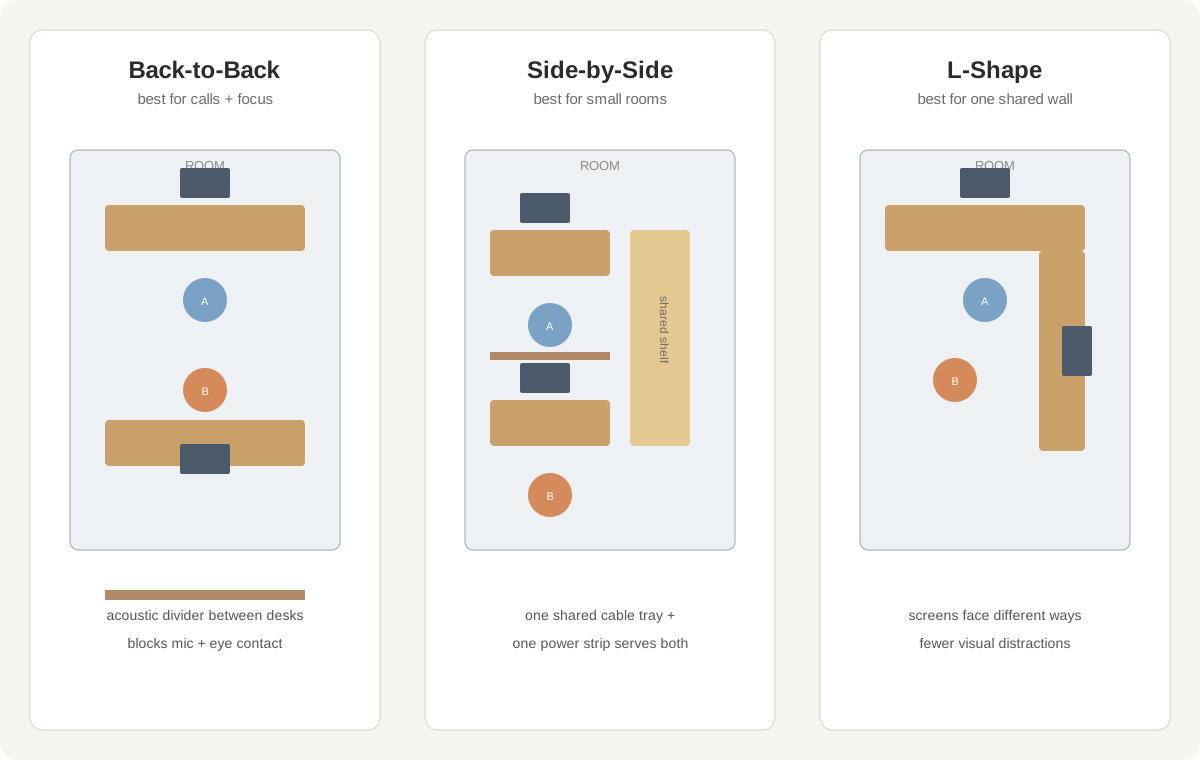
Back-to-back is the winner for most pairs. Desks float in the middle of the room (or on either side of a low bookshelf), each person faces a different wall, and neither of you sees the other’s screen or face. Webcam backgrounds stay clean because the camera sees a wall, not your partner mid-sandwich.
Side-by-side suits quiet work. One long 72-to-96-inch desk against the longest wall. Most space-efficient and shares power elegantly — but there’s no acoustic separation, so both people should be on headphones for any call.
L-shape works when the room has one good wall and one short wall. Each person gets their own wall and their own outlets; the corner becomes shared storage. Screens face different directions, so visual distraction is minimal with no furniture between you.
Avoid face-to-face as a permanent setup. Every eye movement, sigh, and snack becomes a shared event — and eye contact during someone else’s tense call is its own special awkwardness.
How Do You Reduce Noise Between Two Workstations?
Sound is the number-one complaint in shared offices, and the fix is layered — no single trick does it all.
- Both people wear headsets for calls. A closed-back headset with a noise-canceling boom mic (not just laptop speakers) is the single biggest improvement. Your partner’s mic won’t pick up your call, and you won’t hear theirs.
- Add a soft barrier between desks. A low bookshelf (12–14 inches deep) in a back-to-back layout absorbs mid-range sound and blocks the peripheral motion that pulls your eyes off your screen. Acoustic desk dividers (24-inch PET felt panels) work on a shared table.
- Soften the room itself. Hard floors and bare walls bounce sound. A rug under both chairs, curtains on the window, and one upholstered item (even a beanbag or fabric storage cubes) noticeably drop the echo. You don’t need studio foam — domestic softness is enough.
- Run low background masking. A fan or air purifier on low smooths out spikes — keyboard clicks, chair squeaks, sudden laughter. Keep it under 45 dB so it doesn’t join the problem.
- Stagger the worst overlaps. If both of you have a daily 9:30 standup, one of you takes it in another room, or you negotiate quiet hours. This is a scheduling problem as much as an acoustic one.
With two headsets, a rug, and a bookshelf divider, normal conversation at one desk measures roughly 40–45 dB at the other person’s ears — library-quiet. Without any of it, two simultaneous calls in a bare 10×10 room can top 65 dB of mutually assured distraction.
How Do You Plan Power and Cables for Two Workstations?
Two workstations roughly double your power and cable load, and one over-stuffed strip becomes a fire-hazard art installation. Plan it like an electrician would: count devices, then work backward.
Step 1: Count outlets per workstation. A typical setup needs 4–6 plugs: laptop dock or PC, monitor, phone charger, desk lamp, plus one spare. Two workstations = 8–12 plugs — you’ll need strips, not miracles.
Step 2: Give each person their own surge-protected strip. A 6-outlet surge protector rated 1,800+ joules per desk keeps each setup independent. Never daisy-chain strips — plug each directly into a wall outlet, on different walls when possible, so one kicked strip can’t take down both workstations.
Step 3: Run a shared cable channel. Mount an under-desk cable tray per desk and one shared channel along the baseboard for runs to the wall. Label both ends of every cable with tape — six months from now, “whose power brick is this” will be a daily question.
Step 4: Upgrade the network. Two people on simultaneous video calls need 10–20 Mbps of stable upload each. If Wi-Fi drops during your partner’s Zoom, run one ethernet cable along the baseboard to a small 5-port switch behind a desk and wire both computers — a one-hour job that ends an entire category of arguments.
Step 5: Plan the shared printer and charging zone. Put the printer and shared gear on a neutral wall — not inside one person’s zone. A small shelf with a 4-port USB charger becomes the household charging station so nobody’s desk becomes the cable lost-and-found.
How Should Two People Share Lighting Without Fighting Over It?
Light causes two kinds of conflict: glare on screens and brightness preference. Handle both.
- Both desks face perpendicular to windows, never with a window directly behind or in front of a screen. A window behind you turns your webcam into a silhouette; a window behind the screen creates wash-out glare. Side-by-side desks along the same wall get the same window angle automatically — one reason that layout is lighting-friendly.
- Each person gets their own task lamp. A 400–500 lumen lamp with adjustable color temperature (2700K evening, 4000–5000K daytime) lets each person set their own brightness. One ceiling light forces one compromise; two task lamps allow two preferences.
- Use bias lighting behind each monitor. A cheap LED strip behind each monitor raises the ambient light around the screen, reducing eye fatigue in a dim room — and lets one person work near-dark while the other keeps a lamp on, with neither screen glaring.
For the glare specifics, our guide on how to reduce monitor glare pairs well with a shared setup — two screens in one room double the reflections to manage.
What House Rules Keep a Shared Office Peaceful?
Furniture fixes the room; rules fix the relationship. Agree on these in week one, not month three.
- Call protocol. Headsets on for every call, even “quick” ones. If both of you must be unmuted at once, the second person takes the call in another room.
- The mute default. Both mics stay muted unless speaking. This one rule eliminates most background-sound complaints.
- Do-not-disturb signals. Headphones on or a closed laptop at lunch means “not now.” Pick one signal and respect it until it’s habit.
- Desk territory. Each person’s zone is sovereign — no borrowing chargers, no stacking mail on the other desk. Shared gear lives in the shared zone only.
- Weekly schedule check. Five minutes every Sunday: any overlapping presentations, interviews, or recordings this week?
The one insight worth quoting: a shared home office doesn’t fail because the room is small — it fails because two people never agreed on how sound, space, and schedules work.
What Does a Shared Office Setup Cost?
You don’t need to double your budget — the second workstation is mostly a clone of the first, and shared items split in half.
| Item | Budget pick | Mid-range | Notes |
|---|---|---|---|
| Second desk (48–60 in) | $60–120 | $150–250 | Matching tops look intentional; mixing is fine |
| Second chair | $80–150 | $200–350 | Don’t cheap out — back pain is not a team sport |
| Headsets x2 | $60–120 | $150–300 | Closed-back with boom mic, one per person |
| Desk divider or bookshelf | $25–60 | $100–200 | PET felt panel or a 4-cube shelf |
| Surge strips x2 | $30–50 | $50–80 | 1,800+ joules, one per desk |
| Cable management x2 | $20–40 | $40–80 | Tray + sleeves per desk |
| Task lamps x2 | $40–80 | $100–180 | Adjustable color temperature |
| Rug (5×7 or larger) | $40–100 | $150–300 | Under both chairs, doubles as sound treatment |
| Total for person #2 | ~$355–720 | ~$1,040–1,940 | Shared items (rug, printer, switch) split |
What If the Room Is Too Small for Two Full Desks?
Sometimes the math just doesn’t work. Three workarounds that beat giving up:
- The split shift. One person works the desk 7–12, the other 12–5. Each person gets the good setup, just not simultaneously.
- One desk + one fold-down wall table. The primary worker gets the desk; the second gets a 24-inch fold-down table on the opposite wall for light laptop work, folded away when calls happen.
- The second room. A bedroom corner with a 32-inch desk and a divider screen is a better “shared office” than two people crammed into 80 square feet.
FAQ
Can two people really share a 10×10 room as a home office?
Yes — a 10×10 room fits two 48-inch desks back-to-back with chair clearance, as long as each workstation gets its own wall outlet and both people use headsets for calls.
For a 10×10 room, place the desks in the center back-to-back with a low bookshelf divider, keep 24 inches of clear floor behind each chair, and put shared gear (printer, charger shelf) on the remaining wall.
How do you stop hearing your partner’s calls?
Use closed-back headsets with noise-canceling mics on both sides, add a soft barrier (bookshelf or PET felt divider) between desks, and put a rug under the chairs to cut echo.
Layering all three drops a partner’s call to library-quiet at your ears; the single most effective step is simply that both people wear headsets for every call.
Should two people share one big desk or use two desks?
Two separate desks are better for daily work because each person controls their own height, monitor position, and cable layout — one shared 6-foot desk only works if both people rarely take calls and keep similar schedules.
If space forces one desk, use a 72–96-inch top with a center divider panel and separate power strips per side so each half stays independent.
How many outlets do two home office workstations need?
Plan for 8–12 outlets total: 4–6 per workstation (computer, monitor, phone charger, lamp, plus one spare), delivered through two separate surge-protected strips plugged directly into wall outlets.
Never daisy-chain strips, and put each strip on a different wall when possible so one kicked cable can’t kill both setups.
What is the best desk arrangement for couples working from home?
Back-to-back is the best default: desks in the room’s center, each person facing a different wall, with a low divider between them — it separates sight lines, screens, and webcam backgrounds while keeping the room’s footprint compact.
Choose side-by-side only if the room is narrow and both people rarely take calls; choose L-shape when you have two good adjoining walls and want each person on separate power.
How do you share a printer in a home office for two?
Put the printer on a neutral wall or shared shelf outside both personal desk zones, connect it to Wi-Fi (not one person’s USB), and keep paper and supplies in the same shared spot so neither workstation becomes the supply closet.