
How to Reduce Eye Strain at a Computer (2026 Guide)
Computer eye strain (digital eye strain) is the burning, tired, blurry-eyed feeling after long screen sessions — and it usually comes from poor monitor setup, not bad eyes. Sit an arm’s length from your screen with the top at eye level, match screen brightness to the room, follow the 20-20-20 rule, and blink more. Persistent pain, double vision, or headaches need an eye doctor.
Burning eyes at 4 PM. A headache behind your forehead. Text that goes slightly blurry when you finally look up. The majority of heavy screen users report at least one symptom of digital eye strain — and the cause is rarely your eyes failing. It’s usually the setup: a monitor too close or too bright, a room too dark, hours without a real break, and a blink rate that drops by two-thirds the moment you focus.
The fix is unglamorous and it works. Eye strain responds to distance, lighting, and breaks — the same three levers every time. This guide covers the evidence-backed fixes in order of impact, the blue-light reality check, and the warning signs that mean it’s time to see a professional.
Does the 20-20-20 Rule Actually Work?
Yes — it’s the single highest-impact habit, and it’s free.
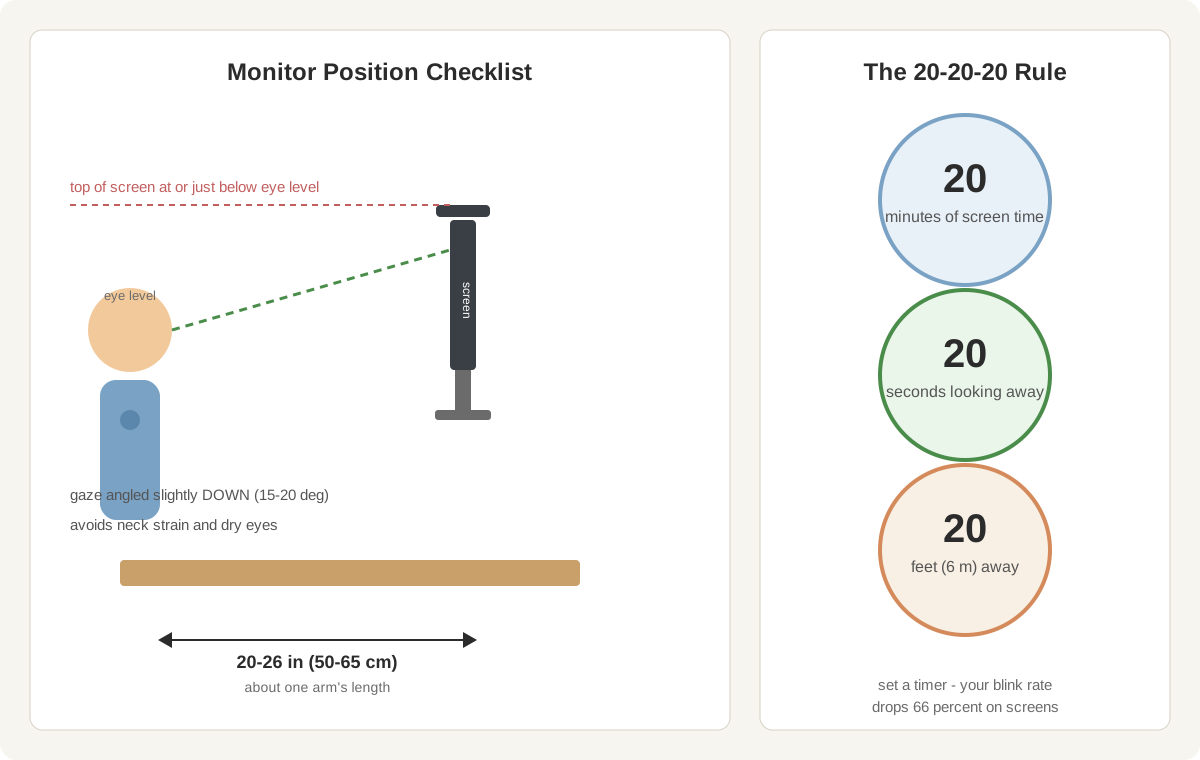
The rule: every 20 minutes, look at something 20 feet (6 meters) away for 20 seconds. That’s it. Looking into the distance relaxes the ciliary muscle inside your eye, which locks into “near focus” mode during screen work and fatigues like any held muscle. The 20-second break also lets your tear film recover, since blink rate drops from ~15–20 blinks per minute to 5–7 when you concentrate on a screen.
Is it clinically proven? The rule is endorsed by the American Optometric Association, and studies on structured screen breaks show measurable reductions in eye fatigue and dryness. The exact numbers are a mnemonic, not a magic formula — the point is regular, deliberate breaks from near focus.
How to actually stick to it:
- Set a timer, not your willpower. Use a free break-reminder app or a phone timer. Willpower fails by 11 AM; timers don’t.
- Make the break real. Look out a window, across the room, down a hallway — genuine distance, not the wall behind your monitor.
- Blink deliberately during the break. Ten slow, full blinks re-spread your tear film better than 20 seconds of passive staring.
- Pair it with movement. Stand, roll your shoulders, walk to get water. Your eyes and your back share the same break.
How Far Should You Sit From Your Monitor?
Arm’s length — 20 to 26 inches (50–65 cm) from your eyes to the screen. Closer than 20 inches forces your focusing muscles to work overtime; farther than 30 inches and you’ll squint and lean forward, trading eye strain for neck strain.
Height matters as much as distance:
- Top of the screen at or just below eye level. Your gaze should angle slightly downward (about 15–20 degrees). Screens mounted too high force your eyes wide open, which dries them faster.
- Tilt the screen back slightly (10–20 degrees) so it’s perpendicular to your line of sight.
- Laptop users: elevate and externalize. A $25 laptop stand plus a separate keyboard brings the screen to eye level — one of the cheapest eye-strain fixes there is.
For multi-monitor setups, the primary screen goes directly in front; secondary screens angle in at 15–30 degrees at the same height. If you constantly turn your head to a side monitor, move it.
What Brightness and Contrast Settings Reduce Eye Strain?
Your screen should roughly match the brightness of the room around it. A glowing white rectangle in a dark room, or a dim screen fighting daylight, both force your eyes to adapt constantly — and adaptation is work.
| Setting | Target | How to set it |
|---|---|---|
| Brightness | Matches a white sheet of paper held next to the screen in the same light | Adjust until the screen’s white looks like the paper, not brighter |
| Contrast | 60–70% (high enough for crisp text, not maxed) | Raise until text is sharp, then back off slightly |
| Color temperature | 6500K daytime; 4000–5000K evening | Use built-in night mode or f.lux-style scheduling |
| Text scaling | 125–150% on 1080p; comfortable reading size | If you lean in to read, the text is too small |
| Refresh rate | Highest your monitor supports (60Hz min, 75Hz+ better) | Display settings → Advanced → Refresh rate |
Two settings people overlook: auto-brightness (enable it if your monitor has an ambient light sensor — it tracks the room through the day) and dark mode (genuinely easier on the eyes in dim rooms; in bright rooms, dark mode can actually increase strain, so match it to the room, not the trend).
The quotable version: your monitor is a lamp that happens to show spreadsheets — its brightness should obey the same rules as every other light in the room.
Does Bias Lighting Really Help?
Yes. Bias lighting — a soft light strip behind your monitor — is the most underrated eye-comfort upgrade, and it costs under $20.
Here’s why it works: in a dim room, your pupils constantly adjust between the bright screen and the dark wall. A light strip behind the monitor raises the wall’s brightness closer to the screen’s, so the contrast your eyes must handle shrinks — meaning less fatigue in evening sessions.
Setup rules:
- Color temperature: 2700–4000K (warm to neutral white). Avoid RGB rainbow modes — colored light behind a screen is a distraction, not therapy.
- Brightness: subtle glow on the wall, not a second lamp. You should notice it only when it’s off.
- Placement: the back of the monitor, 2–3 inches from the edge, all four sides if possible.
It also lets you keep the room dimmer overall — useful in shared offices where your partner wants darkness and you need to see your keyboard. Pair it with a desk lamp aimed at your paperwork, not your screen.
Do Blue-Light Glasses and Night Mode Help?
Here’s the reality check. Blue light from screens has not been shown to damage eyes — the amounts are tiny compared to daylight, and the American Academy of Ophthalmology does not recommend blue-light glasses for eye health. Multiple reviews have found no reliable evidence that blue-light-filtering lenses reduce digital eye strain.
So why do some people swear by them? Night mode and warm color temperature genuinely help sleep — less blue light in the evening supports melatonin, and better sleep affects how your eyes feel the next day. It’s a sleep intervention wearing an eye-strain costume.
The honest guidance: use night mode or a warm color temperature in the evening for your sleep, skip the $50 blue-light glasses unless you like how they look, and spend the money on a bias light strip or a monitor with a real flicker-free backlight instead. If you’re shopping for an eye-friendly display, see our best monitors for home office under $200 — flicker-free panels and adjustable stands matter more than any blue-light marketing claim.
How Do You Set Up Your Workspace to Reduce Glare?
Glare is the silent partner of eye strain: you don’t notice it separately, you just notice your eyes feel tired and can’t say why. Three rules:
- No window directly behind or in front of your screen. Side lighting is the goal — desk perpendicular to the window.
- No overhead light reflecting in the screen. If you can see a ceiling fixture’s reflection, move the monitor or the light; matte screen protectors help in rooms you can’t rearrange.
- Match the room to the screen. Close blinds or use sheer curtains during the brightest hours; a $15 curtain beats a $150 “anti-glare” accessory.
For window placement, lamp angles, and screen coatings, see our guide on how to reduce monitor glare, which pairs directly with everything in this article.
What Daily Habits Protect Your Eyes at a Computer?
These small habits compound over an 8-hour day:
- Blink on purpose. Consciously do a full blink (lids fully closing) every few minutes during intense focus. Partial blinking — common at screens — doesn’t re-wet the whole cornea.
- Keep artificial tears at your desk. Preservative-free lubricating drops, used 2–3 times a day, help if your office air is dry. They’re moisture, not medicine — fine for daily use.
- Drink water through the day. Dehydration shows up in your eyes first; a glass an hour is a reasonable target.
- Take a real lunch away from the screen. 30–45 minutes of distance vision and no near focus is the best reset your eyes get all day.
- Follow the 50-10 rhythm. Every 50 minutes, 10 minutes away from the desk. The 20-20-20 micro-breaks handle the eyes; the 50-10 handles everything else.
Which Monitor Features Matter for Eye Comfort?
If you’re buying a monitor partly for your eyes, prioritize these over resolution hype:
| Feature | Why it matters | What to look for |
|---|---|---|
| Flicker-free backlight | PWM flicker causes fatigue even when invisible | DC dimming or certified “flicker-free” |
| Low blue light mode (hardware) | Warmer evening viewing without software tint | TÜV Rheinland certified models |
| Adjustable stand | Height + tilt = correct eye-level position | 4+ inches of height adjustment |
| Matte coating | Kills reflections in bright rooms | Matte > glossy for offices |
| Size at your distance | Bigger screen at same distance = larger text, less squinting | 24″ at 20–24 in; 27″ at 24–30 in |
| IPS panel | Consistent colors at an angle; less head-repositioning | IPS over TN for text work |
Notice what’s missing: 4K resolution and 144Hz gaming specs. For office eye comfort, a flicker-free 1080p IPS panel at the right distance beats a 4K panel two inches too close. Spend the budget on ergonomics, not pixels.
When Should You See an Eye Doctor?
Home fixes handle fatigue. They don’t handle disease. Book an exam if you notice any of these:
- Eye pain (not just tiredness — actual aching or sharp pain)
- Double vision that persists after breaks
- Headaches that start or worsen with screen time and don’t respond to setup changes within two weeks
- Blurry vision that doesn’t clear after looking away for several minutes
- New floaters, flashes, or a dark curtain in your vision — same-day urgency, not a routine booking
Also: if you’re over 40 and haven’t had an eye exam in the last two years, get one before blaming the monitor. Presbyopia (age-related near-focus loss) arrives for everyone — and an updated prescription is sometimes the entire “eye strain” cure.
FAQ
What is the 20-20-20 rule for eye strain?
Every 20 minutes, look at something 20 feet (6 meters) away for 20 seconds.
The break relaxes your eye’s focusing muscle and lets your tear film recover; set a timer to make it automatic, and add ten slow, deliberate blinks during each break.
How far should my eyes be from the computer screen?
Sit 20–26 inches (50–65 cm) from the screen — about one arm’s length — with the top of the monitor at or just below eye level.
Closer forces your focusing muscles to overwork; farther makes you squint and lean forward, trading eye strain for neck strain.
What monitor brightness is best for eyes?
Set brightness so a white screen looks like a white sheet of paper held next to it in the same room light — not brighter, not dimmer.
Enable auto-brightness if your monitor has an ambient light sensor, and use dark mode only in dim rooms (in bright rooms it can increase strain).
Do blue light glasses reduce eye strain?
No reliable evidence shows blue-light glasses reduce digital eye strain — screen blue light is far below daylight levels and hasn’t been shown to harm eyes.
Night mode and warm color temperature genuinely help sleep quality, which affects next-day eye comfort; for strain itself, distance, brightness, and breaks matter far more.
Why do my eyes burn after working on a computer?
Burning usually means dryness: your blink rate drops from ~15–20 to 5–7 blinks per minute during screen focus, so the tear film evaporates faster than it’s replaced.
Fix it with deliberate full blinks, the 20-20-20 rule, preservative-free artificial tears 2–3 times a day, and humidified or less air-conditioned room air.
When should I see a doctor about eye strain?
See an eye doctor if you have eye pain, persistent double or blurry vision, screen-triggered headaches that don’t improve within two weeks of setup changes, or any new floaters, flashes, or dark spots.
New floaters, flashes, or a dark curtain across vision need same-day attention; everyone over 40 should get an exam every 1–2 years regardless.