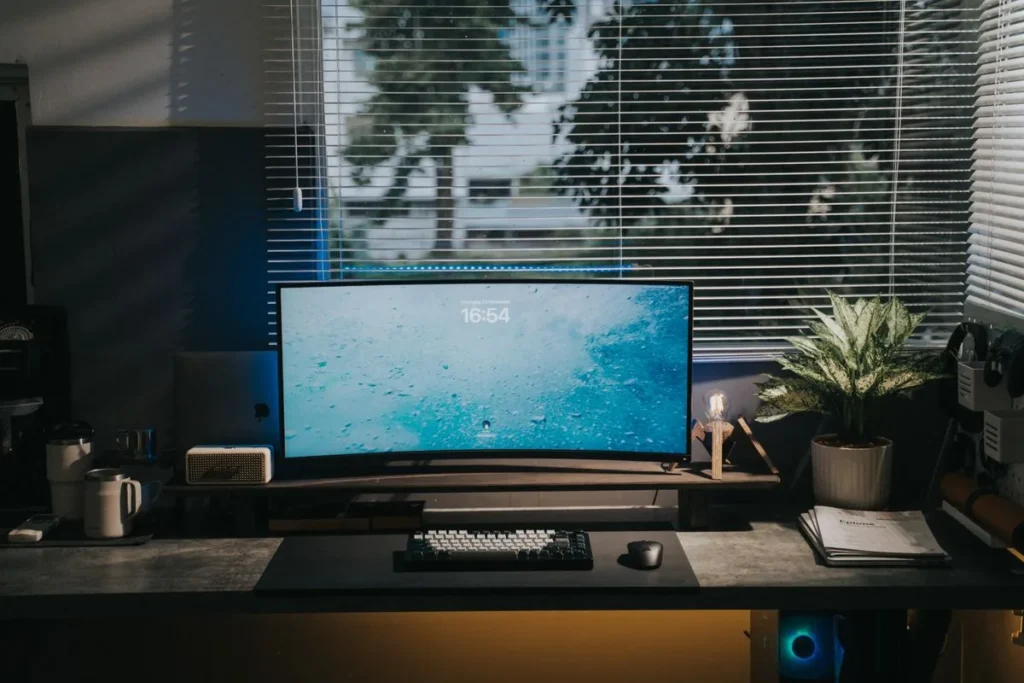
To reduce monitor glare, position your desk so the window sits 90 degrees to your screen, keep room lighting at 300–500 lux, and match your monitor’s brightness to the room around it. Add sheer curtains for harsh sunlight, tilt the screen slightly back or down, and use a matte anti-glare filter only if reflections survive all of that.
How to Reduce Monitor Glare in Your Home Office
Glare is the single most fixable cause of eye strain at a home desk — and most fixes are free. What follows is a practical system in the right order: reposition first, tune light second, add accessories last. You may never need to buy anything.
The quotable rule: glare is a geometry problem, not a brightness problem — fix the angle of the light before you touch the brightness slider.
Where Should I Put My Desk to Avoid Monitor Glare?
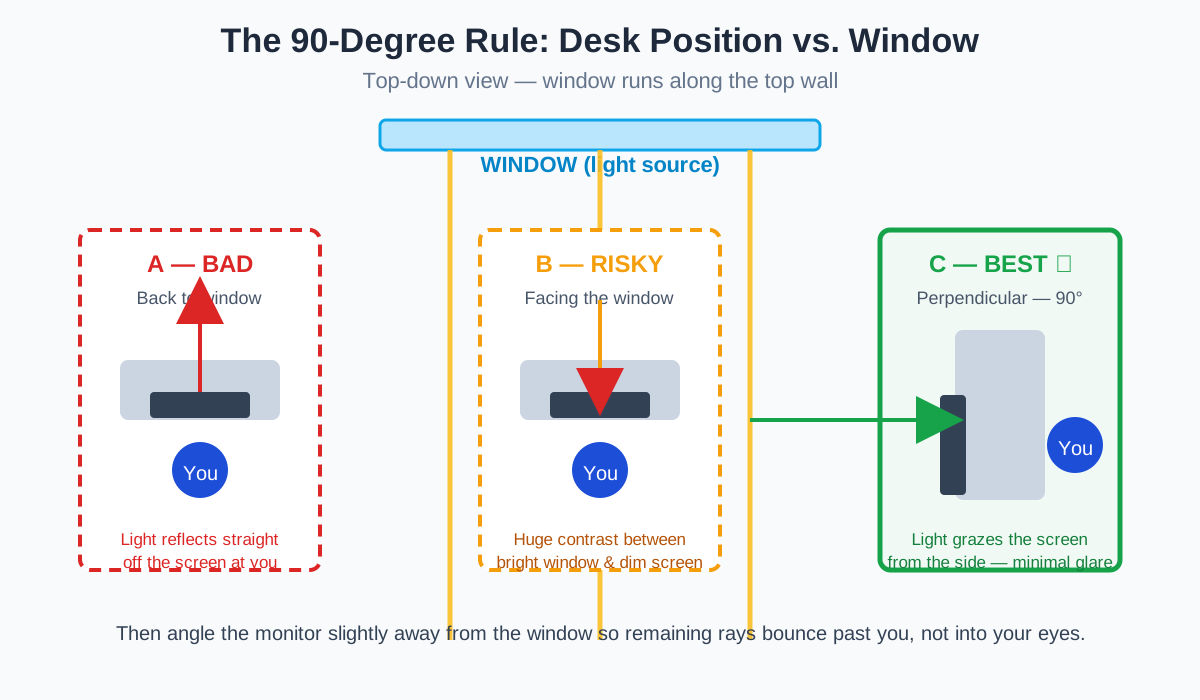
Put your desk perpendicular to the window — monitor at a 90-degree angle to the light source. This single move eliminates more glare than any product on this list.
With your back to the window, bright sky reflects directly off the glass panel like a mirror — the worst-case scenario. With the monitor facing the window, reflections improve but a new problem appears: the extreme contrast between a bright window and a darker screen forces your eyes to readjust every time you glance up.
With the window to your side, light grazes across the screen instead of bouncing into your eyes. You still get daylight and a view.
How to reposition in 10 minutes
- Stand at your desk and note where the brightest window is. That’s your light source to neutralize.
- Rotate your desk (or just your monitor arm) so the screen faces neither the window nor directly away from it — aim for roughly 90 degrees.
- Tilt the top of the monitor slightly back (5–10 degrees). This angles overhead-light reflections downward, away from your eyes, instead of straight back at them.
- Set the screen so its center sits about 4–5 inches below your eye level and 20–28 inches from your face.
- At the brightest hour of your day (usually 11 a.m.–2 p.m.), sit down and look for reflections. If you can see the window in your screen, rotate another 10–15 degrees.
No room to rotate? In a studio or bedroom office, even shifting the desk 6 inches off-center from the window can move the reflection out of your sightline.
How Bright Should My Home Office Be for Screen Work?
Keep ambient light around 300–500 lux — dimmer than a typical bright living room, brighter than a cave. That’s the range occupational-health guidance points to for screen-based work.
The practical test is simpler than a lux meter: your screen should look about as bright as the room around it. If the display glows like a lantern in a dark room, your pupils fight a constant contrast battle. If it looks dull and gray against a bright room, you squint to resolve text — and squinting invites glare complaints that aren’t really glare at all.
Two refinements most guides skip:
- Lower the overheads, raise the bias light. Recessed ceiling spots directly above your desk are the most common indoor glare source in home offices. Dim them or switch them off and let side or wall-bounced light carry the room.
- Match color temperature. If your room lamps are warm 2700K and your monitor runs cool 6500K, your eyes constantly re-adapt. Set the monitor’s white point within about 500K of your room’s dominant bulb — most displays have Warm/Cool/Neutral presets.
A dim room isn’t the goal either. Working in the dark raises the screen-to-room contrast gap just as much as a blazing room does. Aim for evenly lit, not dramatically lit.
Does an Anti-Glare Screen Protector Actually Work?
Yes — a matte filter cuts the sharpest reflections, but it trades away a little contrast and sharpness. Think of it as a fine diffusion layer: instead of a crisp mirror reflection of your window, you get a soft, low-contrast haze. For glossy laptops (still common on many consumer models), the improvement is dramatic.
What to know before buying:
- Expect to pay $15–$30 for a quality matte filter sized to a 24-inch monitor. Brands like 3M and Kensington have sold them for years, and generic matte PET films work fine if you don’t need privacy.
- Measure by viewable area, not the marketed size — a “24-inch” panel’s actual glass is smaller diagonally, so check the seller’s exact dimensions.
- Apply in a dust-free moment with the included squeegee. Trapped dust creates bubbles worse than the glare you started with.
- The contrast cost is real: blacks get slightly gray. Photo and video editors usually prefer repositioning over filters for this reason.
The honest verdict: buy the filter only after repositioning, dimming, and curtaining. It solves the last 20% of glare, not the first 80%.
When Does a Monitor Hood Make Sense?
A 3-sided monitor hood is worth it when you can’t move the light source — a fixed overhead fixture, a glass-walled room, or a desk facing a window you can’t reposition away from.
Hoods work by physically blocking light from the top and sides before it reaches the screen. Folding fabric or rigid-plastic hoods for 24–27-inch monitors typically cost $30–$60.
Two caveats: a hood won’t help if the glare source is behind you, and hoods fit curved ultrawides poorly — most are designed for flat 16:9 panels. For most people this is a niche fix; try it only if your room layout is truly locked in place.
How Do I Block Sunlight Without Sitting in the Dark?
Layer sheer curtains behind your existing blinds or shades. This is the home-office sweet spot: sheers scatter direct sunlight into soft, diffuse light — killing the hard reflection while keeping the room bright and the view visible.
A few specifics:
- Sheers first, blackout second. Blackout curtains solve glare by deleting daylight, which most people regret by 3 p.m. Sheers cut the harsh directional component while keeping the room bright.
- Top-down/bottom-up cellular shades are the upgrade pick: lower from the top to block high sun while keeping the lower window open for light and view.
- Renters: tension-rod sheers or static-cling window film cost under $20 and leave no marks. Frosted film on the lower half of a window is a classic fix for a desk facing a bright street.
Seasonal note: the sun’s angle changes through the year. A setup that’s glare-free in October can develop a 4 p.m. reflection in June when the sun drops lower. Re-check your worst hour once per season.
Should I Get a Monitor Light Bar or a Desk Lamp?
A monitor light bar is the better anti-glare upgrade; a desk lamp is the better general-purpose upgrade. They solve different halves of the lighting equation, and which one you need depends on where your light currently comes from.
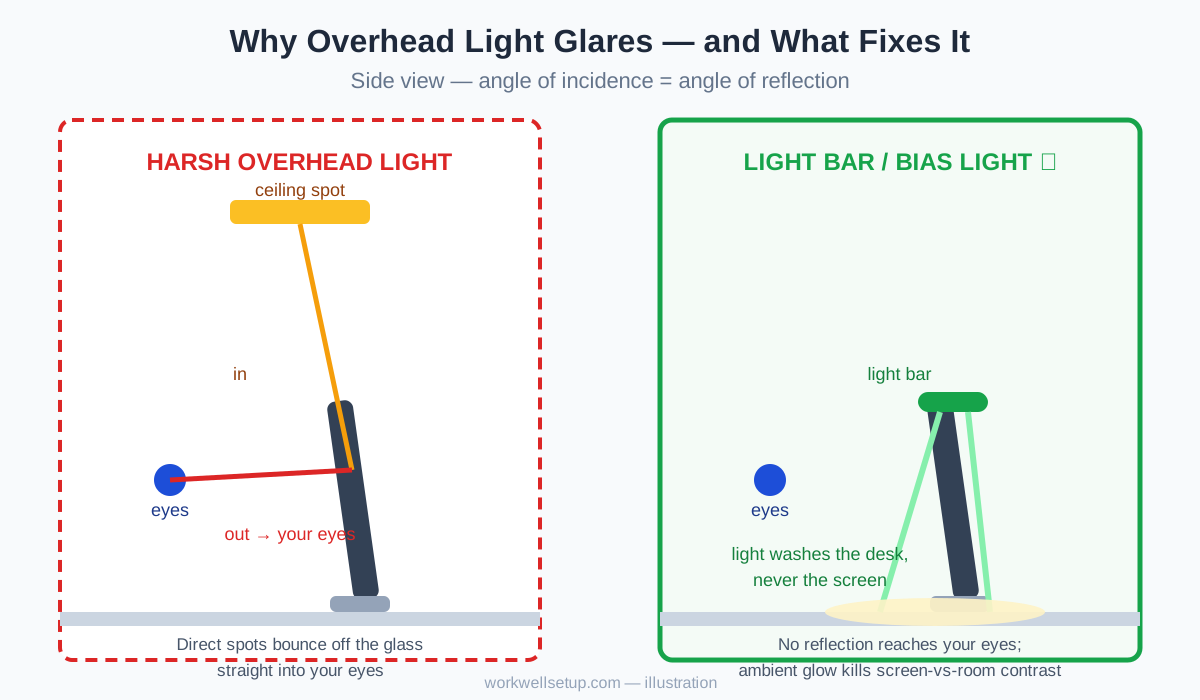
A light bar (like the BenQ ScreenBar Plus at around $120, or budget picks near $25) clamps to the top of your monitor and throws an asymmetric beam down onto your desk, never at your screen. Because the light source sits above and slightly behind the panel plane, its reflections physically cannot reach your eyes — and it raises ambient light where you read papers, closing the screen-to-desk contrast gap.
A traditional desk lamp usually sits beside the monitor, so its bulb often shows up in your peripheral vision and its light can graze the screen at a reflective angle. If you already own a good lamp, move it behind the monitor or bounce it off the wall, and keep the shade below screen-top height.
When a light bar adds glare: on low, glossy ceilings, its upward spill can bounce off the ceiling back onto the screen. The fix is tilting the bar slightly forward — details in our monitor light bar vs. desk lamp comparison. And if you do video calls all day, a lamp aimed at your face (not your screen) still matters — see the best desk lamp for video calls.
The quotable rule: light the desk and the room, never the screen — every photon that hits the panel directly is a photon that can end up in your eyes.
Which Glare Fix Gives the Best Bang for the Buck?
Every fix below is self-contained: pick the cheapest row that addresses your glare source and stop there.
| Fix | Cost | Effort | Best for | Glare reduction |
|---|---|---|---|---|
| Rotate desk to 90° from window | $0 | 10 minutes | Window reflections | High — fixes the geometry |
| Tilt monitor back 5–10° | $0 | 1 minute | Overhead-light reflections | Medium |
| Dim overheads, use side/bias light | $0 | 15 minutes | Harsh ceiling spots | Medium–High |
| Match screen brightness to room | $0 | 2 minutes | Eye-strain misdiagnosed as glare | Medium |
| Sheer curtains or window film | $15–$25 | 30 minutes | Direct sunlight | High |
| Matte anti-glare filter | $15–$30 | 20 minutes | Glossy laptop screens | Medium |
| Monitor hood | $30–$60 | 10 minutes | Fixed, unmovable light sources | Medium–High |
| Monitor light bar | $25–$160 | 10 minutes | Dark-room contrast + desk lighting | Medium |
Notice the pattern: the four free fixes handle most rooms.
How Do I Tune My Monitor Settings Against Glare?
Drop brightness until the screen matches the room, then raise contrast slightly to keep text crisp. That’s the whole technique.
- Open a blank white document (not a photo — photos lie about brightness).
- Lower brightness until the white looks like paper in your room’s light, not like a light source. If it glows, it’s too high.
- If text now looks washed out, nudge contrast up a few notches rather than raising brightness again.
- Set color temperature to match your room bulbs (the 500K rule above).
- Use your OS’s night-light only in the evening — it doesn’t reduce glare, but it softens the blue-white harshness that makes glare feel worse after dark.
One myth to retire: dark mode does not reduce glare. Reflections are a property of the glass, not the pixels — a dark-mode window reflects your ceiling light exactly as much as a light-mode one. Dark mode can reduce perceived contrast strain in dim rooms, but it won’t fix a single reflection.
If you run two displays, match their brightness to each other, not just to the room. Our dual-monitor setup guide covers positioning both screens glare-free.
Frequently Asked Questions
Does a matte screen protector reduce glare on a laptop?
Yes — the most effective fix for glossy laptop displays; blacks will look slightly gray.
Why does my monitor glare get worse in the afternoon?
The sun drops lower and shines more directly through side windows; sheer curtains or a 15-degree monitor rotation for the 3–5 p.m. window usually solves it.
Is it better to face the window or have my back to it?
Neither — both positions cause glare or contrast fatigue; place your desk perpendicular to the window so light comes from the side.
Can a monitor light bar cause glare?
Rarely, but yes — on low, glossy ceilings its upward spill can bounce back onto the screen; tilt the bar forward or pick a model with minimal upward spill.
Does turning down brightness reduce glare?
No — brightness changes the image, not the reflection; matching brightness to the room reduces eye strain, but only repositioning, diffusion, or filters reduce actual glare.
Do I need an anti-glare filter if my monitor already has a matte coating?
Probably not — most modern office monitors ship with matte anti-glare coatings; filters add the most value on glossy laptop and consumer displays.
Your 15-Minute Glare Audit
Work through this list in order, and stop when the reflections are gone:
- Rotate to the 90-degree window position.
- Tilt the monitor back 5–10 degrees.
- Dim or switch off the ceiling spot directly above the desk.
- Match screen brightness to the room using the white-document test.
- Add sheers or window film if sunlight still punches through.
- Add a matte filter (glossy screens) or a hood (immovable light sources) only if 1–5 leave reflections behind.
Glare-free isn’t a product you buy — it’s a room you arrange. Get the geometry right once and your eyes stop noticing the screen.