
Mechanical vs Membrane Keyboards for Office Work: Which Should You Choose?
If you type for a living, your keyboard is the tool you touch more than anything else you own — yet most office workers use whatever came in the box. The two main technologies under those keycaps, mechanical and membrane (rubber dome), feel and behave very differently. Enthusiasts swear mechanical keyboards transformed their workdays; plenty of productive people happily type on membrane boards for decades.
As an Amazon Associate I earn from qualifying purchases.
So which is actually better for office work? The honest answer is “it depends on what you value” — noise tolerance, typing feel, budget, and whether you share your space. This guide explains how each type works, compares them across the factors that matter at work, and helps you pick the right one for your desk.
How They Work: The 30-Second Explainer
Mechanical Keyboards
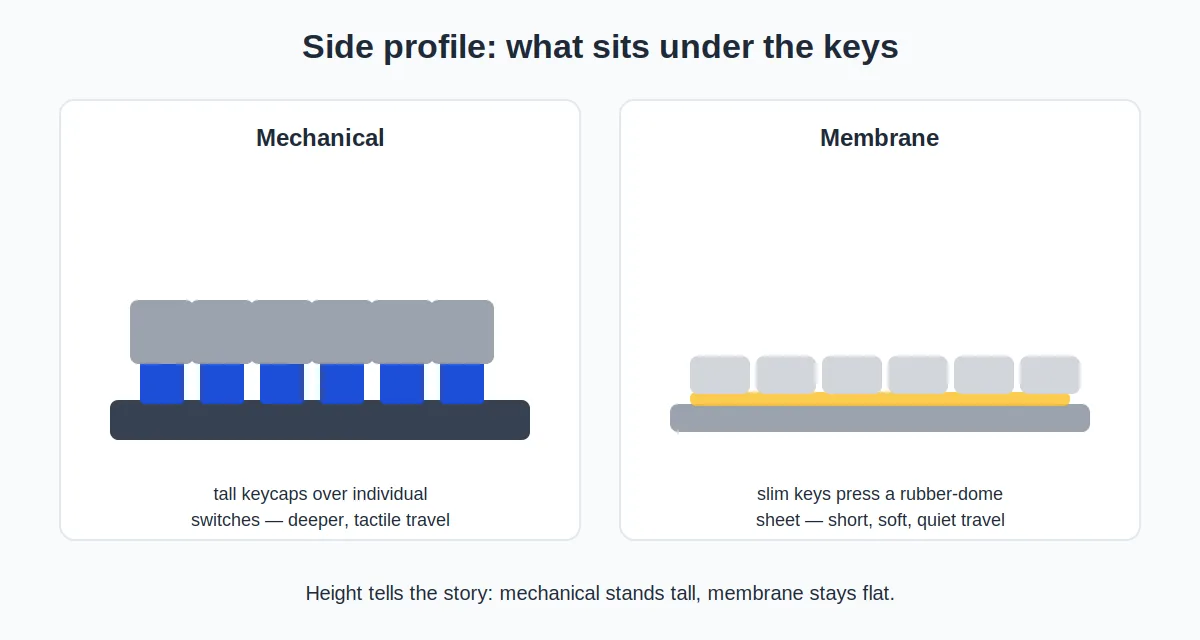
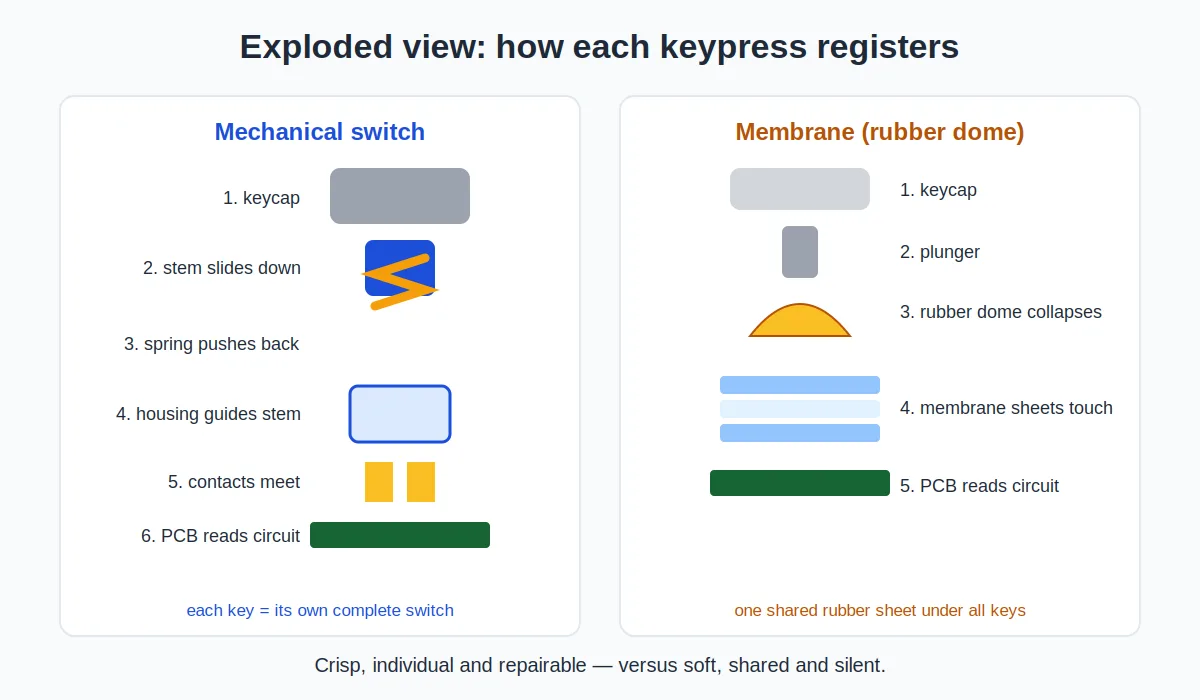
Under each key sits an individual mechanical switch — a self-contained spring-and-contact mechanism. Press the key, the switch actuates at a precise point, and you feel (and often hear) distinct tactile feedback. Different switch types feel different: linear switches press smoothly, tactile switches have a noticeable bump, and clicky switches add an audible click. Because each key is independent, the feel is consistent across the whole board.
Membrane (Rubber Dome) Keyboards
Under the keycaps sits a rubber dome sheet over a membrane circuit. Press a key, the dome collapses, and the circuit registers the press. This is the technology in most bundled office keyboards and slim wireless boards. The feel is softer and quieter, but mushier — and because it’s one shared sheet, keys can feel slightly different from each other as the domes age unevenly.
The Middle Ground: Scissor Switches
Worth knowing about: scissor-switch keyboards (like laptop keyboards and popular low-profile boards) use a stabilizing scissor mechanism over a dome. They’re a refined membrane variant — quieter and more precise-feeling than classic rubber domes, and the reason many premium office keyboards feel as good as they do. When people praise a “great membrane keyboard,” it’s often a scissor-switch one.
Head-to-Head Comparison
Noise: The Office Dealbreaker
This is the factor that decides the debate for most shared offices. Membrane keyboards are inherently quieter — the rubber domes muffle each keystroke. Mechanical keyboards vary enormously: clicky switches are genuinely loud enough to annoy coworkers several desks away, while tactile and linear switches are moderate.
But “mechanical” doesn’t have to mean loud. Quiet switch variants (often labeled “silent”) include built-in dampening that brings noise close to membrane levels, and simple mods like O-rings soften the bottom-out sound further. If you want mechanical in an open office, silent switches aren’t optional — they’re the price of admission. Our guide to the quietest mechanical keyboards for offices covers the best low-noise options in detail.
Winner: membrane for out-of-the-box quiet; silent mechanical ties with the right switches.
Typing Feel
The most subjective category — and the one mechanical fans care about most. Mechanical switches offer crisp, consistent actuation with a clear point where the key registers. Many typists find this reduces bottoming out (slamming keys to the base), which can mean less finger fatigue over long sessions. The variety is the real draw: you can choose exactly the resistance and feedback you like.
Membrane boards feel softer and less defined. You typically press until the key bottoms out because there’s no clear actuation point. Good scissor-switch boards feel precise and pleasant; cheap rubber domes feel mushy and vague.
Winner: mechanical for feel and feedback, though premium scissor-switch membranes are closer than you’d expect.
Durability and Lifespan
Mechanical switches are typically rated for tens of millions of keystrokes per key — often 50 million or more. Just as important, individual switches can be replaced on many boards, so one dead key doesn’t kill the keyboard. A quality mechanical board can realistically last a decade.
Membrane keyboards wear differently: the rubber domes lose their springiness over time, and keys gradually feel mushier and less responsive. Most office membrane boards start feeling tired after a few years of heavy use, and when they go, the whole board goes.
Winner: mechanical, comfortably.
Price
Membrane wins on upfront cost, no contest. Decent membrane office keyboards start around $15–30, and even excellent scissor-switch wireless boards (like the well-regarded Logitech MX Keys style) sit in the $80–120 range.
Mechanical keyboards start higher: budget-friendly models run $50–80, quality mid-range boards $100–160, and premium or custom builds climb well past $200. You’re paying for individual switches, sturdier construction, and often features like hot-swappable sockets and PBT keycaps.
Winner: membrane for budget; mechanical is the long-term investment.
Customization and Repair
Mechanical keyboards are the tinkerer’s platform: hot-swappable switches (no soldering) let you change the feel key by key, keycap sets change the look and sound, and layouts from compact 65% to full-size abound. Spill coffee on one key? Replace the switch.
Membrane keyboards are essentially sealed units — what you buy is what you get, and repairs usually mean replacing the whole board.
Winner: mechanical, overwhelmingly — if you care about this at all.
Typing Speed and Accuracy
Enthusiasts claim mechanical switches make them faster, and there’s a grain of truth: the clear actuation point can reduce errors from half-pressed keys. But controlled studies show modest gains at best — a few percent for most typists, and plenty of fast typists use membrane boards. Don’t buy mechanical expecting a typing-speed miracle; buy it for feel and comfort.
Winner: slight edge to mechanical, but it’s not the reason to choose.
Wrist Fatigue and Ergonomics
Here’s a nuance people miss: the keyboard type matters less than the keyboard shape. Ergonomic benefits come from tenting, split layouts, negative tilt, and proper height — available in both technologies. That said, mechanical’s lighter actuation options and clear feedback can reduce the pounding that aggravates tired hands, and low-profile mechanical boards combine a slim wrist-friendly height with mechanical feel.
Whatever you choose, pair it with good posture: elbows near 90 degrees, wrists straight, and the keyboard close enough that you’re not reaching. For a direct comparison of two popular low-profile office boards, see our Logitech MX Keys vs MX Mechanical breakdown.
Winner: tie — ergonomics is about shape and setup, not switch technology.
Comparison Table
| Factor | Mechanical | Membrane / Rubber Dome |
|---|---|---|
| Noise | Varies widely; silent switches available | Quiet by default |
| Typing feel | Crisp, consistent, customizable | Softer; best in scissor-switch designs |
| Durability | 50M+ keystrokes per key; repairable | Domes wear out; whole board replaced |
| Price | $50–$200+ | $15–$120 |
| Customization | Switches, keycaps, layouts | Essentially none |
| Typing speed | Slight edge | Perfectly capable |
| Ergonomics | Depends on shape, not switches | Depends on shape, not switches |
| Best for | Enthusiasts, heavy typists, tinkerers | Budget setups, quiet-first offices |
Prices shift frequently — treat ranges as approximate and check current listings.
Who Should Choose Which?
Choose mechanical if…
- You type for hours daily and want the most satisfying, consistent feel.
- You enjoy (or want to explore) customization — switches, keycaps, layouts.
- You want a keyboard that lasts a decade and can be repaired.
- You’re willing to pick silent or quiet switches (and maybe add O-rings) for office courtesy.
- You work from home or have your own office where noise isn’t policed.
Choose membrane if…
- Quiet matters most and you don’t want to think about switch types.
- You’re on a tight budget — a $25 membrane board types just fine.
- You prefer slim, low-profile keyboards (most are membrane/scissor-switch).
- You share a desk or hot-desk and want zero-fuss reliability.
- You simply don’t care about keyboard feel — no shame in it.
- You want keyboard and mouse in one box — a wireless keyboard and mouse combo is the simplest zero-fuss upgrade.
The Office Compromise: Quiet Mechanical and Low-Profile Options
The market has largely solved the old dilemma. Silent mechanical switches deliver much of the mechanical feel at near-membrane noise levels. Low-profile mechanical boards give you slim, wrist-friendly designs with real switches underneath — the best of both worlds for many office workers. And premium scissor-switch boards remain the pragmatic choice: quiet, slim, pleasant, and cheaper than mechanical.
If you’re leaning mechanical but work around others, start with our quiet mechanical keyboard roundup — every pick there is chosen specifically to keep the peace in shared spaces.
Tips for Using a Mechanical Keyboard in a Shared Office
- Choose silent or linear switches. Avoid clicky switches entirely — they’re the ones that generate complaints.
- Add O-rings or use a desk mat. Both soften the “thock” of keys bottoming out, which is most of what coworkers actually hear.
- Type lighter. Mechanical switches actuate before bottoming out — you don’t need to hammer them. A lighter touch is quieter and easier on your fingers.
- Keep the board on a mat, not bare desk. A hard desk amplifies every keystroke; a mat absorbs it.
- Read the room. If your team is on calls all day, even a quiet mechanical might be too much — that’s what good membrane boards are for.
Frequently Asked Questions
Are mechanical keyboards too loud for offices?
Clicky ones, yes. But silent and linear mechanical switches are comparable to membrane boards in noise, especially with O-rings and a desk mat. The blanket statement “mechanical keyboards are loud” is outdated.
Do mechanical keyboards really last longer?
Yes — the per-key durability ratings are an order of magnitude higher than membrane domes, and individual switches can be replaced. In practice, a good mechanical board outlasts several membrane boards.
Is a membrane keyboard bad for your wrists?
No — wrist strain comes from posture, keyboard height, and layout, not switch technology. An ergonomic membrane board with proper tenting beats a flat mechanical board for wrist comfort every time.
What’s the difference between membrane and scissor-switch?
Scissor-switch is a refined membrane design: a stabilizing scissor mechanism sits over the dome, giving shorter travel and a more precise feel. It’s what’s in most laptop keyboards and premium slim office boards — and why those feel better than cheap rubber-dome boards.
Should I get a mechanical keyboard if I’ve never tried one?
If you’re curious and the budget allows, a hot-swappable board with quiet tactile switches is a low-risk way to find out — you can change switches later if the feel isn’t right. If you’d rather not experiment, a quality scissor-switch board is the safe, excellent default.