

Best Desks for Dual Monitor Setups (2026): 5 Picks From 48 to 72 Inches
The best desk for a dual monitor setup in 2026 is the UPLIFT V2 with a 60-by-30-inch bamboo top: two 27-inch monitors fit side by side with room left for a laptop and a dock, and the frame adjusts from 24.3 to 49.9 inches. On a budget, the VIVO Electric 60-by-24 offers the same 60-inch width for about $200–$240 as of November 2026.
As an Amazon Associate I earn from qualifying purchases.
TL;DR — Our 2026 dual monitor desk picks
- Best overall: UPLIFT V2 Bamboo 60×30 — premium sit-stand, 355 lb capacity, ~$800–$900
- Best mid-range sit-stand: FlexiSpot E7 Pro 48×30 — dual motor, 25–50.6 in range, ~$450–$480
- Best budget sit-stand: VIVO Electric 60×24 — solid 1.1 in one-piece top, 4 presets, ~$200–$240
- Best wide fixed desk: Tribesigns 63″ — 63×31.5 in of open surface, ~$180–$200
- Best budget fixed desk: SHW 55″ — the cheapest real dual monitor desk, ~$110–$130
Method: we compared published specs, November 2026 prices, and verified owner feedback — no hands-on testing.
How wide does a desk need to be for two monitors?
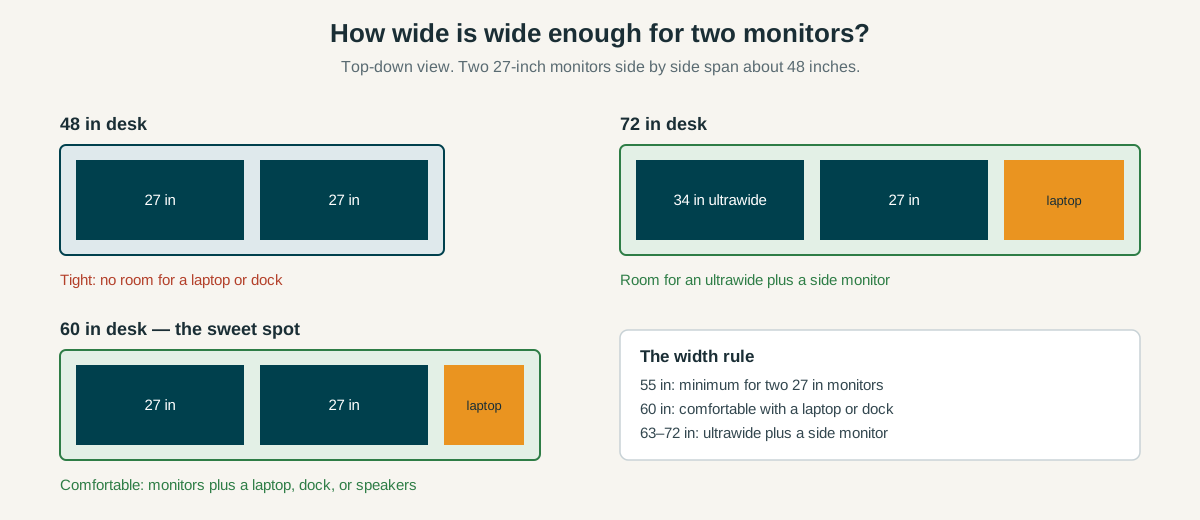
Width is the whole decision, so start with the math. A 27-inch monitor is about 24 inches wide once you count the bezel and the stand base, so two of them side by side span roughly 48 inches. That leaves nothing for a laptop, dock, speakers, or notebook on a 48-inch desk.
A 55-inch desk is the realistic minimum for two 27-inch monitors, and 60 inches is the comfortable width. At 60 inches you get the two screens plus a laptop or a docking station off to one side, which is how most dual monitor desks actually get used. Our dual monitor setup walkthrough covers screen arrangement.
The exception is an ultrawide: a 34-inch ultrawide plus a 27-inch side monitor spans about 56 inches before accessories, so that pairing wants a 63- or 72-inch desk.
Depth matters almost as much as width. Monitors on an arm sit 6 to 8 inches off the back edge, and your keyboard needs another 10 to 12 inches in front. A 24-inch-deep desk works, but it is the floor — a 30-inch-deep top gives your wrists room.
Will a monitor arm clamp fit my desk?
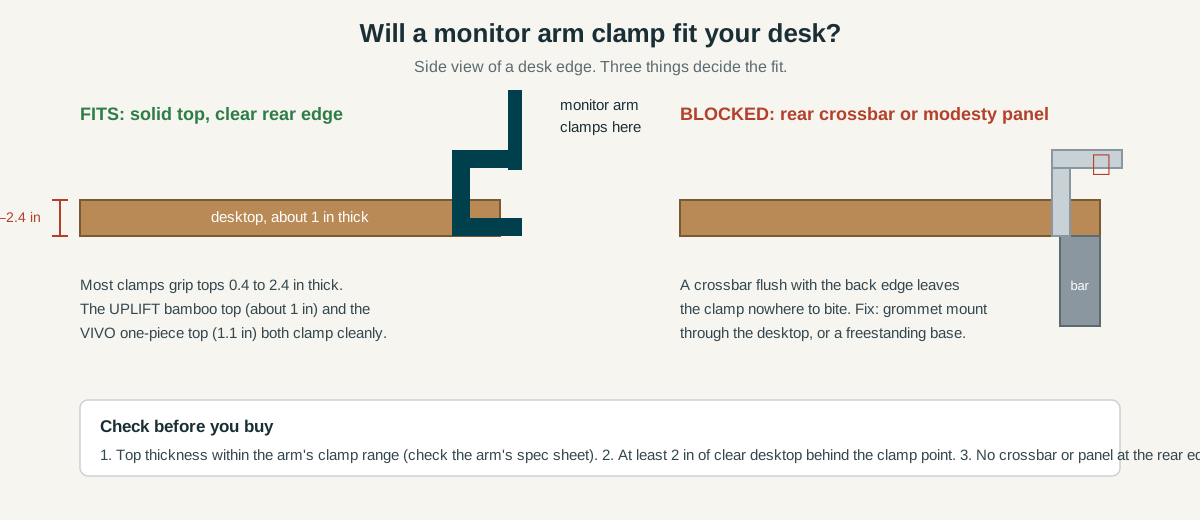
Most dual monitor setups end up on a monitor arm, and the arm has to clamp to the desk. Three things determine the fit.
- Desktop thickness. Most monitor-arm clamps grip tops between 0.4 and 2.4 inches thick. A 1-inch top is the sweet spot: thick enough to hold a dual-arm clamp without flexing, thin enough for any standard clamp.
- Clear rear edge. The clamp needs a bare stretch of desktop at the back edge — at least 2 inches of clear surface behind the clamp point. Check the back of the desk before you buy, not after.
- No crossbar or modesty panel at the rear edge. Some budget desks run a steel crossbar or a modesty panel flush with the back edge, and a clamp has nowhere to bite. If your desk has one, the fix is a grommet mount through the desktop or a freestanding monitor base instead of a clamp.
Our best dual monitor arm guide lists the clamp range of each arm we compared, so match the arm to the desk top. On thin budget tops, use the reinforcement plate if your arm ships with one — a dual-arm clamp concentrates two monitors’ weight on a small patch.
The 5 best desks for dual monitor setups in 2026
1. UPLIFT V2 Bamboo 60×30 — Best overall dual monitor desk
The UPLIFT V2 is the benchmark sit-stand desk for a dual monitor setup, and the 60-by-30-inch bamboo top is the size to get. Sixty inches fits two 27-inch monitors with a laptop beside them, and the 30-inch depth keeps the screens at a comfortable distance with room for a keyboard in front. The V2 frame adjusts from 24.3 to 49.9 inches, lifts 355 pounds, and includes an advanced memory keypad, wire grommets, and a cable tray — accessories other desks charge extra for.
Two honest caveats. First, UPLIFT replaced the V2 with the V3 in late 2025, so V2 bundles now sell on Amazon while stock lasts — typically about $150 under a comparable V3, which makes this the value moment for the V2. Second, the price: about $800–$900 for the 60×30 bamboo configuration as of November 2026. That is real money, but it buys the sturdiest frame here, a 15-year warranty, and a top that clamps cleanly with any monitor arm.
Best for: anyone building a permanent dual monitor workstation who wants sit-stand.
Check the UPLIFT V2 Bamboo 60×30 price on Amazon
2. FlexiSpot E7 Pro 48×30 — Best mid-range sit-stand desk
The FlexiSpot E7 Pro is the mid-range sit-stand pick, with a dual-motor, three-stage frame that adjusts from 25 to 50.6 inches and lifts up to 440 pounds depending on the exact configuration. Four memory presets and a cable tray round out a package that costs roughly half the UPLIFT at about $450–$480 as of November 2026.
The trade-off is width, and it matters for this article: the Amazon configuration we verified is 48 by 30 inches. Two 24-inch monitors fit comfortably, but two 27-inch monitors span the full 48 inches with nothing to spare — no laptop, no dock. If your monitors are 27 inches, check FlexiSpot’s wider desktop options before ordering.
Best for: dual 24-inch monitor setups and single-monitor-plus-laptop desks that want premium sit-stand mechanics at a mid-range price.
Check the FlexiSpot E7 Pro price on Amazon
3. VIVO Electric 60×24 — Best budget sit-stand desk
The VIVO Electric 60-by-24 is the cheapest way to get a real sit-stand desk wide enough for two monitors. The headline spec is the top: a solid one-piece desktop, 1.1 inches thick, instead of the thin split boards that budget standing desks usually ship with. That thickness is exactly what a monitor-arm clamp wants. Height runs 29.3 to 48.5 inches on a single motor, with four memory presets and a 220-pound capacity.
The compromises are visible in the spec sheet: a single motor instead of dual, a 24-inch depth instead of 30, and a 29.3-inch minimum height that sits slightly higher than the premium frames. None of those matter much for a dual monitor desk — 220 pounds is far more than two monitors, a laptop, and a dock weigh. Pricing as of November 2026: about $200–$240, which makes it the best value on this page by a wide margin. Our best standing desk under $500 guide covers more budget sit-stand options if you want to compare.
Best for: anyone who wants 60 inches of width and electric height adjustment for about $200.
Check the VIVO Electric 60×24 price on Amazon
4. Tribesigns 63″ Large Desk — Best wide fixed desk
If you never plan to stand, the Tribesigns 63-inch desk buys the most surface per dollar on this page: 62.99 inches wide by 31.5 inches deep, at a fixed 29.5-inch height. That footprint swallows an ultrawide plus a side monitor, or two 27-inch monitors with a laptop open beside them. The 31.5-inch depth is the deepest top here, which matters more than it sounds — deep tops let you push the monitors back and still have a full keyboard zone in front.
The trade-off is that this is a fixed desk in every sense: no height adjustment, no cable tray, no grommets. You are buying square inches, not features. The steel-leg frame is sturdy and the open legroom is generous, but plan your cable management separately. Pricing as of November 2026: about $180–$200.
Best for: ultrawide-plus-side-monitor setups and anyone who wants maximum surface area.
Check the Tribesigns 63-inch Large Desk price on Amazon
5. SHW 55″ Commercial-Grade — Best budget fixed desk
The SHW 55-inch desk is the cheapest real dual monitor desk we compared: 55 by 24 inches of commercial-grade laminate on a steel frame, for about $110–$130 as of November 2026. Fifty-five inches is the minimum width for two 27-inch monitors, and the SHW hits it exactly — the screens fit, and not much else does.
Owner feedback is the reason it earns the budget slot instead of a cheaper no-name desk: the SHW line has sold for years, the frame is rated for office use, and the assembly is straightforward. Two things to know before ordering. First, the 24-inch depth is the floor for dual monitors on arms, so keep the monitors close to the back edge. Second, check the rear edge for the crossbar before clamping an arm to it — if the clamp cannot clear it, use a grommet mount or a freestanding base.
Best for: tight budgets, spare rooms, and second workstations.
Check the SHW 55-inch Commercial-Grade Desk price on Amazon
Quick comparison: all five dual monitor desks side by side
| Desk | Size (W × D) | Type | Height | Clamp note | Typical price (Nov 2026) |
|---|---|---|---|---|---|
| UPLIFT V2 Bamboo | 60 × 30 in | Sit-stand, dual motor | 24.3–49.9 in | ~1 in bamboo top, clamps cleanly | $800–$900 |
| FlexiSpot E7 Pro | 48 × 30 in | Sit-stand, dual motor | 25–50.6 in | 30 in depth, fits dual 24 in monitors | $450–$480 |
| VIVO Electric | 60 × 24 in | Sit-stand, single motor | 29.3–48.5 in | 1.1 in one-piece top, clamp-friendly | $200–$240 |
| Tribesigns 63″ | 63 × 31.5 in | Fixed | 29.5 in fixed | Deepest top here, 31.5 in | $180–$200 |
| SHW 55″ | 55 × 24 in | Fixed | 28 in fixed | Check rear crossbar before clamping | $110–$130 |
When should you buy a desk for a dual monitor setup?
Desks are furniture, so the discounts follow furniture sales, not tech launches — and the deepest cuts land in late November. Time your purchase if you can. If you’re not in a hurry, Black Friday week (Nov 27–30) is when desk prices hit their yearly floor — our Black Friday dual monitor desk deals guide tracks the discount bands to expect. Sit-stand desks in particular have dropped $50–$150 during past Black Friday weeks, which is real money on a $200–$480 desk.
If you need a desk now, buy on width first: measure your monitors, add the accessories that live on the desk, and pick the cheapest desk that covers the total. A desk that is 6 inches too narrow costs more in frustration than any sale saves.
FAQ: desks for dual monitor setups
What size desk do I need for two 27-inch monitors?
At least 55 inches wide — 60 is comfortable: two 27-inch monitors span about 48 inches, so 55 leaves a little room and 60 leaves room for a laptop or dock.
Can I clamp a monitor arm to any desk?
Almost any desk with a solid top edge works, as long as the top is 0.4 to 2.4 inches thick and the rear edge is clear of crossbars or modesty panels — if a crossbar blocks the clamp, use a grommet mount or a freestanding base instead.
Is a standing desk worth it for a dual monitor setup?
Yes, if you want to change posture during the day: a sit-stand frame raises both monitors together without rebuilding the setup, and the 60-inch sit-stand picks above cost little more than their fixed equivalents.
The bottom line
Buy width first. Two 27-inch monitors need 55 inches at minimum and 60 inches to breathe, and an ultrawide plus a side monitor wants 63 inches or more. The UPLIFT V2 60×30 is the best desk for a dual monitor setup if the budget stretches to about $800–$900; the VIVO Electric 60×24 delivers the same 60-inch width with electric height adjustment for about $200–$240. Fixed-desk buyers get the most surface from the Tribesigns 63-inch at about $180–$200, and the SHW 55-inch covers the minimum width for about $110–$130.