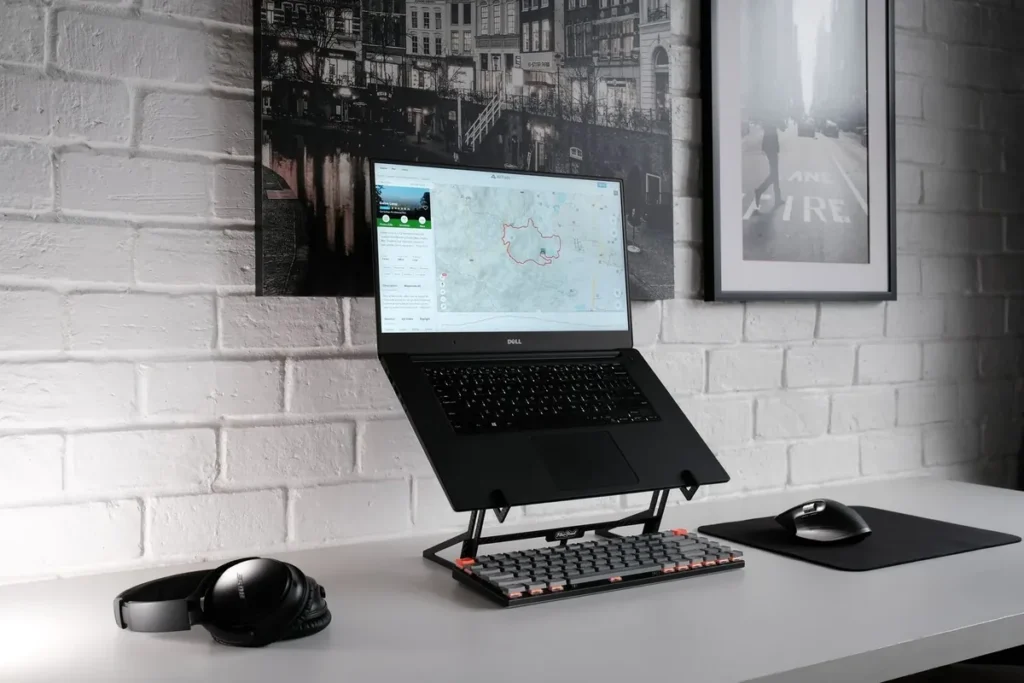
The best laptop stand for a desk in 2026 is the Rain Design mStand 360 (~$65): its single-piece aluminum body with 360° swivel base raises the screen 5.9 inches and lets you share it with one spin. Budget buyers should get the Nulaxy C3 (~$21) — it holds up to 22 lbs and breaks down into 3 flat parts.
As an Amazon Associate I earn from qualifying purchases.
Best Laptop Stands for Desk (2026): Ergonomic Picks
TL;DR — The 6 best laptop stands for a desk:
- Best overall: Rain Design mStand 360 (~$65) — single-piece aluminum, 5.9″ screen rise, 360° swivel base, cable-routing hole.
- Best value: Nulaxy C3 (~$21) — 5mm aluminum alloy, holds 22 lbs, detaches into 3 parts, fits 10–16″ laptops.
- Best adjustable: BoYata N21 (~$35) — multi-angle height adjustment, fits up to 17″ laptops, 4.8/5 from 14,800+ ratings.
- Best minimalist: SOUNDANCE LS1 (~$30) — fixed-height aluminum cradle, keyboard stashes underneath, fits 10–15.6″.
- Best foldable: Lamicall LN09 (~$30) — adjustable and folds flat, #5 bestseller in Laptop Stands, fits 10–17.3″.
- Best travel pick: Nexstand K2 (~$35) — 230-gram reinforced nylon, 8 angle settings, sets up in one second.
The quotable rule: a laptop stand only works if you pair it with an external keyboard and mouse — raising the screen fixes your neck, but typing on the raised keyboard recreates the same shoulder strain.
| Model | Stand type | Screen rise | Weight capacity | Fits laptops | Foldable | Price (Oct 2026) |
|---|---|---|---|---|---|---|
| Rain Design mStand 360 | Fixed cradle + 360° swivel | 5.9″ | Not rated (fits up to 15″) | 13–15″ (≤10.4″ deep) | No | ~$65 |
| Nulaxy C3 | Fixed cradle | ~6″ | 22 lbs | 10–16″ | Breaks into 3 parts | ~$21 |
| BoYata N21 | Multi-angle adjustable | Adjustable | 17″ max laptop | Up to 17″ | Yes | ~$35 |
| SOUNDANCE LS1 | Fixed cradle | 5.7″ | Not rated (fits 10–15.6″) | 10–15.6″ | No | ~$30 |
| Lamicall LN09 | Adjustable, folding | Adjustable | 17.3″ max laptop | 10–17.3″ | Folds flat | ~$30 |
| Nexstand K2 | Adjustable, ultra-portable | 8 angle settings | 17″ max laptop | 10–17″ | Folds to 35.4 × 4 × 4 cm | ~$35 |
Best Overall: Rain Design mStand 360
The Rain Design mStand 360 is the stand every desk stand is still measured against. Machined from a single solid piece of aluminum, it lifts your laptop screen a full 5.9 inches (150 mm) to eye level — the height that lets you sit upright instead of hunching down toward the screen. The 360° swivel base has a profile of just 0.1 inches, so you can spin the screen toward a colleague or client without lifting the laptop.
Practical details add up: the aluminum body doubles as a heat sink to cool the laptop, a 2-inch cable hole in the back routes charging and display cables out of sight, and the keyboard slot clears desk space when you pack up. The stand itself weighs 3.08 lbs and measures 10 × 9.3 × 6.13 inches, fitting all Apple notebooks plus most PC laptops with depths under 10.4 inches — in practice, 13- to 15-inch machines.
The trade-off: height is fixed, so if 5.9 inches doesn’t match your eye level, you can’t change it — adjustable picks like the BoYata N21 win there. It’s also the least portable option here. But for a permanent home-office desk, the mStand 360’s stability is unmatched — the single-piece construction simply doesn’t wobble, which matters when you’re pairing it with an external monitor in clamshell mode.
Best Value: Nulaxy C3
The Nulaxy C3 is the best-selling budget stand on Amazon for a reason: 5mm aluminum alloy construction, a 22-lb (10 kg) weight capacity, and a price around $21. It raises the screen roughly 6 inches, fits laptops from 10 to 16 inches, and breaks down into 3 flat parts — assemble it with one step when you arrive, flatten it when you leave.
The open-back design does double duty: it sheds heat and keeps heavy gaming laptops from cooking themselves, while the rubber pads top and bottom stop both the laptop and the stand from sliding. At 1.48 lbs it’s light enough to commute with, and the massive back cutout means the aluminum effectively acts as a passive cooling plate.
The trade-off: the C3 has a fixed ergonomic angle, so taller users can’t dial it down. Nulaxy’s own testing found typing directly on the raised keyboard can wobble — use an external keyboard and mouse, which you should be doing with any stand anyway. If you want the proven sub-$25 pick that thousands of reviewers already trust, this is it.
Best Adjustable: BoYata N21
The BoYata N21 solves the one thing fixed stands can’t: it adjusts to your body. The multi-angle Z-type hinge lets you dial in both height and tilt, and it fits laptops up to 17 inches — including chunky gaming machines most stands can’t hold. With a 4.8/5 rating across more than 14,800 reviews, it’s the most socially proven adjustable stand on Amazon.
The build is serious: premium alloy steel rather than thin stamped aluminum, four anti-slip silicone pads, and a heat-vent surface that keeps airflow moving under the laptop. The Z-folding design collapses flat for bag storage, so it works as well in a coworking space as at home.
The trade-off: at about 1,100 g it’s the heaviest adjustable pick here — you won’t forget it’s in your bag. The industrial alloy-steel look also reads more “workshop” than “Apple store”. If you switch desks often or share a workstation with someone taller or shorter than you, adjustability beats every other feature, and nothing under $40 does it better.
Best Minimalist: SOUNDANCE LS1
The SOUNDANCE LS1 is for the desk that never changes. The fixed-height aluminum cradle (10.24 × 8.86 × 5.71 inches) raises 10- to 15.6-inch laptops to 5.7 inches, and the open frame creates a storage cavity where your external keyboard and mouse disappear when you’re done for the day. It’s the cleanest-looking way to dock a laptop on a desk.
SOUNDANCE calls it their flagship stand for a reason: the thick aluminum frame is noticeably sturdier than budget Z-arm stands, the polished-and-rubberized finish feels premium, and it comes with a 1-year warranty. It consistently ranks in the top 25 in Amazon’s Laptop Stands category, which tells you people keep it on their desks for years.
The trade-off: there’s no height adjustment, and 15.6 inches is the hard ceiling — 17-inch laptop owners should look at the BoYata N21 or Lamicall LN09 instead. If your desk setup is finished and you just want the laptop screen at eye level with zero fuss, the LS1 is the buy-once pick.
Best Foldable: Lamicall LN09
The Lamicall LN09 is the rare stand that’s both height-adjustable and truly foldable. Unfold it at the office, dial in your angle, fold it flat into your bag at 6 pm. It fits laptops from 10 to 17.3 inches — the widest range in this roundup — and sits at #5 in Amazon’s Laptop Stands bestseller list, ahead of far more expensive competition.
The aluminum construction keeps it at 2.35 lbs with a 12 × 10-inch footprint, and the anti-skid silicone on the arms and edges protects both the laptop and the desk surface. The adjustable hinge has enough range to work at a bar-height café table or a low coffee table, which fixed stands can’t do.
The trade-off: like every folding Z-arm, typing directly on the laptop at full extension can bounce — pair it with an external keyboard. If your “desk” is wherever you opened your laptop today, the LN09 is the one stand that keeps up.
Best Travel Pick: Nexstand K2
The Nexstand K2 is what travel writers actually carry. At 230 grams — about the weight of your phone — the reinforced glass-fibre nylon frame folds down to a 35.4 × 4 × 4 cm tube that disappears into any laptop sleeve. Setup takes literally one second: unfold, lock, done. Eight angle settings raise 10- to 17-inch laptops, and a 4.6/5 rating from over 3,000 reviewers backs the design.
This is the stand that proves ergonomics don’t have to live at your desk. Road warriors and remote workers who spend their days in cafés, airports, and coworking spaces get eye-level screens anywhere, which is where neck strain actually accumulates — your desk at home is probably fine; the hotel chair is the problem.
The trade-off: nylon isn’t aluminum, and it looks utilitarian next to a MacBook Pro. Heavy 17-inch gaming laptops at the highest angle will test the hinge. For travel and hot-desking, though, nothing this light sets up this fast — and the price (~$35) means losing one on a trip stings less than losing the mStand 360.
How High Should a Laptop Stand Raise Your Screen?
The top of your screen should sit at or just below eye level, with a slight 15–20° downward gaze.
That’s a rise of roughly 6 inches for most desks and chairs, which is why nearly every fixed stand in this roundup — the mStand 360 (5.9″), Nulaxy C3 (~6″), SOUNDANCE LS1 (5.7″) — lands in the same zone. If you’re taller than about 6’1″ or sit on a high stool, that 6-inch zone may leave the screen slightly low; that’s the moment to buy an adjustable pick like the BoYata N21 instead.
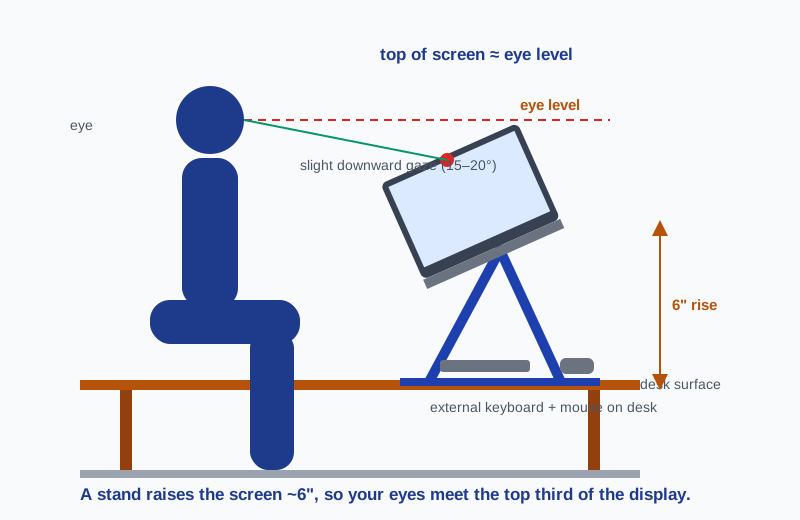
Two more rules complete the setup. First, the screen top matters more than the exact angle — tilt the display back slightly so you’re looking at the top third of the screen, not craning up at the bottom. Second, keep the external keyboard and mouse on the desk surface, not on a tray above it; elbows should hang at 90° with shoulders relaxed. A stand without an external keyboard just relocates the strain from your neck to your shoulders.
Should You Get a Fixed or Adjustable Laptop Stand?
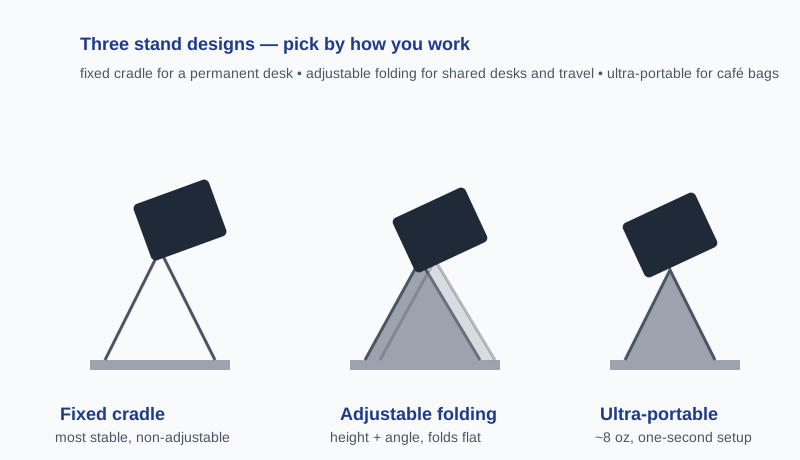
Fixed stands are more stable; adjustable stands adapt to you. Choose based on how often your seating changes.
Fixed cradles (mStand 360, SOUNDANCE LS1) are machined or bent into one shape, so they can’t wobble at a hinge — and they last for years. They’re the right answer for a permanent desk where you sit in the same chair every day. Adjustable stands (BoYata N21, Lamicall LN09, Nexstand K2) trade a little rigidity for the ability to dial height and angle to your body and your current chair.
The honest middle ground: buy the fixed stand for your home desk and the adjustable or travel stand for the road. At $21–$65 each, owning both costs less than one mediocre “does everything” stand. Whatever you choose, place a desk mat under the setup — it stops aluminum stands from skating and protects the desk finish.
Will a Laptop Stand Fit Your 17-Inch Laptop?
Check the stand’s max size and the laptop’s depth, not just the screen diagonal.
Screen size is a proxy; what actually matters is whether the laptop’s base sits fully on the cradle arms. The Lamicall LN09 and Nexstand K2 both accept up to 17.3″ and 17″ respectively; the BoYata N21 fits up to 17″; the Nulaxy C3 and SOUNDANCE LS1 stop at 16″ and 15.6″. A 17-inch gaming laptop also weighs 5–7 lbs, so pair it with a stand rated for the load — the Nulaxy C3’s 22-lb rating is the most headroom here.
Depth matters for the mStand 360 specifically: it accepts laptops up to 10.4 inches deep, which covers 15-inch MacBooks but can exclude some 15-inch Windows machines with deep trackpads. If your laptop is unusually deep, adjustable cradle arms (BoYata, Lamicall) are the safer bet.
Frequently Asked Questions
Can I type directly on a laptop on a stand?
You shouldn’t — typing on a raised keyboard bends your wrists upward and raises your shoulders, undoing the ergonomic benefit; always pair a stand with an external keyboard and mouse.
Do laptop stands actually help with neck pain?
Yes — raising the screen to eye level removes the forward head tilt that strains the cervical spine; studies on workstation ergonomics consistently link screen height to reduced neck and upper-back discomfort.
Is an expensive laptop stand worth it over a cheap one?
Pay for stability and the right features: the $65 mStand 360 earns its price with a wobble-free single-piece frame, but the $21 Nulaxy C3 delivers 90% of the ergonomic benefit at a third of the cost.
Can a laptop stand replace a monitor arm?
For a single laptop, yes — a stand plus an external keyboard achieves the same eye-level goal as a monitor arm in a single-screen setup; arms still win for multi-monitor arrays and ultrawides.
What laptop stand size do I need?
Match the stand’s max rating to your laptop: 10–16″ for most MacBooks and ultrabooks (Nulaxy C3, SOUNDANCE LS1), and a 17″-rated adjustable stand (BoYata N21, Lamicall LN09) for 15–17″ gaming and workstation laptops.
Do laptop stands help with cooling?
Yes — aluminum stands act as passive heat sinks and their open frames expose the laptop base to airflow; the open-back designs of the Nulaxy C3 and BoYata N21’s heat-vent surface are the most effective here.
The Bottom Line
The Rain Design mStand 360 is the best laptop stand for a desk you’ll never have to think about again; the Nulaxy C3 gets you there for ~$21. Whichever you buy, add the external keyboard and mouse — the stand raises the screen, the peripherals finish the posture. See our desk accessories guide for the keyboard and mouse picks that complete this setup.