
Best Vertical Mice for Office Work (2026)
The best vertical mouse for most office workers is the Logitech MX Vertical: its 57-degree handshake angle, 400–4,000 DPI sensor, and rechargeable battery suit medium-to-large hands. If your hand is small, the Logitech Lift is the better fit, and the $30 Anker 2.4G is the cheapest way to try the shape before committing.
As an Amazon Associate I earn from qualifying purchases.
TL;DR — Best vertical mice for office work at a glance
- Best overall: Logitech MX Vertical — $99.99 list, often $74–$99 on Amazon (as of November 2026). Best for medium-to-large hands.
- Best for small hands: Logitech Lift — $79.99 list, often $60–$70. Same 57-degree angle in a smaller body, with a left-hand version.
- Best budget try-out: Anker 2.4G Wireless — about $29.99. The cheapest way to find out if a vertical grip suits you.
- Best for unusual hand sizes: Evoluent VerticalMouse D — wired from about $97. The only pick sold in three sizes (Small, Medium, Large).
- Best big-hand bargain: DeLUX M618Plus RGB — about $28–$35. Large, wired, and far cheaper than the Logitech flagships.
Method: we compared published specs, November 2026 street prices, and verified owner feedback.
How do the best vertical mice for office work compare?
| Mouse | Price (Nov 2026) | Angle | Sensor | Weight | Battery | Best for |
|---|---|---|---|---|---|---|
| Logitech MX Vertical | $99.99 list; $74–$99 street | 57° | 400–4,000 DPI | 135 g | USB-C rechargeable, up to 4 months | Medium-to-large hands |
| Logitech Lift | $79.99 list; $60–$70 street | 57° | 400–4,000 DPI | 125 g | 1× AA, up to 24 months | Small-to-medium hands, left-handers |
| Anker 2.4G Wireless | ~$29.99 | ~60° | 800–1,600 DPI | ~95 g | 2× AAA | Trying the shape on a budget |
| Evoluent VerticalMouse D | Wired from ~$97; wireless ~$115 | ~90° | 800–3,200 DPI | 132–158 g wired | Wired USB or 1× AA, up to 3 months | Hands that fit no standard size |
| DeLUX M618Plus RGB | ~$28–$35 | ~60° | 800–4,000 DPI | 210 g | Wired USB | Large hands on a tight budget |
What does a vertical mouse actually do for your wrist?
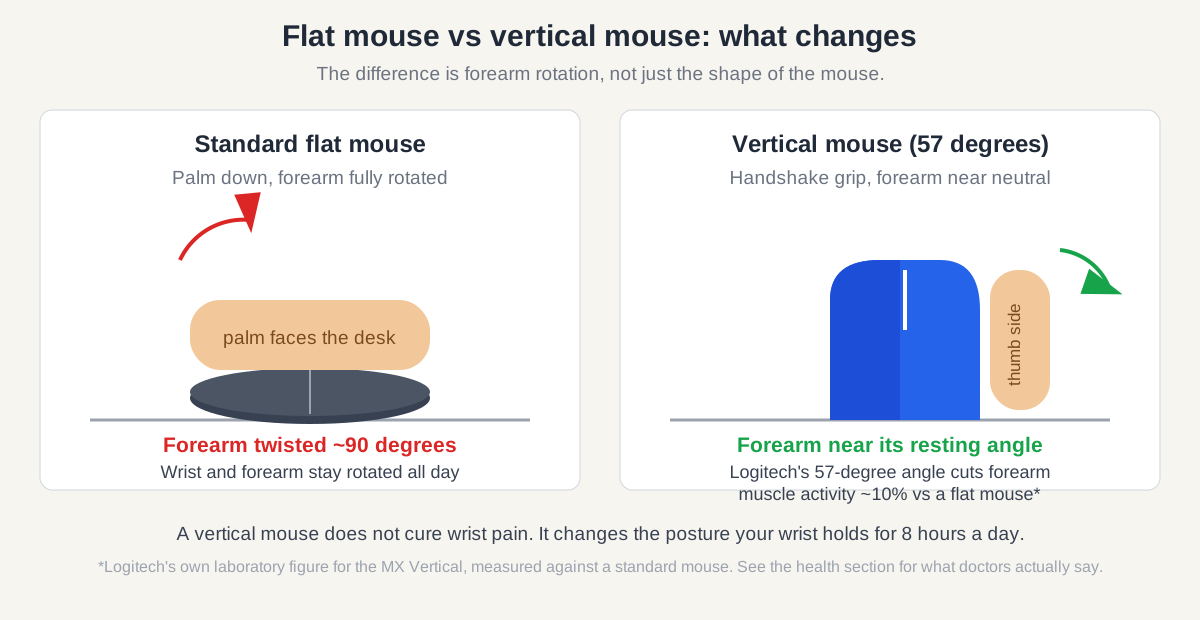
A vertical mouse changes the angle your forearm holds for eight hours a day — it does not treat or cure wrist pain. A flat mouse forces the forearm into full pronation, palm down against the desk. A vertical mouse rotates the hand into a handshake position, so the forearm sits closer to its natural resting angle.
OSHA’s Computer Workstations eTool advises keeping wrists straight and in line with the forearms, elbows close to the body, and the mouse at the same height as the keyboard and within easy reach — a vertical grip makes the straight-wrist part easier to hold without thinking about it. The Mayo Clinic’s carpal tunnel guidance notes that carpal tunnel syndrome comes from pressure on the median nerve in the wrist, with symptoms including numbness, tingling, and weakness — and that the evidence linking computer use itself to carpal tunnel is inconclusive.
A vertical mouse is a reasonable ergonomic experiment if your wrist aches at day’s end. But no mouse here is a treatment: persistent numbness, tingling that wakes you at night, or a weakening grip means seeing a clinician, not shopping. Pair any new mouse with the free basics: a neutral wrist, the mouse close to the keyboard, and a short break every 30 minutes.
Which vertical mouse is the best all-rounder for office work?
The Logitech MX Vertical is the best all-rounder because it pairs the ergonomic angle with the fewest everyday compromises. Its 57-degree tilt holds the hand in a natural handshake position, and Logitech’s own laboratory figure puts the reduction in forearm muscle activity at about 10% compared with a standard mouse. The 400–4,000 DPI sensor adjusts in 50-DPI steps. At 120 × 79 × 78.5 mm and 135 g, it is built for medium-to-large hands: owners with hands over 19 cm call it the comfortable one.
It connects over Bluetooth or the included 2.4 GHz receiver and switches between three devices with a button on the base. The built-in 240 mAh battery charges over USB-C and runs up to four months per charge. Downsides: right-hand only, a 125 Hz polling rate, and a $99.99 list price — though Amazon street prices of $74–$99 (as of November 2026) soften that.
Buy the MX Vertical if: your hand is medium-to-large and you want one mouse for years. Check the Logitech MX Vertical on Amazon — it carries a 4.4-star average across roughly 14,850 Amazon reviews.
Which vertical mouse fits a small hand?
The Logitech Lift is the vertical mouse for small-to-medium hands — and the only pick here with a native left-hand version. It is the same 57-degree handshake design as the MX Vertical, shrunk by about 22%: 108 × 70 × 71 mm and 125 g, sized for hands under about 19 cm. If the MX Vertical feels like holding a paperweight, the Lift is the one that disappears under your palm.
Everything else matches: the same 400–4,000 DPI sensor, quiet clicks, Bluetooth plus Logi Bolt receiver, and three-device switching. It runs on a single AA battery (up to 24 months) instead of a rechargeable cell. The left-hand version, Lift Left, is a mirrored twin at the same price — the MX Vertical has no left-hand model.
At $79.99 list and roughly $60–$70 on Amazon (as of November 2026), the Lift is also the cheaper Logitech. Buy the Lift if: your hand measures under 19 cm or you are left-handed. Check the Logitech Lift on Amazon — it averages 4.5 stars across roughly 10,900 Amazon reviews.
Is the Logitech Lift worth it over the MX Vertical?
No — unless your hand is small or left-handed, in which case the Lift is the only Logitech that fits at all. The two share the same angle, sensor range, connectivity, and quiet clicks. The differences are size, battery, and price: the MX Vertical is bigger and rechargeable; the Lift is smaller and left-hand friendly.
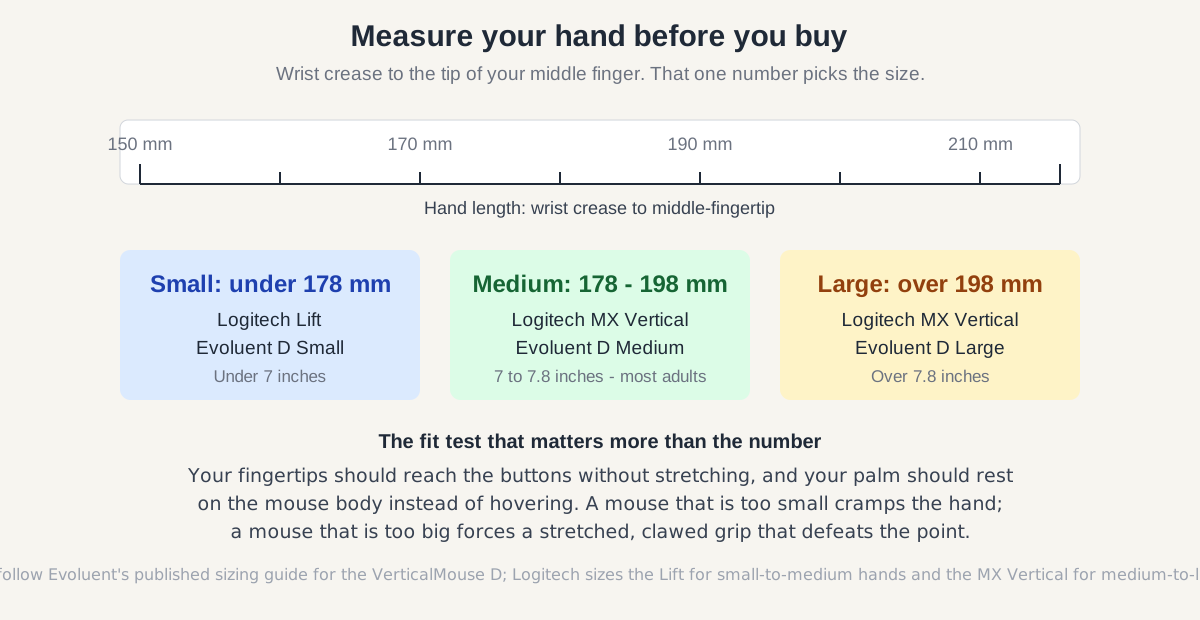
Measure from your wrist crease to the tip of your middle finger: under 19 cm, buy the Lift; over 19 cm, buy the MX Vertical.
Which cheap vertical mouse is actually worth buying?
The Anker 2.4G Wireless Vertical Ergonomic Mouse is the honest $30 answer — and the best way to test whether you like the shape at all. At about $29.99 on Amazon (as of November 2026), it costs a third of the MX Vertical, and its 4.2-star average across more than 53,000 Amazon ratings is the largest feedback base on this page. The handshake grip is real, the five buttons include forward/back thumb controls, and the three DPI steps (800, 1,200, 1,600) cover ordinary office work.
The compromises are exactly what the price suggests. There is no Bluetooth, so it ties up one USB-A port with its 2.4 GHz receiver and works with one computer only. It runs on two AAA batteries (not included), the side buttons are not recognized on macOS, and the 1,600 DPI ceiling means more arm movement across a large monitor.
Buy the Anker if: you want to try a vertical grip for a month before spending $70–$100. Check the Anker 2.4G Wireless on Amazon.
Which vertical mouse fits a large hand without the Logitech price?
The DeLUX M618Plus RGB is the large-hand bargain: a big, wired vertical mouse for about $28–$35 (as of November 2026). It is the bulkiest mouse here at 148.85 × 94.82 × 98.93 mm and 210 g, with a removable wrist rest. The DPI button cycles 800–4,000 DPI, the six buttons include forward/back controls, and the RGB strip switches off.
The price buys quirks rather than polish. It is wired only, so the cable is part of your desk forever. The 125 Hz polling rate and heavy body make it a poor gaming mouse despite the “gaming” label some listings carry, and Mac support is limited — buy from a listing with a clear return policy.
Buy the M618Plus if: you have a large hand, a small budget, and a fixed desk where a cable is no problem. Check the DeLUX M618Plus RGB on Amazon.
What if no standard size fits your hand?
The Evoluent VerticalMouse D is the only mouse here sold in three sizes — Small, Medium, and Large — and that is its entire reason to exist. The D is Evoluent’s sixth generation: a near-90-degree handshake grip with grooved finger buttons, an extended lip for the little finger, and a laser sensor adjustable across 800–3,200 DPI. Six buttons are configurable through Evoluent’s MouseManager software, and every size comes wired or wireless.
Sizing is the point: under 178 mm is Small, 178–198 mm is Medium, over 198 mm is Large. The Medium wired model is 136 g; the Large is 158 g. The wired version uses a 2.1 m USB cable; the wireless version runs on a single AA battery for up to three months. It is right-hand only, and the D’s driver features do not fully support macOS 10.15 and later.
The price is the hurdle: wired from about $97, wireless around $115 (as of November 2026) — above the MX Vertical, with no Bluetooth and no multi-device switching. Buy the Evoluent D if: your hand falls outside the Logitech sizes. Check the Evoluent VerticalMouse D (Medium, wired) on Amazon.
How do you pick the right size, and when should you buy?
Measure your hand first, then match the size — the angle matters less than the fit. A vertical mouse in the wrong size creates the cramping it is supposed to fix. Quick test: fingertips should reach the buttons without stretching, and your palm should rest on the body, not hover.
Beyond size, three questions decide it. First, wired or wireless: wireless costs more and needs batteries or charging, but a cable dragging across the desk undermines the relaxed grip. Second, one computer or several: only the Logitech picks switch between three devices. Third, left or right hand: only the Lift has a left-hand version.
If you are not in a hurry, Black Friday week (Nov 27–30) is when mouse prices hit their yearly floor — our Black Friday mouse deals guide tracks the discount bands to expect. The MX Vertical has dropped to around $74 in past sale events, and the Lift has been seen near $60. That timing matters most at the premium end; the Anker and DeLUX are already cheap enough that waiting saves only a few dollars.
A vertical mouse fixes the grip, but the wrist rests on the desk between movements — see our best wrist rest for keyboard and mouse guide. The best ergonomic keyboard for office work pairs with any pick above, and a trackball mouse removes wrist movement almost entirely if the vertical grip still feels wrong.
What should you expect in your first week with a vertical mouse?
Expect three to seven days of slower, clumsier mousing — then normal speed with less end-of-day ache. The handshake grip uses different forearm muscles, so precision tasks like selecting text feel off at first. The usual mistake is judging the mouse after one afternoon and sending it back.
Start at a middle DPI setting (around 1,200–1,600) so the cursor does not fly while you adjust. Keep the mouse close to the keyboard at the same height, as OSHA’s workstation checklist recommends.
Frequently asked questions
Do vertical mice actually help with wrist pain?
They can reduce the forearm twisting that aggravates wrist discomfort, but they are not a treatment for carpal tunnel syndrome. The Mayo Clinic notes the evidence linking computer use to carpal tunnel is inconclusive — see a clinician for persistent numbness or weakness.
How long does it take to get used to a vertical mouse?
About three to seven days of full-time use. Precision clicking feels clumsy at first because the handshake grip uses different forearm muscles, then speed returns to normal.
Which vertical mouse is best for small hands?
The Logitech Lift: sized for small-to-medium hands (under about 19 cm), 125 g, and the only pick here with a native left-hand version.
Is the Logitech MX Vertical worth $99?
For medium-to-large hands, yes — at its frequent $74–$99 street price. At full list, the Lift is the better value if it fits.
The bottom line
Buy the mouse that fits your hand, not the one with the best spec sheet. For most office workers that is the MX Vertical; for small or left hands the Lift; for a $30 experiment the Anker; for a hand no standard size fits the Evoluent D; for a large hand on a small budget the DeLUX M618Plus. Whichever you choose, measure your hand, give it a full week, and keep the workstation honest: neutral wrist, mouse close, breaks every half hour.