
Best Mechanical Keyboard Switches for Office Work (2026 Guide)The best mechanical keyboard switches for office work are quiet tactile switches such as Cherry MX Brown or Gateron G Pro Brown: they give your fingers a small bump to confirm each keypress without the loud click that annoys coworkers. If you type alone, smooth linear switches such as Gateron Milky Yellow Pro are quieter and less tiring; clicky switches belong at home.
As an Amazon Associate I earn from qualifying purchases.
TL;DR — Best mechanical keyboard switches for office work at a glance
- Best overall: Cherry MX Brown — tactile bump, no click, 55 g actuation, the safe default for shared spaces.
- Best quiet linear: Gateron Milky Yellow Pro — pre-lubed, smooth 50 g press, about $19–$22 for 70 switches (as of November 2026).
- Best budget linear: Akko V3 Cream Yellow Pro — 50 g linear, dustproof stem, about $13–$16 for 45 switches (as of November 2026).
- Best clicky (home office only): Cherry MX Blue — crisp click, 60 g actuation, satisfying alone but too loud for shared rooms.
- Best way to try them: a hot-swappable board such as the Keychron K8 Pro — swap switches in seconds with no soldering.
Method: we compared published specs, November 2026 street prices, and verified owner feedback.
How do linear, tactile, and clicky switches compare?
| Switch type | Feel | Sound | Actuation force | Best for office work |
|---|---|---|---|---|
| Linear | Smooth press, no bump, no click | Quietest of the three | 45–50 g (e.g. Gateron Milky Yellow Pro, 50 g) | Yes — best for shared offices |
| Tactile | Small bump midway, no click | Moderate — a soft thock, no click | 55 g (e.g. Cherry MX Brown, 55 g) | Yes — best all-rounder, feedback without noise |
| Clicky | Bump plus an audible click | Loudest — a sharp click on every press | 60 g (e.g. Cherry MX Blue, 60 g) | No — home office only |
What is a mechanical keyboard switch, and what does it do?
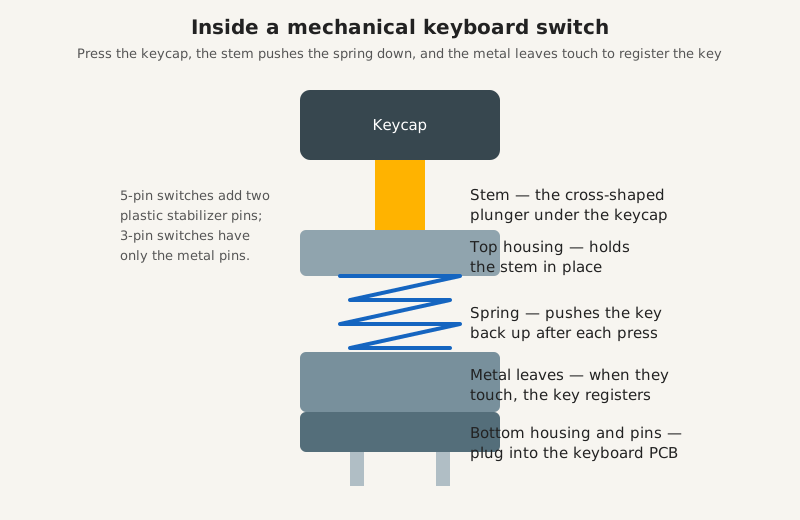
A mechanical keyboard switch is the small mechanism under each keycap that registers a keypress — and it decides how your keyboard feels and sounds. Every key has its own switch: a plastic stem, a metal spring, and two metal leaves inside a small housing. Press the key, the stem pushes the spring down, the metal leaves touch, and the keyboard sends the character to your computer. Release, and the spring pushes everything back up.
The spring’s stiffness sets how hard you press, and the stem’s shape decides whether you feel a bump halfway down or nothing at all. Two switches can look identical and feel completely different — and since you press keys thousands of times a day, that feel becomes the feel of your whole working day.
What are the three types of mechanical keyboard switches?
Every mechanical switch is linear, tactile, or clicky — and the difference is what your finger feels halfway through the press. They share the same parts and 4 mm of total travel; only the stem shape and the click mechanism change.
Linear switches press straight down with no bump and no click. Force rises in a smooth line from rest to the bottom of the press. They are the quietest switch type and the easiest on tired fingers. Gateron Milky Yellow Pro and Cherry MX Red are classic linears. The risk is accidental keypresses: with no bump to warn you, a resting finger can fire a key.
Tactile switches add a small bump about halfway down. You feel a little resistance, then the switch gives way at the moment the key registers. There is no click sound, just the bump. Cherry MX Brown is the original tactile switch, and Gateron G Pro Brown is its most common modern rival. The bump tells your fingers the key registered, so you stop pressing sooner, which cuts typos and finger strain.
Clicky switches add a bump plus a loud, sharp click. A small plastic jacket snaps as the key actuates, producing the classic typewriter sound. Cherry MX Blue is the classic clicky switch. They feel wonderful and sound satisfying — alone. In a shared office, on a video call, or in a quiet house at night, that click carries.
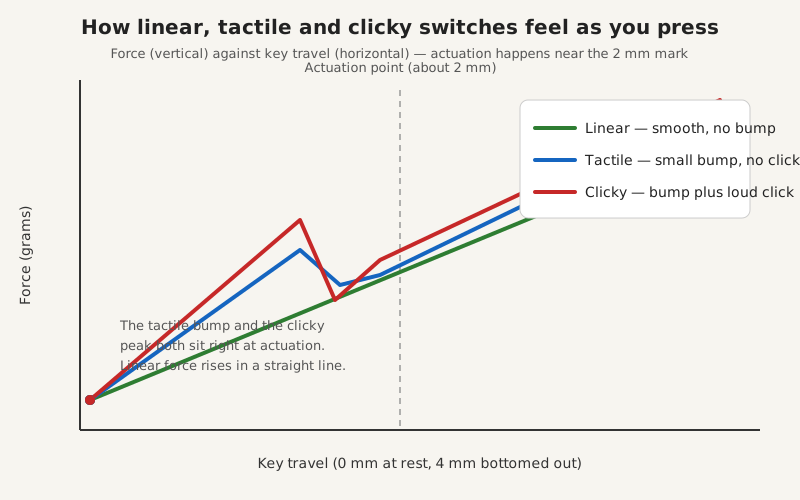
The diagram above shows it at a glance: linear force rises steadily, tactile force dips briefly at the bump, and clicky force spikes and drops sharply at the click. All three actuate at roughly 2 mm — about halfway down — so the choice is about feel and sound, not speed.
Which switch type is best for office work?
Tactile switches are the best switch type for most office work, because they give feedback without noise. The bump confirms each keypress, which means fewer typos and less finger fatigue across an eight-hour day. In a shared office, a tactile board is the polite choice: audible to you, unobtrusive to everyone else.
Linear switches are the best choice if you type in a shared or quiet room and want the lowest possible noise. A pre-lubed linear such as Gateron Milky Yellow Pro is quieter than any tactile switch, because there is no bump mechanism to make sound — only the soft thock of the keycap landing. Clicky switches are the best choice only for a home office where nobody else can hear you. But a clicky board is audible through walls, on microphone calls, and across open-plan offices. If you share your workspace with anyone — including family in the next room — skip clicky switches for work. When in doubt, start tactile: Cherry MX Brown is the switch that disappoints the fewest office workers.
What do actuation force, travel, and lifespan actually mean?
Actuation force is how hard you press before the key registers, travel is how far the key moves, and lifespan is how many presses the switch is rated for. Actuation force is measured in grams: 45 g is light, 55 g is medium, and 60–65 g is heavy — most office workers are happiest between 45 and 55 g. Travel has two numbers: actuation distance (usually about 2.0 mm) and total travel (usually 4.0 mm). Lifespan is typically 50 million keystrokes for Gateron and Akko switches and up to 100 million for current Cherry MX switches.
| Spec | What it means | Office sweet spot |
|---|---|---|
| Actuation force | Pressure needed to register a key | 45–55 g |
| Actuation distance | Travel before the key registers | About 2.0 mm |
| Total travel | Full distance to the bottom | 4.0 mm (standard) |
| Lifespan | Rated keystrokes before wear | 50 million or more |
| Pins | 3-pin (plate mount) or 5-pin (PCB mount) | Match your board — 5-pin fits both |
The pin count is the one spec that causes real buying mistakes. Buy five-pin switches if you are unsure: they fit plate- and PCB-mounted boards, while three-pin switches fit plate-mounted boards only.
What is a hot-swappable keyboard, and do you need one?
A hot-swappable keyboard lets you pull switches out and push new ones in with your fingers — no soldering, no tools beyond a small switch puller. The switches sit in sockets on the circuit board instead of being soldered in place. Changing the feel of a whole keyboard takes about ten minutes.
You need one if you want to try switches before committing — and for a first purchase, that is almost everyone. With a hot-swappable board, a $15 pack of switches is a reversible experiment instead of a $100 keyboard gamble. The Keychron K8 Pro is a good example: a tenkeyless board with hot-swappable sockets for almost any 3-pin or 5-pin MX-style switch, Gateron G Pro Brown switches pre-installed, and Bluetooth for three devices. At about $94–$109 (as of November 2026), it is the cheapest way to test every switch in this guide. Check the Keychron K8 Pro (Gateron G Pro Brown) on Amazon.
If your current keyboard is not hot-swappable, you cannot change its switches without desoldering them. In that case, your switch choice is made at purchase. Our best ergonomic keyboard for office work guide covers complete keyboards, including which switch options each one ships with. If you can wait to buy, Black Friday week (Nov 27–30) is when hot-swappable boards hit their lowest prices — our Black Friday home office deals guide tracks the discount bands to expect.
Which switches should you buy for office work?
Buy Cherry MX Brown for the safe default, Gateron Milky Yellow Pro for quiet and smooth, and Akko V3 Cream Yellow Pro for the same smooth feel for less money. Each one fits any hot-swappable MX-style board.
Cherry MX Brown is the reference tactile switch. Rated to 100 million keystrokes, with a 55 g actuation force, 2.0 mm actuation point, and 4.0 mm total travel. A 10-pack costs about $12–$15 (as of November 2026). Check Cherry MX Brown switches (10-pack) on Amazon.
Gateron Milky Yellow Pro is the quiet linear to buy first. Pre-lubed 5-pin linears with a 50 g actuation force, 2.0 mm pre-travel, and 4.0 mm total travel, rated for 50 million keystrokes. Factory lubrication makes them smoother than unlubed budget linears, and the milky housing softens the sound. A 70-pack costs about $19–$22 (as of November 2026). Check Gateron Milky Yellow Pro switches (70-pack) on Amazon.
Akko V3 Cream Yellow Pro is the budget linear that embarrasses switches twice its price. A 50 g linear with a dustproof stem, 5-pin mount, and factory lubrication, rated for 50 million keystrokes. Owner feedback calls it the best value linear under $20. A 45-pack costs about $13–$16 (as of November 2026). Check Akko V3 Cream Yellow Pro switches (45-pack) on Amazon.
Cherry MX Blue is the clicky switch to buy only if you work alone. The 60 g actuation force and 2.2 mm actuation point pair with a crisp audible click on every press; rated to 100 million keystrokes. It is the most satisfying switch here and the least office-appropriate. A 10-pack costs about $12–$15 (as of November 2026). Check Cherry MX Blue switches (10-pack) on Amazon.
| Switch | Type | Actuation | Pack price (Nov 2026) | Best for |
|---|---|---|---|---|
| Cherry MX Brown | Tactile | 55 g, 2.0 mm | ~$12–$15 (10-pack) | The safe office default |
| Gateron Milky Yellow Pro | Linear | 50 g, 2.0 mm | ~$19–$22 (70-pack) | Quiet, smooth all-day typing |
| Akko V3 Cream Yellow Pro | Linear | 50 g, 2.0 mm | ~$13–$16 (45-pack) | Best value linear |
| Cherry MX Blue | Clicky | 60 g, 2.2 mm | ~$12–$15 (10-pack) | Home office only |
How do you swap switches and keep them quiet?
Swapping switches on a hot-swappable board takes ten minutes: pull the keycaps, pull the old switches, push the new ones in. First, unplug the keyboard. Second, use a keycap puller to remove the keycaps, wiggling straight up. Third, use a switch puller to pull the old switch straight up. Fourth, line up the new switch’s pins with the socket holes and press firmly until it seats flush — check the pins are straight first, since a bent pin is the most common mistake. Fifth, replace the keycaps and test every key.
Lubricating switches — a thin coat of grease on the stem rails — removes the scratchy sound from unlubed switches. A desk mat absorbs vibration, and O-ring dampeners soften the bottom-out clack. Switches also collect dust like any keyboard, so read our how to clean a mechanical keyboard guide before your first deep clean. A wrist rest helps too: the right hand height keeps your fingers light on the keys.
Frequently asked questions
What is the best mechanical keyboard switch for office work?
A quiet tactile switch such as Cherry MX Brown: it gives a bump to confirm each keypress without the click that disturbs coworkers.
Are clicky switches too loud for the office?
Yes, for any shared office. Cherry MX Blue switches are audible across a room and on video calls, so save them for a home office where nobody else can hear you.
Do I need a hot-swappable keyboard to change switches?
Yes. Hot-swappable boards let you pull switches out by hand; soldered boards need desoldering tools and a soldering iron.
The bottom line
Buy tactile for the office, linear for silence, and clicky only if you work alone. Cherry MX Brown is the switch that disappoints the fewest office workers; Gateron Milky Yellow Pro is the quietest smooth option; Akko V3 Cream Yellow Pro is the same idea for less money. Get a hot-swappable board, test a 10-pack on your busiest keys, and give the new switches a full week — the right switch is the one you stop noticing by Friday.