
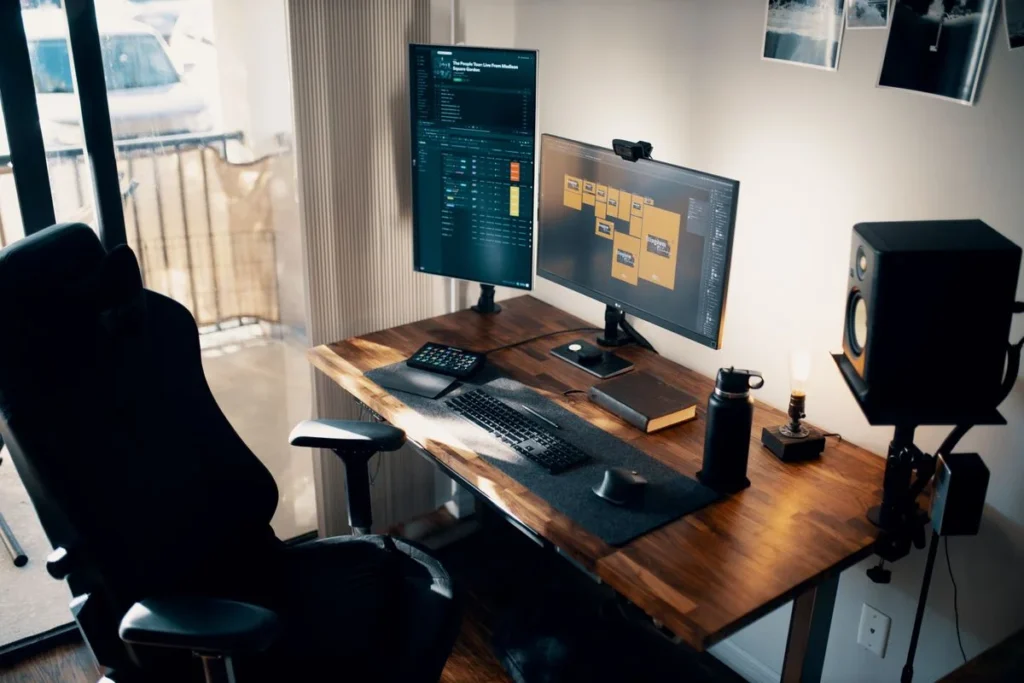
Home Office Desk Setup Ideas for Small Spaces (2026)
A good small-space desk setup is a math problem before it is a shopping problem: a 48-inch desk, a monitor at arm’s length, a chair that slides back without hitting the wall, and cables with somewhere to go. Get those four measurements right and almost any small room works; get them wrong and no amount of gear fixes it.
As an Amazon Associate I earn from qualifying purchases.
How much desk do you actually need?
Start with honest minimums, not the showroom ideal. A single 24-inch monitor, a full-size keyboard, and a mouse need about 42 inches of desk width. Two 24-inch monitors side by side need roughly 48 to 55 inches, depending on bezels and screen angle.
Depth matters more than width. A 20-inch-deep desk is the floor for a monitor setup: a few inches behind the screen for cables, about 16 inches in front for keyboard and forearms. A 24-inch-deep desk is the sweet spot — the monitor sits a full arm’s length away. A 30-inch-deep desk feels luxurious, but in a room under 100 square feet it costs more floor than it returns.
The number people forget is the chair zone: at least 30 inches clear behind the desk so a chair slides out and you can stand up without shuffling sideways. Measure from the desk edge to the nearest wall, bed, or dresser — under 30 inches and every workday feels like sitting in a cupboard.
Run this arithmetic first: wall width minus 12 inches, 30 inches clear behind the chair, screen widths plus 6 inches for a lamp or coffee. If it does not fit, shrink the screens or the desk — not the chair zone.
Where should the monitor go in a small room?
The monitor decides the layout. The most common small-room mistake is pushing the desk against the short wall and discovering the monitor is 14 inches from your face — your eyes need distance more than they need a view.
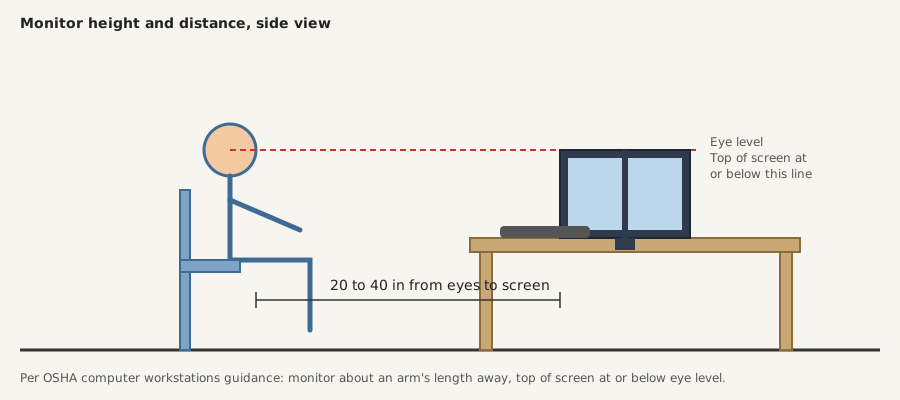
OSHA’s computer workstations guidance recommends placing the monitor about an arm’s length away — roughly 20 to 40 inches from your eyes — with the top of the screen at or slightly below eye level. That rule settles most placement arguments: on a 20-inch-deep desk with the monitor at the back edge, you are already at the near end of the range, and a monitor arm that pushes the screen back a few inches is worth more than a bigger screen.
Height matters as much as distance: a screen top above eye level tilts your neck back all day, and one too low makes you hunch. A monitor arm or riser that puts your eyes on the top third of the display solves both at once and frees the desk underneath. Our ergonomic desk setup guide covers the full chair, desk, and screen height chain.
Glare is the other placement factor. A window directly behind the monitor turns the screen into a mirror, and one behind you throws your shadow across the keyboard. Sit perpendicular to the window: daylight comes from the side, the screen stays readable, and you still get natural light for video calls.
What layout works best for a tiny room?
There is no single best layout — only the layout that fits your room’s one usable wall. These three cover almost every small space.
| Layout | Best for | What it costs you | Minimum wall |
|---|---|---|---|
| Desk flat against the long wall | Rectangular rooms, dual monitors | No view while working | 48 inches |
| Corner L-shape | Square rooms, two work zones | One side is always in shadow | 60 inches across both walls |
| Facing into the room | Great window; video calls | Cables visible | 48 inches plus 36 inches behind |
Flat against the wall is the default: easiest to cable, easiest to light, most open floor. The corner layout wins in a nearly square room that needs a second surface for paperwork or a printer. The facing-in layout looks best on camera, but it needs a cable plan from day one, because every wire is on display.
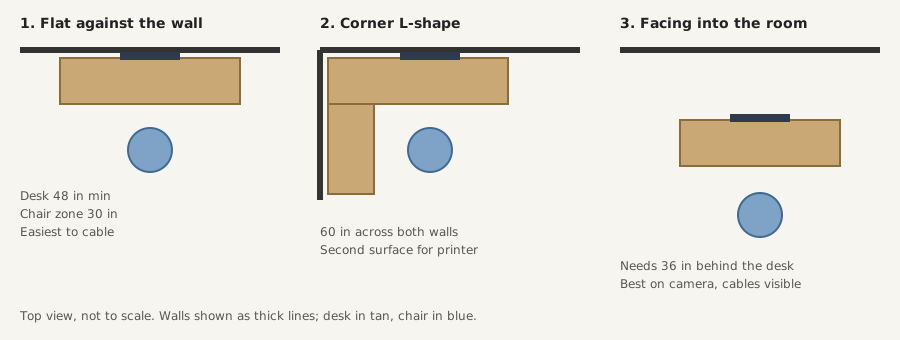
A practical rule: under 80 square feet, go flat against the wall; 80 to 120 with a usable corner, try the L-shape; facing-in only with 36 inches behind the desk.
How do you fit two monitors on a 48-inch desk?
Two 24-inch monitors run about 44 inches wide with bezels and a gap, which is why a 48-inch desk is the practical minimum for dual screens. Two 27-inch monitors need roughly 50 inches, so they overhang a 48-inch desk unless angled inward — a slight V buys back 2 to 3 inches and points both panels at your eyes.
The trick is getting the monitor bases off the desk: stock stands eat 8 to 10 inches of depth each — exactly what a small desk cannot spare. A dual monitor arm clamps to the back edge, lifts both screens, and returns the footprint underneath. Our dual monitor setup guide covers the height-matching and alignment details.
Three numbers decide it: screen width (two 24-inch monitors run about 44 inches; two 27-inch about 50); clamp depth (most clamps need 2 to 4 inches of desk edge and a desktop 0.4 to 3.5 inches thick); viewing distance (each screen should still sit 20 to 40 inches away, so a shallow desk plus two big screens means angling them in or turning one vertical).
A vertical second monitor is the underrated small-desk move: turn it 90 degrees and it holds email, chat, or a document at full height in only about 14 inches of desk width — the cheapest way to run two screens on a desk built for one.
Where does everything else go?
Small desks fail at storage, not at screens. Move storage off the desk surface and onto the walls and the underside of the desk, in that order.
Wall space is free real estate. A floating shelf 12 to 16 inches above the monitor holds books and daily-reach items; a pegboard or shallow rail holds headphones, cables, and notebooks without taking a single inch of desk. Keep it above eye level and shallow — 8 to 10 inches deep is plenty.
Under the desk is the second storage zone. A clamp-on cable tray or hanging drawer turns dead space into a home for the power strip, charger, and external hard drive. Test it: can you still slide your knees under the desk without touching it? If not, it is in the wrong place.
The third zone is the desk surface, and the rule there is one layer only. If something sits on top of something else — a notebook on a keyboard, a phone on a book — it does not belong on the desk. A small caddy or a monitor riser with a drawer gives pens, phone, and charging cable a home that is not the middle of your work area.
How do you light a desk that never sees the sun?
Small rooms often mean small windows, a north-facing wall, or a desk in an alcove daylight never reaches. Bad lighting shows up as eye strain first and bad video calls second — both fixable without rewiring anything.
A monitor light bar is the best lighting upgrade for a small desk: zero desk space. It clamps to the top of the monitor, throws an asymmetric beam down across the keyboard, and never bounces glare back into the screen — unlike a desk lamp, which needs a 6-inch footprint on a desk that has none to spare. Check the clamp range first if your monitor is curved or thick-bezeled; most bars fit 0.4 to 1.2 inches.
Layer the light: one source, however good, leaves shadows. Pair the bar with a floor lamp or wall light behind the monitor for ambient fill — on video calls, soft light behind the screen keeps your face from going dark while the bar keeps your keyboard readable. Keep it warm in the evening, around 2700K to 3000K, and neutral during the day.
How do you hide the cables when the desk is against the wall?
Cables are the difference between a finished setup and a temporary one. The routing takes twenty minutes: power strip in a tray, cables up the back edge, one cable down to the wall.
- Mount a cable tray under the back edge of the desk, as close to the wall as the desk allows.
- Put the power strip inside the tray, not on the floor, where it collects dust and gets kicked.
- Route every cable into the tray with slack, then zip-tie the bundle loosely so you can still pull one cable out later.
- Run one cable — the strip’s cord — down the back desk leg to the outlet, clipped so it never dangles.
- Label both ends of any cable you might unplug: monitor power, laptop charger, and light bar are the usual suspects.
The common mistake is routing cables across the desk to reach an outlet on the wrong side. If the outlet is on the left and your strip is on the right, move the strip, not the cables. Leave a 2-inch gap behind a flush desk: that gap is where the cables live, and what lets you reach behind the monitor without moving the desk.
What gear makes these ideas work?
Most of these ideas cost nothing — they are measurements and rearrangements. Three pieces of gear earn their keep because each returns space the room cannot provide. Prices are as of November 2026 and move with sales; check the listing before buying.
First, a dual monitor arm. The HUANUO HNDS5B gas spring dual monitor mount holds two screens from 17 to 32 inches, up to 17.6 lbs each, on VESA 75×75 or 100×100 mounts, with a C-clamp or grommet base. Based on specs and owner reviews, it turns a 48-inch desk from a two-monitor squeeze into a workable dual setup. Our best dual monitor arm guide has the full shortlist.
Second, an under-desk cable tray. The YECAYE all-metal clamp-mount cable tray clamps under the desk with no drilling, holds the power strip and cable bundle out of sight, and installs in minutes. It is the least glamorous item here and the one owners mention most when a setup finally feels finished.
Third, a monitor light bar. The BenQ ScreenBar clamps to the top of the monitor, auto-dims to the room, and adjusts from 2700K to 6500K, lighting the desk without glare on the screen. At around $109 as of November 2026 it is the priciest item here — worth it when your desk gets little daylight.
How much should a small-space setup cost?
A small desk setup does not need a big budget — it needs the budget spent in the right order. Desk and chair are the foundation; arm, tray, and light are the multipliers that make a small desk feel big.
| Priority | What to buy | Typical cost as of November 2026 |
|---|---|---|
| 1 | Desk, 48 x 24 inches | $80–$150 |
| 2 | Adjustable chair, lumbar support | $150–$300 |
| 3 | Dual monitor arm | $50–$70 |
| 4 | Under-desk cable tray | $20–$30 |
| 5 | Monitor light bar | $40–$110 |
Buying desk and arm together? Wait for a sale if you can. If you’re not in a hurry, Black Friday week (Nov 27–30) is when desks and monitors hit their yearly floor — our Black Friday desk setup deals guide tracks the discount bands to expect. The chair is the one item not to buy on price alone: a chair that fits your body is worth more than a discount, and you will feel it every hour of every workday.
FAQ
How small can a home office desk be and still work?
A 36-inch-wide desk works for a laptop-only setup, and a 42-inch desk is the realistic minimum for a single external monitor with a full-size keyboard. Anything narrower forces the keyboard onto your lap or the monitor onto a riser.
How far should my monitor be from my eyes?
About an arm’s length — roughly 20 to 40 inches — with the top of the screen at or slightly below eye level, according to OSHA’s computer workstations guidance. On a 20-inch-deep desk, a monitor arm that pushes the screen back a few inches is often the fix.
Can two monitors fit on a 48-inch desk?
Yes — two 24-inch monitors fit on a 48-inch desk with about 4 inches to spare, and a dual monitor arm makes the fit comfortable by lifting both screens off the surface. Two 27-inch monitors need roughly 50 inches, so angle them inward or turn one vertical.