Best Monitor Stand Risers with Storage (2026)
The best monitor stand riser with storage in 2026 is the Amazon Basics Height Adjustable Monitor Riser: it lifts a 24–27 inch screen about 4–5 inches to eye level, holds up to 22 pounds, and its open frame swallows a keyboard or dock underneath for roughly $20. Heavier setups suit the 80-pound-rated 3M MS80B.
As an Amazon Associate I earn from qualifying purchases.
The short version: Amazon Basics Height Adjustable (DHMSA) is the best overall riser for most desks — adjustable, sturdy, and cheap. The VIVO STAND-V000SB is the best for dialing in an exact height (4.5–6.5 inches). The 3M MS80B is the office veteran that holds up to 80 pounds. The ROCDEER bamboo shelf is the best-looking storage option, and the Fellowes 91712 is the classic budget pick for corporate desks.
How do the best monitor stand risers with storage compare?
Prices are typical US street prices as of October 2026.
| Riser | Lift height | Weight capacity | Storage style | Price (Oct 2026) |
|---|---|---|---|---|
| Amazon Basics Height Adjustable (DHMSA) | 3 steps, about 3.9–4.9 in | 22 lbs | Open space under platform | ~$18–$25 |
| VIVO Universal Riser (STAND-V000SB) | 4.5–6.5 in, continuous | 33 lbs | Open space under platform | ~$25–$35 |
| 3M Adjustable Monitor Stand (MS80B) | 3 steps, 1–5.9 in | 80 lbs | 11 in gap between columns | ~$35–$45 |
| ROCDEER Bamboo Dual Monitor Shelf | Fixed 5.5 in | 130 lbs (per listing) | Open shelf underneath | ~$35–$50 |
| Fellowes Standard Monitor Riser (91712) | 3 steps, 2–4 in | 60 lbs | Open space, cable guides | ~$18–$25 |
What is the best monitor stand riser overall?
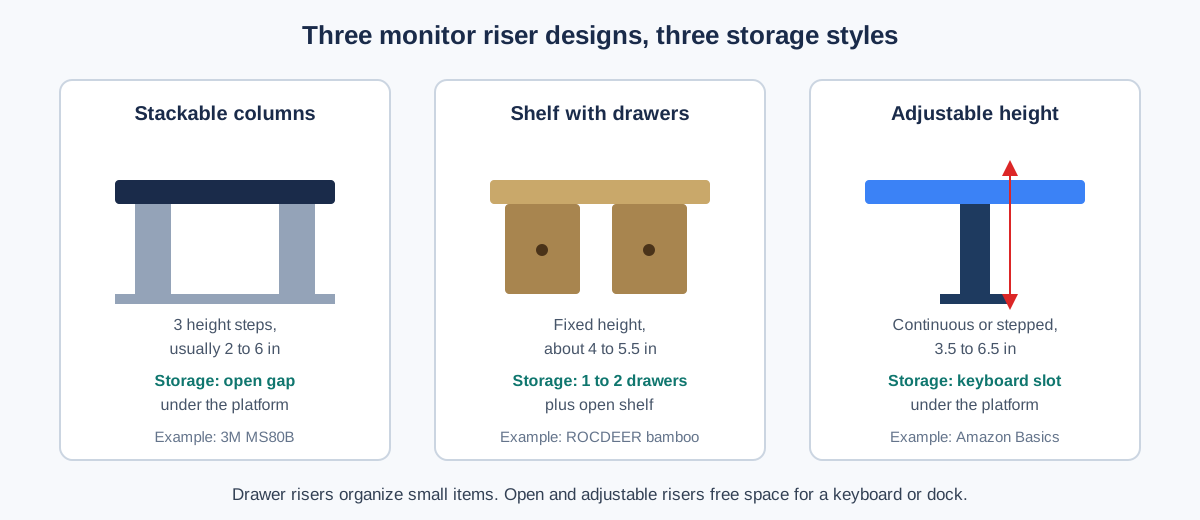
The Amazon Basics Height Adjustable Monitor Riser (DHMSA) is the best monitor stand riser for most people, because it nails the three things that matter: height choice, strength, and storage. Three leg positions set the platform at roughly 3.9, 4.4, or 4.9 inches, the steel-and-plastic frame is rated for 22 pounds (more than any mainstream 27-inch monitor), and the 16.1 x 11-inch platform leaves a tall open bay underneath.
That bay is the whole point of a storage riser. Slide your keyboard under it at the end of the day, park a docking station or an external drive there, or stash the notebook you reach for twice a week. The legs are set wide enough that a full-size keyboard fits without scraping.
The honest trade-off is looks: it is a black metal-and-plastic stand, not furniture. It will not win style points next to a walnut desk. But it assembles in minutes, the non-slip feet keep it planted, and at roughly $18–$25 it costs less than the takeout lunch you will eat while reading this. For a first riser, buy this one.
Which riser is best for dialing in an exact height?
The VIVO Universal Height Adjustable Monitor Riser (STAND-V000SB) is the pick when stepped heights are not precise enough. Instead of fixed stacking columns, a center post with a set screw gives continuous adjustment from 4.5 to 6.5 inches, so you can match your exact seated eye level rather than settling for the nearest click.
The steel-and-aluminum build is rated for 33 pounds, comfortably above any 32-inch monitor, and the 9 x 7-inch steel base keeps it stable at full extension. The 12 x 8-inch padded top fits a single monitor or a laptop, and the footprint underneath stays open for a keyboard or a small hub.
The catch: the top surface is compact, so it suits one screen, not a dual-monitor span. It also ships in VIVO’s industrial black, which reads more “server room” than “home office.” But if you have ever stacked books under a monitor to get the height just right, this is the grown-up version of that habit — typically $25–$35 as of October 2026.
Which monitor riser holds the most weight?
The 3M Adjustable Monitor Stand (MS80B) has been the default office riser for over a decade, and its spec sheet explains why: stacking columns adjust through three heights from 1 inch to 5-7/8 inches, and the platform is rated for a remarkable 80 pounds. That is CRT-era overengineering, and it means a 34-inch ultrawide, a printer, or a monitor plus a heavy speaker will not make it flinch.
The design is clever in a distinctly 3M way. The columns leave an 11-inch-wide gap between them — a natural cubby for a laptop standing on edge, a stack of notebooks, or a small printer paper tray. The platform itself has a recessed area that corrals pens and sticky notes so they stop migrating across your desk.
It is plastic, and it looks like it: silver columns on a black platform, straight out of a 2010 office catalog. At roughly $35–$45 it also costs more than the Amazon Basics riser while lifting to a similar height. You are paying for the 80-pound rating and the decades-long track record. If your setup is heavy or shared with family members who lean on furniture, the MS80B is the safe, boring, correct choice.
Which monitor riser looks best on a wood desk?
The ROCDEER Bamboo Dual Monitor Shelf is the riser to buy when the stand is part of the room, not just the workstation. Solid bamboo legs and a 39.4-inch-wide shelf lift one ultrawide or two monitors 5.5 inches, and the long open bay underneath (34.5 x 7.4 x 3.5 inches) is genuinely useful storage: a laptop dock, a console, a row of books, or the keyboard you want off the desk during calls.
Bamboo earns its place beyond looks. It is harder than most softwood, resists warping in dry heated rooms, and the listing rates it to 130 pounds — far beyond what two monitors weigh. The natural finish warms up white and oak desks alike, and the non-slip rubber feet protect the desktop.
The trade-off is adjustability: the height is fixed at 5.5 inches, which suits most seated adults but offers no tuning. It is also the widest pick here, so measure first — on a 40-inch desk it will dominate. At roughly $35–$50 as of October 2026, it costs about the same as the 3M while looking three times as good.
What is the best budget monitor riser for an office?
The Fellowes Standard Monitor Riser (91712) is the riser your IT department has been buying in bulk for twenty years, and there is a reason it never went away. Three stacking heights (2, 3, and 4 inches), a 60-pound capacity, non-skid rubber feet, and built-in cable guides — all in high-impact plastic that survives office moves, all typically for $18–$25 at US office-supply retailers.
Fellowes even made it from 100% recycled plastic and had it FIRA-accredited for ergonomic compliance, which matters if you are outfitting a team and need a defensible standard pick. The space beneath the 13.1 x 13.5-inch platform fits a keyboard or a slim stack of papers.
We could not verify a stable Amazon listing for the 91712 at research time, so we are not linking it — check office-supply stores or Fellowes’ own channels. And know its limits: 4 inches of lift is modest for tall users, and the 13-inch depth feels cramped under a deep 32-inch monitor. For a basic, honest lift on a budget, though, it remains the benchmark everything else is measured against.
How high should a monitor riser lift your screen?
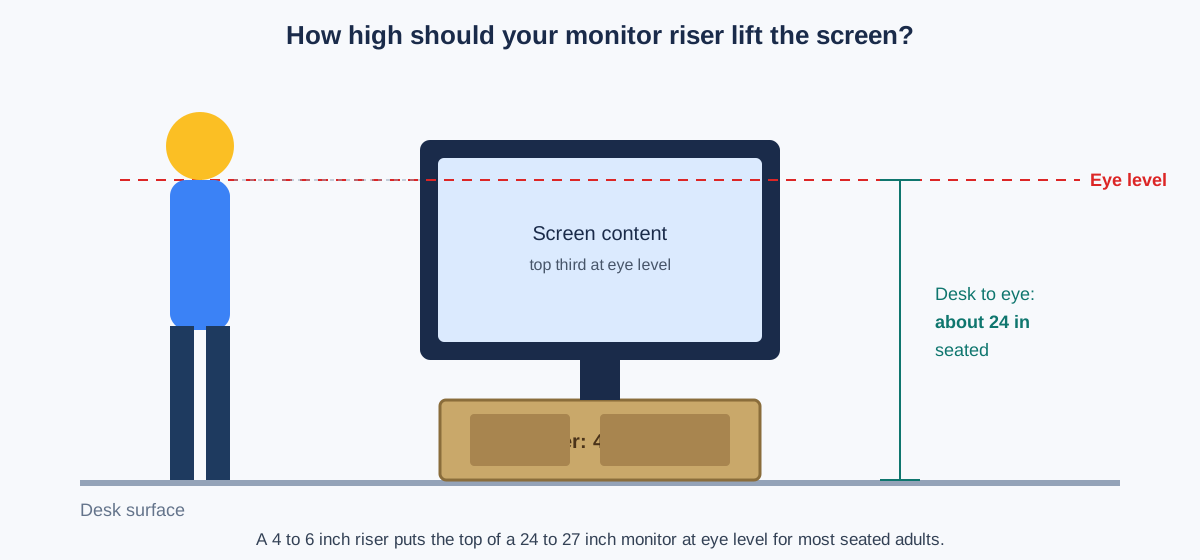
Aim the top third of your screen at your seated eye level. For most adults at a standard 29–30-inch desk, that means lifting a 24–27-inch monitor about 4–6 inches — which is exactly the range these risers cover. Sit back, close your eyes, open them, and your gaze should land near the top of the display, not the middle.
If you wear bifocals or progressives, drop the target slightly: you will be looking through the lower part of your lenses, so a riser on its lowest setting (or even no riser) may feel better. Tall users over 6’2″ should check the math — you may need the VIVO’s full 6.5 inches rather than a fixed 4-inch shelf.
A riser is not a substitute for a monitor arm if you need the screen to float, swivel, or clear desk space entirely. Arms win on flexibility; risers win on simplicity, price, and the storage shelf underneath.
What should you store under a monitor riser?
The space under a riser is prime desk real estate — roughly a cubic foot that would otherwise collect dust. Put it to work with a simple rule: daily-use items live under the riser, archive items live in a drawer.
- Keyboard and mouse — slide the full keyboard under the riser when you leave, and the desk instantly reads as clean.
- Docking station or USB hub — the open bay hides cable clutter while keeping ports reachable.
- Notebook and pen — a slim notebook fits the 3–4-inch clearance of most risers.
- External drive or small speaker — low, stable, and out of the elbow zone.
- Charging brick and cables — route them through the riser’s cable guides if it has them.
Avoid stacking anything taller than the clearance — a riser tipping forward under a top-heavy load is the one real safety failure here. And if small items keep vanishing into the bay, a desk organizer drawer on the riser’s shelf gives them a proper home.
When is the best time to buy a monitor riser?
Monitor risers are steady-price accessories — they rarely swing more than a few dollars month to month. The exception is Black Friday week, when desk-accessory bundles and coupon stacking can shave 15–25% off the bamboo and adjustable models.
If you’re not in a hurry, Black Friday week (Nov 27–30) is when riser prices hit their yearly floor — our Black Friday home office deals guide tracks the discount bands to expect.
Otherwise, buy when your neck tells you to. A $20 riser that fixes your posture this week beats a $15 riser next month — the ergonomic payoff starts the day it arrives. And if you run two screens, check our dual monitor arm guide too: some dual setups are better served by arms than by one long shelf.
Frequently asked questions
Do I need a monitor riser or a monitor arm?
You need a riser if you want a cheap, stable lift plus a storage shelf; you need an arm if you want the screen to float, swivel, or free the desk surface entirely.
Arms offer far more positioning freedom and reclaim the footprint under the screen, but they cost 2–4x more and need a sturdy desk edge or grommet. Risers install in seconds, hold their position forever, and give you a shelf — the right default for most single-monitor desks.
What size monitor fits on a stand riser?
Most risers support 24–32-inch monitors up to 22–33 pounds; the 3M MS80B stretches to 80 pounds and the ROCDEER shelf spans 39 inches for dual screens.
Check two numbers before buying: the weight rating (a 34-inch ultrawide can top 20 pounds) and the platform depth. A good rule is that the monitor’s base should sit fully on the platform with an inch to spare on each side.
Can a monitor riser hold a laptop instead?
Yes — a riser works well as a laptop stand, and the open space underneath stays free for a keyboard.
Pair the riser with an external keyboard and mouse so you are not hunching over the laptop’s own keyboard at its raised height. For a cleaner laptop setup, a dedicated stand with ventilation is better, but a riser does the job.
Is bamboo or metal better for a monitor riser?
Bamboo looks warmer and resists warping; metal and steel hold more weight and usually adjust.
For a single monitor under 25 pounds, either is fine — choose by style. For ultrawides, printers, or shared desks, pick steel or the 3M’s high-impact plastic for the higher weight rating. Bamboo’s real advantage is that it reads as furniture, not office equipment.
How much desk space does a riser actually save?
A riser reclaims roughly one square foot of usable surface by turning dead air above the desk into a storage shelf.
The footprint of the riser itself is the cost — typically 16 x 11 inches for a single-monitor model. Net, you gain the shelf volume (about a cubic foot) while losing nothing you were using, since the monitor base occupied that floor space anyway.
Prices are typical US street prices as of October 2026 and change frequently — the linked listings show current pricing.