Best White Noise Machines for Home Offices (2026)
The best white noise machine for a home office is the LectroFan EVO: its 22 non-looping sounds and precise volume control mask speech better than any fan-based machine, which matters when neighbors, kids, or street noise leak into your calls. If you want the most natural sound while you work, the fan-based Yogasleep Dohm is the classic alternative.
As an Amazon Associate I earn from qualifying purchases.
TL;DR — The 5 best white noise machines for home offices
- Best for masking speech: LectroFan EVO — 22 non-looping sounds, finest volume steps, headphone jack
- Most natural sound: Yogasleep Dohm — real fan, the original since 1962, zero looping possible
- Best smart fan machine: SNOOZ Pro — real fan plus app control, 10 volume levels, sleep timer
- Best wind-down routine: Hatch Rest 2nd Gen — night light, app routines, white-to-pink noise library
- Best clock combo: Loftie Clock — 100+ sounds, Bluetooth speaker, keeps the phone out of the bedroom
Typical street prices as of October 2026: $45–$170 depending on features.
Why does white noise help you focus in a home office?
White noise does not silence a room — it raises the floor. Your brain notices changes in sound (a door slam, a dog bark, a neighbor’s laugh), not constant sound. A steady wash of noise lifts the background level so those spikes poke through less. Researchers call this auditory masking, and it is why open-plan offices have used masking systems for decades. For home offices the payoff is specific: speech privacy on calls and fewer attention breaks during deep work.
Here is the uncomfortable truth most roundups skip: a white noise machine is a masking tool, not a soundproofing tool. If noise bleeds through walls, pair the machine with physical fixes from our home office soundproofing guide and acoustic panel guide — the machine covers what the panels cannot.
Fan-based vs. digital: which masks office noise better?
This is the fork in the road, and the right answer depends on what you are masking.
Fan-based machines (Yogasleep Dohm, SNOOZ Pro) use a real spinning fan inside the housing. The sound is rushing air — organic, slightly uneven, and physically incapable of looping. Many people find it the least fatiguing over an 8-hour workday. The tradeoff: two or three speed settings and no timers on classic models.
Digital machines (LectroFan EVO, Hatch Rest, Loftie) play synthesized sound through a speaker. They offer dozens of sound profiles — white, pink, and brown noise, fan simulations, rain — with fine volume steps, sleep timers, and app control. Brown noise (deeper, bass-heavy) masks low voices and traffic rumble better than classic white noise, which is why digital machines win for speech privacy.
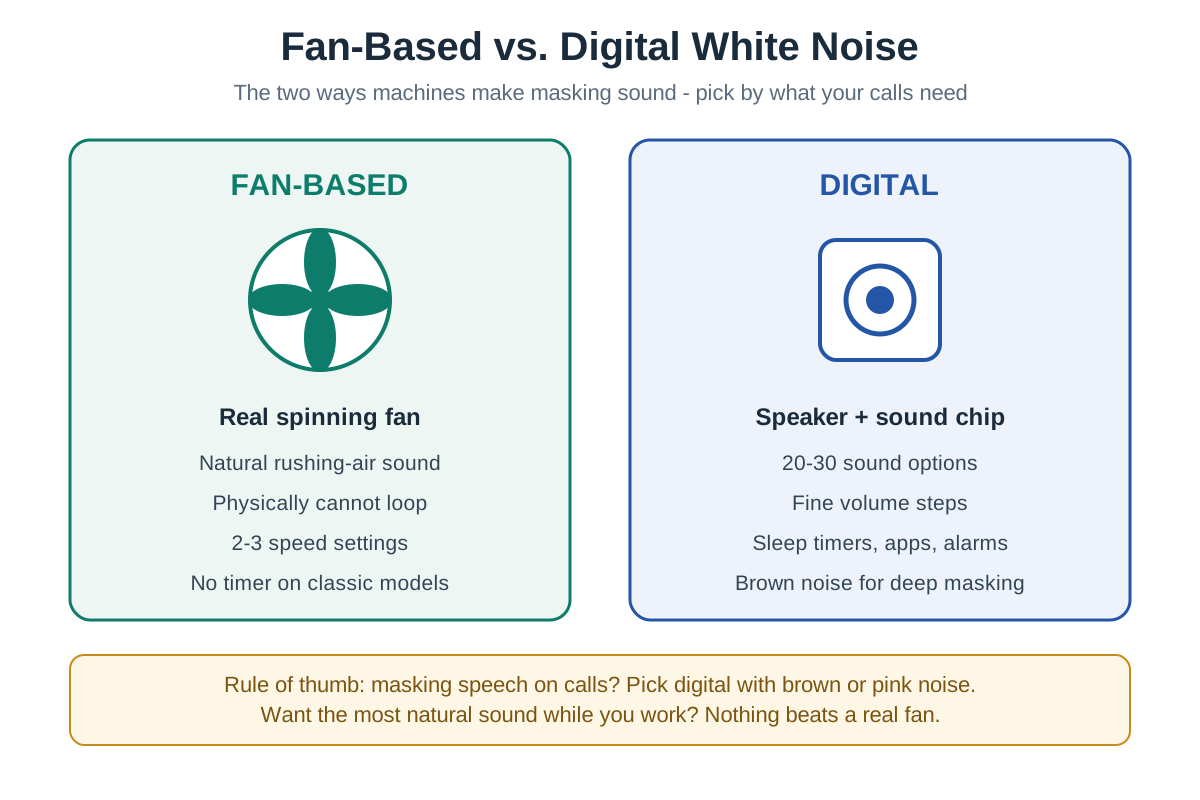
The short version: masking unpredictable human speech on calls? Go digital with brown or pink noise. Want the most natural background hum for solo deep work? Go fan-based.
What should you look for in an office white noise machine?
- Volume range, not max volume. Masking works at moderate levels. What matters is fine-grained control — 10+ steps — so you can sit exactly at the threshold where distractions fade but the machine itself disappears.
- Non-looping sound. Cheap machines play a 30-second loop with an audible seam. Every pick below is genuinely non-looping (real fan) or engineered seamless loops.
- Brown/pink noise options. White noise is bright and hissy; brown noise is deeper and far better at covering voices, HVAC rumble, and traffic. If calls are your use case, this feature is non-negotiable.
- Size and placement flexibility. The machine should sit between you and the noise source — often a door or window — not necessarily next to you. Compact, USB-powered models give you options.
- Timer and controls. For work use, a simple on/off or 8-hour timer beats app-only controls. You do not want to unlock your phone mid-meeting to adjust volume.
The 5 best white noise machines for home offices
LectroFan EVO
Best for masking speech on calls
LectroFan EVO is the precision instrument of this list: 22 unique non-looping sounds — 10 fan sounds, 10 white/pink/brown noise variations, and 2 ocean sounds — with pinpoint volume control across a wide range. That granularity is exactly what speech masking needs: you dial the brown noise to the precise level where the neighbor’s conversation dissolves without the machine itself becoming distracting.
It runs on AC or USB, includes a sleep timer, and even has a headphone jack — handy if you want masking in an open co-working space without broadcasting sound. Designed in the USA with a 1-year warranty.
Typical price: $50–$60 band.
Best for: call-heavy remote workers who need maximum masking control.
Watch out for: the interface is button-based and takes a day to learn; there is no app.
Yogasleep Dohm
Most natural sound — the original since 1962
Yogasleep Dohm Classic is the machine every other machine is judged against. A real fan inside the housing generates rushing-air sound with two speed settings and an adjustable tone collar — twist it to tune the pitch from bright whoosh to low hum. Because the sound is mechanical, it never loops, never glitches, and never sounds “digital.”
It is also the easiest machine here to run all day: plug it in, flip the switch, done. No apps, no firmware, no Bluetooth pairing. Assembled in the USA with a 1-year warranty.
Typical price: $45–$60 band.
Best for: solo deep-work sessions where natural sound matters more than maximum masking.
Watch out for: only two speeds and no timer — it is gloriously dumb, which is either the point or the problem.
SNOOZ Pro
Best smart fan machine
SNOOZ Pro is what you get when a fan-based machine grows up: a real fan for non-looping natural sound, plus 10 volume levels, an adjustable tone knob, Bluetooth app control, and a sleep timer — with a travel case included. It bridges the fan/digital divide better than anything else here.
The app lets you schedule it to your workday — on at 9, off at 5 — so the masking is simply there when you sit down.
Typical price: $80–$100 band.
Best for: people who want fan sound with modern conveniences and scheduling.
Watch out for: it needs an outlet (corded) — less placement-flexible than USB-powered digitals.
Hatch Rest 2nd Gen
Best for the wind-down routine
Hatch Rest (2nd Gen) earns its spot differently: it is a white/brown/pink noise machine, night light, and sleep routine builder in one, controlled from your phone. For home-office workers whose problem is not just daytime noise but the transition — shutting the laptop and actually winding down — the programmable light-plus-sound routines are genuinely useful.
The sound library covers white, brown, and gray noise plus ocean and lullaby options, and the dimmable light doubles as a video-call fill glow in a pinch. Wi-Fi connected with touch controls on the device itself.
Typical price: $70–$90 band.
Best for: remote workers who want one device for focus time and bedtime alike.
Watch out for: it is designed for bedrooms first — no headphone jack, and the app nudges toward a subscription for premium content.
Loftie Clock
Best alarm clock + white noise combo
Loftie Clock replaces two bedside devices: a thoughtful alarm clock (two-phase gentle wake) and a sound machine with 100+ free sleep sounds including white noise. It doubles as a Bluetooth speaker and has a blackout mode for total darkness — plus an offline mode once set up, for the privacy-minded.
For the home office angle: it keeps your phone out of the bedroom, which is the single highest-leverage sleep upgrade a remote worker can make. Better sleep beats any masking algorithm.
Typical price: $150–$170 band.
Best for: anyone combining a bedroom and office, or ditching the phone-as-alarm habit.
Watch out for: premium price for masking alone — buy it for the clock, stay for the sounds. Initial setup requires the app and 2.4 GHz Wi-Fi.
White noise machines compared
| Machine | Sound source | Sounds | Volume control | Timer | Power | Typical price band | Best for |
|---|---|---|---|---|---|---|---|
| LectroFan EVO | Digital | 22 non-looping | Precise steps | Yes (1–8h) | AC or USB | $50–$60 | Speech masking on calls |
| Yogasleep Dohm | Real fan | 1 (adjustable tone) | 2 speeds | No | AC plug | $45–$60 | Natural all-day sound |
| SNOOZ Pro | Real fan | 1 (adjustable tone) | 10 levels | Yes, app | AC plug | $80–$100 | Smart fan + scheduling |
| Hatch Rest 2nd Gen | Digital | 18+ via app | App + touch | Yes, app | AC plug | $70–$90 | Routines + night light |
| Loftie Clock | Digital | 100+ free | On-device | Sleep timer | AC plug | $150–$170 | Clock + phone-free bedroom |
How to position a white noise machine for maximum masking
Placement matters more than brand. Follow this order:
- Find the noise path. Stand in your office and listen: most leaks come through the door, a shared wall, or a window facing the street.
- Put the machine between you and the leak. Sound masking works best at the midpoint — a machine by the door masks hallway noise better than one by your elbow.
- Start at the lowest effective volume. Raise it until distracting sounds blur, then stop. If you can clearly hear the machine over your own thoughts, it is too loud — OSHA’s guidance for background sound is to keep it conversational-level or below.
- Use brown noise for voices, white noise for hiss. Low rumbly distractions (traffic, HVAC, bass) surrender to brown noise; sharp sounds (keyboard clatter, dishes) surrender to white.
- Layer, don’t blast. If one machine is not enough, add acoustic panels at reflection points before turning the volume up. Ears fatigue; walls do not.
How much should you spend?
$50–$60 buys the best pure masking on this list — the LectroFan EVO is the value king for call-heavy workers. Pay more only for a different job: the SNOOZ Pro ($80–$100) for fan purists who want an app, the Hatch ($70–$90) for routines, the Loftie ($150–$170) for the clock combo. If you’re not in a hurry, Black Friday week (Nov 27–30) is when home audio and sleep-tech prices hit their yearly floor — our Black Friday home office deals guide tracks the discount bands to expect.
Frequently asked questions
Will a white noise machine block out my neighbor’s noise on Zoom calls?
It helps your focus more than your microphone. Masking blurs background sound for your ears, but your mic still picks up loud spikes. For calls, combine a machine (for your concentration) with a good work-from-home headset (for your callers) — that pairing solves both sides.
Is it safe to run a white noise machine all workday?
Yes, at moderate volume. Keep it at or below normal conversation level (around 60 dB) and take it as a sign to add physical sound treatment if you need it louder than that. Fan-based machines are designed for continuous multi-year operation.
White, pink, or brown noise — which is best for an office?
Brown noise for voices and rumble, white noise for sharp intermittent sounds. Brown noise’s deep profile covers speech frequencies best, which is why the LectroFan EVO’s brown variations are the top call-masking pick. Pink sits between the two and suits all-day background best.
Can I just use a phone app instead of buying a machine?
For testing, yes; for daily use, a dedicated machine wins. Apps work fine to audition sounds, but they tie up your phone, drain its battery, and route through a small phone speaker. A $50 machine with a real speaker or fan sounds dramatically better over 8 hours.
Do white noise machines help with tinnitus during work?
Many people find steady background sound reduces tinnitus perception. This is a widely reported benefit, though not a treatment. If tinnitus affects your work, a machine with fine volume control (like the EVO) lets you find the exact level that takes the edge off — and a clinician visit is worth it if it persists.
The bottom line
Buy for your actual problem. Masking speech on back-to-back calls? Get the LectroFan EVO and its brown noise. Want natural sound for solo deep work? Get the Yogasleep Dohm. Want scheduling and an app with your fan sound? Get the SNOOZ Pro. And remember: the machine is half the solution — sealing the noise paths is the other half.