
As an Amazon Associate I earn from qualifying purchases.
See our complete standing desk guide.
Best Corner Desks for Home Offices (2026)
The best corner desk for a home office in 2026 is the Mr IRONSTONE 47-Inch L-Shaped Desk (~$100 as of October 2026): it fits tight corners, includes built-in power outlets and USB ports, and supports 300 lbs. Budget buyers should pick the Huuger 47-inch (~$80); dual-monitor setups need the 58-inch GreenForest (~$150).
TL;DR — The 6 best corner desks:
- Best overall: Mr IRONSTONE 47-Inch with Power Outlets (~$100) — outlets and USB built in, 300-lb frame.
- Best budget: Huuger 47-Inch with Storage Shelves (~$80) — reversible shelves, clean look.
- Best compact with storage: Bestier 47-Inch Small L-Shaped Desk (~$85) — side shelves for a printer.
- Best for monitors: GreenForest 58-Inch with CPU Stand (~$150) — holds 2–3 monitors.
- Best for artists: Tribesigns 59-Inch with Tiltable Top (~$200) — 0–45° drafting tilt.
- Best for paperwork: Coleshome 55-Inch with 6 Drawers (~$200) — file drawer, USB-C power.
The quotable rule: a corner desk should turn dead space into your main workstation — if it converts wasted walls into a real workspace, it’s paying rent.
How Do I Measure My Corner for an L-Shaped Desk?
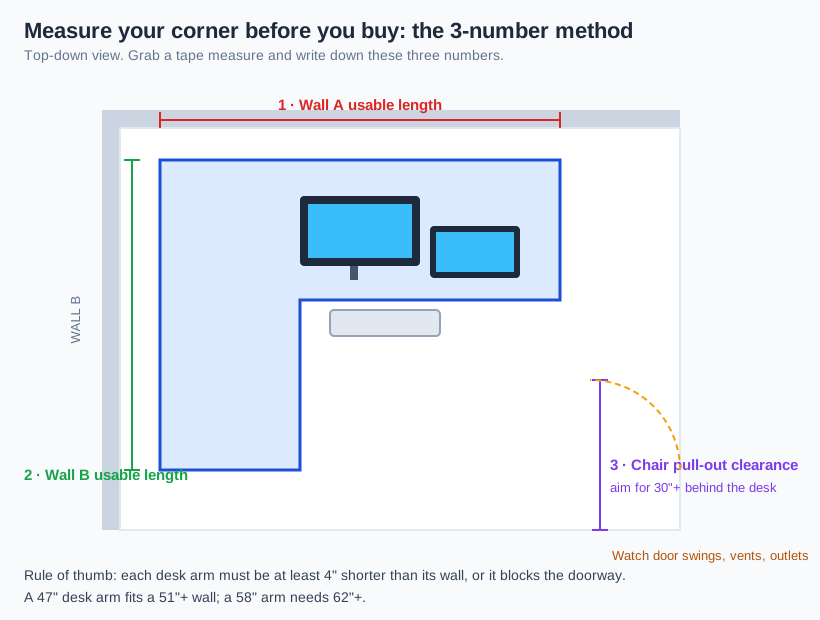
Take three numbers with a tape measure before you click buy:
- Wall A usable length — from the corner to the first obstruction (door trim, vent, outlet). The desk arm on this side must be at least 4 inches shorter.
- Wall B usable length — same along the second wall. A 47-inch desk arm fits a 51-inch-or-longer wall; a 58-inch arm needs 62 inches.
- Chair pull-out clearance — about 30 inches of open floor from the desk’s front edge so your chair slides out.
Also check baseboards (they push the desk half an inch off the wall) and look for floor vents or ethernet jacks the desk would cover — the most common reason a corner desk ends up 6 inches out from the wall, wasting the space it was supposed to save.
The quotable rule: measure wall A, wall B, and chair clearance — every corner-desk return story starts with “it looked smaller in the photos.”
If your corner is truly tiny, our best desks for small bedrooms roundup covers the smallest options worth buying.
Is a 19-Inch-Deep Desk Enough for Monitors?
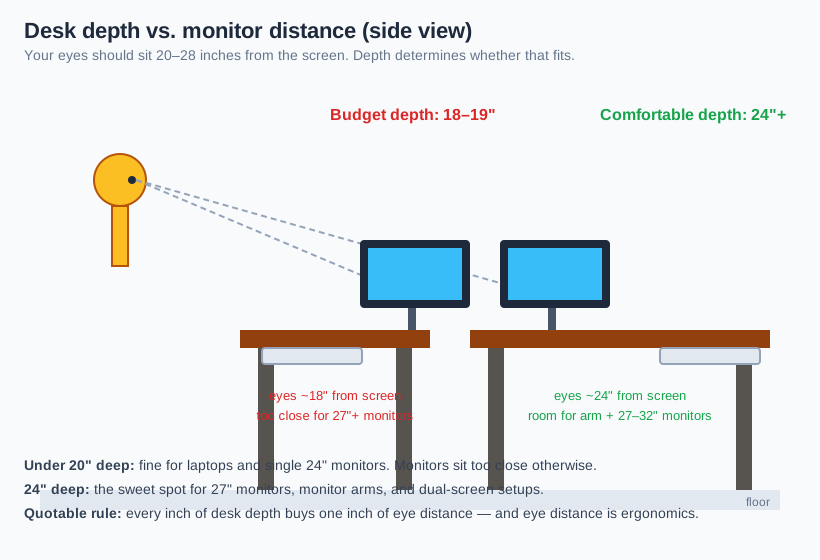
For a laptop and one 24-inch monitor, yes. For 27-inch monitors or dual screens, no — you want 24 inches of depth. Your eyes should sit 20–28 inches from the screen, and every inch of desk depth buys one inch of viewing distance.
Budget L-desks (Huuger, Bestier) run 18–19 inches deep on the return arm — fine with a stock monitor stand, but too close the moment you add a monitor arm or a second screen. Depth also matters for monitor bases: on a 24-inch-deep desk you can push the monitor back and still have 10 inches in front for a keyboard; on a 19-inch desk, a chunky base eats the middle third.
The quotable rule: 19 inches of depth handles one small monitor; 24 inches is the sweet spot for monitor arms and dual screens — depth is ergonomics.
What Cable Management Should a Corner Desk Have?
Two things: a cable path you can reach and a place to hide the power strip. Corners are cable traps — two monitors, a laptop charger, a lamp, and a printer all converge behind the desk, and the corner is the hardest spot in the room to reach, so whatever tangles there stays tangled.
Look for reversible shelves that double as a vertical cable chase (Huuger, Bestier), a CPU stand that lifts cables off the floor (GreenForest), or a built-in power module (Mr IRONSTONE, Coleshome) — when the desk has outlets on the surface, only one cord reaches the wall.
Skip zip-tying cables under an L-desk without a plan: the underside is wide, dark, and hard to reach. Mount a small cable tray on the longer arm’s underside, where your hands can reach it while seated.
Should I Get a Sit-Stand Corner Desk Instead?
Only if you’ll actually stand. Electric L-shaped standing desks start around $350 and need roughly double the wall length for two lifting columns. For most home offices, a $100 fixed corner desk plus the savings toward a good ergonomic chair improves your whole working day more than a standing desk you forget to raise. Our home office ergonomics checklist shows how to set monitor and keyboard heights on a fixed desk so you don’t need to stand to fix pain.
What Are the Best Corner Desks for Home Offices in 2026?
Six picks, each with a real job. Prices are Amazon street prices as of October 2026 and move with sales.
1. Mr IRONSTONE 47-Inch with Power Outlets — Best Overall
The headline feature is the built-in power module: 2 AC outlets and 2 USB ports on the desktop, with an 80-inch cord to the wall. Your monitor, laptop charger, phone, and lamp plug into the desk itself — one cord crosses your floor, and cable management mostly solves itself.
The double X-brace steel frame is rated for 300 lbs — the point is rigidity, not bragging rights. A 300-lb-rated frame doesn’t wobble when you type. The two-tier shelves mount on either side to fit both corner orientations, and a storage bag plus headphone hook handle small clutter.
Dimensions: 47″ × 47″ L × 29.5″H. Material: P2 MDF top, powder-coated steel. Capacity: 300 lbs. Price: ~$100 as of October 2026 (typical range $79–$117). Check the Mr IRONSTONE 47-Inch L-Shaped Desk.
2. Huuger 47-Inch with Reversible Storage Shelves — Best Budget
The cheapest corner desk here we’d still recommend: ~$80 as of October 2026, with 2 reversible shelves and a drawer. The rustic brown finish and metal frame read like a $150 desk.
What the price gives up: depth. At 19.7 inches deep it’s a single-24-inch-monitor desk — perfect with a laptop plus one screen, too close with a 27-inch monitor. The drawer is shallow (pens, not files). For a student or a second bedroom office, it converts dead space into a real workstation for less than a dinner for two.
Dimensions: 47.2″ × 19.7″ × 28.6″H. Material: engineered wood, metal frame. Price: ~$80 as of October 2026. See the Huuger 47-Inch L-Shaped Desk.
3. Bestier 47-Inch Small L-Shaped Desk — Best Compact with Storage
The Bestier answers “where does the printer go?”: a vertical side shelving unit with three open shelves swallows a printer, books, or storage boxes while the desktop stays clear. Desktop rated for 60 lbs, each shelf for 25 lbs — honest capacity for a laser printer and books, not a filing cabinet.
At 47 × 35 × 29 inches it’s one of the smaller L-desks in total footprint, but the vertical shelves use wall space you’d otherwise waste. CARB P2 wood plus a steel frame — you pay for compactness, not cheapness.
Dimensions: 47″ × 35″ × 29″H. Material: CARB P2 wood, steel. Capacity: 60 lbs desktop, 25 lbs/shelf. Price: ~$85 as of October 2026. Check the Bestier 47-Inch Small L-Shaped Desk.
4. GreenForest 58-Inch with CPU Stand — Best for Dual/Triple Monitors
The multi-monitor pick: a 58-inch long arm with a movable monitor shelf that installs on either side — a built-in riser that frees the desktop underneath. Two monitors on the long arm plus one on the return is the realistic 3-screen layout.
The CPU stand keeps your tower off the floor (less dust, reachable power button), the desktop is reversible for both corner orientations, and thickened X-legs (40×20mm steel) keep it rigid. Pair it with our dual-monitor ergonomics guide to get screen heights right.
Dimensions: 58″ × 44″ L × 18.9″D × 29.5″H. Material: P2 particle board, steel X-legs. Price: ~$150 as of October 2026 (typical range $130–$175). See the GreenForest 58-Inch L-Shaped Desk.
5. Tribesigns 59-Inch with Tiltable Drafting Top — Best for Artists
The specialist pick: one arm of the L tilts from flat to 45 degrees across 12 positions, with a sheet stopper so paper doesn’t slide. If you draw, draft, or read large documents for hours, bringing the work surface toward your eyes beats craning your neck down to a flat desk.
The rest is a conventional L-workstation: 59 × 51 inches of surface, two open storage shelves, 0.59-inch-thick top on a steel frame, industrial rustic-brown finish. The tilt mechanism adds assembly complexity — budget 60–90 minutes.
Dimensions: 59″ × 51″ × 19.68″D. Tilt: 0–45°, 12 positions. Price: ~$200 as of October 2026. Check the Tribesigns 59-Inch Tiltable L-Shaped Desk.
6. Coleshome 55-Inch with 6 Drawers — Best for Paperwork
For home offices that still run on paper: five fabric drawers plus a large fabric file drawer that fits letter-size folders — more closed storage than any other desk here. The built-in power module (3 AC outlets, 1 USB, 1 USB-C) means the printer and shredder plug into the desk, not the wall across the room.
At 55 × 31.5 inches the corner section is deep enough for a laptop plus document stacks side by side, and the drawer unit reverses left or right. Fabric drawers are the trade-off: light and quiet, but not workshop-grade.
Dimensions: 55″ × 31.5″ × 29.6″H. Material: particleboard, metal frame, fabric drawers. Price: ~$200 as of October 2026. See the Coleshome 55-Inch L-Shaped Desk with Drawers.
How Do the Six Corner Desks Compare?
Every cell below stands on its own — no cross-referencing needed.
| Desk | Footprint (L × W × H) | Top material | Price (Oct 2026) | Weight capacity | Best for |
|---|---|---|---|---|---|
| Mr IRONSTONE 47″ with outlets | 47″ × 47″ × 29.5″ | P2 MDF, steel frame | ~$100 | 300 lbs | Best overall — outlets built in, fits small corners |
| Huuger 47″ with shelves | 47.2″ × 19.7″ × 28.6″ | Engineered wood, metal | ~$80 | Standard home-office loads | Best budget — reversible shelves under $100 |
| Bestier 47″ small with shelves | 47″ × 35″ × 29″ | CARB P2 wood, steel | ~$85 | 60 lbs desktop, 25 lbs/shelf | Compact with vertical storage for printers and books |
| GreenForest 58″ with CPU stand | 58″ × 44″ × 18.9″ × 29.5″ | P2 particle board, X-legs | ~$150 | 3-monitor setups | Dual/triple monitors — movable shelf, CPU stand |
| Tribesigns 59″ tiltable drafting | 59″ × 51″ × 19.68″ | 0.59″ particle board, steel | ~$200 | Standard home-office loads | Artists — 0–45° tiltable drafting top, 12 positions |
| Coleshome 55″ with 6 drawers | 55″ × 31.5″ × 29.6″ | Particleboard, fabric drawers | ~$200 | Standard home-office loads | Paperwork — file drawer, 3 AC + USB + USB-C outlets |
Frequently Asked Questions
What is the best corner desk for a home office?
The Mr IRONSTONE 47-inch L-shaped desk (~$100 as of October 2026). It combines built-in power outlets and USB ports, a rigid 300-lb-rated frame, and a 47-inch footprint that fits standard corners.
Are L-shaped desks good for small home offices?
Yes — they’re the most space-efficient desk shape for small rooms. An L-desk converts two walls of dead corner into one continuous work surface. For more small-space options, see our small home office ideas on a budget.
How much weight can a corner desk hold?
The desks here range from 60 lbs to 300 lbs on the desktop. For normal setups (monitors, laptop, lamp) anything above 100 lbs is plenty — the rating matters more as a proxy for rigidity than for actual load.
Can I put two monitors on a corner desk?
Yes, on any desk 47 inches or wider. Put the primary monitor on the long arm and the secondary on the return, or use a monitor arm to free the desktop. Our dual-monitor setup ergonomics guide covers heights and angles.
Do corner desks work in rented apartments?
Yes — all six picks are freestanding with no wall mounting. They assemble with included tools in 30–90 minutes and disassemble flat for moving.
Is a $80 corner desk sturdy enough for daily work?
The Huuger 47-inch (~$80) is sturdy enough for a laptop plus one monitor. Budget desks give up depth and load rating, not basic stability — spend more when you need depth, storage, or built-in power.
The Bottom Line
Measure your two walls and your chair clearance, then pick for the corner you have. The Mr IRONSTONE 47-inch (~$100) is the best all-rounder with built-in power; the Huuger 47-inch (~$80) wins on budget; the GreenForest 58-inch (~$150) is the multi-monitor choice; the Tribesigns 59-inch (~$200) serves artists; the Coleshome 55-inch (~$200) is the paperwork desk. The corner was dead space — now it’s your office.