Best Under-Desk Keyboard Trays (2026)
The best under-desk keyboard tray is the HUANUO HNKB03 if you want full height, tilt, and 180° swivel adjustment on an articulating arm, or the VIVO MOUNT-KB04C if you want similar ergonomics at a lower price. For a no-drill clamp-on install, the HUANUO HNKB17B Large is the strongest pick: it clamps to desks 0.39–1.57 inches thick and holds 11 lbs.
As an Amazon Associate I earn from qualifying purchases.
TL;DR — the 6 best under-desk keyboard trays (2026)
- Best overall: HUANUO HNKB03 — 6.3″ height range, 6° up / 22° down tilt, 180° swivel on an articulating arm.
- Best value: VIVO MOUNT-KB04C — same articulating-arm ergonomics, 25 × 10 in platform, 3-year warranty, usually cheaper.
- Best no-drill clamp-on: HUANUO HNKB17B Large — 25.59 × 11.81 in tray, C-clamps fit desks up to 1.57 in thick, storage drawer included.
- Best wide budget pick: Mount-It! MI-7143 Easy Clamp-On — 27 × 11 in surface, clamps desks up to 2.5 in thick, no drilling.
- Best slim option: 1home Under-Desk Keyboard Tray — compact clamp-on tray for smaller desks and apartment setups.
- Best simple slider: Suptek Under-Desk Keyboard Tray — 25.6 in platform, fixed height, C-clamp mount, nothing to fiddle with.
| Pick | Tray width | Mount type | Weight rating | Price (Oct 2026) |
|---|---|---|---|---|
| HUANUO HNKB03 | 25 × 9.84 in | Articulating arm (screw-mount) | 11 lbs | ~$110 |
| VIVO MOUNT-KB04C | 25 × 10 in | Articulating arm (screw-mount) | 10 lbs | ~$65 |
| HUANUO HNKB17B Large | 25.59 × 11.81 in | C-clamp, no drilling | 11 lbs | ~$110–120 |
| Mount-It! MI-7143 | 27 × 11 in | C-clamp, no drilling | 11 lbs | ~$78 (Target) |
| 1home tray | ~24 in | C-clamp, no drilling | 10 lbs | ~$70 |
| Suptek tray | 25.6 × 11.8 in | C-clamp, no drilling | 11 lbs | ~$75 |
Why does your desk feel too high when you type?
Most desks are 28–30 inches tall, but most people sit with elbows at 24–27 inches. That 2–4 inch gap is why your shoulders creep toward your ears and your wrists bend upward to reach the keys. A standard desk was built for paperwork, not keyboards.
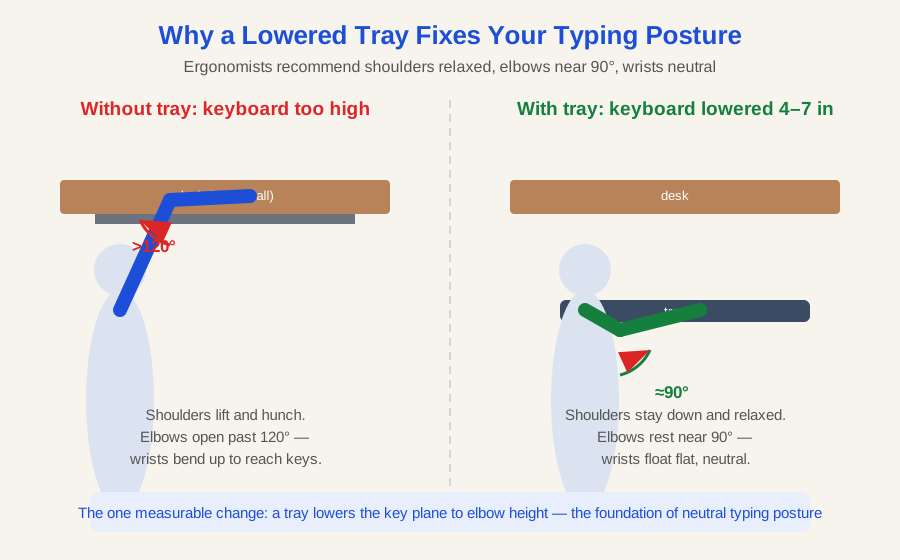
An under-desk keyboard tray closes that gap mechanically. It hangs the key plane 4–7 inches below the desktop — right at elbow height. Shoulders drop, elbows settle near 90°, and wrists float flat. Of every ergonomic upgrade under $120, this is the one with the most measurable change in typing posture.
One quotable truth worth remembering: a keyboard tray does not change your posture — it moves the keyboard to meet the posture your body already wants.
What should you measure before buying a keyboard tray?
Tray returns happen for one reason: fit. Five minutes with a tape measure prevents all of it.
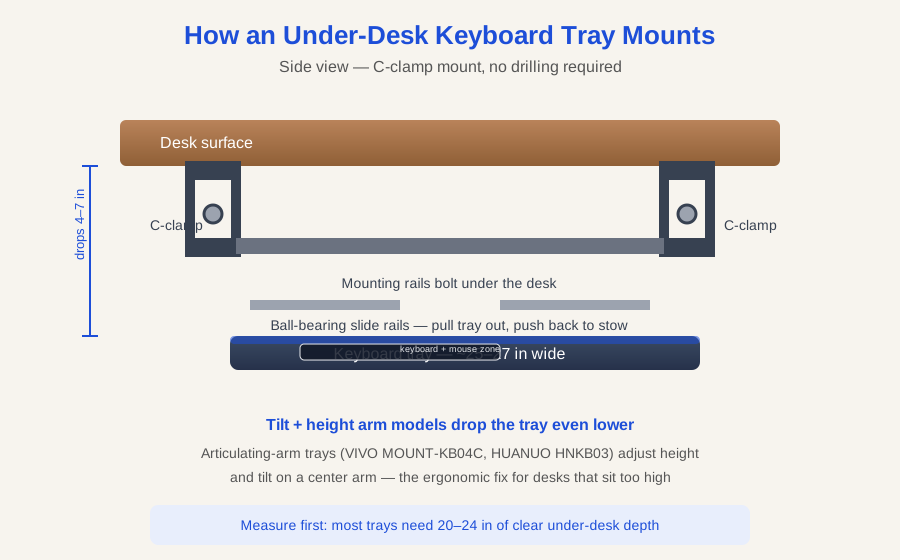
- Desk thickness. Clamp-on trays accept a fixed range (e.g., 0.39–1.57 in for the HUANUO HNKB17B, up to 2.5 in for the Mount-It! MI-7143). Screw-mount trays need at least 5/8 in of solid material.
- Under-desk clearance. You need 11–12 inches of open depth under the desktop for the tray to retract, and no crossbars or drawer units in the slide path.
- Desk width. Articulating-arm models like the HUANUO HNKB03 want a desk at least ~35 in wide; compact trays fit smaller desks.
- Edge shape. C-clamps need a flat, straight front edge. Beveled, rounded, or waterfall edges won’t hold a clamp.
- Your load. A full-size keyboard plus a mouse is 3–5 lbs. The trays here are rated 10–11 lbs, so you’re fine — just don’t treat the tray as a shelf.
If you haven’t already, run through the /home-office-ergonomics-checklist/ to check your current chair height and monitor position — a tray fixes typing posture, not the whole setup.
Which under-desk keyboard tray is best?
HUANUO HNKB03 — Best overall
The HNKB03 is the tray to beat because its articulating arm gives you three adjustments most trays don’t offer together: 6.3 inches of height range, 6° up to 22° down tilt, and a full 180° swivel left and right. The 25 × 9.84 inch platform fits a full-size keyboard and mouse, and the included wrist rest plus under-tray storage drawer keep small accessories off your desk. It’s rated for 11 lbs and the unit itself weighs 11.54 lbs — the arm is genuinely sturdy.
The catch is installation. This is a screw-mount tray: it bolts into the underside of your desk, and HUANUO wants at least 0.6 in of desk thickness, 21.26 in of depth, and 35.4 in of width. It’s the wrong pick for a glass top or a rental desk you can’t drill. But if you own your desk, nothing under $120 adjusts this much. It typically sells for around $110 on Amazon, as of October 2026.
Check the HUANUO HNKB03 price on Amazon
VIVO MOUNT-KB04C — Best value
VIVO’s MOUNT-KB04C plays the same game as the HUANUO — articulating arm with height, tilt, and swivel adjustment — on a 25 × 10 inch platform with a padded wrist rest across the front. The particle-board core has a smooth finish and comes in five options: black, white, and three wood-grain tones, so it can disappear visually under a matching desk. VIVO backs it with a 3-year warranty, the longest on this list.
Like the HUANUO, it screws into the desk (minimum 5/8 in thick, able to support 10 lbs), so the same rental-desk caveat applies. The trade-off for the lower price — typically around $60–65, as of October 2026 — is a slightly smaller adjustment range than the HUANUO arm. If your desk height is only a little off, the VIVO gets you neutral wrists for roughly half the money.
Check the VIVO MOUNT-KB04C price on Amazon
HUANUO HNKB17B Large — Best no-drill clamp-on
If drilling into your desk is off the table, the HNKB17B is the pick. Two steel C-clamps bite desks from 0.39 to 1.57 inches thick with rubber pads that protect the surface — no screws, no holes, and you can remove it in minutes when you move. The tray itself is the widest here at 25.59 × 11.81 inches (30.16 inches including the clamps, so measure your width), holds 11 lbs, and slides out 7.76 inches on its tracks.
It also has the most storage of any pick: a built-in drawer under the tray swallows earbuds, pens, and a phone, plus there’s a rear backstop so your keyboard can’t slide off. The trade-off versus the articulating-arm models is adjustability — the HNKB17B’s height and tilt are fixed, so it lowers your keyboard by a set amount rather than dialing in an exact angle. It typically runs around $110–120, as of October 2026.
Check the HUANUO HNKB17B Large price on Amazon
Mount-It! MI-7143 Easy Clamp-On — Best wide budget pick
The MI-7143 is the tray for thick desks. Its C-clamps open to 2.5 inches — wider than any other pick here — so it fits chunky butcher-block and standing-desk tops that defeat most clamps. The 27 × 11 inch platform is also the largest surface on this list, with an elevated back rail to keep things from sliding off and a low 1.75-inch profile that tucks away cleanly. It mounts on wood, glass, marble, or metal with no drilling, and is rated for 11 lbs.
What you give up: there’s no tilt or height adjustment beyond the fixed drop, so what you see is what you get. But at about $78 at Target (as of October 2026), it’s the cheapest way to get a genuinely wide tray onto a thick desk. No corroborated Amazon listing found for this exact model, so compare prices at major retailers before buying.
1home Under-Desk Keyboard Tray — Best slim option
1home’s clamp-on tray is the compact pick for smaller desks and apartment setups where a 27-inch platform would overhang. It’s a straightforward slide-in, slide-out tray with a C-clamp mount that needs no drilling, aimed squarely at the budget end of the market at around $70. There’s no height or tilt adjustment — it simply lowers the keyboard plane below the desk — which is all many people need. Fit it anywhere a wider tray won’t go, like a narrow writing desk or a desk with a modesty panel eating the under-space. No corroborated Amazon listing found for the current model revision, so verify the exact variant’s dimensions before ordering.
Suptek Under-Desk Keyboard Tray — Best simple slider
The Suptek is for people who want a tray with nothing to fiddle with. A 25.6 × 11.8 inch platform on dual steel C-clamps, rated for 11 lbs, with an edge stopper to prevent keyboards from sliding off and non-slip pads to protect the desk. Dual steel C-clamps attach to desks up to 1.57 inches thick with no drilling. Height and tilt are fixed — it extends, retracts, and that’s the job. At around $75, as of October 2026, it’s a fair price for a no-nonsense slider, though the articulating-arm picks give you more posture control for not much more. No corroborated Amazon listing found, so check the current listing’s clamp range against your desk before buying.
Do keyboard trays work with standing desks?
Yes — and this is where trays quietly earn their keep. When you raise a standing desk, the keyboard rises with it, and most people find their ideal standing key height is a couple of inches below the desktop anyway. A tray gives you that offset in both positions without adjusting the desk twice. One caveat from the measurement section applies double here: check the desk’s crossbar and frame. Many standing-desk frames run a support bar right where a tray’s clamps want to sit, so confirm the slide path is clear before ordering. For small-space sit-stand setups, the /standing-desk-small-apartment/ guide covers frame layouts that play well with trays.
If your keyboard sits on the desk today, also check your /keyboard-and-mouse-positioning/ — the tray handles height, but mouse placement and keyboard distance matter just as much for wrist strain.
Are under-desk keyboard trays worth it?
For anyone whose desk is more than an inch above elbow height, yes. A tray is a $65–120 mechanical fix for a geometry problem that stretching and “better posture” reminders can’t solve. The articulating-arm models (HUANUO HNKB03, VIVO MOUNT-KB04C) are worth the extra install effort if your desk is badly mismatched to your height; the clamp-on models (HUANUO HNKB17B, Mount-It! MI-7143, 1home, Suptek) win on convenience and renter-friendliness. Either way, pair the tray with a desk at the right height overall — see /best-standing-desk-under-500/ if the desk itself is the problem.
Frequently asked questions
Will a keyboard tray fit my desk?
It fits if your desk is thick enough for the mount, has 20–24 inches of clear under-desk depth, and has a flat front edge for clamps; measure thickness, depth, and width before ordering.
Do keyboard trays damage desks?
Clamp-on trays use rubber-padded C-clamps that leave no marks on wood, metal, or glass; screw-mount trays drill small pilot holes into the underside, which only matters for rental or glass desks.
What is the ideal keyboard height?
Your keyboard should sit at or just below elbow height with shoulders relaxed and elbows near 90° — for most seated adults that’s 24–27 inches off the floor, 2–4 inches below a standard desk.
Can I use a keyboard tray with a full-size keyboard and mouse?
Yes — every tray on this list is 25 inches or wider and rated for 10–11 lbs, which covers a full-size keyboard plus a mouse with room to spare.
Is tilt adjustment important on a keyboard tray?
Tilt helps but isn’t essential: a slight negative tilt (front edge higher) keeps wrists neutral, though a tray at the right height with a flat platform already fixes most posture problems.
How hard is it to install a keyboard tray?
Clamp-on trays take 5–10 minutes with no tools beyond tightening knobs; screw-mount articulating trays take 15–30 minutes with a drill and need at least 5/8 inch of solid desk material.
Pingback: How Should Your Keyboard and Mouse Be Positioned? Ergonomic Guide - WorkWell Setup
Pingback: Best Ergonomic Mice for Office Work (2026) — 5 Wrist-Friendly Picks