
Sit-Stand Schedules That Actually Work for Remote Workers
The sit-stand schedule that works for remote workers is the 20-8-2 rhythm: in every 30-minute cycle, sit for 20 minutes, stand for 8, and move for 2. Spread that pattern across the day — more standing in the morning, mostly sitting by late afternoon — and you build toward 2 to 4 hours of standing without ever standing long enough to hurt.
See our complete standing desk guide.
Here’s what rarely gets said: the desk itself isn’t the fix. The schedule is. Most people who buy a standing desk use it wrong. They stand for three hours straight on day one, their feet and lower back ache, and the desk quietly becomes the world’s most expensive coat rack. Standing all day isn’t healthier than sitting all day — it’s just a different way to stay still too long.
After comparing the published sit-stand research with hundreds of verified owner reviews, one pattern beats both extremes: a simple, realistic sit-stand schedule. Here’s what works, why it works, and how to build one around a real workday.
Why Does the Ratio Matter More Than the Desk?
Occupational health researchers have converged on a useful starting point: desk-based workers should aim for roughly 2 hours of standing or light activity spread across the workday, gradually building toward about 4 hours. That’s not 4 hours straight — it’s alternation.
The logic is straightforward. Sitting compresses spinal discs, tightens hip flexors, and slows circulation in the legs. (Source: CDC NIOSH) Standing relieves that compression, but locks the body into a static posture that loads the feet, knees, and lower back. The healthiest posture, researchers keep finding, is simply your next one.
This is where a schedule earns its keep. Without one, you default to whatever position you’re in until discomfort forces a change — and by then, the damage is done. With one, transitions happen on autopilot. If you’re still deciding whether the desk itself is worth buying before you build the habit, our breakdown of whether standing desks are worth it covers the honest pros, cons, and costs.
What Is the 20-8-2 Rhythm?
Ergonomics specialists at Cornell popularized a simple hourly pattern that’s easy to remember and surprisingly sustainable:
- Sit for 20 minutes — focused, deep work
- Stand for 8 minutes — calls, email triage, reading
- Move for 2 minutes — refill water, stretch, walk to the window
Source: OSHA)com/wp-content/uploads/2026/10/sit-stand-rhythm-diagram.svg” alt=”Diagram of the 20-8-2 sit-stand rhythm showing 20 minutes sitting, 8 minutes standing, and 2 minutes moving in a 30-minute cycle”>
Twenty minutes of sitting is short enough that your body never fully settles into its worst habits, and 8 minutes of standing is long enough to decompress your spine without fatiguing your feet. The 2 minutes of movement are the secret ingredient — walking, even briefly, resets circulation in a way that neither sitting nor standing can.
You don’t need a timer app to start. Pair the rhythm with tasks you already do: stand for every phone call, sit for focused writing, move every time you finish a coffee. Task-based transitions stick better than alarm-based ones, because they piggyback on behavior you’re already doing.
What Does a Sample Sit-Stand Day Look Like?
Here’s what this looks like mapped onto a typical 9-to-5 remote workday. Adjust the clock to your own hours — the pattern matters, not the exact times.
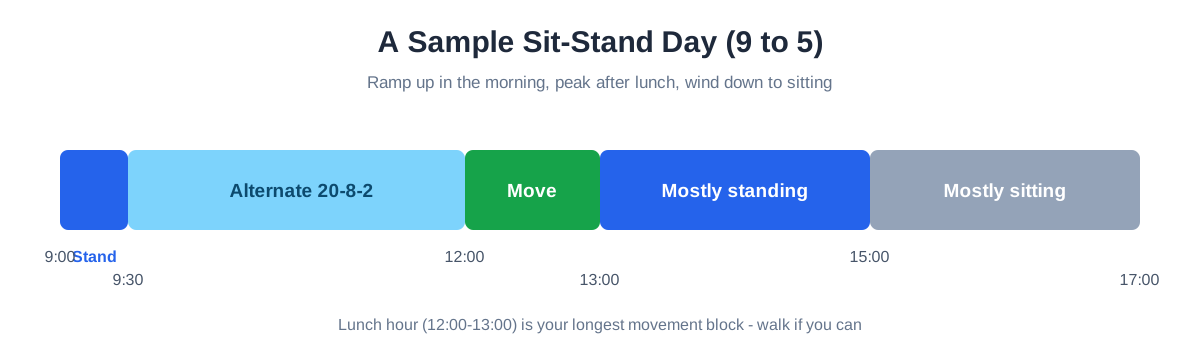
9:00 – 9:30: Stand. Start the day standing. It signals to your body that work has begun, and morning energy makes the first stand of the day the easiest one. Use this block for inbox triage and planning.
9:30 – 12:00: Alternate. Settle into focused work with the 20-8-2 rhythm. Most people naturally sit for deep work and stand for lighter tasks — let the work type decide.
12:00 – 13:00: Move. Lunch is your longest movement block. Walk if you can, even ten minutes. Your afternoon self will thank you.
13:00 – 15:00: Mostly standing, lightly. The post-lunch slump is real, and it’s the best argument for a sit-stand desk. Standing through the early afternoon keeps energy up when sitting would drag it down. Alternate in 30-minute blocks: 20 standing, 10 sitting.
15:00 – 17:00: Mostly sitting. By late afternoon, your feet have done their work. Sit for the final stretch, standing only for calls. There’s no prize for limping to 5 PM.
Notice the arc: the day ramps up, peaks in the early afternoon, and winds down. Your body isn’t a machine that runs at one setting — your schedule shouldn’t pretend it is.
What Five Rules Make a Sit-Stand Schedule Stick?
1. Transition on tasks, not timers. “Stand for every call” beats a buzzing reminder you’ll eventually mute. Anchor position changes to things that already happen: calls, bathroom breaks, the end of a meeting.
2. Fix your heights once, then forget them. The number one reason people abandon standing is a desk that’s slightly wrong. Set your standing height so elbows rest at 90 degrees and the top of your monitor sits at or just below eye level — the same rules as sitting. If your desk has memory presets, program one for sit and one for stand. A 10-second transition is one you’ll actually make; a 60-second fiddle is one you won’t.
3. Get a mat before you need one. Standing on a hard floor is the fastest path to sore feet and an abandoned schedule. An anti-fatigue mat — the thick, cushioned kind, not a yoga mat — makes standing dramatically more comfortable; it’s the single highest-ROI accessory for a sit-stand setup, and our guide to the best anti-fatigue mats for standing desks compares the options that hold up. If you’re still shopping for the desk or the mat, timing helps: standing desks and anti-fatigue mats see some of their deepest discounts during Black Friday week (Nov 27–30), and our Black Friday home office deals guide tracks the price drops worth waiting for.
4. Wear real shoes (or none). Standing in unsupportive slippers or barefoot on hardwood punishes your arches. Supportive shoes or a good mat solve it. If your feet hurt after a week despite a mat, you’re standing too long — shorten the standing blocks before you blame the gear.
5. Expect a two-week adjustment. The first week feels awkward; the second feels almost automatic. Don’t judge the schedule on day three. Give your body time to build standing stamina the same way you’d build any other habit — gradually.
Balance boards for standing desks are worth considering — our guide covers the best options.
Why Isn’t Your Sit-Stand Schedule Working?
“My feet hurt.” Shorten standing blocks to 15 minutes and check your surface. A mat plus supportive footwear resolves this for most people. If pain persists past two weeks, talk to a professional — no schedule should hurt.
“I forget to stand.” You’re relying on memory instead of anchors. Tie standing to your most frequent light task — for most remote workers, that’s calls and messages. One rule (“I stand for every call”) outperforms any reminder system.
“I get tired standing in the afternoon.” That’s your body telling you the truth: don’t stand in the late afternoon. The sample schedule above deliberately winds down to sitting. Standing is a tool for the high-energy hours, not a moral obligation for the whole day.
“My monitor setup only works for sitting.” This is a setup problem masquerading as a schedule problem. A monitor arm — or even a stack of books to test heights — lets you find a standing height where your neck stays neutral. If the transition takes more than a few seconds, fix the setup before blaming the schedule.
How Do You Start? A Two-Week Quick-Start Checklist
- Set both heights today. Elbows at 90 degrees, top of the screen at or just below eye level, for sitting and standing. Save memory presets if your desk has them.
- Put a mat where you stand. If you don’t have one yet, a folded bath towel works for week one — just don’t skip the cushioning.
- Pick one anchor task. Calls are the easiest: every call, you stand. Nothing else changes yet.
- Run 20-8-2 only inside focused blocks. Meetings, lunch, and errands stay flexible — the rhythm lives in your solo work time.
- End every day sitting. The last hour is for winding down, not for proving something to your step counter.
- Add, don’t lengthen. After two weeks, add one more standing block to your morning instead of stretching the blocks you already have.
Don’t own an adjustable desk yet? A desktop standing desk converter on your existing desk is enough to run this entire schedule while you decide whether to upgrade.
What’s the Smallest Way to Start?
The biggest mistake in sit-stand adoption isn’t buying the wrong desk — it’s trying to change everything on Monday. Pick one rule from this article. “I stand for every call” is enough. Run it for two weeks, then add the 20-8-2 rhythm to your focused blocks.
Remote work gives you something office workers rarely get: full control over your physical environment. A sit-stand schedule is one of the simplest ways to use that control — not to stand all day, but to never stay still too long.
Your next posture is the healthiest one. Make it a habit, not an accident.
Frequently Asked Questions
How long should you stand at a standing desk each day?
Start with about 2 hours of standing spread across the workday and build gradually toward 4 hours. The total matters less than the spread — four 30-minute stands do more for you than one 2-hour stand, because the benefit comes from changing position, not from standing itself.
Is standing all day better than sitting all day?
No — standing all day swaps one set of strains for another. Prolonged standing loads the feet, knees, and lower back and can leave you more tired by evening than sitting did. Alternating positions on a schedule is what the research supports, not a single “correct” posture held for eight hours.
Do you need a timer app to follow a sit-stand schedule?
No — anchoring position changes to tasks you already do works better for most people than alarms. A buzzing reminder gets muted within a week; “I stand for every call” piggybacks on a behavior that already happens, so it survives long after the novelty wears off.
Pingback: Are Standing Desks Worth It? Honest Pros, Cons & Verdict (2026) - WorkWell Setup
Pingback: Standing Desk Guide: How to Choose the Right One (2026)