
Best Video Call Backdrops for Home Offices (2026)
The best video call backdrop for a home office in 2026 is the Anyvoo pop-up backdrop (from $199 as of October 2026): it is the only pick sized and printed specifically for webcam framing, with a wrinkle-free tension fabric that looks like a real room behind you. If you want a green screen instead, the Elgato Green Screen (about $129–$160) is the fastest setup of all — it pops up in seconds and retracts into its own case.
As an Amazon Associate I earn from qualifying purchases.
TL;DR — our verdicts: Best overall: Anyvoo (from $199) for a printed, branded background. Best green screen: Elgato Green Screen (~$129–$160) for instant setup. Best large portable: Valera Explorer 90 (~$200) for the widest coverage. Best budget pop-up: FOTOCREAT 5×6.5ft (~$30). Best permanent setup: a Neewer cloth backdrop + T-stand (under $60 combined).
What makes a video call backdrop good?
A good video call backdrop fills your webcam’s frame, stays flat and wrinkle-free, and disappears from your mind once it is up. The backdrop is not the star of the call — you are.
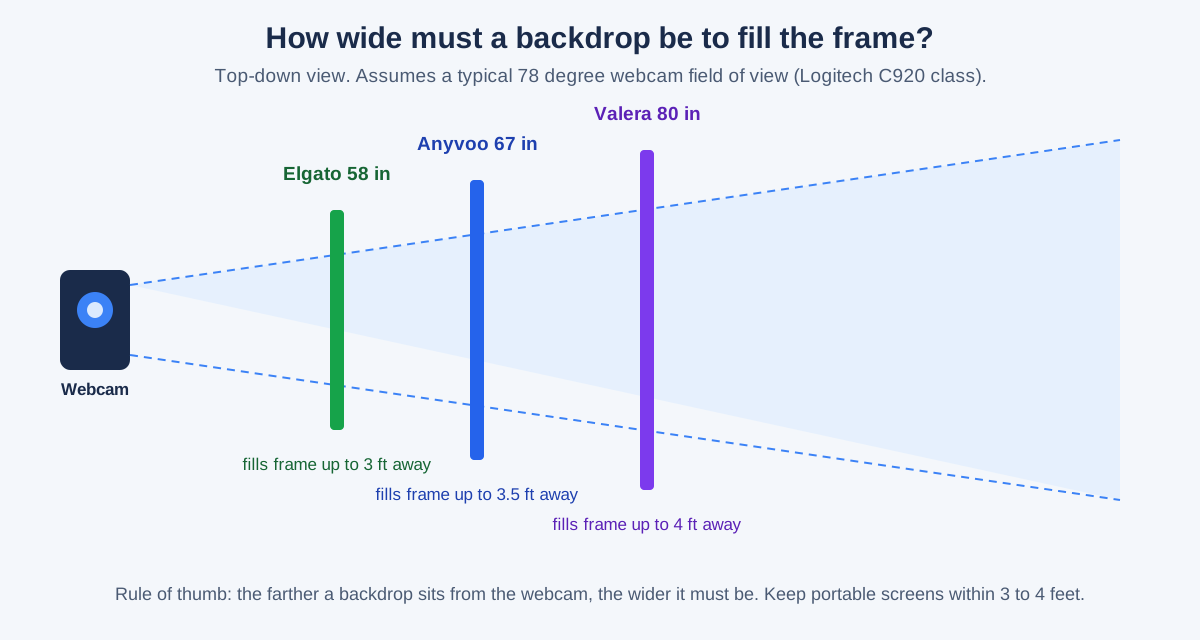
- Coverage. The backdrop must be wider than your webcam’s field of view at the distance it sits from the camera. A typical 78-degree webcam sees about 58 inches of width at 3 feet, so a 58-inch screen only works if it sits within 3 feet of the lens.
- Wrinkle resistance. Wrinkles read as shadows on camera and break a green-screen key. Tension fabric, rigid pop-up frames, and retractable roller screens stay flat; loose cloth needs steaming or ironing.
- Setup time. A backdrop you use daily must go up in under two minutes. Pop-up and pull-up designs win; stand-and-cloth kits take five to ten minutes and tend to stay up permanently instead.
- Printed vs. chroma key. A printed backdrop looks like a real room and needs no software. A green screen needs Zoom, Teams, or OBS to replace it — and even then, you still look like you are using a green screen.
Which video call backdrop should you buy?
| Pick | Price (as of Oct 2026) | Size | Setup time | Weight | Best for |
|---|---|---|---|---|---|
| Anyvoo pop-up backdrop | From $199 | 67 x 51 in | ~2 min | ~8 lbs | Printed branded background |
| Elgato Green Screen | ~$129–$160 | 58 x 71 in | Seconds | 20.5 lbs | Fastest green screen |
| Valera Explorer 90 | ~$200 | 80 x 46 in | ~2 min | 8.5 lbs | Widest portable screen |
| FOTOCREAT pop-up 5×6.5ft | ~$30 | 60 x 78 in | Seconds | 4.8 lbs | Budget green/blue screen |
| Neewer 6x9ft cloth + T-stand | Under $60 combined | 72 x 108 in | ~10 min | ~5 lbs | Permanent studio corner |
Price note: the Elgato screen has ranged from $119 to $160 in recent price history, so buying at the low end of the band saves roughly 25%.
Which video call backdrop is the best overall?
The Anyvoo pop-up backdrop is the best video call backdrop for most home offices because it is the only pick designed around a webcam frame rather than a photo studio. The frame is 67 inches wide and 51 inches tall — just enough to fill a typical webcam shot when it sits 3 to 4 feet behind your chair — and the tension fabric stretches drum-tight, so printed designs look like a real room instead of a wrinkled sheet.
The stock design costs $199 as of October 2026, with a green-screen back available for $219 and a fully custom design (your logo, your colors) from $269. That is real money next to a $30 pop-up screen, but the use case differs: the Anyvoo is for people who spend hours a day on client calls and want to look professional without running chroma-key software. Setup takes about two minutes.
The one honest limitation is width: at 67 inches it covers a single person on a standard webcam, not two people side by side.
Buy it if: you want a backdrop that looks like a real, tidy office behind you — especially if you take client-facing calls and want your logo in frame. Anyvoo sells direct from its own site, not on Amazon, so check the current price at anyvoo.com.
What is the best green screen for Zoom calls?
The Elgato Green Screen is the best green screen for video calls because it removes every excuse not to use one: flip open the aluminum case, lift the handle, and the pneumatic X-frame locks the wrinkle-resistant Dacron fabric in place in seconds. When the call ends, it retracts back into the case and slides under a bed.
The screen measures 58.27 by 70.87 inches and weighs 20.5 pounds — the solid aluminum case and metal frame explain the heft. The current Amazon price is about $129 as of October 2026, and price-history records show it ranging from $119 to $160.
The trade-off is width. At 58 inches wide, the Elgato only fills a webcam frame if it sits within about 3 feet of the camera — fine behind a desk chair, but not for wide shots or two people. It is also a green screen, which means it only looks good with software keying, and a bad key leaves a green halo around your hair.
Buy it if: you want the fastest, most reliable green screen for daily Zoom and Teams calls. Check the current price on Amazon.
What is the best large portable video call backdrop?
The Valera Explorer 90 is the widest portable backdrop in this roundup: an 80-by-46-inch screen on a tripod stand that sets up in about two minutes and packs into a 46-inch carry case. At 8.5 pounds it is less than half the weight of the Elgato, which makes it the better choice if the backdrop travels between rooms — or between home and a co-working space.
Its 90-inch diagonal and 16:9 aspect ratio match a webcam’s frame better than the tall, narrow screens in this category, and the ChromaBoost fabric keys cleanly even in low light.
The price sits around $200 as of October 2026. The Valera is a green screen for software backgrounds; the Anyvoo is a printed backdrop that needs no software at all. Choose the Valera if you stream or present with virtual backgrounds, and the Anyvoo if you want a consistent real-looking room behind you on every call.
Buy it if: you need the widest portable green screen you can carry in one bag. See it on Amazon.
What is the best budget video call backdrop?
The FOTOCREAT 5×6.5ft pop-up backdrop is the cheapest credible way to get a green screen behind your desk: around $30 as of October 2026 for a double-sided green and blue screen that pops open in seconds and folds back into a carry bag. The 5-by-6.5-foot (60-by-78-inch) panel is actually larger than the Elgato’s screen.
The double-sided design is the practical win. Green keys best in most software, but blue works better if you wear green or sit in front of green plants — flip the panel and you have both options for the price of one.
The compromises are what the price suggests. The pop-up frame leaves rounded corners, so the usable rectangular area is smaller than the headline dimensions, and the fabric can show fold creases if it has been stored compressed for weeks — a quick steam fixes that. It also has no stand of its own, so for a freestanding setup you will want a cheap backdrop stand or a pair of wall hooks.
Buy it if: you want to try a green screen before spending $150 or more. See it on Amazon.
What is the cheapest permanent backdrop setup?
If the backdrop never needs to move, a cloth backdrop on a stand is the cheapest way to cover a whole wall: a Neewer 6x9ft polyester backdrop (around $20) hung on a Neewer T-shape backdrop stand (around $35) gives you a 6-by-9-foot background for under $60 combined as of October 2026.
The cloth is 100% polyester, 6 by 9 feet, with a rod pocket on one edge and stitched edges to prevent tearing. Black is the most useful color for video calls — it reads as a clean, professional void behind you and hides shadows.
The catch is setup and space. Hanging cloth on a stand takes about ten minutes, the tripod feet eat roughly 3 feet of floor depth, and the fabric arrives folded with creases that need a day hanging or a pass with a steamer. That is why this pick belongs in a dedicated studio corner, not a living room you reset every evening.
Buy it if: you have a permanent home-office corner and want maximum coverage for minimum money. See the backdrop on Amazon and the stand on Amazon.
How do you set up a backdrop behind your desk?
A backdrop only works if it sits in the right place relative to your webcam.
Our guide shows how to look better on video calls.
- Put the webcam at eye level first. A good webcam on a tripod beats a laptop camera for framing.
- Sit in your chair and measure. The backdrop should sit 1 to 2 feet behind your chair back, and no more than 4 feet from the webcam lens. At that distance a 58-to-67-inch screen fills a standard webcam frame.
- Center it on the lens, not on the room. Sit down, look at the preview, and slide the backdrop until its edges disappear off both sides of the frame. Off-center by even 6 inches, a bright doorway or messy shelf creeps into the shot.
- Light the backdrop separately from your face. A cheap LED panel aimed at it evens it out and keeps a green-screen key clean.
- Check the edges on a test call. Record a 10-second clip in Zoom or Teams and watch for green fringing around your hair, visible backdrop edges, or wrinkles catching light. Fix it now, not in the middle of a client meeting.
What size backdrop do you need for video calls?
The size you need depends on one number: how far the backdrop sits from your webcam. A typical webcam has a 78-degree horizontal field of view, which means the visible width doubles roughly every 3 feet of distance — about 58 inches wide at 3 feet and 78 inches at 4 feet.
That math is why the portable screens in this roundup are all 58 to 80 inches wide: they are designed to sit 3 to 4 feet from the camera, directly behind a desk chair. Move it to the far wall of a 12-foot room and it covers less than half the frame. If your desk faces into the room with a long gap behind you, you need either a full stand-and-cloth setup like the Neewer 6x9ft or a wide screen like the Valera Explorer 90 pulled as close to your chair as possible.
Height matters less than width, because webcams crop vertically: a 51-inch-tall backdrop is plenty when you are seated.
Good audio matters as much as the picture: a headset built for working from home keeps your voice clear, and acoustic panels tame the echo a big flat backdrop bounces at your microphone.
When is the cheapest time to buy a video call backdrop?
Backdrop prices are steady most of the year and dip hardest during big sale events. The Elgato Green Screen, for example, has swung between roughly $119 and $160 in recent price history — a 25% swing on the same product.
If you’re not in a hurry, Black Friday week (Nov 27–30) is when backdrop prices hit their yearly floor — our Black Friday video call deals guide tracks the discount bands to expect.
Video call backdrop FAQ
Do I need a green screen for Zoom? No — Zoom’s built-in virtual backgrounds work without one, but a physical green screen makes the cutout far cleaner around hair and glasses.
What color backdrop is best for video calls? A neutral printed scene or soft grey looks most professional; green is best only with chroma-key software, and pure white can blow out your camera’s exposure.
How far behind me should a backdrop be? 1 to 2 feet behind your chair, and no more than 4 feet from the webcam — farther than that and a portable screen stops filling the frame.
Can I use a bookshelf as a video call backdrop? Yes — a tidy shelf with books and one plant reads as professional on camera, as long as nothing distracting sits at head height.
Will a backdrop help my lighting? Not directly — a backdrop fixes what is behind you, not the light on your face. Pair it with a key light at eye level.