Best Monitor Arms for Ultrawide Monitors (2026)
The best monitor arm for an ultrawide monitor is one rated for 20% more than your panel’s bare weight, with a gas spring or constant-force mechanism and a matching VESA pattern. For most 34- to 49-inch ultrawides, that means the Ergotron HX with HD Pivot — or the HUANUO TitanLift at a quarter of the price.
As an Amazon Associate I earn from qualifying purchases.
The short version: A standard arm rated to 20 lbs will sag under a 34-inch ultrawide — and has no chance with a 49-inch Samsung Odyssey G9 at 29–33 lbs. Ultrawide arms are different: heavier springs, thicker arms, reinforced tilt joints, ratings of 26–44 lbs.
What makes a monitor arm “ultrawide-ready”?
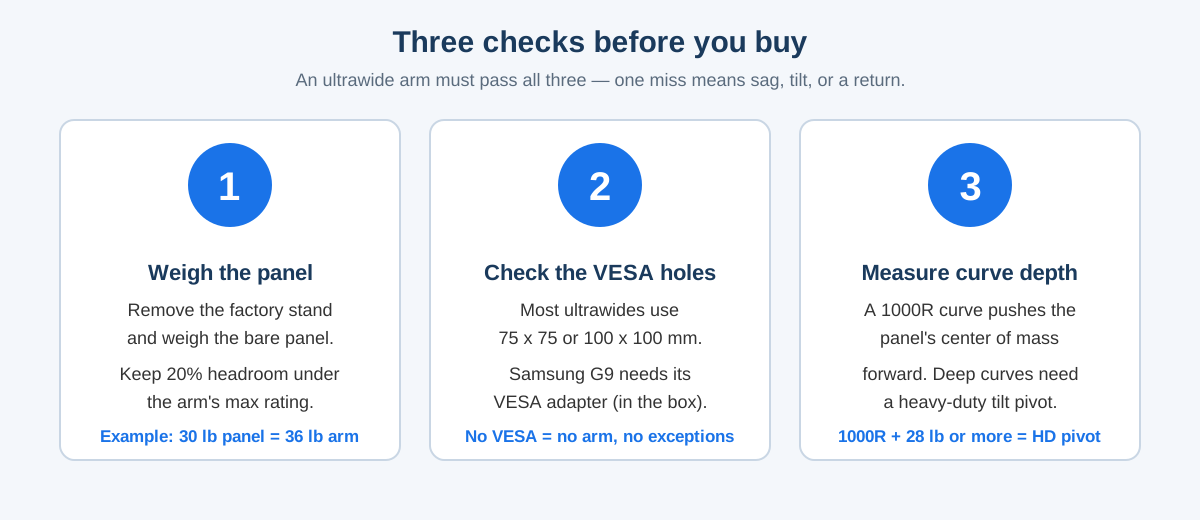
Three numbers decide whether an arm can hold an ultrawide: weight capacity, screen-size limit, and curve depth. A typical gas-spring arm is rated for 4.4–19.8 lbs, which covers a 27-inch monitor — but a 34-inch ultrawide usually weighs 15–22 lbs without its stand, and a 49-inch super-ultrawide weighs 26–33 lbs. An overloaded spring cannot hold its position: the screen drifts down or the tilt joint creeps forward.
Weight and size are separate limits: an arm rated for 44 lbs but only 34-inch screens can still fail with a 49-inch panel, because the wide panel acts as a lever on the tilt joint. Check both numbers.
Curve depth is the number most buyers miss. A 1000R curved monitor like the Samsung Odyssey G9 is 6–12 inches deep at the edges, pushing its center of mass forward of the VESA plate. Ergotron says a display 6–12 inches deep and 28–42 lbs needs the HX Heavy-Duty Tilt Pivot.
Will a VESA mount fit my 34-inch ultrawide?
Yes, almost certainly: nearly every 34- to 49-inch ultrawide uses VESA 75 x 75 mm or 100 x 100 mm, and every arm in this guide supports both. The one famous exception is the Samsung Odyssey G9, which ships with a non-standard mount and includes a VESA adapter in the box — keep it, because without it no arm will attach.
Wider VESA patterns matter for the biggest panels: the VIVO STAND-V100H also accepts 200 x 100 mm via an included adapter, covering a handful of 43-inch 4K displays that 100 x 100-only arms cannot take. If your manual lists a VESA pattern above 100 x 100, that is the arm to buy.
One more check: desk depth. The Ergotron HX extends about 17.8 inches from the desk edge, so a shallow 24-inch-deep desk leaves a 49-inch screen hanging over the front edge — 30 inches is the comfortable minimum.
Best monitor arms for ultrawide monitors — compared
| Arm | Max screen | Weight range | VESA | Price (Oct 2026) | Best for |
|---|---|---|---|---|---|
| Ergotron HX with HD Pivot | 49″ | 28–42 lbs | 75×75, 100×100 | ~$400 | Heavy 1000R curved panels |
| HUANUO TitanLift (40 lb) | 49″ | 6.6–40 lbs | 75×75, 100×100 | ~$93 | Best value heavy-duty |
| HUANUO Heavy Duty (35 lb) | 49″ | 13–35 lbs | 75×75, 100×100 | ~$80 | Mid-price ultrawide |
| VIVO STAND-V100H | 49″ | up to ~40 lbs | 75×75, 100×100, 200×100 | ~$95 | Wide VESA patterns |
| HUANUO HNUSS6 | 49″ | 4.4–26.4 lbs | 75×75, 100×100 | ~$60 | Budget 34″ ultrawides |
Prices are Amazon US list prices as of October 2026 and move with coupons and sales; all five arms include both mounts.
Ergotron HX with HD Pivot — best overall for heavy ultrawides
The Ergotron HX with HD Pivot (matte black) is the arm every other ultrawide arm is measured against, and the one PCWorld calls the best heavy-duty arm it has tested. It holds 49-inch screens weighing 28–42 lbs, using Ergotron’s patented Constant Force technology — a counterbalance spring that lets you move a 35-lb panel with one hand.
The HD Pivot is the reason this version, not the standard HX, tops the list. It is a reinforced tilt joint built for 1000R curved monitors 6–12 inches deep, like the Samsung Odyssey G9, tilting +15°/−5° where the standard pivot offers a wider but weaker range. It lifts 11.5 inches and clamps to desk edges 0.4–2.4 inches thick.
The downsides are price and the minimum weight: at around $400 as of October 2026, it costs four times the TitanLift, and its spring needs at least 28 lbs of monitor — a light 34-inch panel will float up on its own. The 10-year warranty is the justification: a buy-once arm.
HUANUO TitanLift — best value heavy-duty arm
The HUANUO TitanLift Heavy Duty Monitor Arm (model HNSS49B) is the value pick that makes the Ergotron hard to justify for most buyers. It holds 17- to 49-inch screens from 6.6 to 40 lbs, with a mechanical spring and a 19.5-inch tall pole offering up to 29.1 inches of height — about 50% taller than most arms.
The build is the story: aluminum alloy arms 20% thicker than HUANUO’s standard mounts, a reinforced VESA head, and a double C-clamp that grips the desk with two bolts. It passed 50,000 motion cycles and a 3x load test. Tilt is ±50°, swivel ±90°, rotation 360°, and both mounts are included for desks 0.8–3.5 inches thick.
At around $93 on Amazon as of October 2026, it costs less than a quarter of the Ergotron HX for nearly the same weight range. The trade-off is refinement: stiffer movement and a shorter warranty. For a flat or gently curved panel under 40 lbs, that trade is easy.
HUANUO Heavy Duty 35 lb — best mid-price ultrawide arm
One step down from the TitanLift, the HUANUO Heavy Duty Monitor Arm (35 lb) covers 27- to 49-inch screens weighing 13–35 lbs, with the same aluminum construction and 30% thicker arms. It tilts −60°/+15°, swivels ±90°, rotates 360°, and reaches 25.2 inches from the desk edge with up to 18.5 inches of height.
That still covers the most common ultrawides — a 34-inch LG UltraWide at ~16 lbs, a 38-inch Dell at ~20 lbs, a 49-inch Samsung G9 at 29–33 lbs — and the mounts fit desks up to 3.35 inches thick.
At around $80 after coupon as of October 2026, it is the cheapest arm here that can honestly hold a 49-inch panel. Buy it when your panel is under 35 lbs and you do not need the TitanLift’s taller pole.
VIVO STAND-V100H — best for wide VESA patterns
The VIVO STAND-V100H is the only arm in this guide that accepts a 200 x 100 mm VESA pattern, via an included adapter, alongside the usual 75 x 75 and 100 x 100. That makes it the pick for 43-inch 4K displays and ultrawides with oversized VESA plates.
It fits screens up to 49 inches and 18 kg (about 40 lbs), with a pneumatic arm for quick height adjustment, +45°/−45° tilt, 180° swivel, and 180° rotation. The heavy-duty C-clamp fits desks up to 3.3 inches thick and the aluminum build carries a 3-year warranty.
At around $95 as of October 2026, it sits in the same price band as the TitanLift: if your panel’s VESA pattern is 200 x 100, the V100H is the only option here; if it is 100 x 100, the TitanLift’s taller pole and higher ceiling win. If you run a standard best single monitor arm for a second screen, the V100H pairs well with it visually — both use the same clean aluminum look.
HUANUO HNUSS6 — best budget arm for 34-inch ultrawides
The HUANUO HNUSS6 is the budget pick, and it is honest about its limits: 13- to 49-inch screens, 4.4–26.4 lbs, VESA 75 x 75 or 100 x 100 mm. That rules out a 49-inch G9, but covers nearly every 34-inch ultrawide — most weigh 15–22 lbs without their stands.
For around $60 as of October 2026 you get aerospace-grade aluminum, a gas-spring arm with 21.1 inches of height adjustment and 25.6 inches of extension, tilt +85°/−30°, swivel 180°, rotation 360°, and a built-in USB 3.0 port. Both mounts are included, for desks 0.39–3.54 inches thick.
The 26.4-lb ceiling is the whole story: if your panel is a 34-inch ultrawide under 26 lbs, the HNUSS6 is the cheapest arm that will hold it properly — and the USB port is a useful extra. If your panel is heavier, or you plan to upgrade to a 49-inch screen, spend the extra $30 on the TitanLift instead of buying twice. For a two-screen setup, our best dual monitor arm guide covers arms that carry a pair of panels.
Gas spring vs. pole mount — which holds an ultrawide better?
A gas-spring arm (Ergotron HX, HUANUO TitanLift) counterbalances the monitor’s weight with a pressurized spring, so the screen floats and you can move it with one hand. A pole mount clamps the screen to a vertical post and holds it with friction and a locking collar — rock-solid once set, but every height change means loosening a collar and lifting the screen by hand.
For an ultrawide, the gas spring wins on daily use and the pole wins on absolute stability: a 30-lb panel on a pole mount will never drift, because there is no spring to wear out. But a gas spring cannot hold a panel outside its rated weight band: too light and it floats up, too heavy and it sinks — which is why the weight check above matters more than the mechanism.
Desk clamp vs. grommet — which is safer for a heavy ultrawide?
Every arm here ships with both, and the right choice depends on your desk, not the arm. A C-clamp grips the desk edge with one or two threaded bolts and needs no drilling — the default for renters. A grommet mount passes a bolt through a hole in the desk and locks underneath, spreading the load on thin or hollow tops.
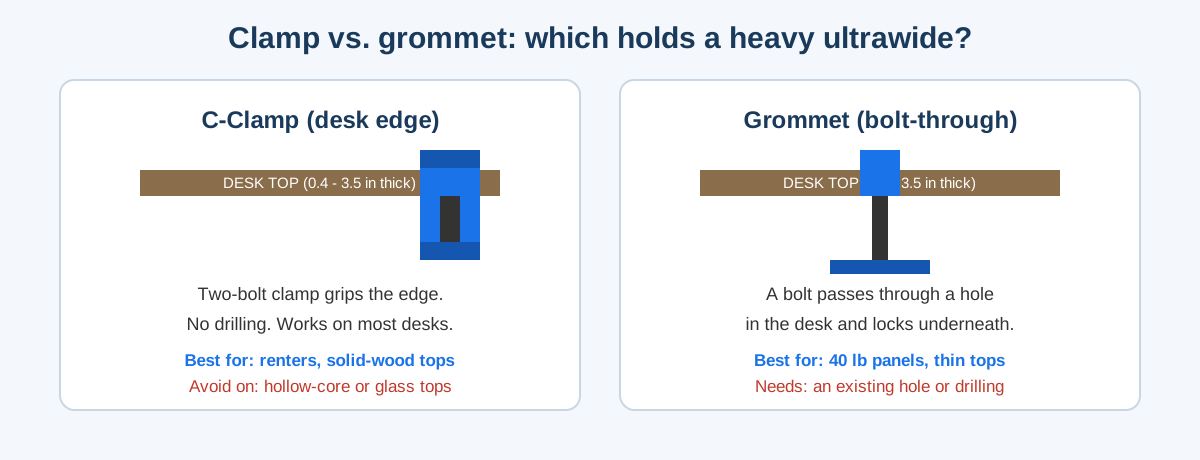
The rule is simple: on solid wood or thick laminate (over 1.5 inches), a clamp is fine even for a 40-lb panel — especially a double-bolt clamp like the TitanLift’s. On a hollow-core IKEA top, thin particle board, or glass, use the grommet mount or a reinforcement plate under the clamp. A 33-lb G9 on a hollow desk edge is how ultrawides end up on the floor. Our best curved monitor for home office guide covers the panels themselves.
How much should you pay — and when to buy?
Ultrawide arms have a clear price ladder as of October 2026: about $60 for a 26-lb budget arm, about $80–$95 for a 35–40-lb mid-range arm, and about $400 for the Ergotron HX with HD Pivot. The mid-range is where the value sits: $60 to $93 buys 14 lbs of capacity and a much taller pole, while $93 to $400 mostly buys the HD Pivot, the 10-year warranty, and the Constant Force feel.
If you’re not in a hurry, Black Friday week (Nov 27–30) is when monitor-arm prices hit their yearly floor — our Black Friday monitor arm deals guide tracks the discount bands to expect. The HX has dropped to around $285–$300 in past sales, while HUANUO arms typically drop $10–$20 with coupons.
How to set up your ultrawide arm in 30 minutes
- Weigh the bare panel. Remove the factory stand, weigh the panel on a bathroom scale, and add 20% — that is the minimum arm rating you should buy.
- Check the VESA holes. Look for the four-hole pattern on the back of the panel. If it is a Samsung G9, fit the VESA adapter from the box first.
- Mount the base. Clamp or grommet-mount the base at the back edge of the desk and tighten until it does not rock when pushed.
- Attach the VESA plate to the panel. Do this with the panel face-down on a bed or towel, never on a hard desk edge.
- Hang the panel and set the tension. Slide the VESA plate onto the arm, then adjust the tension screw until the panel stays put at any height.
- Route the cables and test. Run power and video through the arm’s cable channel with slack for full motion, then tilt, swivel, and raise the panel through its whole travel. If it creeps down over 10 minutes, add a quarter-turn of tension.
Best monitor arm for ultrawide — FAQ
What is the best monitor arm for a 49-inch ultrawide? The Ergotron HX with HD Pivot is best for heavy 1000R curved 49-inch panels; the HUANUO TitanLift is the best value at around $93 for flat or gently curved screens under 40 lbs.
Can a regular monitor arm hold a 34-inch ultrawide? Yes, if rated for the panel’s weight: most 34-inch ultrawides weigh 15–22 lbs without their stand, so an arm rated to 26 lbs or more, like the HUANUO HNUSS6, holds them with headroom.
How much weight can a monitor arm hold? Budget ultrawide arms hold 26 lbs, mid-range arms hold 35–40 lbs, and the Ergotron HX holds 42 lbs — always check both the weight rating and the screen-size limit.
Do I need a special arm for a curved ultrawide? Yes, for deep curves: a 1000R monitor shifts its center of mass forward and needs a heavy-duty tilt pivot like the Ergotron HX HD Pivot; gently curved 1800R panels work on standard arms.
Is a gas spring or a pole mount better for an ultrawide? A gas-spring arm is better for daily use — you can reposition a heavy panel with one hand — while a pole mount is more stable long-term but needs two hands and a collar adjustment for every height change.
Will a monitor arm damage my desk? Not if mounted correctly: use a grommet mount or reinforcement plate on hollow or thin tops, and check the clamp pad sits fully on the desk.