
Quick answer: Adjust an office chair from the floor up: set the seat height so your feet rest flat with knees about level with or slightly below your hips, slide the seat pan until there is a gap behind your knees, move the lumbar support into the curve of your lower back, set the recline and tension, then lower the armrests until they sit just under relaxed elbows. Only after that should you fine-tune the desk, keyboard and monitor.
Most chairs have four to eight levers and knobs, and the order matters because each setting changes the next one. This guide walks through every common control, what “right” feels like, and how to fix the usual problems. It is general information, not medical advice; if you have ongoing pain, talk to a doctor or physical therapist.
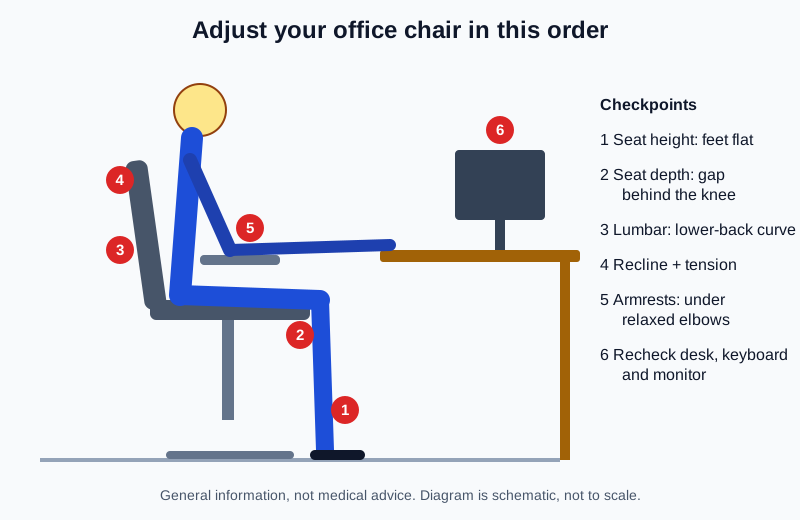
What order should you adjust an office chair in?
Work from the ground up, because your feet and thighs set the foundation for everything above them:
- Seat height – feet flat, thighs roughly horizontal.
- Seat depth – back against the backrest without the seat edge pressing behind your knees.
- Lumbar support – height (and depth, if adjustable) matched to your lower-back curve.
- Backrest recline and tilt tension – a slightly open angle you can hold without effort.
- Armrests – height, width and pivot so your shoulders stay relaxed.
- Desk, keyboard and monitor – adjust these to the chair, not the other way around.
Before you start, sit all the way back in the chair and unlock the tilt so you are not fighting the mechanism.
How high should your office chair seat be?
According to OSHA’s computer workstation eTool, chair height is right when the whole sole of your foot rests on the floor and the back of your knee sits slightly higher than the seat. In practice that usually means thighs close to parallel with the floor and knees at or a little below hip level.
- Stand in front of the chair and raise or lower the seat until the front edge is just below your kneecap.
- Sit down and pull the height lever (usually on the right side under the seat). Lift your weight off the seat to let it rise, or stay seated to lower it.
- Check that both feet are flat with no pressure from the seat edge on the underside of your thighs.
If the seat drifts down over the day, the gas cylinder may be failing – see our guide on how to fix a sinking office chair.
What if your desk is too high for that seat height?
Raise the chair until your elbows line up with the desk surface, then support your feet with a footrest. OSHA notes a footrest is the fix when the seat cannot be lowered without making the desk or monitor too high. Our roundup of under-desk footrests covers the main styles, and the desk height calculator gives you a starting number for your height.
How do you set seat depth?
Seat depth (the seat slider) controls how far the seat pan extends under your thighs. OSHA’s goal is simple: no contact between the back of your knee and the front edge of the seat.
- Sit with your back fully against the backrest.
- Pull the seat-slide lever (often on the right, front) and move the seat pan forward or back.
- Stop when you can slip a few fingers between the seat edge and the back of your knee.
- If your chair has no seat slider and the seat is too deep, a firm lumbar cushion can bring your back forward – but a chair that fits is the better long-term answer.
Where should lumbar support sit?
Lumbar support should fill the inward curve of your lower back, usually around belt height. OSHA recommends lumbar support that is height adjustable so it can be matched to the user.
- Height: slide the lumbar pad or the whole backrest up or down until you feel even support in the small of your back, not in the middle of your back or on your tailbone.
- Depth: if there is a knob or dial, increase depth only until the gap is filled. Too much feels like a fist pushing you forward.
- No adjustment? Try a small rolled towel or lumbar pillow before replacing the chair.
For more on chairs and back discomfort, read what to look for in an ergonomic chair for lower back pain.
How should you set recline and tilt tension?
Sitting bolt upright all day is not required. OSHA suggests the backrest should be able to recline at least 15 degrees from vertical and either lock in place or have adjustable tension.
- Unlock the tilt (usually a lever on the left or a paddle under the seat).
- Lean back and feel how much force it takes. Turn the tension knob (typically a large knob under the front of the seat) until the backrest supports you without throwing you forward or letting you fall back.
- For focused typing, lock the backrest at a slight recline you can hold comfortably; for reading or calls, leave it free to rock.
- If your chair has a seat-tilt (forward tilt) function, try a small forward angle only if it feels stable with your feet flat.
How high should armrests be?
Armrests should support your forearms without lifting your shoulders. OSHA describes them as low enough for relaxed shoulders, high enough to support the lower arms, and close enough that your upper arms stay near your body.
- Let your arms hang, then bend your elbows to roughly 90 degrees.
- Raise the armrests until they just touch the underside of your forearms – then go one notch lower if your shoulders creep up.
- Bring them inward (width or pivot adjustment) so your elbows stay close to your sides.
- If the armrests stop you from pulling close to the desk, lower them below desk height or swing them out of the way.
Once your arms are set, line up the keyboard and mouse using our keyboard and mouse positioning guide.
What should you check after the chair is set?
- Desk height: your forearms should be close to level when typing. Use what desk height is right to check yours.
- Monitor: top of the screen at or slightly below eye level, about an arm’s length away.
- Headrest (if any): it should cradle your head when you recline, not push it forward while you type.
- Whole setup: run through our home office ergonomics checklist once a month or whenever someone else uses the chair.
What not to do
- Don’t set the chair to the desk first and then let your feet dangle.
- Don’t crank the lumbar so far forward that it pushes you away from the backrest.
- Don’t leave armrests so high that your shoulders shrug while you type.
- Don’t lock the backrest fully upright for eight hours; small posture changes through the day are normal.
- Don’t ignore a chair that slowly sinks or wobbles – worn cylinders and loose bolts can be unsafe.
Frequently asked questions
How do I adjust an office chair without a lever?
Some budget chairs use a fixed height or a screw-type spindle instead of a gas lift. A spindle chair is adjusted by turning the seat while you are off it. If there is truly no adjustment, use a footrest or a firm seat cushion to fine-tune fit.
Should my knees be higher or lower than my hips?
Aim for knees about level with or slightly below your hips with feet flat. That keeps pressure off the back of your thighs; if your knees end up higher than your hips, the seat is probably too low.
How do I adjust an office chair seat tilt?
Look for a lever labeled seat angle or forward tilt, often on the left side. Unlock it, shift your weight to set a small angle, then lock it. Not every chair has this; many only tilt the backrest.
How often should I readjust my chair?
Recheck whenever you change shoes, desk height or monitor, or share the chair. A quick 60-second check at the start of the week is plenty for most people. If you are still shopping, see how to choose an ergonomic office chair.
Pingback: How to Choose an Ergonomic Office Chair (2026 Buying Guide)
Pingback: How to Fix a Sinking Office Chair: 4 Fixes That Work