
How to Improve Your Posture at a Desk (2026 Guide)
To improve your posture at a desk, set your monitor so the top of the screen sits at or just below eye level, adjust your chair so elbows rest near 90 degrees with feet flat on the floor, and follow the 20-8-2 rhythm — 20 minutes sitting, 8 standing, 2 moving. Add chin tucks and chest-opening stretches twice daily.
Why does desk work wreck your posture?
Your body is not failing — your setup is training it badly. Sit at a too-low monitor for eight hours and your head drifts forward to see; every inch of forward head posture adds roughly 10 pounds of effective load on your neck muscles. Shoulders round in to reach a too-far keyboard. Hips tighten from a too-high chair. None of this is a willpower problem. It is geometry.
The research backs this up. Prolonged static sitting is associated with neck, lower back, and shoulder pain in office workers — and the risk climbs with uninterrupted sitting time, not just total sitting time. That distinction matters: it is the unbroken hours that hurt you, which is why movement beats any single “perfect” chair.
Posture also degrades invisibly. You start the morning upright and end it draped over the desk like a question mark. The fix is not trying harder to sit straight — it is building a setup where good posture is the path of least resistance, then breaking up stillness on a schedule.
What is the correct sitting posture at a desk?
Forget the rigid “sit up straight” poster from school. Ergonomists describe good sitting posture as a set of joint angles, not a military position. Dial in these five and your body does the rest:
- Eyes: top of the screen at or just below eye level, so your gaze tilts slightly downward. Craning up or hunching down both load the neck.
- Distance: screen 20–26 inches (50–65 cm) from your eyes — about an arm’s length. Closer invites leaning in; farther invites squinting forward.
- Arms: elbows bent near 90 degrees, upper arms hanging relaxed at your sides, wrists straight and floating over the keyboard — not bent up or planted on a wrist rest while typing.
- Back: lower back supported by the chair’s lumbar curve (or a small cushion), torso reclined slightly to 100–110 degrees rather than bolt upright at 90. That slight recline unloads the spinal discs.
- Legs: feet flat on the floor (or a footrest), knees at 90–100 degrees, hips very slightly above knee level. Dangling feet and perched thighs both pull the pelvis out of neutral.
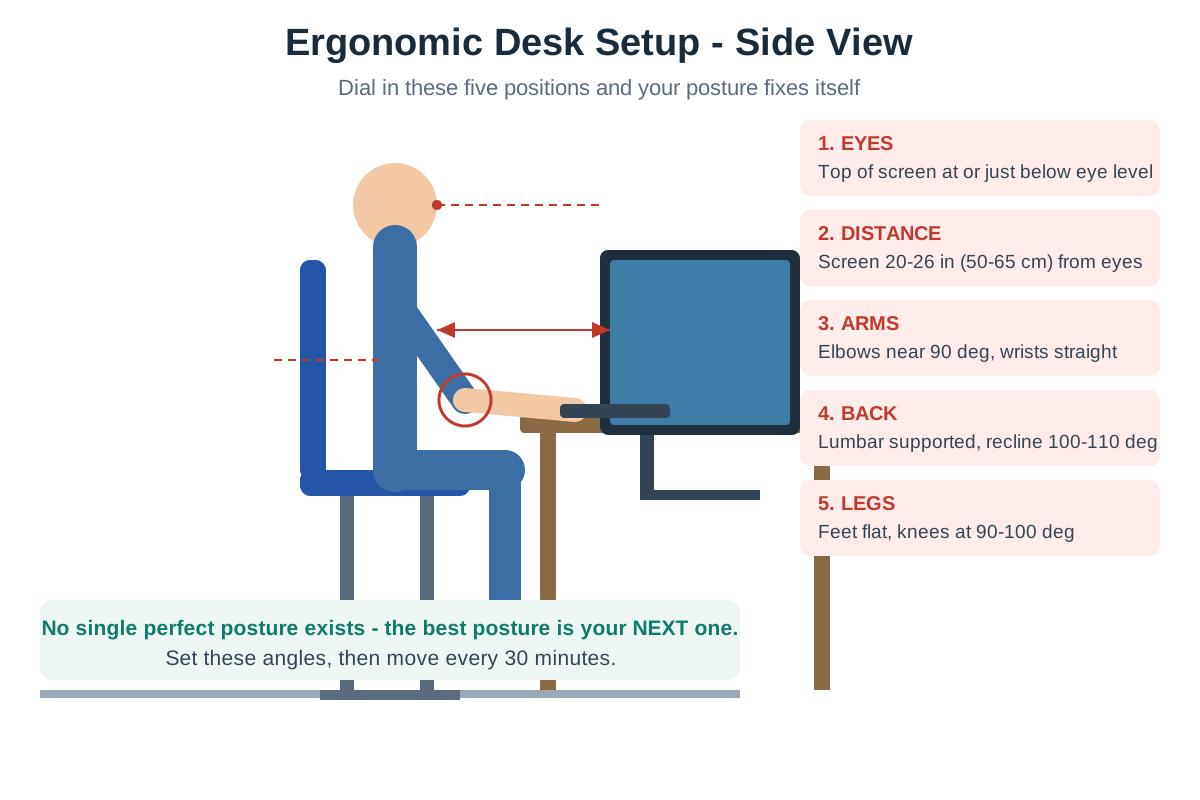
One more truth worth internalizing: there is no single perfect posture — the best posture is your next one. Even textbook angles become harmful held for three hours straight. The setup buys you a good default; movement does the rest.
How should you set up your monitor?
The monitor is the number-one posture lever on a desk because your head follows your eyes all day. Get this right and half the battle is won.
Height first. The top bezel of the screen should sit at or just below seated eye level. On most desks with most people, that means the monitor needs a riser, a stack of books, or a monitor arm — factory stands are built for average heights and average desks, which describes almost nobody. If you wear progressive lenses, drop the screen slightly lower so you are not tilting your chin up to find the reading zone.
Distance second. Park the screen an arm’s length away (20–26 inches). A quick test: sit back in your chair, extend your arm — your fingertips should just brush the screen. Laptop users, this is your warning: a laptop screen can never be at the right height and the right distance simultaneously, which is why the laptop section below exists.
Dual monitors? If you use both equally, center the split between them directly in front of you so your neck rotates symmetrically. If one is primary, center that one and angle the secondary to the side — and put your most-used apps on the primary. Constant 30-degree neck rotation toward a “main” monitor parked off-center is a classic slow-burn neck complaint.
Reduce the lean-in triggers. Bump text scaling to 125–150% instead of leaning toward small text. These micro-adjustments remove the subconscious reasons your head creeps forward by 4pm.
How should you set up your chair?
An ergonomic office chair is only ergonomic if you adjust it. Spend ten minutes on this sequence — it pays off for years:
- Seat height: raise or lower until your feet rest flat on the floor with thighs roughly parallel to the ground. If the desk is too high to allow this, raise the chair and add a footrest — never dangle.
- Seat depth: slide back until your back touches the backrest. You want 2–3 fingers of clearance between the seat edge and the back of your knees. Too deep cuts circulation; too shallow leaves thighs unsupported.
- Lumbar support: position it in the small of your back, at belt level. It should fill the inward curve of your lumbar spine — you should feel gentle contact, not a shove.
- Backrest recline: unlock it and settle around 100–110 degrees. Locked bolt-upright at 90 degrees increases disc pressure; a slight recline with lumbar contact is the sweet spot for long sessions.
- Armrests: set them so shoulders hang relaxed — not hitched up, not drooping. Your elbows should just graze the pads. If the armrests force your shoulders up even at their lowest, remove them or lower the chair.
If your current chair has none of these adjustments — fixed height, no lumbar, no recline — no amount of discipline will save your posture. That is the honest signal it is time to look at our ergonomic chairs under $300 guide.
What is the 20-8-2 rule for desk work?
The 20-8-2 rhythm is the most practical sit-stand schedule ever published: in every 30 minutes, sit for 20, stand for 8, and move for 2. It comes from ergonomics research popularized by Cornell’s Human Factors lab, and it works because it is specific enough to follow and forgiving enough to sustain.
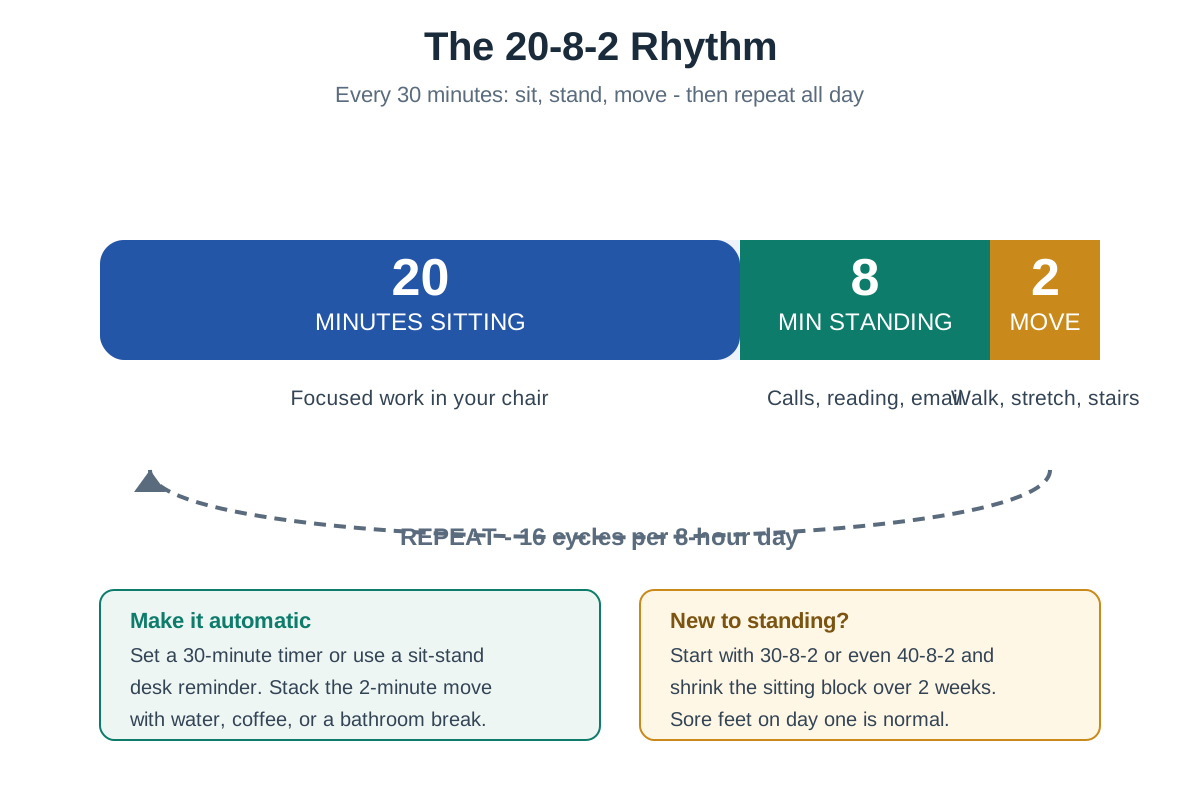
Here is how to actually live it:
- 20 sitting: your focused work block. Chair dialed in per the section above, monitor at eye level.
- 8 standing: take calls standing, read long documents standing, do email triage standing. A standing desk under $500 makes this frictionless — the transition should take five seconds, not five minutes.
- 2 moving: walk to get water, do the stretches below, take the stairs. This is the block people skip, and it is the most important one — walking rehydrates spinal discs and resets hip flexors.
That is 16 cycles in an 8-hour day, which sounds like a lot until you realize most of your existing breaks already fit the pattern. You are just distributing them evenly instead of saving them all for lunch.
New to standing? Do not start at 20-8-2 on day one. Begin with 40 minutes sitting, 8 standing, 2 moving, and shrink the sitting block over two weeks. Sore feet and achy calves in week one are normal adaptation, not injury — an anti-fatigue mat helps enormously. Our sit-stand schedules guide has full beginner-to-advanced progressions.
What microbreak routine actually fixes desk posture?
You do not need a 30-minute yoga session. You need five movements, two minutes, twice a day — targeting exactly what desk sitting shortens and weakens:
- Chin tucks (10 reps). Sit tall, pull your chin straight back like making a double chin, hold 5 seconds. This directly reverses forward head posture by strengthening the deep neck flexors. The single highest-value exercise on this list.
- Doorway chest stretch (30 seconds each side). Forearm on a doorframe, step through until you feel the chest and front shoulder open. Hours of keyboarding shorten the pecs; this is the antidote.
- Thoracic extension over chair (10 reps). Hands behind head, lean back over the top of your chair, open the chest to the ceiling. Counteracts the rounded upper back.
- Standing hip flexor stretch (30 seconds each side). Half-kneeling or standing lunge position, tuck the pelvis slightly. Sitting shortens hip flexors, which then tilt the pelvis and flatten the lower back — this breaks the chain.
- Shoulder blade squeezes (15 reps). Pinch shoulder blades together and slightly down, hold 5 seconds. Wakes up the mid-back muscles that go dormant at a keyboard.
Do the full circuit mid-morning and mid-afternoon. Set a recurring calendar reminder for the first two weeks — after that, your stiffening body becomes its own reminder.
How do you fix posture when working on a laptop?
Laptops are ergonomic contradictions: if the screen is at eye level, the keyboard is too high; if the keyboard is right, you are craning down at the screen. There is no posture fix that keeps both built-in — so stop trying.
The minimum viable laptop ergonomics kit has two items:
- A laptop riser or stand that lifts the screen to eye level. Even a $25–$40 aluminum stand transforms the neck angle.
- An external keyboard and mouse at desk height, so elbows stay near 90 degrees while the screen stays high.
That is it. Riser plus external input devices converts any laptop into a desktop-equivalent posture setup for under $75 total. If you dock at the same desk daily, a USB-C hub or dock collapses the whole connection to one cable.
For couch or bed laptop sessions — the true posture killers — the honest advice is time-boxing, not gear: 20 minutes max, then back to the desk. No accessory makes a slouched couch ergonomic.
When should you see a professional about posture pain?
Self-help has limits, and knowing them matters. Book a physical therapist or clinician if:
- Pain is sharp, shooting, or radiates down an arm or leg (possible nerve involvement — not a DIY project).
- Numbness, tingling, or weakness appears in hands or feet.
- Pain persists more than 2–3 weeks despite setup fixes and the stretch routine above.
- You have had a recent injury, or pain wakes you at night.
What a good PT does differently: they assess your specific restrictions — maybe your thoracic spine is stiff, maybe your hip flexors are the limiter — instead of handing you generic posture tips. Two to four sessions of targeted work often resolve what months of guessing cannot.
Frequently asked questions
How long does it take to fix bad desk posture?
Expect noticeable improvement in 2–4 weeks of consistent setup fixes and daily stretches. You are retraining muscles and habits built over years, so think in weeks, not days. The monitor and chair adjustments help immediately; the chin tucks and hip flexor work compound over a month.
Is sitting up straight actually good for you?
Rigid upright sitting is overrated — supported, slightly reclined sitting is better. Research on spinal disc pressure favors a 100–110 degree recline with lumbar support over bolt-upright 90 degrees. “Sit up straight” as a constant muscular effort causes its own fatigue and tension.
Can a posture corrector brace fix my slouching?
Braces are a reminder tool, not a fix. They can cue you to sit taller for short periods, but wearing one all day lets your own postural muscles weaken further — the opposite of the goal. Spend the money on a monitor riser and do chin tucks instead.
Why does my neck hurt even with a good chair?
Because the monitor is usually the culprit, not the chair. If your screen sits too low, your head drifts forward regardless of lumbar support — and every inch of forward head posture multiplies neck load. Check monitor height before blaming the chair.
Does standing all day fix posture?
No — all-day standing creates its own problems (foot, knee, and vein strain). The evidence favors alternating: the 20-8-2 rhythm above beats both all-sitting and all-standing. Movement variety is the actual medicine.
What is the cheapest posture upgrade for a desk?
A monitor riser (or sturdy books) plus the free stretch routine above — under $40 total. Height-correct the screen first; it delivers the biggest posture return per dollar of any desk change. The external keyboard and mouse come second.
The bottom line
Posture is not a character trait — it is an output of your setup plus your movement habits. Raise the monitor to eye level, dial in the five chair adjustments, run the 20-8-2 rhythm, and do the two-minute stretch circuit twice a day. In a month, the “bad posture” you thought was permanent will feel like someone else’s problem.