
For office work, IPS is the right panel for almost everyone. It keeps colors accurate at wide viewing angles and renders text crisply — what matters most for documents, spreadsheets, and video calls. VA wins only for dark-room night work thanks to ~3000:1 contrast. TN is obsolete: it saves a little money but colors shift every time you move.
IPS vs VA vs TN Panels for Office Work: Which Should You Buy? (2026)
TL;DR — the verdict for 2026:
- Buy IPS if you write, code, read, or join video calls. Colors stay accurate from any angle and text renders crisply.
- Buy VA if you work late in a dim room. Its ~3000:1 contrast makes blacks look truly black where IPS looks dark gray.
- Skip TN for office work. It saves $40–60 versus a comparable IPS but shifts color every time you lean back.
We compared specs, prices, and verified owner feedback across the current office monitor lineup rather than testing units in a lab.
What do IPS, VA, and TN actually mean?
Every LCD monitor is a backlight, a layer of liquid crystals, and color filters. IPS, VA, and TN arrange those crystals differently, and the arrangement decides how light gets through — which decides everything you see.
IPS (In-Plane Switching) lines the crystals up horizontally and rotates them in plane to let light pass. The payoff: color stays consistent across wide viewing angles, which is why IPS dominates office and color-critical displays — Dell, LG, ASUS ProArt, and ViewSonic’s professional lines are mostly IPS.
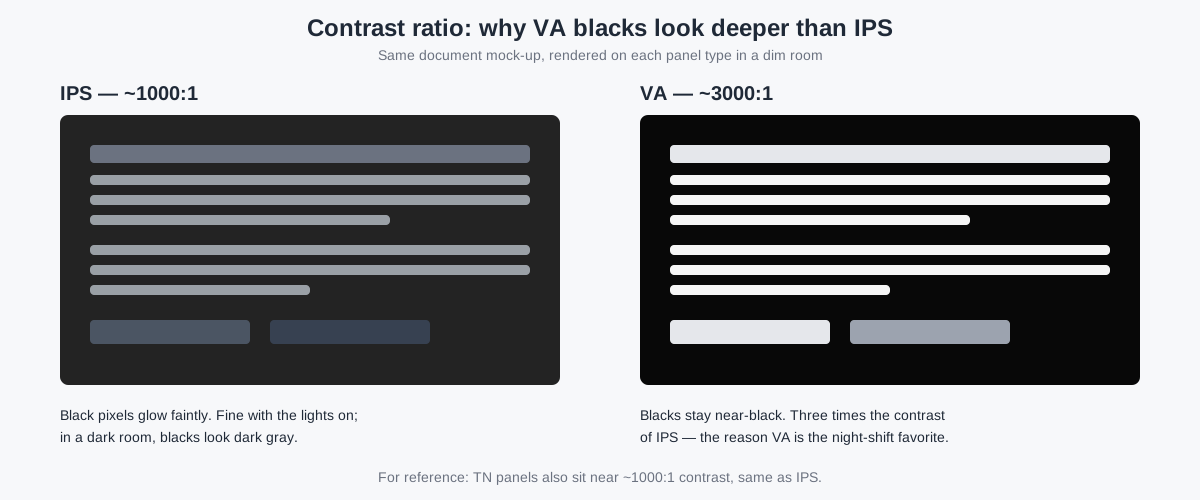
VA (Vertical Alignment) stands the crystals upright and tilts them to modulate light. Because upright crystals block light more effectively when “off,” VA panels reach roughly three times the contrast of IPS — about 3000:1 versus 1000:1. The tradeoff: color and gamma drift off-center, and some VA panels smear on fast dark transitions. VA is the backbone of curved monitors, including budget models like the Gigabyte GS27QC.
TN (Twisted Nematic) twists the crystals to control light. It is the oldest, cheapest technology and the fastest — TN hit 1ms response times years before the others — but the twist collapses at an angle, so colors invert or wash out as soon as you move your head. TN survives mainly in sub-$100 bulk office purchases and competitive gaming monitors where refresh rate is everything.
The one-sentence version: IPS is the all-rounder, VA is the contrast specialist, and TN is the budget holdout that time passed by.
What actually matters for office work — not gaming?
Almost every panel comparison online is written for gamers, and gaming priorities are inverted for office work: response time and 144–240 Hz refresh dominate gaming reviews; for documents, they barely register. What matters at a desk is different.
Contrast ratio matters more than refresh rate for documents. A 3000:1 VA renders white-on-black, spreadsheet gridlines, and dark-mode interfaces with real depth; a 1000:1 IPS shows the same content as dark gray on gray. If your workday lives in dark mode or you work with the lights low, contrast is the single most visible panel difference. Refresh rate above 75 Hz is a rounding error for documents; contrast ratio is the headline.
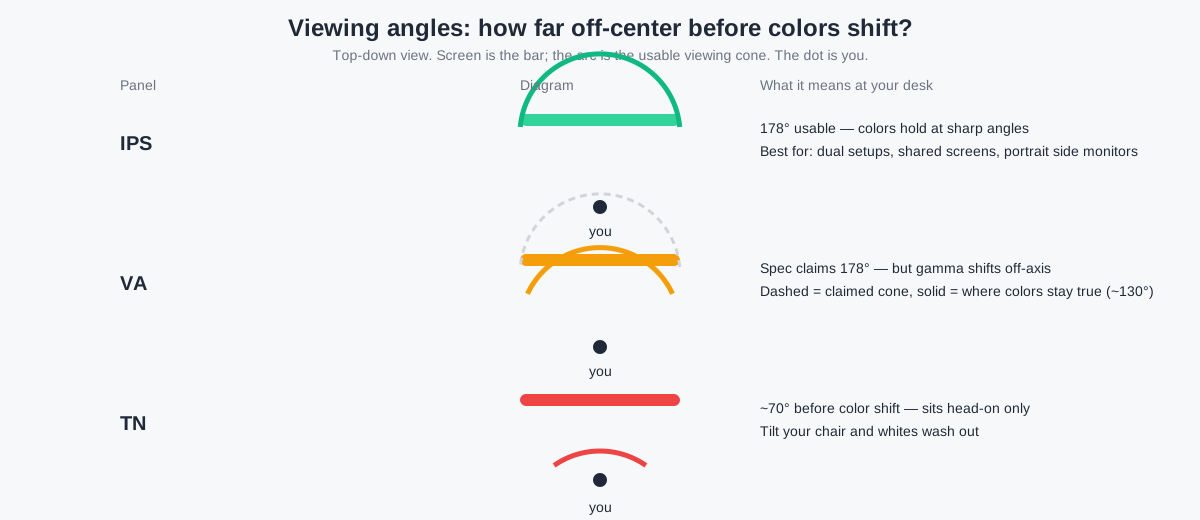
Viewing angles matter because you don’t sit still. You lean back during calls, stand at a sit-stand desk, and glance at a second monitor from the side. IPS keeps colors stable out to 178° in both directions. VA keeps its claimed 178° on the spec sheet but gamma-shifts off-axis — the image lightens or darkens at an angle. TN gives up around ±35° before colors wash out. If you run dual monitors angled toward you, viewing angles are a daily ergonomic factor, not a spec-sheet footnote. Our guide to mounting two screens on one stand assumes you can glance sideways without the second screen changing color — which is an IPS promise, not a TN one.
Text clarity is a panel-sorting question. Most IPS office monitors render text cleanly. One trap: some budget curved VA monitors use BGR instead of RGB subpixel order, and Windows ClearType assumes RGB — causing subtle color fringing around text that no setting fixes. Check owner reviews for “BGR” and “text fringing” before buying a curved VA for text-heavy work.
Brightness and glare handling beat panel type in bright rooms. Panel type says little about fighting sunlight: a 400-nit IPS with good matte coating beats a 250-nit VA near a window regardless of contrast specs. If your desk faces a window, our glare reduction guide matters more than this article — matte coating plus placement fixes glare; no panel type fixes it alone.
Eye strain is mostly about habits and lighting, not panel type. No panel technology has meaningful evidence behind “easier on the eyes” marketing claims. What does have evidence: the American Optometric Association’s 20-20-20 rule (every 20 minutes, look 20 feet away for 20 seconds), plus matching screen brightness to the room and avoiding glare. Do those and your panel choice matters less than your lamp placement.
IPS vs VA vs TN: the office-work comparison
| IPS | VA | TN | |
|---|---|---|---|
| Response time (typical) | 4–5 ms GtG; “fast IPS” models hit 1 ms | 4–8 ms GtG; some smear on dark transitions | ~1 ms GtG; fastest of the three |
| Contrast ratio | ~1000:1; blacks look dark gray in dim rooms | ~3000:1 (some reach 5000:1); blacks stay near-black | ~1000:1; same black level as IPS |
| Viewing angles | 178°/178° with colors holding — best of the three | 178°/178° claimed, but gamma shifts off-axis | ~160°/170° claimed; real-world color shift past ±35° |
| Color accuracy out of the box | Best of the three; typical Delta E under 3 on office models | Good; dips off-center and on dark gradients | Weakest; banding visible on smooth gradients |
| Text clarity | Clean with default OS smoothing | Clean on RGB-subpixel models; check curved VA for BGR fringing | Acceptable, but color shift makes text look uneven at angles |
| Price tier (24–27″, as of November 2026) | $230–430 for office-grade models | $110–200 for budget curved; $250+ for premium office VA | $75–110; mostly discontinued or bulk-channel models |
Read the table across the “office work” rows and the ranking is clear: IPS leads on viewing angles, color, and text; VA leads on contrast; TN leads on nothing an office worker needs.
Who should pick which panel? Verdicts by task
Document writers, coders, and spreadsheet users → IPS. Your eyes live on text for eight hours. IPS gives you the cleanest text, the most stable colors when you lean back in your chair, and the widest choice of office-grade models with USB-C power delivery. The office market has already voted: nearly every business monitor line is IPS.
Night-shift workers and dim-room desks → VA. If you work after dark in a dark room, VA’s 3000:1 contrast is genuinely visible — dark mode looks correct instead of washed out, and movies after hours look cinematic. Budget curved VA models like the BenQ GW2780 (~$170, 27″, 1080p) or the Gigabyte GS27QC (~$200, 27″, 1440p curved) undercut comparable IPS models by $60–100. Just check owner reviews for BGR subpixel fringing before buying a curved model for text-heavy work.
Dual-monitor setups → IPS, almost always. The second screen sits at an angle to your eyes, which is exactly where VA’s gamma shift and TN’s color collapse show up. With two IPS panels both screens look the same from your chair; with TN, the side monitor always looks slightly wrong. See our best monitors under $200 — most of the good ones are IPS for exactly this reason.
Budget-first buyers → the cheapest IPS you can find, not TN. This is the verdict that surprises people: a $130 24″ IPS beats a $90 24″ TN for office work so decisively that the $40 “saving” is a false economy. You get the TN savings once; you get the color shift every day for five years. TN only makes sense for bulk corporate purchases where IT buys fifty identical monitors and nobody gets a choice.
Video editors and designers → IPS (or OLED, not VA). IPS is the only one of the three with color stable enough for design review. VA’s off-axis drift disqualifies it for color work, and TN was never in the conversation. Our curved monitor guide covers where curved screens — mostly VA — actually help versus hurt.
Which panel types can office workers safely ignore?
OLED. Stunning contrast — and a bad office deal in 2026. Burn-in risk from static taskbars and grids remains the dealbreaker for 8-hour static workloads, and 27″ OLED monitors still start around $700–900, roughly double a comparable IPS. OLED is a gaming and cinema panel; wait for the burn-in story to change before putting one on a work desk.
Mini-LED. Thousands of dimming zones push IPS-class panels toward VA-level contrast — but as of November 2026 it lives mostly in $600+ creator monitors. For document work the premium buys nothing you’ll notice over a good IPS.
QLED / Nano IPS / Fast IPS. These are marketing labels on top of VA or IPS panels, not new panel types. A “QLED” monitor is a VA panel with a quantum-dot film for wider color — nice for video, irrelevant for Word. A “Nano IPS” is an IPS panel with the same film. Ignore the label; check the underlying panel.
What to buy and when: prices as of November 2026
Panel type narrows the field; price picks the winner. Street prices as of November 2026: 24″ 1080p IPS office monitors sit around $230 (Dell P2425H); 27″ 1080p IPS around $300 (Dell P2725H); 27″ 1440p IPS — the sweet spot for office work — around $300–350 (ASUS ProArt PA278CV at ~$320, LG 27QN880-B at ~$350); 27″ 1440p IPS with USB-C power delivery around $390–430 (ViewSonic VG2756-2K at ~$390, Dell U2724D at ~$430). Budget curved VA models undercut the field at $110–200, and leftover TN models clear out at $75–110.
If you’re not in a hurry, Black Friday week (Nov 27–30) is when monitor prices hit their yearly floor — our Black Friday monitor deals guide tracks the discount bands to expect. Office IPS monitors typically drop 15–25% during the week, which puts a 27″ 1440p IPS in the $240–280 range — the best value window of the year for a desk upgrade.
One last rule of thumb: match resolution to size. A 27″ panel at 1080p looks soft up close; 1440p is the crisp-text sweet spot and our recommended buy for any IPS office monitor in 2026.
Frequently asked questions
Is IPS or VA better for your eyes?
Neither — there is no meaningful evidence that one LCD panel type causes less eye strain than another. The American Optometric Association’s 20-20-20 rule (every 20 minutes, look 20 feet away for 20 seconds) has far more evidence behind it than any panel marketing claim. Match screen brightness to room brightness, kill glare, and take the breaks — then pick the panel for your work, not your worries.
Is TN really that bad for office work?
For one person doing office work, yes — it’s the wrong tradeoff. TN’s only advantages are sub-$100 prices and 1ms response times that matter in competitive shooters, not spreadsheets. In return you get color shift at normal seating angles, weak color accuracy, and gradient banding. A budget IPS at $130–150 outperforms every TN monitor ever made for desk work.
Do I need a 144 Hz monitor for office work?
No. The jump from 60 Hz to 75–100 Hz makes the mouse feel smoother, but 144 Hz buys nothing for documents, email, or calls. Don’t pay a gaming premium for refresh rate; put the money toward 1440p resolution or a USB-C dock instead.
Can I mix panel types in a dual-monitor setup?
You can, but your eyes will notice. A VA primary next to an IPS secondary shows different blacks and slightly different whites at normal viewing angles, which is distracting during long sessions. If you already own one monitor, match the second to the same panel type and, ideally, the same brightness — your eyes adapt to one look far more easily than two.
Will a curved monitor hurt my office work?
Only if it’s the wrong panel for your tasks. Curved monitors are mostly VA panels, so they inherit VA’s traits: great contrast, off-axis gamma shift, and potential BGR text fringing. For a single-monitor immersive setup they’re fine; for text-heavy dual setups or shared screens, flat IPS is the safer buy. Our curved monitor guide breaks down when curved actually helps.