
Ultrawide vs Dual Monitors for Work: Which Is Better for Productivity? (2026)
For most desk workers in 2026, a 34-inch ultrawide is the simpler and cleaner productivity setup — one panel, one cable, no bezel gap. Dual monitors still win for anyone who runs one app truly full-screen per window, needs mixed orientations, or wants to upgrade one screen at a time.
As an Amazon Associate I earn from qualifying purchases.
TL;DR — Ultrawide vs dual monitors at a glance
- Pick a 34″ ultrawide for the cleanest desk: one cable (USB-C/Thunderbolt), no center bezel, ~16 inches less desk width than two 27s.
- Pick dual monitors if you maximize one window per screen, want a vertical secondary, or plan to buy one screen now and a second later.
- On pixels, dual wins on paper: two 27″ 4K panels deliver 16.6 megapixels vs 4.95 on a 34″ ultrawide — but you pay for two stands, two cables, and a wider desk.
- On cost, it’s close: a good 34″ ultrawide ($450–$800) lands in the same band as two quality 27″ monitors ($400–$600 a pair).
Method: we compared published specs, November 2026 street prices, and verified owner feedback. No hands-on lab testing.
Ultrawide vs dual monitors: the head-to-head verdict
| 34″ ultrawide (3440×1440) | Two 27″ monitors | |
|---|---|---|
| Screen real estate | 4.95 megapixels on one continuous panel | Two 27″ QHD: 7.37 MP (+49%); two 27″ 4K: 16.59 MP (+235%) |
| Multitasking | No center bezel splitting the middle window | True full-screen apps side by side; one window per panel |
| Typical cost (Nov 2026) | $450–$800 for a good 34″ work ultrawide | $400–$600 a pair (two 27″ 1440p) or $550–$700 (two 27″ 4K) |
| Desk footprint | ~32.7 in / 83 cm wide — fits a 40-inch desk | ~48.2 in / 122 cm wide — needs a 55-inch desk or a dual arm |
| Monitor-arm fit | Needs an arm rated for 34″+ panels, ~15–22 lbs, VESA 100×100 | Standard dual arms work; each panel is lighter (~10–13 lbs) |
| Text clarity | ~109 PPI, same as a 27″ 1440p panel | 109 PPI (QHD pair) or 163 PPI (4K pair) — sharper on 4K |
| One-screen workflows | Wins: video timelines, wide spreadsheets, dashboards | Loses: the bezel splits the middle of the canvas |
| Upgrade path | All-or-nothing replacement | Incremental: buy one now, add a matching second later |
Which setup gives you more usable screen space?
Two 27-inch monitors give you more total pixels, full stop. A 34-inch ultrawide delivers 4,953,600 pixels on one canvas. Two 27-inch QHD panels add up to 7,372,800 pixels, and two 27-inch 4K panels reach 16,588,800 — more than triple the ultrawide.
But raw pixels are not the whole story, and this is the quotable line: a bezel-free middle third is worth more than extra pixels at the edges for most office workflows. On an ultrawide, your active window sits exactly where your eyes rest — no plastic divider splitting a spreadsheet or timeline.
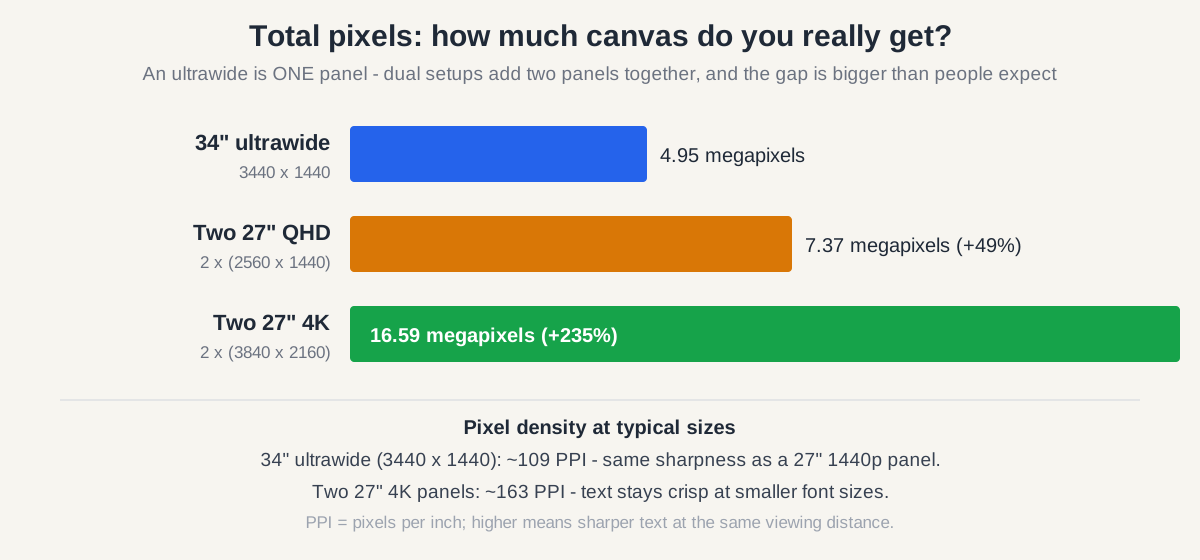
There is also a sharpness trade-off to know: a 34-inch 1440p ultrawide and a 27-inch 1440p monitor both sit at roughly 109 PPI, so text looks the same on both. If your work is small fonts all day — code, contracts, research — two 27-inch 4K panels at ~163 PPI render noticeably crisper text.
What does an ultrawide actually cost versus two 27-inch monitors?
They cost about the same, and the cable/arm math often tips it to the ultrawide. As of November 2026, a quality 34-inch work ultrawide (USB-C or Thunderbolt, height-adjustable stand) runs $450–$800, versus $400–$600 a pair for good 27-inch 1440p monitors or $550–$700 for two 27-inch 4K panels.
Hidden costs roughly balance out: duals need a ~55-inch desk or a dual arm ($60–$150), while USB-C/Thunderbolt ultrawides replace a laptop dock ($80–$150) since one cable carries video, data, and up to 90W of charging.
Time your purchase if you can. If you’re not in a hurry, both ultrawides and 27-inch 4K pairs hit their yearly price floor during Black Friday week (Nov 27–30) — our Black Friday monitor deals guide tracks the discount bands to expect. The Samsung ViewFinity S65TC, for example, dropped to $399.99 on Amazon during the October 2026 Prime event.
Does an ultrawide cause more neck strain than dual monitors?
An ultrawide causes no more neck strain — and for most setups, slightly less horizontal rotation. With two 27-inch panels you turn your head to face whichever monitor holds the active window, and many dual users park the primary monitor off-center, creating sustained one-sided rotation. A 34-inch ultrawide keeps your main content centered with only gentle side glances.
What actually protects your neck is the setup, not the format: OSHA’s computer-workstation guidance recommends the monitor top at or below eye level, about an arm’s length away (roughly 20–28 inches) — the same rule for one panel or two. The Mayo Clinic’s office-ergonomics guidance agrees: center the screen directly in front of you and take short breaks. Follow the American Optometric Association’s 20-20-20 rule (every 20 minutes, look 20 feet away for 20 seconds) to relieve digital eye strain from long sessions on any large screen.
When do dual monitors win?
Dual monitors are the better choice when your workflow is two full-screen apps at once:
- Full-screen apps side by side. Video calls, design tools, and data-entry apps each get a full panel instead of stretching awkwardly.
- Mixed orientation. A horizontal primary plus a vertical (portrait) secondary is the classic coding and document-review layout.
- Incremental upgrades. Buy one 27-inch monitor today, add a matching second in six months — ultrawides are all-or-nothing.
- Multi-PC setups. Run a work laptop on one screen and a personal desktop on the other — clean separation, no input-switching dance.
Wiring two screens is straightforward, and our dual-monitor setup guide covers daisy-chaining, USB-C hubs, and window management for a two-screen station.
When does an ultrawide win?
The ultrawide wins when you want the simplest desk:
- No center bezel. Uninterrupted glass matters for video timelines, wide spreadsheets, and trading dashboards.
- Single-cable docking. Thunderbolt 4/USB-C ultrawides (the Dell U3425WE, Samsung S65TC) replace a laptop dock: one cable for video, charging, and peripherals.
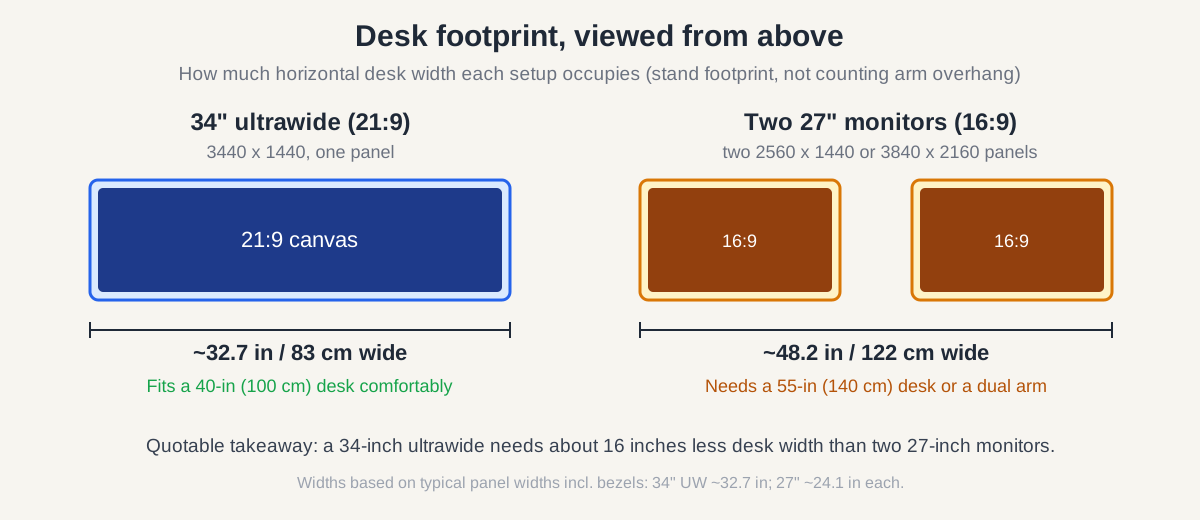
- Small desks. A 34-inch ultrawide occupies about 16 inches less horizontal desk width than two 27-inch monitors — it fits on a 40-inch desk where duals would overhang.
- Cleaner look. One panel, one stand or one arm, one power cable.
If a curved panel appeals to you, our curved monitor guide breaks down when the curve actually helps versus when it’s marketing.
The best ultrawide and dual-monitor picks for 2026
We compared published specs, November 2026 street prices, and verified owner feedback to pick these five.
Ultrawide pick 1: LG 34WN80C-B — Best value ultrawide for office work
The 34WN80C-B is the workhorse of this category: a 34-inch curved IPS panel at 3440×1440 with 99% sRGB coverage, HDR10, and USB-C with 60W power delivery — enough for most 13–14-inch laptops over a single cable. Text sharpness matches a 27-inch 1440p panel at ~109 PPI. Trade-offs: 60W won’t keep a 16-inch laptop topped up under load, and the 60Hz panel is work-first, not for gaming.
Typical price as of November 2026: $450–$550.
Check the LG 34WN80C-B price on Amazon
Ultrawide pick 2: Dell UltraSharp U3425WE — Best premium ultrawide for work
The step-up pick is Dell’s current 34-inch IPS Black ultrawide: 3440×1440 with a 2000:1 contrast ratio (double conventional IPS), 120Hz refresh, 98% DCI-P3 coverage, and a Thunderbolt 4 hub with 90W power delivery, Ethernet, and a KVM switch — effectively a monitor and a docking station in one box, backed by Dell’s 3-year advance-exchange warranty.
Typical price as of November 2026: $750–$900.
Check the Dell U3425WE price on Amazon
Ultrawide pick 3: Samsung 34″ ViewFinity S65TC — Best ultrawide with Thunderbolt 4 under $500
Samsung’s S65TC packs the features list: a 34-inch 1000R curved VA panel at 3440×1440, 100Hz refresh, HDR10, AMD FreeSync, built-in speakers, a height-adjustable stand, TÜV-certified Intelligent Eye Care, and a Thunderbolt 4 port with 90W power delivery.
The caveat: the VA panel trades some color accuracy versus the IPS picks above. But on sale it’s the cheapest way into a Thunderbolt 4 ultrawide — it dropped to $399.99 on Amazon during the October 2026 Prime event, per PCWorld’s deal coverage.
Typical price as of November 2026: $400–$600.
Check the Samsung ViewFinity S65TC price on Amazon
Dual pick 1: Two Dell S2721QS 27″ 4K monitors — Best dual setup for sharp text
For the dual route, two Dell S2721QS monitors are the value play: 27-inch 4K IPS panels at ~163 PPI, 99% sRGB coverage, and fully ergonomic stands (height, tilt, swivel, pivot) on both, plus a 3-sided ultrathin bezel that keeps the center gap minimal.
Why this pair: the 4K resolution is the dual setup’s whole advantage over an ultrawide (16.6 megapixels total), and at around $300 each you’re at $600 a pair. CamelCamelCamel price history shows Amazon itself has sold this model as low as $198.95, so sale timing matters.
Typical price as of November 2026: ~$300 each, ~$600 a pair.
Check the Dell S2721QS price on Amazon
Dual pick 2: Two ASUS ProArt PA278QV 27″ monitors — Best dual setup for color-accurate work
If your dual setup serves design or photo work, the ASUS ProArt PA278QV pairs Calman-verified color (Delta E < 2, 100% sRGB and 100% Rec.709) with a 27-inch QHD IPS panel at 75Hz, plus an ergonomic stand, built-in speakers, and a four-port USB 3.0 hub.
At QHD the pair delivers 7.37 megapixels — still 49% more than a 34-inch ultrawide — with the same ~109 PPI text sharpness. This monitor has sold as low as $169 during Amazon’s October 2026 Prime event, so a matched pair can land under $450.
Typical price as of November 2026: $200–$250 each.
Check the ASUS ProArt PA278QV price on Amazon
What should you check before buying either setup?
Measure the desk first. A 34-inch ultrawide needs about 33 inches of width; two 27s need about 48 inches.
Check your laptop’s ports. One-cable ultrawides need USB-C or Thunderbolt with DisplayPort Alt Mode; dual setups need two video outputs (or one USB-C plus daisy-chaining). Older laptops sometimes drive only one external display.
Budget for a real arm if the desk stand won’t cut it. Ultrawides weigh 15–22 lbs and need an arm rated for 34-inch panels; two 27s split onto a dual arm. Our dual monitor arm guide covers weight ratings and desk-thickness limits.
Don’t mix resolutions carelessly on duals. Pairing a 4K panel with a 1440p one makes windows jump size when dragged across — matched pairs are worth it.
FAQ: ultrawide vs dual monitors for work
Is an ultrawide better than two monitors for video editing?
Yes — an ultrawide is better for video editing because the timeline stretches across one uninterrupted panel instead of splitting at a center bezel.
Can I use an ultrawide and a second monitor together?
Yes: a 34-inch ultrawide as the main canvas plus a smaller second monitor (often vertical) for chat, email, or reference material.
Is 34-inch 1440p sharp enough for text work?
It’s fine for most office work at about 109 PPI — the same density as a 27-inch 1440p monitor. For small fonts all day, a dual 27-inch 4K pair at 163 PPI is visibly sharper.
Do ultrawide monitors work with MacBooks?
Yes, over a single USB-C or Thunderbolt cable on models with USB-C/Thunderbolt inputs — macOS handles 3440×1440 natively; just confirm your Mac’s port supports DisplayPort Alt Mode.
Which is cheaper: one ultrawide or two monitors?
Roughly equal in 2026: $450–$800 for a good 34-inch ultrawide versus $400–$700 for two quality 27-inch monitors. Dual can cost more once you add a dual arm.
Should I get a 34-inch or 49-inch super ultrawide?
Skip the 49-inch unless you have a deep desk and a heavy-duty arm: a 34-inch ultrawide plus a vertical second monitor gives most of the benefit for far less money.
The bottom line
Buy the ultrawide for the simplest desk: one panel, one cable, no bezel, and a main window that always sits center. Buy dual monitors if you live in two full-screen apps, want a portrait secondary, or plan to build the setup one screen at a time. Both routes are excellent on a typical $500–$700 budget — choose based on your workflow, not the spec sheet.