
How to Fit a Standing Desk in a Small Apartment: Space-Saving Layouts & Setup Tips
Yes — you need about 15 square feet: a 40-by-24-inch desktop plus 24 to 30 inches of clearance behind it for your chair. Put the desk against a wall or in a corner, keep the depth at 24 inches, route cables along the baseboard, and it fits a studio nook as of October 2026.
This guide is the space-planning companion to our product roundup of the best small adjustable standing desks for apartments. Read that one for which desk to buy — read this one for where it goes, how much room it really needs, and how to keep it renter-friendly.
How Much Floor Space Does a Standing Desk Really Need?
Less than you think — but the number that matters isn’t the desk’s footprint, it’s the work zone around it. A compact standing desk desktop measures 36 to 48 inches wide and 24 inches deep. That’s 6 to 8 square feet of floor, roughly the size of a welcome mat and a half.
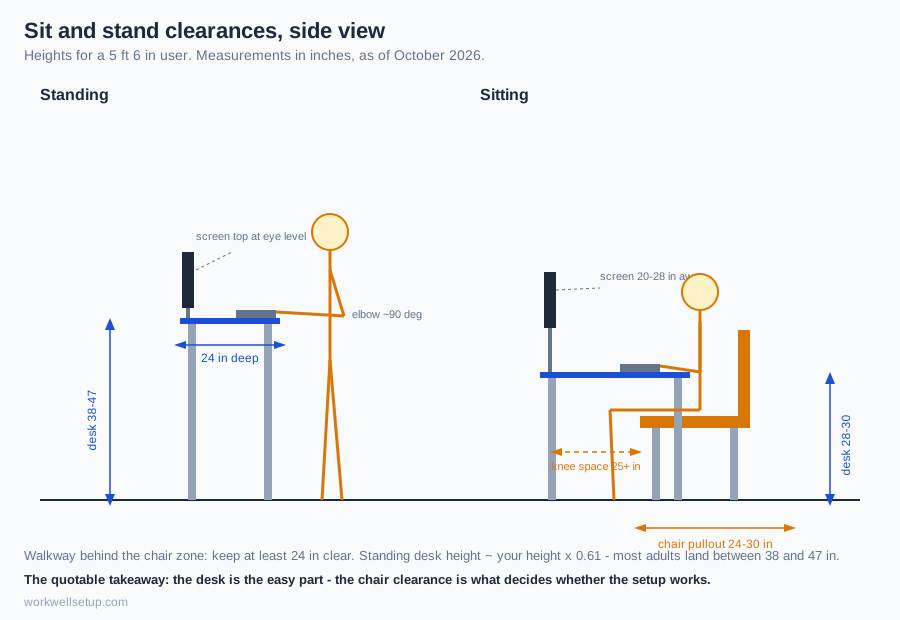
The chair zone doubles it. You need 24 to 30 inches of clearance behind the desk to pull your chair out and push back in. Add that to a 24-inch-deep desk and the full work zone is 40 inches wide by 54 inches deep — 2,160 square inches, or 15 square feet. In a 500-square-foot studio, that’s 3 percent of your floor.
24-inch depth beats 30-inch depth in small rooms. The extra six inches of a 30-inch desk mostly becomes a paper graveyard between keyboard and wall. At 24 inches you still fit a 27-inch monitor, a full-size keyboard, and a coffee mug. Depths of 20 inches or less crowd the monitor too close and leave no room for your forearms.
One detail people miss: a standing desk’s footprint barely changes when it moves. The desktop rises about 20 inches but doesn’t slide forward — so the floor space you measure once is the floor space it always uses. (Locking-caster frames are the exception: plan a foot of roll room.) When you stand, your chair tucks under the desk and the room actually feels bigger than when you sit.
Where Should a Standing Desk Go in a Small Apartment?
There are four placements that consistently work in apartments under 700 square feet. Every one of them assumes the 40-by-54-inch work zone above.
1. Against the wall — the default. Push the desk’s back edge flush to the wall. The wall becomes your cable raceway (more on that below), and the desk reads as furniture rather than an obstacle mid-room. If you have a window, prefer a side wall: direct backlight turns your screen into a mirror.
2. Into the corner — reclaiming dead space. Corners are where apartments waste floor. A 36-by-24-inch desk tucked into a corner turns about 8 square feet nobody uses into a workstation. The tradeoff is light — corners are dim, so add a small task lamp — and your chair needs a few extra inches of swing room.
3. Inside the closet — the disappearing office. A standard reach-in closet is about 48 inches wide and 24 inches deep: a 40-inch desk slides in with inches to spare. Remove the doors (store them behind the bed — most landlords only care they come back at move-out) or leave bi-folds open, add a $20 LED strip, and the office vanishes when guests arrive. No drilling, nothing a landlord would notice. Our small home office ideas on a budget guide has more nook setups like this.
4. Under a loft bed or as a room divider — the studio play. In a studio, a desk with its back to the sofa splits one room into two: office on one side, living room on the other. A twin loft bed (75 by 38 inches) hides an entire desk underneath, but check vertical clearance — you need at least 40 inches under the frame to sit, 60-plus to stand.
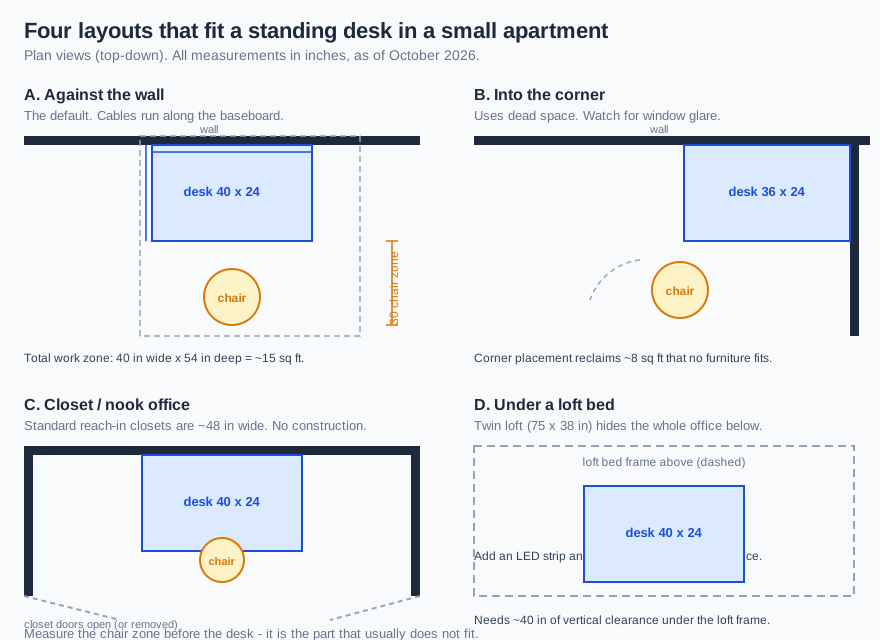
The quotable rule: measure the chair zone before you buy the desk. A 40-inch desk that fits the wall is useless if your chair has nowhere to pull back. Tape the 54-inch depth on your floor with painter’s tape and live with the outline for a day — it’s the cheapest space test there is.
Is a Compact Frame, a Desk Converter, or a Folding Desk Best for a Tiny Room?
The answer depends on whether you’re optimizing for floor space, money, or ergonomics. Every cell below stands on its own.
| Option | Working footprint | Typical cost (Oct 2026) | Strengths | Weaknesses |
|---|---|---|---|---|
| Compact 2-leg frame (40 x 24 in top) | 40 x 24 in desk + 30 in chair zone = ~15 sq ft total | $150–$300 | Full 25–50 in height range; most stable; monitor-arm compatible | Permanent footprint; needs cable slack for the lift |
| Desk converter (sits on existing table) | Zero new floor — uses your current table | $80–$250 | Cheapest entry; no new furniture; reversible in seconds | Eats desktop space; keyboard tray sits high; monitor wobbles on cheap tables |
| Folding standing desk | ~31 x 24 in open; folds flat to ~4 in deep | $130–$230 | Disappears when guests come; no installation | Wobbles at standing height; 35–55 lb weight limits |
| Wall-mounted fold-down | Zero floor when folded | $100–$200 | Smallest possible footprint of any option | Requires drilling into studs — a dealbreaker for most renters |
A compact frame wins for most small apartments. It holds a real monitor arm, reaches a true standing height of 45-plus inches, and doesn’t steal your dining table every workday. Converters are the right call when you genuinely cannot add furniture. Folding desks suit people who need the floor back on weekends.
For specific models in each category — including which compact frames actually ship with a 40-inch top — see our companion roundup of the best small adjustable standing desks for apartments. If you want the narrowest possible option, our narrow standing desk guide covers 32-inch-and-under picks.
How Do You Manage Cables on a Moving Desk Without Drilling Holes?
A standing desk breaks every static cable plan because the desktop travels about 20 inches. Cables that are tidy at sitting height become guitar strings at standing height — or yank out of the monitor. The fix is one rule and a renter-safe kit.
The rule: build in a slack loop. Every cable between the desk and the wall needs at least 26 inches of slack (20 inches of travel plus 6 inches of safety margin). The easiest method is a flexible cable spine — a segmented plastic chain hanging from the desk’s back edge that guides cables down as the desk rises. An under-desk tray that clamps to the desktop (no screws) holds the power strip, and the strip rides up and down with the desk.
The renter-safe kit, all damage-free:
- Adhesive cable clips (3M Command or similar): run monitor and laptop cables from the spine to the tray. They peel off clean at move-out.
- Velcro ties, not zip ties: you’ll re-route cables three times before the layout settles. A 100-pack costs about $11.
- A clamp-on under-desk tray: holds the power strip and chargers off the floor. Screws to the tray, never to the desk.
- Flat adhesive cord cover along the baseboard: routes the one cable leaving the desk to the wall outlet. Paintable versions blend into rental-white walls.
Keep the power strip on the desk’s tray, not on the floor — a floor strip in a small apartment is a tripping hazard in a room you cross in four steps. Our full cable management for standing desks guide walks through the routing with diagrams.
The quotable rule: on a standing desk, cables fail at the extremes — always test the full up-and-down range before you call the routing done.
How Do You Keep a Standing Desk Quiet for Thin Walls and Downstairs Neighbors?
Standing desks hum — typically 45 to 50 decibels on a dual-motor frame, about the level of a quiet library. That’s not loud, but apartment walls and floors transmit vibration more than sound, and your downstairs neighbor hears structure-borne thumps, not the hum. Plan for vibration and the noise problem mostly solves itself.
Pick dual-motor over single-motor if noise matters. Dual-motor frames lift more evenly — less shudder, fewer resonances traveling through floor joists. Single-motor frames cost less but vibrate more at the top of their range, exactly where you’ll stand.
Isolate the feet. Four rubber anti-vibration pads under the desk feet (about $10) decouple the frame from the floor. An anti-fatigue mat under your standing spot doubles as a second isolation layer — and since sore feet are the number-one reason people quit standing desks, the mat pays for itself twice.
Keep the desk off shared walls. A desk touching the wall between you and the neighbor’s bedroom turns the wall into a speaker for every motor cycle. Leave an inch of air gap, and run adjustments during the day rather than at midnight.
Protect the floor you roll on. In rentals with hardwood or laminate, a chair mat under the desk area (about $30) prevents the twin tracks of doom that landlords photograph at move-out. It also quiets the chair’s casters, which are honestly louder than most desk motors.
What Height Should You Set the Desk For Standing?
The ergonomic targets are simple: elbows at roughly 90 degrees with forearms parallel to the floor, the top of the screen at or slightly below eye level, and 20 to 28 inches between your eyes and the screen. Everything else is arithmetic.
Standing height ≈ your height × 0.61. A 5-foot-6 (66-inch) person lands at about 40 inches; a 6-foot person at about 44 inches. Most adults end up between 38 and 47 inches, which every decent standing frame covers. Save the number as a memory preset — the one-button return is what makes you actually switch positions through the day.
Sitting height runs 28 to 30 inches for most adults in a standard office chair. If your frame’s minimum doesn’t reach your sitting number, add a footrest rather than hunching.
Raise the monitor, not your neck. The most common standing-desk mistake is lifting the desk while leaving the screen at sitting height — your chin drops and you blame the desk. A monitor arm (about $25–$40) lifts the screen independently and frees the 6 inches of depth the factory stand was eating. In a 24-inch-deep setup, that reclaimed depth is gold.
Frequently Asked Questions
Will a standing desk work in a studio apartment under 400 square feet?
Yes. A complete work zone needs about 15 square feet — under 4 percent of a 400-square-foot studio — and a corner or closet placement keeps it out of the living area entirely.
What is the smallest desk depth that still works for a standing desk?
24 inches. That fits a monitor on an arm, a full-size keyboard, and a mug. At 20 inches or less the screen sits too close and your forearms hang off the edge.
Can I put a standing desk inside a bedroom closet?
Yes — reach-in closets are about 48 inches wide, which fits a 40-inch desk with room to spare. Remove the doors, add an LED strip for light, and you’ve built a home office with zero construction and zero landlord issues.
Do I need a mat under a standing desk in a rental?
Strongly recommended. A chair mat protects hardwood and laminate from caster tracks that cost you the security deposit; an anti-fatigue mat protects your feet, which is the real reason people abandon standing desks.
How do I power a standing desk that’s far from an outlet?
Run the cable along the baseboard inside a flat adhesive cord cover. Keep the power strip mounted in the desk’s under-tray so it travels with the desk, and never run an extension cord across the walking path — in a small apartment that’s a guaranteed trip.
Is a standing desk converter better than a full frame for a tiny room?
Only if you can’t add furniture. A converter costs less and needs zero floor, but it eats your table’s surface and wobbles. If you have 15 square feet, a compact frame is more stable, more ergonomic, and easier to cable-manage.
The Bottom Line
A standing desk needs about 15 square feet — a 40-by-24-inch desktop plus chair clearance — which fits against any free wall, in a corner, or inside a closet in even the smallest apartment. Measure the chair zone first, keep the depth at 24 inches, build slack into every cable, isolate the feet from the floor, and set the standing height to roughly 61 percent of your height. Still deciding whether the habit is worth the furniture? Our are standing desks worth it guide runs the numbers.