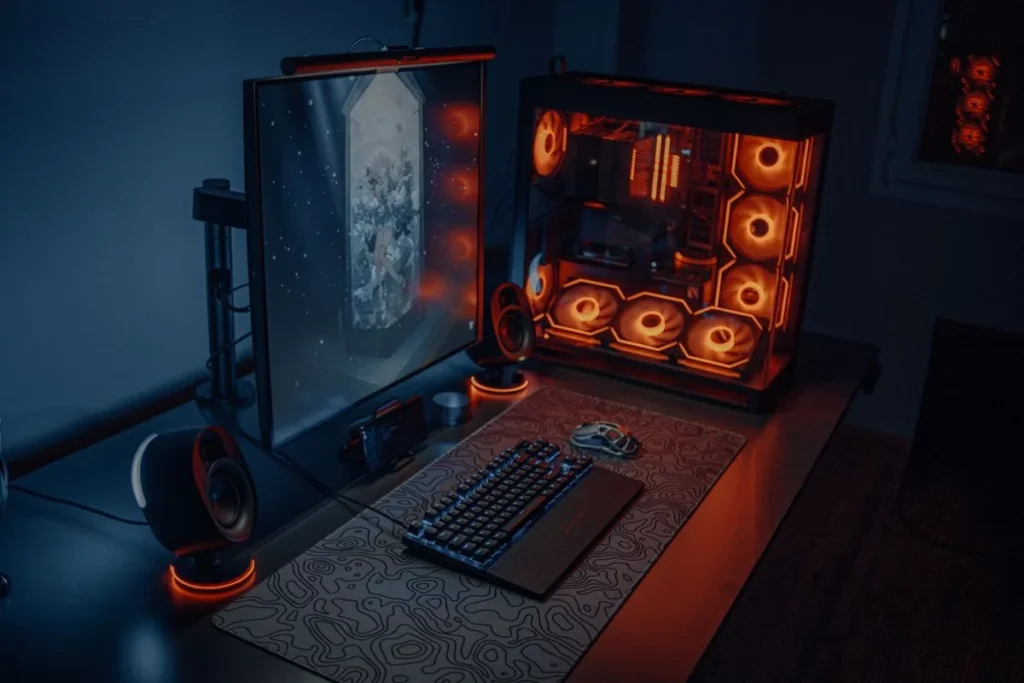
Best Under-Desk CPU Holders (2026)
The best under-desk CPU holder is the VIVO Under Desk and Wall Office PC Mount with Swivel (around $35, as of October 2026): it bolts under the desk or to the wall, adjusts from 3.5 to 7.8 inches wide, and swivels 180 degrees for easy cable access. For heavier gaming towers, the PUTORSEN Under Desk PC Mount supports up to 77 lbs in vertical or horizontal orientation.
As an Amazon Associate I earn from qualifying purchases.
The short answer: get your PC tower off the floor. A good under-desk CPU holder frees roughly two square feet of floor space, keeps the tower out of the dustiest air, protects it from kicks, and — on a standing desk — stops cables from yanking as the desk moves. The category costs $30–$65 and installs in under 30 minutes.
Which Under-Desk CPU Holder Should I Buy?
Here is the field at a glance. Prices are Amazon prices observed in October 2026 — this category drifts a few dollars month to month, so confirm before checkout.
| Pick | Best for | Price (as of Oct 2026) | Max load | Width range |
|---|---|---|---|---|
| VIVO Under Desk + Wall Mount w/ Swivel | Best overall | ~$35 | ~22 lbs | 3.5–7.8 in |
| PUTORSEN Under Desk PC Mount | Heaviest towers | $35.99 | 77 lbs | 6.2–10.6 in (vertical) |
| VIVO MOUNT-PC03V | Budget wall mount | Check current price | ~22 lbs | Adjustable, strap-secured |
| StarTech.com CPUWALLMNT | Warranty + build quality | ~$53* | 22 lbs | 4.8–8.3 in |
| Penn Elcom CPU-42BN | Pro-grade under-desk pivot | Check current price | 55 lbs | Adjustable frame |
*Third-party reseller anchor from mid-2026; the Amazon listing fluctuates around that level.
Bottom line up front: on a standing desk, buy a clamp-on leg mount — the only style that rides up and down with the desk, killing cable strain at the source. It’s also renter-friendly: no screws. Wall and screw-under-desk styles are cheaper and rock-solid, but don’t move with an adjustable desk.
Why Does an Under-Desk CPU Holder Matter?
Floor space. A mid-tower eats roughly two square feet beside your desk — where feet, chair wheels, and the vacuum go. Hanging it under the desk returns that footprint.
Dust and damage. Floor-level air carries the most dust, pet hair, and carpet fibers — the cocktail that clogs intake filters. Elevating the tower 12–18 inches slows dust buildup and keeps it out of kick range. A tower knocked sideways is a cracked side panel waiting to happen.
Cable strain on standing desks. A floor-sitting PC plugged into a standing desk has cables that stretch taut every raise and heap into a tangle every lowering. Connectors fatigue, USB plugs loosen, and something eventually disconnects mid-meeting. Mount the tower on the moving part of the desk and the cables never flex. Pair it with a basic cable-management routine and the problem disappears.
What Types of Under-Desk CPU Holders Exist?
Three mounting styles — pick the style first, then the brand.
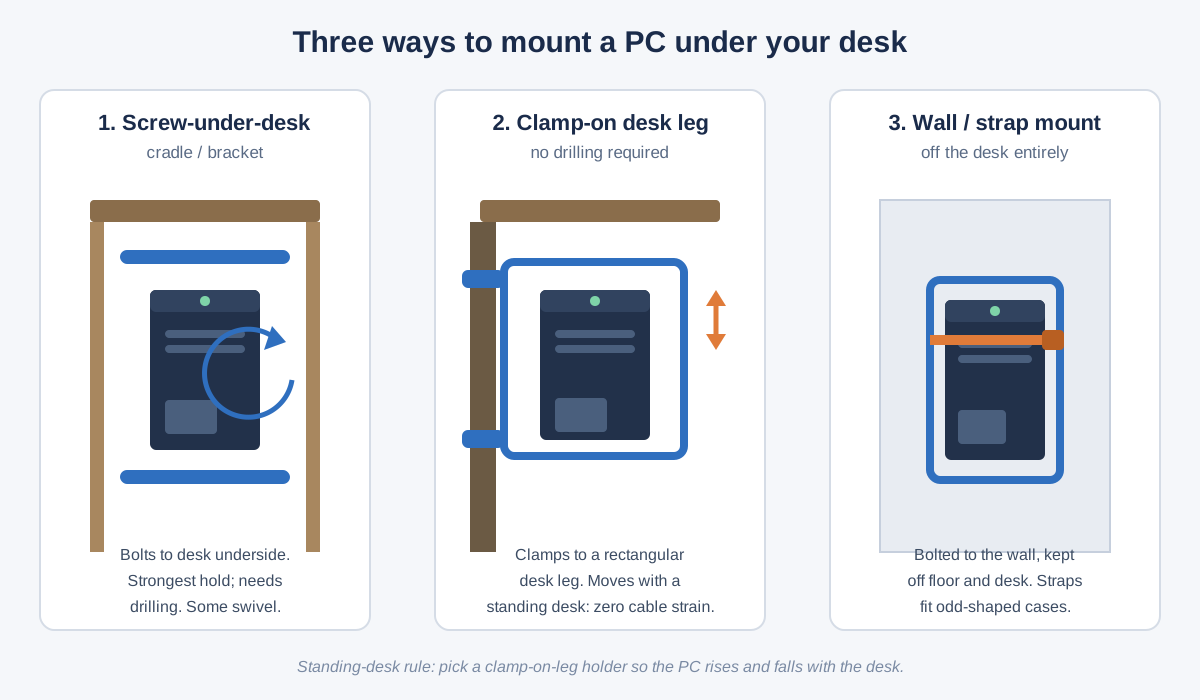
Screw-under-desk cradles bolt to the desktop underside: the strongest hold per dollar, fine for 40–77 lb towers. The tradeoff is drilling: solid wood and plywood take it fine; thin MDF or honeycomb tops can strip or crack — check your desktop first. Most swivel 180–360° for rear-port access.
Clamp-on desk-leg holders grip a rectangular desk leg with U-clamps — no drilling, renter-friendly, and the standing-desk champion because the PC rides up and down with the desk. The catch: they come in fixed leg sizes (typically 65×45, 75×45, 80×50 mm), so measure your leg’s cross-section before ordering. Round or irregular legs are out.
Wall and strap mounts bolt to a wall stud and secure the case with adjustable straps. Straps fit odd shapes rigid brackets can’t — wide gaming towers, cube cases, even some UPS units. The downside: a wall-mounted PC doesn’t move with a standing desk, so cable routing needs more planning.
The 5 Best Under-Desk CPU Holders for 2026
1. VIVO Under Desk and Wall Office PC Mount with Swivel — Best Overall
VIVO Under Desk and Wall Office PC Mount (around $35, as of October 2026)
The frame adjusts from 3.5 to 7.8 inches wide, mounts under the desk or on the wall, and pivots 180 degrees so you can swing the tower out for the rear ports, then tuck it back. Steel construction, all hardware included, and VIVO’s 3-year warranty.
Why it wins: the only mount at this price with both under-desk and wall mounting plus swivel. Lock the pivot for daily use; swing it out when you need the rear ports.
The honest caveat: ~22 lb capacity suits mainstream mid-towers, not water-cooled full towers. Weigh your case — a typical gaming mid-tower is 25–35 lbs, right at the line. Heavier? See the PUTORSEN.
2. PUTORSEN Under Desk PC Mount — Best for Heavy Towers
PUTORSEN Under Desk PC Mount ($35.99, as of October 2026)
Reinforced steel brackets and industrial-grade hardware rated for 77 lbs (35 kg) — triple the typical mount at this price. Two orientations: vertical (width 6 3/16–10 5/8 in, height up to 19 1/4 in) or horizontal for shallow knee clearance (width 13 1/2–25 11/16 in). Open frame for airflow; a drilling template is included.
Why it wins: for a full ATX case with dual GPUs or a custom loop, it’s the only sub-$40 mount we’d trust. Horizontal mode also rescues desks with tight knee clearance.
The honest caveat: drilling required, the frame is bulky, and installation is a project, not a five-minute job.
3. VIVO MOUNT-PC03V — Best Budget Wall Mount
VIVO MOUNT-PC03V Universal PC Wall Mount (check current price — typically under $35)
A steel wall bracket with adjustable straps: wrap, cinch, and the tower hangs on the wall. Open frame for full airflow, all wall-mounting hardware included, 3-year warranty.
Why it wins: straps fit cases rigid brackets can’t — cube cases, HTPC boxes, mini-towers below a bracket’s minimum width. Weird-shaped case? This is your mount.
The honest caveat: wall-mount only — a no for standing-desk cable management unless you plan routing carefully. Re-check strap tension monthly at first.
4. StarTech.com CPUWALLMNT — Best Build Quality and Warranty
StarTech.com CPUWALLMNT Wall Mount CPU Holder (around $53 at resellers, mid-2026 — check current Amazon price)
Heavy-gauge steel wall bracket with adjustable straps, sized for cases 4.8–8.3 in wide and 6–15.7 in tall, rated 22 lbs. The headline is support: a 5-year warranty plus free lifetime technical support — double the budget brands.
Why it wins: for an office where a mount can’t fail in year three, the warranty arithmetic favors StarTech. Fit and finish are a step up too: powder-coat, deburred edges, straps that don’t fray.
The honest caveat: you pay for the name and warranty; 22 lbs doesn’t out-lift the cheaper PUTORSEN. Buy for reliability, not capacity.
5. Penn Elcom CPU-42BN — Best Pro-Grade Under-Desk Pivot
Penn Elcom CPU-42BN Under-Desk Computer Mount (check current price)
An AV-industry steel under-desk frame holding up to 55 lbs, with a 180-degree pivot so the tower swings out for maintenance. Adjustable width and height fit most standard towers; built for commercial installs, not just home offices.
Why it wins: the strongest under-desk option with a pivot — the VIVO’s convenience with near-PUTORSEN capacity.
The honest caveat: commercial pricing fluctuates; confirm price and US-warehouse shipping before ordering.
How Do I Install an Under-Desk CPU Holder on a Standing Desk?
The exact sequence for the most common case — a clamp-on leg holder on an electric standing desk:
- Measure your desk leg. Caliper the leg’s cross-section (width × depth): common sizes are 65×45, 75×45, 80×50 mm. The wrong size won’t clamp.
- Lower the desk fully before starting. Maximum working room, no mid-install movement.
- Test-fit the tower: confirm 2 inches of knee clearance plus 2 inches above the case for airflow.
- Clamp to the leg — typically two U-clamps, tightened evenly. Tug hard; a 30-lb tower amplifies any looseness.
- Seat the PC and check level. Anti-slip pads between frame and case; the tower should sit level.
- Dress the cables. Leave a 6–8 inch service loop at the PC end, route to your power strip with slack for full travel, then run the desk up and down and watch for tugs.
- Retighten after a week. Clamps settle — one follow-up prevents the slow slide.
For screw-under-desk cradles, step 1 becomes “confirm a solid desktop” (at least 3/4-inch plywood or solid wood — skip thin MDF), and step 4 becomes pre-drilling pilot holes. Shopping for the desk itself? Our standing desks guide covers frames that pair well with under-desk accessories.
How Do I Measure My PC for a CPU Holder?
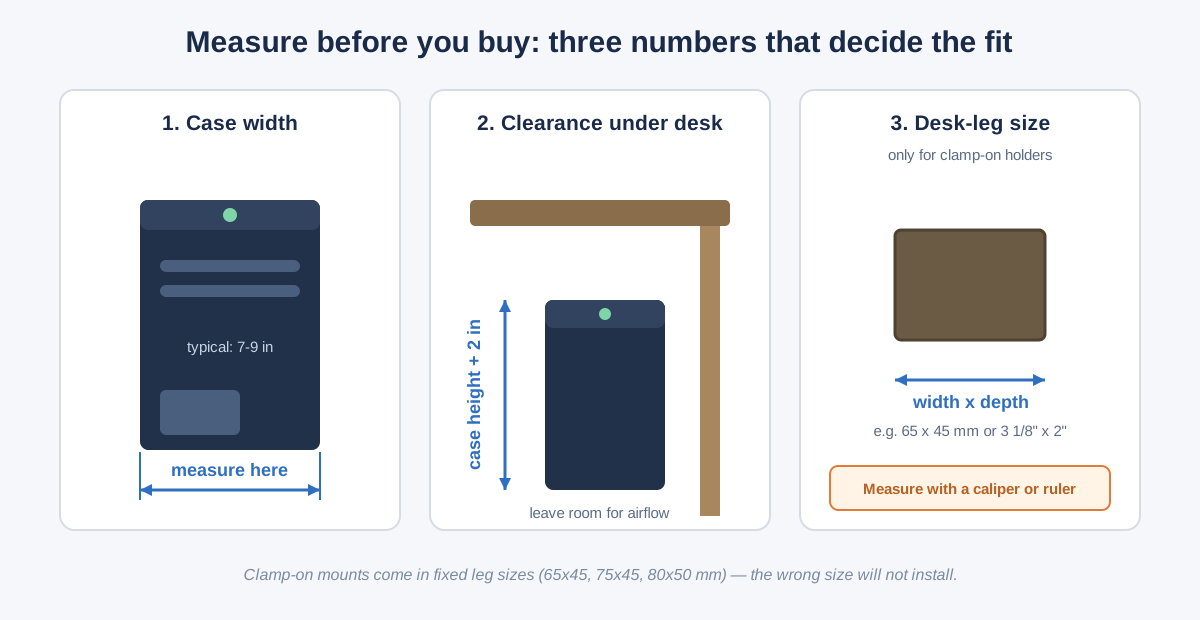
Case width matters most. Measure the tower at its widest point (excluding feet), with half an inch of margin inside the mount’s range on each side. Most mid-towers are 7–9 inches; slim SFF cases under 4 inches may fall below a bracket’s minimum — check both ends.
Under-desk clearance is case height plus 2 inches of breathing room. Subtract from floor-to-desktop to check legroom; under 24 inches remaining starts to feel cramped.
Desk-leg cross-section only matters for clamp-on holders — but when it matters, it’s everything. If your leg isn’t a standard size (65×45, 75×45, 80×50 mm), pick a screw-under-desk or wall style instead.
Will a CPU Holder Fix Cable Strain on My Standing Desk?
Yes — with the right style. Cable strain happens because the desk moves and the floor doesn’t, and the cables between them get stretched and snagged.
A clamp-on leg holder fixes it at the root: the tower rides the desk leg, so desk up = PC up, and cables stay exactly as routed. It’s the only style where cable strain stops being managed and starts being forgotten.
Screw-under-desk cradles solve it too — the tower is bolted to the desktop and moves with it.
Wall mounts need deliberate cable management: a generous service loop, cables routed down the moving leg with velcro ties, and a full travel-range test. Still far better than a floor-sitting PC — especially paired with a good cable tray setup.
The quotable version: on a standing desk, mount the PC to the moving desk, not the stationary floor.
Frequently Asked Questions
How much weight can an under-desk CPU holder support?
Most support 22–77 lbs. Mainstream mounts are rated around 22 lbs (typical mid-towers); the PUTORSEN (77 lbs) and Penn Elcom (55 lbs) handle full gaming towers.
Will a CPU holder fit my gaming PC case?
Probably, if you measure first. Most handle 3.5–10.6 inches, covering standard mid-towers. Full towers over 10.6 inches or 60+ lbs need the PUTORSEN or a wall-strap mount.
Do I need to drill holes to install a CPU holder?
Not always. Clamp-on holders need zero drilling; wall/strap mounts drill into the wall; only screw-under-desk cradles drill into the desktop. Match the style to what you may modify.
Can a CPU holder damage my desk?
Not on a solid desk. Clamp-on holders only touch the leg; screw-under-desk cradles suit solid wood or plywood ≥3/4 inch. Skip thin MDF or honeycomb tops — they can strip or crack under 30 lbs.
Does mounting a PC under the desk hurt cooling?
No — usually it improves it. Open frames leave vents exposed, and elevation escapes the dustiest air. Leave 2 inches above the case and keep intakes clear of the desktop.
Is it safe to hang a $2,000 PC under a desk?
Yes, if rated well above the tower’s weight and installed correctly. Pick 1.5× your PC’s weight, retighten after a week, re-check twice a year. Thousands of offices run exactly this setup.
The Bottom Line
An under-desk CPU holder is cheap, easy, and fixes three real problems: floor space, dust and kicks, and — on a standing desk — cable strain. Spend ~$35 on the VIVO swivel mount for a mainstream tower, step up to the PUTORSEN for a heavy build, and measure your desk leg before ordering clamp-on. Our desk accessories guide covers the rest of the stack.